Solved Problem with Multi displays

niiiro

New member
Local time
2:17 AM
Messages
9
Hey guys, Im new in here so first i'd like to say hello to all :) Now to my issue.. every time I plug the Hdmi cable(dvi to hdmi) to my lcd tv windows will act as the tv was the main display and immediately switches the display to the tv . now the problem is that on tv i see a blank black screen which blinks, for a few seconds it shows the desktop in weird resolution and then moves to blank screen again. in order to gain control back i have to unplug the hdmi cable. I have to say that a while ago when I used build 7100 it used to work just fine. I have tried using various Nvidia drivers including the latest ones. thanks in advanced guys :D
 
Last edited by a moderator:

My Computer

Computer Manufacturer/Model Number
Intel
OS
Windows 7 x64 Ultimate (6.1.7600 Build 16385)
CPU
Intel Core 2 Extreme QX9650 @ 3400 MHz (8 x 425)
Motherboard
ASUS P5Q-E
Memory
G Skill F2-8500CL5 4 GB DDR2-1066 (5-5-5-15 @ 400 MHz)
Graphics Card(s)
GeForce 7950 GX2 (1024 MB)
Monitor(s) Displays
LG L1970HR
Screen Resolution
1280x1024 32bit
Hard Drives
Drive #1 - ST31500341AS (1397 GB)
Drive #2 - Intel Raid 0 Volume (465 GB)
Drive #3 - ST3500320AS (465 GB)
Drive #4 - ST3500320AS (465 GB)
PSU
Enermax 500W
Keyboard
Logitech G15
Mouse
Logitech G5
Internet Speed
5mbit
Hi niiiro, welcome to the forums.

First thing to check is how Windows is set to behave when a TV is plugged in.

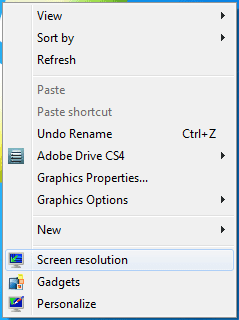
Right-click the desktop & setect 'Screen resolution'
Capture.PNG

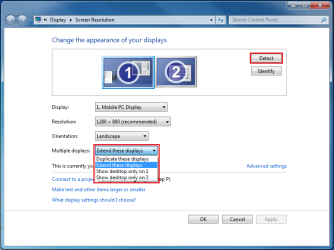
Click the 'Detect' button then make sure that you have the display options set to either 'Duplicate' or 'Extend'
Capture1.PNG
   Note
You may have to do this while the TV has full control at first

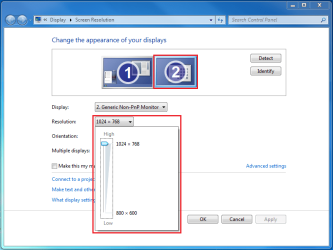
Next, click the secondary display & change the resolution to suit your needs
Capture2.PNG

Hope thie helps :)


OS
 

My Computer

Computer Manufacturer/Model Number
Compaq Desktop
OS
Windows 7 Ultimate x64
CPU
AMD Sempron Dual Core
Memory
3GB
Graphics Card(s)
NVIDIA GeForce 6150SE nForce 430
Screen Resolution
1024x768
Hard Drives
150GB Sata
thanks for your reply Orbital Shark.

but unfortunately as soon as i plug the hdmi cable i cannot see anything but a black blank screen on tv which flickers. after a few seconds i get to see the desktop for a few seconds but then i get a black screen again. I've tried switching modes on 'blind' by pressing win+p but none helped.
 

My Computer

Computer Manufacturer/Model Number
Intel
OS
Windows 7 x64 Ultimate (6.1.7600 Build 16385)
CPU
Intel Core 2 Extreme QX9650 @ 3400 MHz (8 x 425)
Motherboard
ASUS P5Q-E
Memory
G Skill F2-8500CL5 4 GB DDR2-1066 (5-5-5-15 @ 400 MHz)
Graphics Card(s)
GeForce 7950 GX2 (1024 MB)
Monitor(s) Displays
LG L1970HR
Screen Resolution
1280x1024 32bit
Hard Drives
Drive #1 - ST31500341AS (1397 GB)
Drive #2 - Intel Raid 0 Volume (465 GB)
Drive #3 - ST3500320AS (465 GB)
Drive #4 - ST3500320AS (465 GB)
PSU
Enermax 500W
Keyboard
Logitech G15
Mouse
Logitech G5
Internet Speed
5mbit
Hmmm, try Win+P, left then Enter. That sets it to 'duplicate'. Also, have you got the TV setup correctly for HDMI input? Some TV's (mine included) have extra settings for using HDMI input.
 

My Computer

Computer Manufacturer/Model Number
Compaq Desktop
OS
Windows 7 Ultimate x64
CPU
AMD Sempron Dual Core
Memory
3GB
Graphics Card(s)
NVIDIA GeForce 6150SE nForce 430
Screen Resolution
1024x768
Hard Drives
150GB Sata
Tried that already dude.. I believe it's a driver issue but I cannot be so sure because I tried various driver versions already.. It used to work just fine with build 7100, so what could be problem???
 

My Computer

Computer Manufacturer/Model Number
Intel
OS
Windows 7 x64 Ultimate (6.1.7600 Build 16385)
CPU
Intel Core 2 Extreme QX9650 @ 3400 MHz (8 x 425)
Motherboard
ASUS P5Q-E
Memory
G Skill F2-8500CL5 4 GB DDR2-1066 (5-5-5-15 @ 400 MHz)
Graphics Card(s)
GeForce 7950 GX2 (1024 MB)
Monitor(s) Displays
LG L1970HR
Screen Resolution
1280x1024 32bit
Hard Drives
Drive #1 - ST31500341AS (1397 GB)
Drive #2 - Intel Raid 0 Volume (465 GB)
Drive #3 - ST3500320AS (465 GB)
Drive #4 - ST3500320AS (465 GB)
PSU
Enermax 500W
Keyboard
Logitech G15
Mouse
Logitech G5
Internet Speed
5mbit
ok problem solved :)

I used Driver Sweeper to completely erase Nvidia's drivers and reinstalled the latest drivers

thanks orbital shark for the effort!
 

My Computer

Computer Manufacturer/Model Number
Intel
OS
Windows 7 x64 Ultimate (6.1.7600 Build 16385)
CPU
Intel Core 2 Extreme QX9650 @ 3400 MHz (8 x 425)
Motherboard
ASUS P5Q-E
Memory
G Skill F2-8500CL5 4 GB DDR2-1066 (5-5-5-15 @ 400 MHz)
Graphics Card(s)
GeForce 7950 GX2 (1024 MB)
Monitor(s) Displays
LG L1970HR
Screen Resolution
1280x1024 32bit
Hard Drives
Drive #1 - ST31500341AS (1397 GB)
Drive #2 - Intel Raid 0 Volume (465 GB)
Drive #3 - ST3500320AS (465 GB)
Drive #4 - ST3500320AS (465 GB)
PSU
Enermax 500W
Keyboard
Logitech G15
Mouse
Logitech G5
Internet Speed
5mbit
ok problem solved :)

I used Driver Sweeper to completely erase Nvidia's drivers and reinstalled the latest drivers

thanks orbital shark for the effort!

That's good news, good work :D
 

My Computer

Computer Manufacturer/Model Number
Compaq Desktop
OS
Windows 7 Ultimate x64
CPU
AMD Sempron Dual Core
Memory
3GB
Graphics Card(s)
NVIDIA GeForce 6150SE nForce 430
Screen Resolution
1024x768
Hard Drives
150GB Sata
Back
Top