Hi all...im newbie here...im use windows 7 build 7068 32-bit...on 1 to 2 week i use windows 7 its ok but when i add more speaker on my PC its be like quite dosent have any sound more(i use a equalizer to)..i have try to use earphone and other sound device but it still like that..i have reinstall and format it but its still like that dosent change...use other port like earphone port still quite..i install it by boot on DvD...my system like this<><> anyone can dissolve my problem??? plzzz
SORRY FOR MY BAD ENGLISH
AMD Athlon X2 5200+ 2.7Ghz(dual core)
4 GB DDR2 ram 800mhz
120GB Maxtor HD (IDE)
80 GB Maxtor HD (SATA)(i install windows here)
ATI HD 4670 512 DDR3
plz anyone can help me.....my sound is working now but only when listen a song...i have to use 6ch of sound and use subwoofer port.......is there have any tool to make the 2ch port work??
Be patient there izzdihar I'm sure someone will respond - but give it a bit of time.
I can't help with your problem except to say that I'm running AC97 without any problems so there probably is a solution.
I have noticed quite a few posts on sound cards and, I think, on the AC97 drivers so maybe you should search in these forums for those key words - your problem may have already been addressed.
Good luck (and welcome).
My Computer
Computer Manufacturer/Model Number
AMD Athlon 64 3200+, Lenovo G560 i3
OS
Windows 7 Ultimate, Ubuntu
Motherboard
Gigabyte K8T8000
Memory
DDR 2Gb (!)
Graphics Card(s)
6600GT
Monitor(s) Displays
MultiMonitor (2) LCD
Hard Drives
Old Seagate 75
Big Western Digital
Samsung 500Gb pulled out of an external drive and installed
Ext: Maxtor (Firewire), 1Gb Lacie (Samsung)
it is at the bottom left hand corner of control panel (sometimes on desk top task bar a white flag) it will help run the .exe on your disk.
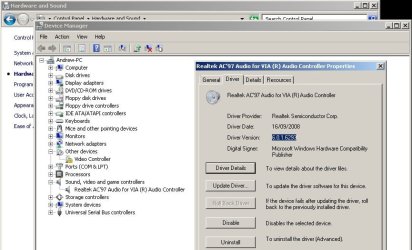
What drivers are you running now. look at picture and follow it to find out if you dont already know (control panel-hardware & sound-device manager-sound,video,and gaming) right click on there go to properties
According to here: BIOSTAR (your mobo model) it says u use realtek AC'97 audio chip... (NO NEED Compatibility mode)
Ok go to : Realtek >AC'97 Audio Codecs (Software)>.....>then download the "Vista/7 driver" driver and install it> once installed (w/o compatiblity mode)> reboot
Then go to control panel>search sound>click on change sound card settings>Click on the audio output you use>Configure.... like how you want it to be
If this still doesn't do the trick>go to control panel>search sound>'Sound Effect Manager>Speaker Configuration>Adjust from here.. NOW IT SHOULD WORK!!!
My Computer
Computer Manufacturer/Model Number
Custom
OS
Windows 7 32-bit; no 64 coz its a P4 478
CPU
Pentium 4 3.00 GHZ HT Socket 478 :(
Motherboard
MSI PM8M-V
Memory
1 GB Kingston DDR-400
Graphics Card(s)
HIS X1650 PRO AGP :(
Sound Card
Intergrated Realtek AC'97
Monitor(s) Displays
17" CRT :(
Screen Resolution
Native: 1027*768 MAX: 1280*1024 :(
Hard Drives
80 GB Maxtor
500 GB Seagate (7200.11)(T.T its now RMA)
Let me get this straight, it works when u put in 6ch system, no work when plug in earphone/ headphone??? Then, just follow my instructions>then try and see whether it works now. Remember: green if for headphones/2 channel speakers... Just try it.... No harm you know??? (COZ i've done those steps above for me Realtek AC'97....
My Computer
Computer Manufacturer/Model Number
Custom
OS
Windows 7 32-bit; no 64 coz its a P4 478
CPU
Pentium 4 3.00 GHZ HT Socket 478 :(
Motherboard
MSI PM8M-V
Memory
1 GB Kingston DDR-400
Graphics Card(s)
HIS X1650 PRO AGP :(
Sound Card
Intergrated Realtek AC'97
Monitor(s) Displays
17" CRT :(
Screen Resolution
Native: 1027*768 MAX: 1280*1024 :(
Hard Drives
80 GB Maxtor
500 GB Seagate (7200.11)(T.T its now RMA)
i try to use the green port but its still dosent work..i use 2 channel speakers..(i try to use headphones to but not work)..is there have a software or tool to make the subwoofer port become 2channel speaker??
No, but did you download the latest driver? May be a driver issue thats y i recommend you to update it (look at my previous posts)... its written there nicely
My Computer
Computer Manufacturer/Model Number
Custom
OS
Windows 7 32-bit; no 64 coz its a P4 478
CPU
Pentium 4 3.00 GHZ HT Socket 478 :(
Motherboard
MSI PM8M-V
Memory
1 GB Kingston DDR-400
Graphics Card(s)
HIS X1650 PRO AGP :(
Sound Card
Intergrated Realtek AC'97
Monitor(s) Displays
17" CRT :(
Screen Resolution
Native: 1027*768 MAX: 1280*1024 :(
Hard Drives
80 GB Maxtor
500 GB Seagate (7200.11)(T.T its now RMA)
Hi all!..huhu...i have dissolve this problem by myself u know how??? huhu...i just bought new MSI 790FX-GD70 with AMD Phenom X4 at a whopping of 3.0Ghz p/Core and a Palit HD 4870 gc...my Biostar T-F 6100 AM2 i just install cyberlink power dvd 8 and sound work properly..i dont know what is the probelm..but i so happy with my new system..i name it erm......i dont know..huhu....just call it My PC ..huhu.....