Problem with my MIC

KrissiKenpachi

New member
Local time
1:11 PM
Messages
4
Hi there, i am having problems leting my PC regonice my microphone, i have a Fatality Creative headset with a jack connection and dispatchable mic on it.
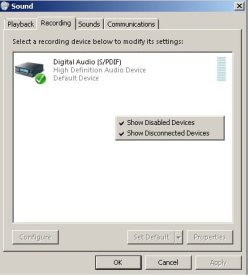
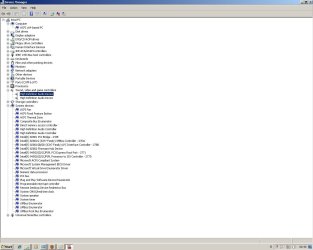
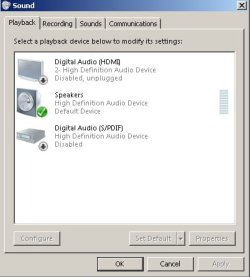
In "Control Panel->Sound->Recording" the only thing that comes up there is Digital Audio (S/PDIF) but no MIC, i have tried showing "Disables devices" but still no luck, i have tried downloading Realtek audio drivers, they do install, but do not work propeley. I have tried downloading the Creative drivers for the headset but they can't open becouse they can´t find Any Audio Device.

I will post pictures with all the info needed for you to help me, since it's geting me nowhere.

Kind regards from Krissi.
 

Attachments
  • Untitled.jpg
    Untitled.jpg
    21.3 KB · Views: 3
  • Untitled2.jpg
    Untitled2.jpg
    19.7 KB · Views: 4
  • Untitled3.jpg
    Untitled3.jpg
    86.5 KB · Views: 38
Last edited:

My Computer

Computer Manufacturer/Model Number
MEDIONPC / MS-7187
OS
Windows 7 Ultimate 64bit
CPU
Intel(R) Pentium(R) D CPU 2.80GHZ 2.89GHZ
Graphics Card(s)
ATI Radeon HD 4650
Sound Card
High Definition Audio Device
Case
Cooler Master
Cooling
Cooler Master
You downloaded the drivers for that headset from Creative for Vista / Windows 7 and they could not open? Perhaps there is more to this than just that one driver - have you searched the Creative forums / FAQs?
 

My Computers

System One System Two

  • Computer type
    PC/Desktop
    Computer Manufacturer/Model Number
    The Beast Model A (homebrew)
    OS
    Windows 11 21H2 Current build
    CPU
    AMD Ryzen 9 3950X
    Motherboard
    MSI MEG X570 GODLIKE
    Memory
    4 * 32 GB - Corsair Vengeance 3600 MHz
    Graphics Card(s)
    EVGA GeForce RTX 3080 Ti XC3 ULTRA GAMING (12G-P5-3955-KR)
    Sound Card
    Realtek® ALC1220 Codec
    Monitor(s) Displays
    2x Eve Spectrum ES07D03 4K Gaming Monitor (Matte) | Eve Spec
    Screen Resolution
    3x 3840 x 2160
    Hard Drives
    3x Samsung 980 Pro NVMe PCIe 4 M.2 2 TB SSD (MZ-V8P2T0B/AM) } 3x Sabrent Rocket NVMe 4.0 1 TB SSD
    PSU
    PC Power & Cooling’s Silencer Series 1050 Watt, 80 Plus Plat
    Case
    Fractal Design Define 7 XL Dark ATX Full Tower Case
    Cooling
    SteelSeries Apex Pro Wired Gaming Keyboard
    Keyboard
    SteelSeries Apex Pro
    Mouse
    Logitech MX Master 3S | MX Master 3 for business
    Internet Speed
    AT&T LightSpeed Gigabit Duplex Ftth
    Antivirus
    Windows Defender + MB 3
    Browser
    Nightly (default) + Firefox (stable),Chrome, Edge
  • Computer type
    PC/Desktop
    System Manufacturer/Model Number
    Dell Latitude E5470
    OS
    ChromeOS Flex Dev Channel (current)
    CPU
    Intel(R) Core(TM) i5-6300U CPU @ 2.40GHz, 2501 Mhz, 2 Core(s), 4 Logical Processor(s)
    Motherboard
    Dell
    Memory
    16 GB
    Graphics Card(s)
    Intel(R) HD Graphics 520
    Sound Card
    Intel(R) HD Graphics 520 + RealTek Audio
    Monitor(s) Displays
    Dell laptop display 15"
    Screen Resolution
    1920 * 1080
    Hard Drives
    Toshiba 128GB M.2 22300 drive
    INTEL Cherryville 520 Series SSDSC2CW180A 180 GB SATA III SSD
    PSU
    Dell
    Case
    Dell
    Cooling
    Dell
    Keyboard
    Dell
    Mouse
    Logitech MX Master 3S (shared w. Sys 1) | Dell TouchPad
    Internet Speed
    AT&T LightSpeed Gigabit Duplex Ftth
John the Creative drivers are only needed if the headset is USB, and from what KrissiKenpachi said,

i have a Fatality Creative headset with a jack connection

it is the non-USB version but plugs directly to a sound card. That said if that is the case the problem is that there are no drivers installed for the onboard audio (CMI9880L) found here,

Chapter 1. Getting Started Getting Started

Now the real problem, C-Media has dropped all support for their older audio solutions including the one on this motherboard. I did find this thread here,

No drivers for onboard CMI9880 (Windows 7)

where most with the same problem had success using the XP driver for it (scroll down to the post by goldtophero). They also mention the XP 64 bit driver for those running Windows 7 x64 which you are. Instead of getting you to wade your way through the Ausu site here is the XP 64 bit driver mentioned,

Download Cmedia_64(WHQL).zip

Just follow goldtophero's method for installing it and hopefully that will get your sound working.
 

My Computer

Computer type
PC/Desktop
Computer Manufacturer/Model Number
Me
OS
Win 7 Ultimate x64
CPU
FX-8350 @ 4.6 GHz so far
Motherboard
Asus M5A97 EVO
Memory
ADATA XPG V1 Series Black 8GB DDR3 1600
Graphics Card(s)
Sapphire R9 270x Dual-X
Sound Card
Xonar DGX w/ Corsair Vengence 1300
Monitor(s) Displays
Acer S232HL Abid
Screen Resolution
1920x1080
Hard Drives
120 GB OCZ Vertex 3
500 GB Seagate 7200.12
PSU
Antec Earthwatts 650W Green
Case
Antec Three Hundred
Cooling
Cooler Master 212 EVO
Keyboard
Logitech G510
Mouse
Logitech G500s
Internet Speed
35000/3000
John the Creative drivers are only needed if the headset is USB, and from what KrissiKenpachi said,

i have a Fatality Creative headset with a jack connection
it is the non-USB version but plugs directly to a sound card. That said if that is the case the problem is that there are no drivers installed for the onboard audio (CMI9880L) found here,

Chapter 1. Getting Started Getting Started

Now the real problem, C-Media has dropped all support for their older audio solutions including the one on this motherboard. I did find this thread here,

No drivers for onboard CMI9880 (Windows 7)

where most with the same problem had success using the XP driver for it (scroll down to the post by goldtophero). They also mention the XP 64 bit driver for those running Windows 7 x64 which you are. Instead of getting you to wade your way through the Ausu site here is the XP 64 bit driver mentioned,

Download Cmedia_64(WHQL).zip

Just follow goldtophero's method for installing it and hopefully that will get your sound working.

Thank you, this seemd to have done it, now the microphone comes up in Recording.
But like always for my computers, fix one problem, get another problem, now in control panel, there is CMI Audio Config (32bit) and everytime i try to open it, my computer freezes or gets really laggy and i can't do anything. So should i try to get the audio config (64bit) or?
 

My Computer

Computer Manufacturer/Model Number
MEDIONPC / MS-7187
OS
Windows 7 Ultimate 64bit
CPU
Intel(R) Pentium(R) D CPU 2.80GHZ 2.89GHZ
Graphics Card(s)
ATI Radeon HD 4650
Sound Card
High Definition Audio Device
Case
Cooler Master
Cooling
Cooler Master
A couple of posts in that Technet link mentioned something about the C-Media control panel not working, and to just make all adjustments using Windows own control settings.
 

My Computer

Computer type
PC/Desktop
Computer Manufacturer/Model Number
Me
OS
Win 7 Ultimate x64
CPU
FX-8350 @ 4.6 GHz so far
Motherboard
Asus M5A97 EVO
Memory
ADATA XPG V1 Series Black 8GB DDR3 1600
Graphics Card(s)
Sapphire R9 270x Dual-X
Sound Card
Xonar DGX w/ Corsair Vengence 1300
Monitor(s) Displays
Acer S232HL Abid
Screen Resolution
1920x1080
Hard Drives
120 GB OCZ Vertex 3
500 GB Seagate 7200.12
PSU
Antec Earthwatts 650W Green
Case
Antec Three Hundred
Cooling
Cooler Master 212 EVO
Keyboard
Logitech G510
Mouse
Logitech G500s
Internet Speed
35000/3000
A couple of posts in that Technet link mentioned something about the C-Media control panel not working, and to just make all adjustments using Windows own control settings.

I'm not quite following you on that :/
 

My Computer

Computer Manufacturer/Model Number
MEDIONPC / MS-7187
OS
Windows 7 Ultimate 64bit
CPU
Intel(R) Pentium(R) D CPU 2.80GHZ 2.89GHZ
Graphics Card(s)
ATI Radeon HD 4650
Sound Card
High Definition Audio Device
Case
Cooler Master
Cooling
Cooler Master
A couple of posts in that Technet link mentioned something about the C-Media control panel not working, and to just make all adjustments using Windows own control settings.

Okey, i have finaly fixed this problem! i tried to change the jacks from the rear panel to the front and that worked out. And btw, thanks alot for your help. This as been driving me crazy! Best regards from Iceland :=)
 

My Computer

Computer Manufacturer/Model Number
MEDIONPC / MS-7187
OS
Windows 7 Ultimate 64bit
CPU
Intel(R) Pentium(R) D CPU 2.80GHZ 2.89GHZ
Graphics Card(s)
ATI Radeon HD 4650
Sound Card
High Definition Audio Device
Case
Cooler Master
Cooling
Cooler Master
Right click on the Speaker icon beside the clock and select "Playback devices", then click on Speakers (assuming that is the default device) and then click on Properties, then make any changes you want there. To set up the speaker configuration (stereo, 5.1, etc) click on Configure instead and make the adjustments there.

The same goes for setting up the mic, only from the Recording tab.
 

My Computer

Computer type
PC/Desktop
Computer Manufacturer/Model Number
Me
OS
Win 7 Ultimate x64
CPU
FX-8350 @ 4.6 GHz so far
Motherboard
Asus M5A97 EVO
Memory
ADATA XPG V1 Series Black 8GB DDR3 1600
Graphics Card(s)
Sapphire R9 270x Dual-X
Sound Card
Xonar DGX w/ Corsair Vengence 1300
Monitor(s) Displays
Acer S232HL Abid
Screen Resolution
1920x1080
Hard Drives
120 GB OCZ Vertex 3
500 GB Seagate 7200.12
PSU
Antec Earthwatts 650W Green
Case
Antec Three Hundred
Cooling
Cooler Master 212 EVO
Keyboard
Logitech G510
Mouse
Logitech G500s
Internet Speed
35000/3000
Back
Top