problem with my PC RAM

Ramy gamal

New member
Local time
4:32 PM
Messages
11
my windows is 7 ultimate 64 bit
installed memory 4GB 2*2 (1.95 usable)
VGA: ATI HD 6850
why the ram is not fully read ?
 

My Computer

Computer type
PC/Desktop
OS
Microsoft Windows 7 Ultimate 64-bit 7601 Multiprocessor Free Service Pack 1
CPU
AMD Phenom(tm) II X4 955 Processor
Motherboard
ASUSTeK COMPUTER INC. M5A97 R2.0
Memory
4.00 GB
Graphics Card(s)
AMD Radeon HD 6800 Series
Sound Card
(1) AMD High Definition Audio Device (2) Realtek High Defi
Screen Resolution
1280 x 1024 x 32 bits (4294967296 colors) @ 60 Hz
Hard Drives
WDC WD50 00AAKX-001CA0 SATA Disk Device
Hi Ramy, welcome to Seven forums.

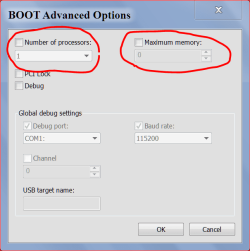
In the Start :orb:Search type msconfig to open the System Configuration window, if UAC asks, allow it to run. Select the Boot tab and click the Advanced button. The BOOT Advanced Options window will open.
Uncheck the box for Maximum Memory if it is checked. Click OK, Apply and reboot for the change to take affect.
picture.php
 

My Computer

Computer type
PC/Desktop
Computer Manufacturer/Model Number
Home Built Desktop By DataTech
OS
Windows 7 Ultimate X64 SP1
CPU
Intel i5-2550K, Differing ~4.4-4.8GHz No built in GPU
Motherboard
ASUS P8Z68-V PRO/GEN3
Memory
16GB G.Skill Sniper 1866MHz @ 2133MHz 2x8GB
Graphics Card(s)
ASUS GTX650TIB-DC2OC-2GD5, (650TI Boost)
Sound Card
Onboard Realtek 5-1
Monitor(s) Displays
Samsung P2570HD
Screen Resolution
1920x1080
Hard Drives
Samsung 840 Pro 256GB SSD for OS, 500GB Seagate Constellation (Enterprise drive) for Data
PSU
Corsair HX650W
Case
Inwin Dragon Rider
Cooling
Hyper 212 EVO w/two Noctua fans, push-pull, @1300 RPM
Keyboard
E-Z Eyes, bright yellow keys with large characters
Mouse
steelseries SENSEI Laser Pro Gaming
Internet Speed
48-51Mbs Mbs down, 11 Mbs up Xfinity Cable
Antivirus
Norton Internet Security 2013
Browser
IE 10, Opera, Pale Moon if needed
Other Info
4 case fans, LG BluRay-RE, ASUS DVD-RW, Mr. Fusion power supply, 1.21 gigawatts.
Hi Ramy, welcome to Seven forums.

In the Start :orb:Search type msconfig to open the System Configuration window, if UAC asks, allow it to run. Select the Boot tab and click the Advanced button. The BOOT Advanced Options window will open.
Uncheck the box for Maximum Memory if it is checked. Click OK, Apply and reboot for the change to take affect.
picture.php

i saw this answer in another topic but it didn't work with me .. the box is already unchecked .. help
 

My Computer

Computer type
PC/Desktop
OS
Microsoft Windows 7 Ultimate 64-bit 7601 Multiprocessor Free Service Pack 1
CPU
AMD Phenom(tm) II X4 955 Processor
Motherboard
ASUSTeK COMPUTER INC. M5A97 R2.0
Memory
4.00 GB
Graphics Card(s)
AMD Radeon HD 6800 Series
Sound Card
(1) AMD High Definition Audio Device (2) Realtek High Defi
Screen Resolution
1280 x 1024 x 32 bits (4294967296 colors) @ 60 Hz
Hard Drives
WDC WD50 00AAKX-001CA0 SATA Disk Device
To better help us to help you would you please add your systems specs? Here's the correct way to do it. :SystemInfo See Your System Specs Under System Manufacturer/Model Number add whether it is a desktop or laptop and whether self built. Very important

Log in to Seven Forums and you will be able to transfer the info directly to the specs page in your profile from within the System Info app.

Your System Specs here.

After doing this your specs will be available in each of your posts.
Click on My system Specs in the lower left of this post to see how it should look.:)
Full instructions are in the tutorial.


In the Start Search type resmon, opening Resource Monitor. Click the Memory tab and post a snip of it.

This is the preferred, best way to upload an image to a post.
http://www.sevenforums.com/tutorials/9733-screenshots-files-upload-post-seven-forums.html#post93869
You may also upload a photo or image as you would a file, without using the Snipping tool.
 

My Computer

Computer type
PC/Desktop
Computer Manufacturer/Model Number
Home Built Desktop By DataTech
OS
Windows 7 Ultimate X64 SP1
CPU
Intel i5-2550K, Differing ~4.4-4.8GHz No built in GPU
Motherboard
ASUS P8Z68-V PRO/GEN3
Memory
16GB G.Skill Sniper 1866MHz @ 2133MHz 2x8GB
Graphics Card(s)
ASUS GTX650TIB-DC2OC-2GD5, (650TI Boost)
Sound Card
Onboard Realtek 5-1
Monitor(s) Displays
Samsung P2570HD
Screen Resolution
1920x1080
Hard Drives
Samsung 840 Pro 256GB SSD for OS, 500GB Seagate Constellation (Enterprise drive) for Data
PSU
Corsair HX650W
Case
Inwin Dragon Rider
Cooling
Hyper 212 EVO w/two Noctua fans, push-pull, @1300 RPM
Keyboard
E-Z Eyes, bright yellow keys with large characters
Mouse
steelseries SENSEI Laser Pro Gaming
Internet Speed
48-51Mbs Mbs down, 11 Mbs up Xfinity Cable
Antivirus
Norton Internet Security 2013
Browser
IE 10, Opera, Pale Moon if needed
Other Info
4 case fans, LG BluRay-RE, ASUS DVD-RW, Mr. Fusion power supply, 1.21 gigawatts.
To better help us to help you would you please add your systems specs? Here's the correct way to do it. :SystemInfo See Your System Specs Under System Manufacturer/Model Number add whether it is a desktop or laptop and whether self built. Very important

Log in to Seven Forums and you will be able to transfer the info directly to the specs page in your profile from within the System Info app.

Your System Specs here.

After doing this your specs will be available in each of your posts.
Click on My system Specs in the lower left of this post to see how it should look.:)
Full instructions are in the tutorial.


In the Start Search type resmon, opening Resource Monitor. Click the Memory tab and post a snip of it.

This is the preferred, best way to upload an image to a post.
http://www.sevenforums.com/tutorials/9733-screenshots-files-upload-post-seven-forums.html#post93869
You may also upload a photo or image as you would a file, without using the Snipping tool.

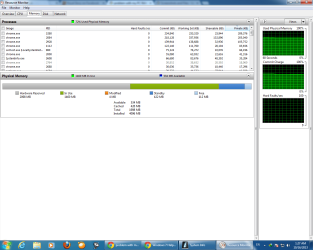
Done
Untitled.png
 

My Computer

Computer type
PC/Desktop
OS
Microsoft Windows 7 Ultimate 64-bit 7601 Multiprocessor Free Service Pack 1
CPU
AMD Phenom(tm) II X4 955 Processor
Motherboard
ASUSTeK COMPUTER INC. M5A97 R2.0
Memory
4.00 GB
Graphics Card(s)
AMD Radeon HD 6800 Series
Sound Card
(1) AMD High Definition Audio Device (2) Realtek High Defi
Screen Resolution
1280 x 1024 x 32 bits (4294967296 colors) @ 60 Hz
Hard Drives
WDC WD50 00AAKX-001CA0 SATA Disk Device
You have a large, just over 2GB, Hardware Reserved RAM amount. I suspect it is being used by the 6800 Series GPU. Do you know the exact model of it?
 

My Computer

Computer type
PC/Desktop
Computer Manufacturer/Model Number
Home Built Desktop By DataTech
OS
Windows 7 Ultimate X64 SP1
CPU
Intel i5-2550K, Differing ~4.4-4.8GHz No built in GPU
Motherboard
ASUS P8Z68-V PRO/GEN3
Memory
16GB G.Skill Sniper 1866MHz @ 2133MHz 2x8GB
Graphics Card(s)
ASUS GTX650TIB-DC2OC-2GD5, (650TI Boost)
Sound Card
Onboard Realtek 5-1
Monitor(s) Displays
Samsung P2570HD
Screen Resolution
1920x1080
Hard Drives
Samsung 840 Pro 256GB SSD for OS, 500GB Seagate Constellation (Enterprise drive) for Data
PSU
Corsair HX650W
Case
Inwin Dragon Rider
Cooling
Hyper 212 EVO w/two Noctua fans, push-pull, @1300 RPM
Keyboard
E-Z Eyes, bright yellow keys with large characters
Mouse
steelseries SENSEI Laser Pro Gaming
Internet Speed
48-51Mbs Mbs down, 11 Mbs up Xfinity Cable
Antivirus
Norton Internet Security 2013
Browser
IE 10, Opera, Pale Moon if needed
Other Info
4 case fans, LG BluRay-RE, ASUS DVD-RW, Mr. Fusion power supply, 1.21 gigawatts.
It looks like only one stick of RAM is recognized.

How did you install the RAM? (How many RAM slots does your MB have, and what slots did you install RAM in?)

How much RAM shows up in BIOS/UEFI?
(You should run a diagnostic program like Memtest86+ - Advanced Memory Diagnostic Tool , but this is pointless unless the RAM shows up at the System level)

Did you buy this RAM as a matched set? Or did you buy an additional stick to go along with an older stick?

Did you buy RAM recommended for your motherboard? Recommended by whom?
It would be good to know the Brand and Model number of the installed RAM.

EDIT: Mmmm. Britton30 is right. I missed that. Do as he says!
 

My Computer

Computer type
PC/Desktop
Computer Manufacturer/Model Number
Home Built - Jan 2013
OS
Windows 7 64 Bit Home Premium SP1
CPU
i7-3820
Motherboard
Asus P9X79-PRO - Bios 4608
Memory
GSkill F3-14900CL9Q - 16GB
Graphics Card(s)
EVGA GeForce GTX660 - Driver 352.86
Sound Card
On board Realtek ALC898
Monitor(s) Displays
Acer S271HL
Screen Resolution
1920 x 1080
Hard Drives
#1- Samsung 840 Pro Series
#2- Western Digital WD1002FAEX Sata3 Black
#3- Western Digital WD1002FAEX Sata3 Black
PSU
Corsair CMPSU-850TX-V2 - 850 watt (by Seasonic)
Case
Corsair Obsidian 550D
Cooling
Standard 3 120mm case fans, Cooler Master Hyper 212 EVO
Keyboard
MS KC-0405
Mouse
Intellimouse 5-button
Internet Speed
56 Mbits/Sec (on a good day)
Antivirus
Avast & Malwarebytes
Browser
Firefox
Other Info
Asus DVD - DRW-24B1ST 24X
Resmon does show Installed 4GB which is how much OP stated, 2x2GB. Odd only 11MB free.
 

My Computer

Computer type
PC/Desktop
Computer Manufacturer/Model Number
Home Built Desktop By DataTech
OS
Windows 7 Ultimate X64 SP1
CPU
Intel i5-2550K, Differing ~4.4-4.8GHz No built in GPU
Motherboard
ASUS P8Z68-V PRO/GEN3
Memory
16GB G.Skill Sniper 1866MHz @ 2133MHz 2x8GB
Graphics Card(s)
ASUS GTX650TIB-DC2OC-2GD5, (650TI Boost)
Sound Card
Onboard Realtek 5-1
Monitor(s) Displays
Samsung P2570HD
Screen Resolution
1920x1080
Hard Drives
Samsung 840 Pro 256GB SSD for OS, 500GB Seagate Constellation (Enterprise drive) for Data
PSU
Corsair HX650W
Case
Inwin Dragon Rider
Cooling
Hyper 212 EVO w/two Noctua fans, push-pull, @1300 RPM
Keyboard
E-Z Eyes, bright yellow keys with large characters
Mouse
steelseries SENSEI Laser Pro Gaming
Internet Speed
48-51Mbs Mbs down, 11 Mbs up Xfinity Cable
Antivirus
Norton Internet Security 2013
Browser
IE 10, Opera, Pale Moon if needed
Other Info
4 case fans, LG BluRay-RE, ASUS DVD-RW, Mr. Fusion power supply, 1.21 gigawatts.
Yeah Gary, I saw that too late. I'm missing your posts by seconds. I think you are on the right track.

But why would a 6800 be using system RAM? Do recall any settings that allow you to do that in BIOS/UEFI?
 

My Computer

Computer type
PC/Desktop
Computer Manufacturer/Model Number
Home Built - Jan 2013
OS
Windows 7 64 Bit Home Premium SP1
CPU
i7-3820
Motherboard
Asus P9X79-PRO - Bios 4608
Memory
GSkill F3-14900CL9Q - 16GB
Graphics Card(s)
EVGA GeForce GTX660 - Driver 352.86
Sound Card
On board Realtek ALC898
Monitor(s) Displays
Acer S271HL
Screen Resolution
1920 x 1080
Hard Drives
#1- Samsung 840 Pro Series
#2- Western Digital WD1002FAEX Sata3 Black
#3- Western Digital WD1002FAEX Sata3 Black
PSU
Corsair CMPSU-850TX-V2 - 850 watt (by Seasonic)
Case
Corsair Obsidian 550D
Cooling
Standard 3 120mm case fans, Cooler Master Hyper 212 EVO
Keyboard
MS KC-0405
Mouse
Intellimouse 5-button
Internet Speed
56 Mbits/Sec (on a good day)
Antivirus
Avast & Malwarebytes
Browser
Firefox
Other Info
Asus DVD - DRW-24B1ST 24X
You have a large, just over 2GB, Hardware Reserved RAM amount. I suspect it is being used by the 6800 Series GPU. Do you know the exact model of it?

it is ATI RADEON HD 6850 1GB DDR5
 

My Computer

Computer type
PC/Desktop
OS
Microsoft Windows 7 Ultimate 64-bit 7601 Multiprocessor Free Service Pack 1
CPU
AMD Phenom(tm) II X4 955 Processor
Motherboard
ASUSTeK COMPUTER INC. M5A97 R2.0
Memory
4.00 GB
Graphics Card(s)
AMD Radeon HD 6800 Series
Sound Card
(1) AMD High Definition Audio Device (2) Realtek High Defi
Screen Resolution
1280 x 1024 x 32 bits (4294967296 colors) @ 60 Hz
Hard Drives
WDC WD50 00AAKX-001CA0 SATA Disk Device
No, ATI RADEON HD 6850 is the graphics engine chip. Need to know the video card manufacturer and model number.
 

My Computer

Computer type
PC/Desktop
Computer Manufacturer/Model Number
Home Built - Jan 2013
OS
Windows 7 64 Bit Home Premium SP1
CPU
i7-3820
Motherboard
Asus P9X79-PRO - Bios 4608
Memory
GSkill F3-14900CL9Q - 16GB
Graphics Card(s)
EVGA GeForce GTX660 - Driver 352.86
Sound Card
On board Realtek ALC898
Monitor(s) Displays
Acer S271HL
Screen Resolution
1920 x 1080
Hard Drives
#1- Samsung 840 Pro Series
#2- Western Digital WD1002FAEX Sata3 Black
#3- Western Digital WD1002FAEX Sata3 Black
PSU
Corsair CMPSU-850TX-V2 - 850 watt (by Seasonic)
Case
Corsair Obsidian 550D
Cooling
Standard 3 120mm case fans, Cooler Master Hyper 212 EVO
Keyboard
MS KC-0405
Mouse
Intellimouse 5-button
Internet Speed
56 Mbits/Sec (on a good day)
Antivirus
Avast & Malwarebytes
Browser
Firefox
Other Info
Asus DVD - DRW-24B1ST 24X
You have a large, just over 2GB, Hardware Reserved RAM amount. I suspect it is being used by the 6800 Series GPU. Do you know the exact model of it?

No, ATI RADEON HD 6850 is the graphics engine chip. Need to know the video card manufacturer and model number.

manufacture is sapphire
let me tell you some info
before i buy this motherboard i had MSI motherboard and it fully read the same ram as 4GB
when i replaced the motherboard with the current one it read ram as 4GB (1.95 usable)
i replaced my ram with 1 stick 4GB from my friend and it was read as 4GB
i guess the prblem is with the motherboard but don't know how to solve
 

My Computer

Computer type
PC/Desktop
OS
Microsoft Windows 7 Ultimate 64-bit 7601 Multiprocessor Free Service Pack 1
CPU
AMD Phenom(tm) II X4 955 Processor
Motherboard
ASUSTeK COMPUTER INC. M5A97 R2.0
Memory
4.00 GB
Graphics Card(s)
AMD Radeon HD 6800 Series
Sound Card
(1) AMD High Definition Audio Device (2) Realtek High Defi
Screen Resolution
1280 x 1024 x 32 bits (4294967296 colors) @ 60 Hz
Hard Drives
WDC WD50 00AAKX-001CA0 SATA Disk Device
The RAM must be compatible with the motherboard, and it must be installed in the correct slots. The RAM may have been compatible with the MSI board, but not the Asus.

If you can tell us the brand and model number of the 2 sticks of 2GB RAM we can check to see if it meets the specs.
If you can tell us what slots the RAM is installed in we can see if it is correct also. The slots are usually marked A1, B1, A2, B2.

Do you have your motherboard manual?
 

My Computer

Computer type
PC/Desktop
Computer Manufacturer/Model Number
Home Built - Jan 2013
OS
Windows 7 64 Bit Home Premium SP1
CPU
i7-3820
Motherboard
Asus P9X79-PRO - Bios 4608
Memory
GSkill F3-14900CL9Q - 16GB
Graphics Card(s)
EVGA GeForce GTX660 - Driver 352.86
Sound Card
On board Realtek ALC898
Monitor(s) Displays
Acer S271HL
Screen Resolution
1920 x 1080
Hard Drives
#1- Samsung 840 Pro Series
#2- Western Digital WD1002FAEX Sata3 Black
#3- Western Digital WD1002FAEX Sata3 Black
PSU
Corsair CMPSU-850TX-V2 - 850 watt (by Seasonic)
Case
Corsair Obsidian 550D
Cooling
Standard 3 120mm case fans, Cooler Master Hyper 212 EVO
Keyboard
MS KC-0405
Mouse
Intellimouse 5-button
Internet Speed
56 Mbits/Sec (on a good day)
Antivirus
Avast & Malwarebytes
Browser
Firefox
Other Info
Asus DVD - DRW-24B1ST 24X
There may be a setting in your BIOS to enable/disable system RAM to be dedicated to graphics. It may be buried in a sub-menu under something like Hardware, Onboard Devices, or Advanced.

As TVeblen said if we have the model numbers of the board and GPU we may be able to fins an online manual.

Also see if you can disable the board's boot logo so the POST (Power on Self test), it will, rather quickly, show installed RAM.
 

My Computer

Computer type
PC/Desktop
Computer Manufacturer/Model Number
Home Built Desktop By DataTech
OS
Windows 7 Ultimate X64 SP1
CPU
Intel i5-2550K, Differing ~4.4-4.8GHz No built in GPU
Motherboard
ASUS P8Z68-V PRO/GEN3
Memory
16GB G.Skill Sniper 1866MHz @ 2133MHz 2x8GB
Graphics Card(s)
ASUS GTX650TIB-DC2OC-2GD5, (650TI Boost)
Sound Card
Onboard Realtek 5-1
Monitor(s) Displays
Samsung P2570HD
Screen Resolution
1920x1080
Hard Drives
Samsung 840 Pro 256GB SSD for OS, 500GB Seagate Constellation (Enterprise drive) for Data
PSU
Corsair HX650W
Case
Inwin Dragon Rider
Cooling
Hyper 212 EVO w/two Noctua fans, push-pull, @1300 RPM
Keyboard
E-Z Eyes, bright yellow keys with large characters
Mouse
steelseries SENSEI Laser Pro Gaming
Internet Speed
48-51Mbs Mbs down, 11 Mbs up Xfinity Cable
Antivirus
Norton Internet Security 2013
Browser
IE 10, Opera, Pale Moon if needed
Other Info
4 case fans, LG BluRay-RE, ASUS DVD-RW, Mr. Fusion power supply, 1.21 gigawatts.
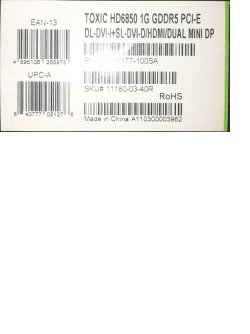
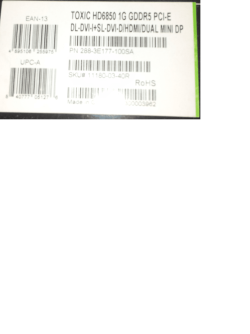
RAM is hyper x DDR3 1600 installed in slots 1 and 3 and i tried all the slots
3.png
4.png

Motherboard
5.png

GPU
1.png
2.png

and i have the manual of motherboard
 

My Computer

Computer type
PC/Desktop
OS
Microsoft Windows 7 Ultimate 64-bit 7601 Multiprocessor Free Service Pack 1
CPU
AMD Phenom(tm) II X4 955 Processor
Motherboard
ASUSTeK COMPUTER INC. M5A97 R2.0
Memory
4.00 GB
Graphics Card(s)
AMD Radeon HD 6800 Series
Sound Card
(1) AMD High Definition Audio Device (2) Realtek High Defi
Screen Resolution
1280 x 1024 x 32 bits (4294967296 colors) @ 60 Hz
Hard Drives
WDC WD50 00AAKX-001CA0 SATA Disk Device
Well, the RAM should be compatible. For best performance Asus recommends installing 2 stick of RAM in slots A2 and B2 (the blue slots). Have you tried that?

So you are back to trying to discover why the system is reserving 2GB of RAM for hardware.

The first thing I would do is reset the UEFI defaults. Make note of your current settings (so you can set them back later if you need to) and the go to the Exit Tab and select "Load Optimized Defaults". See if that changes anything.
 

My Computer

Computer type
PC/Desktop
Computer Manufacturer/Model Number
Home Built - Jan 2013
OS
Windows 7 64 Bit Home Premium SP1
CPU
i7-3820
Motherboard
Asus P9X79-PRO - Bios 4608
Memory
GSkill F3-14900CL9Q - 16GB
Graphics Card(s)
EVGA GeForce GTX660 - Driver 352.86
Sound Card
On board Realtek ALC898
Monitor(s) Displays
Acer S271HL
Screen Resolution
1920 x 1080
Hard Drives
#1- Samsung 840 Pro Series
#2- Western Digital WD1002FAEX Sata3 Black
#3- Western Digital WD1002FAEX Sata3 Black
PSU
Corsair CMPSU-850TX-V2 - 850 watt (by Seasonic)
Case
Corsair Obsidian 550D
Cooling
Standard 3 120mm case fans, Cooler Master Hyper 212 EVO
Keyboard
MS KC-0405
Mouse
Intellimouse 5-button
Internet Speed
56 Mbits/Sec (on a good day)
Antivirus
Avast & Malwarebytes
Browser
Firefox
Other Info
Asus DVD - DRW-24B1ST 24X
they are already in the blue slots
i loaded optimized defaults several times with no result
i think it is hopeless
 

My Computer

Computer type
PC/Desktop
OS
Microsoft Windows 7 Ultimate 64-bit 7601 Multiprocessor Free Service Pack 1
CPU
AMD Phenom(tm) II X4 955 Processor
Motherboard
ASUSTeK COMPUTER INC. M5A97 R2.0
Memory
4.00 GB
Graphics Card(s)
AMD Radeon HD 6800 Series
Sound Card
(1) AMD High Definition Audio Device (2) Realtek High Defi
Screen Resolution
1280 x 1024 x 32 bits (4294967296 colors) @ 60 Hz
Hard Drives
WDC WD50 00AAKX-001CA0 SATA Disk Device
Other than a mouse and keyboard what do you have attached to this computer?

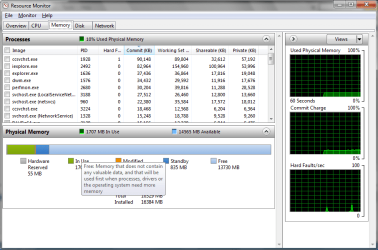
Here's a look at what I have for Hardware reserved with 2 printers, a UPS, 2 SSDs, DVD/R, and wireless adapter.

Untitled.png
 

My Computer

Computer type
PC/Desktop
Computer Manufacturer/Model Number
Home Built Desktop By DataTech
OS
Windows 7 Ultimate X64 SP1
CPU
Intel i5-2550K, Differing ~4.4-4.8GHz No built in GPU
Motherboard
ASUS P8Z68-V PRO/GEN3
Memory
16GB G.Skill Sniper 1866MHz @ 2133MHz 2x8GB
Graphics Card(s)
ASUS GTX650TIB-DC2OC-2GD5, (650TI Boost)
Sound Card
Onboard Realtek 5-1
Monitor(s) Displays
Samsung P2570HD
Screen Resolution
1920x1080
Hard Drives
Samsung 840 Pro 256GB SSD for OS, 500GB Seagate Constellation (Enterprise drive) for Data
PSU
Corsair HX650W
Case
Inwin Dragon Rider
Cooling
Hyper 212 EVO w/two Noctua fans, push-pull, @1300 RPM
Keyboard
E-Z Eyes, bright yellow keys with large characters
Mouse
steelseries SENSEI Laser Pro Gaming
Internet Speed
48-51Mbs Mbs down, 11 Mbs up Xfinity Cable
Antivirus
Norton Internet Security 2013
Browser
IE 10, Opera, Pale Moon if needed
Other Info
4 case fans, LG BluRay-RE, ASUS DVD-RW, Mr. Fusion power supply, 1.21 gigawatts.
Could you check again. I know you have done it once.
Please post a picture of this. Hopefully I'm not getting in the way.

ADVANCE OPTIONS 8 9 2013.PNG
 

My Computer

Computer type
PC/Desktop
Computer Manufacturer/Model Number
Home made Desktop
OS
Windows 10 Pro. 64/ version 1709 Windows 7 Pro/64
CPU
Intel i7-6800K @ 4.3
Motherboard
ASUS X-99 Deluxe II
Memory
Corsair Platinum 16 gig @2400
Graphics Card(s)
EVGA GTX 1070 OC
Monitor(s) Displays
Asus 27" LED LCD/VE278Q
Screen Resolution
1920-1080 or 1280-720 HDMI
Hard Drives
INTEL SSD 730-240 Gb Sata 3.0/
PSU
EVGA Platium 1200W
Case
Phanteks Luxe Tempered Glass 8 fans/ one radiator
Cooling
XSPC/ Water Cooled CPU
Keyboard
Das 4 Professional
Mouse
Logitech M705/MX Anywhere 2-S
Internet Speed
100 mbits
Antivirus
Microsoft Security Essentials/ Malwarebytes Premium 3.0/ SAS
Browser
I.E. 11 default/Firefox/ ISP Time Warner Cable/Spectrum
Other Info
LG BluRay Burner/
Sound system-KLipsch-THX/
Icy Dock ssd Hot Swap bays.
Other than a mouse and keyboard what do you have attached to this computer?

Here's a look at what I have for Hardware reserved with 2 printers, a UPS, 2 SSDs, DVD/R, and wireless adapter.

View attachment 290110

only a sattelite card
axtrom dtv sat 201
 

My Computer

Computer type
PC/Desktop
OS
Microsoft Windows 7 Ultimate 64-bit 7601 Multiprocessor Free Service Pack 1
CPU
AMD Phenom(tm) II X4 955 Processor
Motherboard
ASUSTeK COMPUTER INC. M5A97 R2.0
Memory
4.00 GB
Graphics Card(s)
AMD Radeon HD 6800 Series
Sound Card
(1) AMD High Definition Audio Device (2) Realtek High Defi
Screen Resolution
1280 x 1024 x 32 bits (4294967296 colors) @ 60 Hz
Hard Drives
WDC WD50 00AAKX-001CA0 SATA Disk Device
Back
Top