Problem with network adapters

Vertex

New member
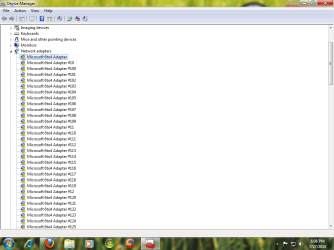
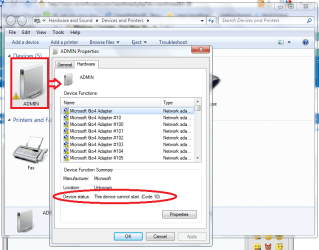
I can see my network adapters having problems. I don't know why this happened but its worrying me. But I can still connect to the Internet.

There is about a hundred devices under "network adapters" in the Device Manager that has this yellow warning sign. All of them had this except the SiS91 Ethernet Controller that makes me connect to the Internet.

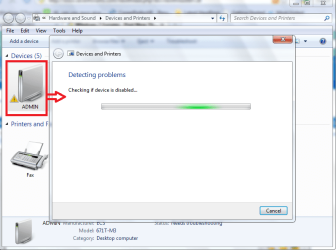
I try troubleshooting and it only gets in cycles from "checking if the device is disabled" to "checking for driver problems" to "checking for missing drivers" and it never ends from there.

I had screenshots.
 

Attachments
  • edueaja.png
    edueaja.png
    158 KB · Views: 10
  • uitueruw.png
    uitueruw.png
    219.8 KB · Views: 20
  • wgdgd.png
    wgdgd.png
    166.2 KB · Views: 20

My Computer

Computer Manufacturer/Model Number
Custom Built
OS
Windows 7 Ultimate 32 Bit, Windows Developer Preview, Linux Mint 9 Gnome 32 Bit
CPU
Intel Pentium Dual CPU E2180@2GHz
Motherboard
Elitegroup 671T-M3
Graphics Card(s)
NVIDIA GeForce 7200 GS
Monitor(s) Displays
AOC TFT1560 15" LCD Monitor
Screen Resolution
1024x768
Keyboard
Logitech USB Keyboard
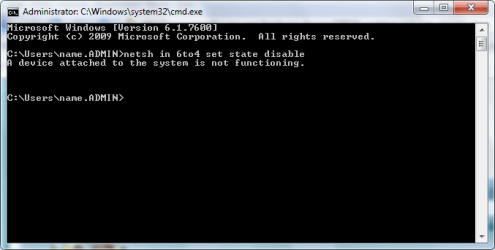
Open a command prompt and type (without quotes) "netsh in 6to4 set state disable"
 

My Computer

Computer Manufacturer/Model Number
Custom Built
OS
Windows 7 Ultimate
CPU
AMD Athlon II X2 245 2.90Ghz
Motherboard
Some Gigabyte one, dont remember model
Memory
3.00 GB
Graphics Card(s)
8800GTS 512MB
Sound Card
Sound Blaster X-Fi Titanium Fatal1ty
Monitor(s) Displays
Dual 22" widescreen
Hard Drives
250GB internal, 500GB internal
PSU
CORSAIR CMPSU-850TX 850W Power Supply
Case
Thermalkake Tsunami Dream
Cooling
Thermaltake Golden Orb II
Keyboard
Saitek Eclipse 2
Mouse
Logitech MX518

Attachments

  • egfeg.png
    egfeg.png
    50.6 KB · Views: 28

My Computer

Computer Manufacturer/Model Number
Custom Built
OS
Windows 7 Ultimate 32 Bit, Windows Developer Preview, Linux Mint 9 Gnome 32 Bit
CPU
Intel Pentium Dual CPU E2180@2GHz
Motherboard
Elitegroup 671T-M3
Graphics Card(s)
NVIDIA GeForce 7200 GS
Monitor(s) Displays
AOC TFT1560 15" LCD Monitor
Screen Resolution
1024x768
Keyboard
Logitech USB Keyboard
You can get rid of those rogue entry's by going into safemode and delating them all. The problem is that your network driver isn't the right one and Windows keeps trying to get it working. You will need to look around for the correct driver, not sure about your system specs or the required driver.
 

My Computer

Computer type
PC/Desktop
Computer Manufacturer/Model Number
Home built
OS
Windows 7 Ult, Windows 8.1 Pro,
CPU
Q9650-4.275GHz, E8600 4.5GHz, E6750-3.8GHz
Motherboard
Evga 780i FTW
Memory
G.Skill PC2 9600 1200Mhz 5 5 5 15 2T
Graphics Card(s)
GTX480
Sound Card
Asus Xonar D2
Monitor(s) Displays
HannsG
Screen Resolution
1680X1050
Hard Drives
GSkill Phoenix Pro 120GB SSD
PSU
ThermalTake Toughpower 1000Watt modular
Case
ThermalTake XaserV
Cooling
Xigmatek S1283
Keyboard
Logitech G15
Mouse
Logitech G9
Internet Speed
T1
Can't see/Connect to my wireless connection

Help. I can't see my wireless network connection. i can't connect to it manually. I have to go through cable. I can see neighbours networks. How in the world?.
 

My Computer

OS
WINDOWS 7
Back
Top