Problem with Non-plug and play drivers [stop responding]

top secret

New member
Member
Local time
11:12 PM
Messages
48
Location
U.A.E - Dubai
Hi..
My problem is that Non-plug and play drivers stop responding, which causes the computer to stop functioning. Then i'll have to turn it off from the cable and reboot.

Sometimes it happens after 10-15 minutes from the time I turn the computer on.


the previous pic. shows the drivers i'm having trouble with

the next pic. summarize what i'm facing due to drivers problem. [pic. from tuneup]


To mention, the problem started 2-3 days ago.

Thanks in advance :)
 

My Computer

Computer Manufacturer/Model Number
HP pavilion m9342.me
OS
Windows 7 Home Premium 32bit
CPU
Intel Quad core 2.40 GHz
Motherboard
PEGATRON CORPORATION Benicia
Memory
4 GB
Graphics Card(s)
nVidia 9500 GS
Sound Card
Realtek
Monitor(s) Displays
Samsung
Screen Resolution
1920 x 1080
Hard Drives
700 GB
Keyboard
HP
Mouse
Samsung
Internet Speed
8.0 MB
Have you checked for malware? I'd suggest running the free Malwarebytes. Update the database and run the full scan. It could take over an hour depending on size of hard drive.

Malwarebytes : Malwarebytes Anti-Malware is a free download that removes viruses and malware from your computer

If Malwarebytes is clean I'd next check the integrity of your system files. Try running System File Checker. If it finds any problems run 3-4 scans.

http://www.sevenforums.com/tutorials/1538-sfc-scannow-command-system-file-checker.html
 

My Computer

Computer type
Laptop
Computer Manufacturer/Model Number
Sony Vaio VPCEB47GM Laptop
OS
Win 7 Pro 64-bit
CPU
Intel i5 2.4 Ghz
Memory
8GB DDR3
Graphics Card(s)
Intel HD 3000
Sound Card
IDT High Definition
Monitor(s) Displays
15.6 WGXA Anti-Glare LED
Screen Resolution
1280x800
Hard Drives
640Gb 7200rpm
Antivirus
MSE
Browser
Opera (primary) with IE9 backup
did the scan ... no malwares
did the file checker "windows resource protection did not find any integrity violations"
 

My Computer

Computer Manufacturer/Model Number
HP pavilion m9342.me
OS
Windows 7 Home Premium 32bit
CPU
Intel Quad core 2.40 GHz
Motherboard
PEGATRON CORPORATION Benicia
Memory
4 GB
Graphics Card(s)
nVidia 9500 GS
Sound Card
Realtek
Monitor(s) Displays
Samsung
Screen Resolution
1920 x 1080
Hard Drives
700 GB
Keyboard
HP
Mouse
Samsung
Internet Speed
8.0 MB

My Computer

Computer type
Laptop
Computer Manufacturer/Model Number
Sony Vaio VPCEB47GM Laptop
OS
Win 7 Pro 64-bit
CPU
Intel i5 2.4 Ghz
Memory
8GB DDR3
Graphics Card(s)
Intel HD 3000
Sound Card
IDT High Definition
Monitor(s) Displays
15.6 WGXA Anti-Glare LED
Screen Resolution
1280x800
Hard Drives
640Gb 7200rpm
Antivirus
MSE
Browser
Opera (primary) with IE9 backup
Yes there are some errors:

like:

The system has rebooted without cleanly shutting down first. This error could be caused if the system stopped responding, crashed, or lost power unexpectedly.

which is caused by me to reboot the computer when it stops responding.

Microsoft Antimalware Real-Time Protection feature has encountered an error and failed.
Feature: Behavior Monitoring
Error Code: 0x80004005
Error description: Unspecified error
Reason: The filter driver requires an up-to-date engine in order to function. You must install the latest definition updates in order to enable real-time protection.

I have no idea what is this!! :)

or this

The HomeGroup Provider service depends on the Function Discovery Provider Host service which failed to start because of the following error:
The service cannot be started, either because it is disabled or because it has no enabled devices associated with it.
 

My Computer

Computer Manufacturer/Model Number
HP pavilion m9342.me
OS
Windows 7 Home Premium 32bit
CPU
Intel Quad core 2.40 GHz
Motherboard
PEGATRON CORPORATION Benicia
Memory
4 GB
Graphics Card(s)
nVidia 9500 GS
Sound Card
Realtek
Monitor(s) Displays
Samsung
Screen Resolution
1920 x 1080
Hard Drives
700 GB
Keyboard
HP
Mouse
Samsung
Internet Speed
8.0 MB
As I understand things ( and I've been known to be wrong occasionally :) ) the Home Group is a Win 7 feature that allows files and printers to be shared on a home network. If there's no home network it's OK for this service to be disabled.

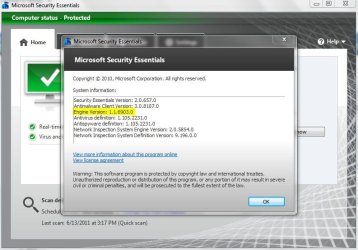
What security product are you using? If you're using Microsoft Security Essentials (the combination antivirus/antispyware product) it appears that the Engine version is out dated and your real time protection isn't working. If you're using MSE open the dashboard and click the Help link in the upper right corner. The Engine version should be like this (current as of a few minutes ago):

mse.JPG

If you don't have the same Engine version I'd recommend unnstalling MSE and reinstalling from here. Make sure it updates during the installation and re-check the Engine version.

Virus, Spyware & Malware Protection | Microsoft Security Essentials

If you're not using MSE and you're using some other security suite that has an antivirus and antispyware, that other product would have turned off Windows Defender (the default antispyware that comes with Win 7.) It also uses an Engine that would not be updated because it's turned off. So this shouldn't be a problem.

Finally, the shut down problem. If a computer isn't shut down properly it can suffer all kinds of problems in the way of damaged or corrupt system files, etc that even the SFC scan may not fix. You could try restoring your computer to a date/time prior to when the non-plug and play problems began.

http://www.sevenforums.com/tutorials/700-system-restore.html

If that doesn't work you could also try a Repair Install.

http://www.sevenforums.com/tutorials/3413-repair-install.html
 

My Computer

Computer type
Laptop
Computer Manufacturer/Model Number
Sony Vaio VPCEB47GM Laptop
OS
Win 7 Pro 64-bit
CPU
Intel i5 2.4 Ghz
Memory
8GB DDR3
Graphics Card(s)
Intel HD 3000
Sound Card
IDT High Definition
Monitor(s) Displays
15.6 WGXA Anti-Glare LED
Screen Resolution
1280x800
Hard Drives
640Gb 7200rpm
Antivirus
MSE
Browser
Opera (primary) with IE9 backup
MSE has the same database you put in the pic.

I restore my system to 7th of june and I just get the same problem now :(

i'm going to try repair install
 

My Computer

Computer Manufacturer/Model Number
HP pavilion m9342.me
OS
Windows 7 Home Premium 32bit
CPU
Intel Quad core 2.40 GHz
Motherboard
PEGATRON CORPORATION Benicia
Memory
4 GB
Graphics Card(s)
nVidia 9500 GS
Sound Card
Realtek
Monitor(s) Displays
Samsung
Screen Resolution
1920 x 1080
Hard Drives
700 GB
Keyboard
HP
Mouse
Samsung
Internet Speed
8.0 MB
MSE has the same database you put in the pic.

I restore my system to 7th of june and I just get the same problem now :(

i'm going to try repair install

If a repair install doesn't fix things there's one more thing you can try. Wiping the hard drive clean by accessing the HP Recovery Manager to return your computer to factory specs (just like the day it was when you brought it home and my personal first choice.) Or doing a Clean Install of the operating system using either a full install disk or an upgrade disk.

But the problem may not be software related and a Clean Install/Recovery Manager may not fix anything. It could be that some piece of hardware was damaged (motherboard, cpu, etc) when the computer wasn't shut down properly. It's also possible that the hard drive may now have some bad sectors that are unreadable causing the non-plug and play drivers to not work.

To access the Recovery Manager I believe you normally get a prompt at start up to press F11 (or perhaps some other function key.) Select Recovery Manager > Enter. Or, you should be able to click the Start button > All Programs > Recovery Manager. In either case (Recovery Manager or Clean Install) all data will be erased from the hard drive so you must back up anything important.

http://www.sevenforums.com/tutorials/1649-clean-install-windows-7-a.html

http://www.sevenforums.com/tutorials/31402-clean-install-upgrade-windows-7-version.html
 

My Computer

Computer type
Laptop
Computer Manufacturer/Model Number
Sony Vaio VPCEB47GM Laptop
OS
Win 7 Pro 64-bit
CPU
Intel i5 2.4 Ghz
Memory
8GB DDR3
Graphics Card(s)
Intel HD 3000
Sound Card
IDT High Definition
Monitor(s) Displays
15.6 WGXA Anti-Glare LED
Screen Resolution
1280x800
Hard Drives
640Gb 7200rpm
Antivirus
MSE
Browser
Opera (primary) with IE9 backup
it is really hard to go for factory settings because I have thousands of important files and applications
is there another way??
 

My Computer

Computer Manufacturer/Model Number
HP pavilion m9342.me
OS
Windows 7 Home Premium 32bit
CPU
Intel Quad core 2.40 GHz
Motherboard
PEGATRON CORPORATION Benicia
Memory
4 GB
Graphics Card(s)
nVidia 9500 GS
Sound Card
Realtek
Monitor(s) Displays
Samsung
Screen Resolution
1920 x 1080
Hard Drives
700 GB
Keyboard
HP
Mouse
Samsung
Internet Speed
8.0 MB
Did you try the Repair Install? If that didn't fix the problem I can't think of anything else to try other than a clean install using an install disk or accessing the recovery manager and returning it to factory specs. The only thing you could do to save your important data is to back everything up (external hard drive, flash drive, CD, DVD.) All of your other programs, applications, etc would have to be reinstalled. And as I mentioned, it's possible that your problems are hardware related so even a clean install or factory recovery may not fix things.
 

My Computer

Computer type
Laptop
Computer Manufacturer/Model Number
Sony Vaio VPCEB47GM Laptop
OS
Win 7 Pro 64-bit
CPU
Intel i5 2.4 Ghz
Memory
8GB DDR3
Graphics Card(s)
Intel HD 3000
Sound Card
IDT High Definition
Monitor(s) Displays
15.6 WGXA Anti-Glare LED
Screen Resolution
1280x800
Hard Drives
640Gb 7200rpm
Antivirus
MSE
Browser
Opera (primary) with IE9 backup

My Computer

Computer Manufacturer/Model Number
HP pavilion m9342.me
OS
Windows 7 Home Premium 32bit
CPU
Intel Quad core 2.40 GHz
Motherboard
PEGATRON CORPORATION Benicia
Memory
4 GB
Graphics Card(s)
nVidia 9500 GS
Sound Card
Realtek
Monitor(s) Displays
Samsung
Screen Resolution
1920 x 1080
Hard Drives
700 GB
Keyboard
HP
Mouse
Samsung
Internet Speed
8.0 MB
Back
Top