Problem with nvidia geforce 9600m gs

Chris Robson

New member
Local time
4:45 AM
Messages
3
Hi,

I have recently installed windows 7 32-bit on my laptop, everything was running fine but then i found out that windows seven didn't recognise my graphics card. I have a nvidia geforce 9600m gs graphics card, and when i try to install drivers for it, well, i cant, it tells me that i cant install drivers onto hardware that doesn't exist. I have been trying to solve this problem for over a 2 days but have had no success what so ever. I would be ever so grateful if someone could help me solve this problem as soon as possible as i am unable to do work for uni as i cant run the progam i need because of this issue.:mad:

Chris
 

My Computer

OS
windows 7

My Computer

Computer Manufacturer/Model Number
self built
OS
7600.20510 x86
CPU
P4 550 3.4 GHz HT running at 3.5 GHz
Motherboard
MSI PM8M3-V (MS-7211 v1.x) Micro-ATX mainboard
Memory
OCZ 2 GB(2x1GB) DDR400mHz running @ 414 mHz
Graphics Card(s)
HIS Radeon HD 3850 IceQ 3 Turbo HDMI Dual DL-DVI AGP
Sound Card
MOTU Traveler firewire studio interface 192 kHz 24 bit
Monitor(s) Displays
22" widescreen Acer X223W LCD, 17" Compaq P75 CRT
Screen Resolution
1680x1050 and 1280x1024
Hard Drives
SATA I x2 WD, 400 GB and 120 GB, SATA 2 WD Caviar Black 1 TB
PSU
350W generic
Case
Cybertronpc, it glows blue
Cooling
stock cpu fan, Ice-Q 3 gpu and system, many case fans
Keyboard
Logitch Classical Keyboard 200
Mouse
Logitech Mediaplay cordless
Internet Speed
1792/448 kbits/sec
Other Info
SATA II PCI fake RAID adapter, 1 GB Readyboost, original ATI Remote Wonder (even works with WMC perfectly), Logitech Rumblepad 2 game controller x2
I have just tried this, but it doesn't make any difference. Does anyone have any other ideas? Thanks.
 

My Computer

OS
windows 7
Sure it does.

I'll help you with a custom method instead, since you're finding troubles with it.

Right click card in device manager. Properties, details tab. Change dropdown to hardware ids. Copy and paste results to here.

I'll make you custom install strings for your card and place into the .inf.

After you do that, get latest driver from here http://www.nvidia.com/object/win7_winvista_32bit_191.07_whql.html
Run and let it extract to C:\NVIDIA
Close installer after it extracts.

When I post again, I'll have further instructions.
 

My Computer

Computer Manufacturer/Model Number
self built
OS
7600.20510 x86
CPU
P4 550 3.4 GHz HT running at 3.5 GHz
Motherboard
MSI PM8M3-V (MS-7211 v1.x) Micro-ATX mainboard
Memory
OCZ 2 GB(2x1GB) DDR400mHz running @ 414 mHz
Graphics Card(s)
HIS Radeon HD 3850 IceQ 3 Turbo HDMI Dual DL-DVI AGP
Sound Card
MOTU Traveler firewire studio interface 192 kHz 24 bit
Monitor(s) Displays
22" widescreen Acer X223W LCD, 17" Compaq P75 CRT
Screen Resolution
1680x1050 and 1280x1024
Hard Drives
SATA I x2 WD, 400 GB and 120 GB, SATA 2 WD Caviar Black 1 TB
PSU
350W generic
Case
Cybertronpc, it glows blue
Cooling
stock cpu fan, Ice-Q 3 gpu and system, many case fans
Keyboard
Logitch Classical Keyboard 200
Mouse
Logitech Mediaplay cordless
Internet Speed
1792/448 kbits/sec
Other Info
SATA II PCI fake RAID adapter, 1 GB Readyboost, original ATI Remote Wonder (even works with WMC perfectly), Logitech Rumblepad 2 game controller x2
here are my results:

PCI\VEN_10DE&DEV_0648&SUBSYS_208C17C0&REV_A1
PCI\VEN_10DE&DEV_0648&SUBSYS_208C17C0
PCI\VEN_10DE&DEV_0648&CC_030000
PCI\VEN_10DE&DEV_0648&CC_0300

thanks for trying to help me.
 

My Computer

OS
windows 7
Download my attachment. Extract the .inf from it. Copy and paste it to directly overwrite C:\NVIDIA\DisplayDriver\191.07\WinVista_Win7\English\NV_DISP.INF

Go to device manager. Right click card, update driver software, browse, let me pick, have disk, browse.

Now go to the folder shown above where you overwrote the original file and click on NV_DISP.INF

Hit ok. Follow along and let it install.

When done, run C:\NVIDIA\DisplayDriver\191.07\WinVista_Win7\English\setup.exe

if you want the Control Panel installed too.

You're welcome and enjoy.
 

Attachments

My Computer

Computer Manufacturer/Model Number
self built
OS
7600.20510 x86
CPU
P4 550 3.4 GHz HT running at 3.5 GHz
Motherboard
MSI PM8M3-V (MS-7211 v1.x) Micro-ATX mainboard
Memory
OCZ 2 GB(2x1GB) DDR400mHz running @ 414 mHz
Graphics Card(s)
HIS Radeon HD 3850 IceQ 3 Turbo HDMI Dual DL-DVI AGP
Sound Card
MOTU Traveler firewire studio interface 192 kHz 24 bit
Monitor(s) Displays
22" widescreen Acer X223W LCD, 17" Compaq P75 CRT
Screen Resolution
1680x1050 and 1280x1024
Hard Drives
SATA I x2 WD, 400 GB and 120 GB, SATA 2 WD Caviar Black 1 TB
PSU
350W generic
Case
Cybertronpc, it glows blue
Cooling
stock cpu fan, Ice-Q 3 gpu and system, many case fans
Keyboard
Logitch Classical Keyboard 200
Mouse
Logitech Mediaplay cordless
Internet Speed
1792/448 kbits/sec
Other Info
SATA II PCI fake RAID adapter, 1 GB Readyboost, original ATI Remote Wonder (even works with WMC perfectly), Logitech Rumblepad 2 game controller x2
Wow, torrentg. I wish someone was this good at figuring out why video is generally lower quality looking in Win7 as compared to XP/Vista for no apparent reason whatsoever (many others with this same, apparently un-answerable problem).
 

My Computer

OS
XP / Win7 x64 Pro
CPU
Intel Quad-Core Q9450 @ 3.2GHz
Motherboard
Asus P5-E
Memory
2x2GB GSkill DDR2
Graphics Card(s)
NVIDIA GeForce 8600 GTS (EVGA)
Monitor(s) Displays
Dell 2408WFP
Screen Resolution
1920x1200
@Torrentg:

"Right click card in device manager. Properties, details tab. Change dropdown to hardware ids. Copy and paste results to here."

What card? And under which device? System devices?
I have exactly the same video card as our friend Chris Robson here and the same problem. I'm trying your method, but I do not know what you mean by "card"?
 

My Computer

OS
Windows7
@Torrentg:

"Right click card in device manager. Properties, details tab. Change dropdown to hardware ids. Copy and paste results to here."

What card? And under which device? System devices?
I have exactly the same video card as our friend Chris Robson here and the same problem. I'm trying your method, but I do not know what you mean by "card"?

If you never had a driver installed previously, it's "standard vga" in display adapters section.
 

My Computer

Computer Manufacturer/Model Number
self built
OS
7600.20510 x86
CPU
P4 550 3.4 GHz HT running at 3.5 GHz
Motherboard
MSI PM8M3-V (MS-7211 v1.x) Micro-ATX mainboard
Memory
OCZ 2 GB(2x1GB) DDR400mHz running @ 414 mHz
Graphics Card(s)
HIS Radeon HD 3850 IceQ 3 Turbo HDMI Dual DL-DVI AGP
Sound Card
MOTU Traveler firewire studio interface 192 kHz 24 bit
Monitor(s) Displays
22" widescreen Acer X223W LCD, 17" Compaq P75 CRT
Screen Resolution
1680x1050 and 1280x1024
Hard Drives
SATA I x2 WD, 400 GB and 120 GB, SATA 2 WD Caviar Black 1 TB
PSU
350W generic
Case
Cybertronpc, it glows blue
Cooling
stock cpu fan, Ice-Q 3 gpu and system, many case fans
Keyboard
Logitch Classical Keyboard 200
Mouse
Logitech Mediaplay cordless
Internet Speed
1792/448 kbits/sec
Other Info
SATA II PCI fake RAID adapter, 1 GB Readyboost, original ATI Remote Wonder (even works with WMC perfectly), Logitech Rumblepad 2 game controller x2
Download my attachment. Extract the .inf from it. Copy and paste it to directly overwrite C:\NVIDIA\DisplayDriver\191.07\WinVista_Win7\English\NV_DISP.INF

Go to device manager. Right click card, update driver software, browse, let me pick, have disk, browse.

Now go to the folder shown above where you overwrote the original file and click on NV_DISP.INF

Hit ok. Follow along and let it install.

When done, run C:\NVIDIA\DisplayDriver\191.07\WinVista_Win7\English\setup.exe

if you want the Control Panel installed too.

You're welcome and enjoy.

This .inf file and the rest following.. is it the same for me too? Or do I need to copy-paste my hardware ids too?
 

My Computer

OS
Windows7
This .inf file and the rest following.. is it the same for me too? Or do I need to copy-paste my hardware ids too?

No. Mobile hardware ids are specific and can not (in most cases) be used by other users attempting the very same thing with same video adapter.

So since this .inf is here already, I can quickly edit it for you.

Right click standard vga in device manager. Properties. Details tab. Change dropdown to hardware ids. Copy and paste the results here.
 

My Computer

Computer Manufacturer/Model Number
self built
OS
7600.20510 x86
CPU
P4 550 3.4 GHz HT running at 3.5 GHz
Motherboard
MSI PM8M3-V (MS-7211 v1.x) Micro-ATX mainboard
Memory
OCZ 2 GB(2x1GB) DDR400mHz running @ 414 mHz
Graphics Card(s)
HIS Radeon HD 3850 IceQ 3 Turbo HDMI Dual DL-DVI AGP
Sound Card
MOTU Traveler firewire studio interface 192 kHz 24 bit
Monitor(s) Displays
22" widescreen Acer X223W LCD, 17" Compaq P75 CRT
Screen Resolution
1680x1050 and 1280x1024
Hard Drives
SATA I x2 WD, 400 GB and 120 GB, SATA 2 WD Caviar Black 1 TB
PSU
350W generic
Case
Cybertronpc, it glows blue
Cooling
stock cpu fan, Ice-Q 3 gpu and system, many case fans
Keyboard
Logitch Classical Keyboard 200
Mouse
Logitech Mediaplay cordless
Internet Speed
1792/448 kbits/sec
Other Info
SATA II PCI fake RAID adapter, 1 GB Readyboost, original ATI Remote Wonder (even works with WMC perfectly), Logitech Rumblepad 2 game controller x2
Hey,

I got something like the same problem, I got 9600m gs too, but i get an error code (43), can i fix this with that special instal thingy too?
My Hardware IDs are

PCI\VEN_10DE&DEV_0648&SUBSYS_014D1025&REV_A1
PCI\VEN_10DE&DEV_0648&SUBSYS_014D1025
PCI\VEN_10DE&DEV_0648&CC_030000
PCI\VEN_10DE&DEV_0648&CC_0300

Also, i got an Acer Laptop, so i need modificated Acer drivers, are you able to make a good updated driver with that?

Sorry for bad English, I'm Dutch and i coulnd't find any information about this issue on Dutch forums.
 

My Computer

OS
Win 7 32 bit
Hey,

I got something like the same problem, I got 9600m gs too, but i get an error code (43), can i fix this with that special instal thingy too?
My Hardware IDs are

PCI\VEN_10DE&DEV_0648&SUBSYS_014D1025&REV_A1
PCI\VEN_10DE&DEV_0648&SUBSYS_014D1025
PCI\VEN_10DE&DEV_0648&CC_030000
PCI\VEN_10DE&DEV_0648&CC_0300

Also, i got an Acer Laptop, so i need modificated Acer drivers, are you able to make a good updated driver with that?

Sorry for bad English, I'm Dutch and i coulnd't find any information about this issue on Dutch forums.

Hi. Use this attachment and install like others did, with the latest desktop 191.07 driver.

You have to extract the download from NVIDIA then overwrite the N_DISP.inf with my attachment before you install as I instructed others.
 

Attachments

My Computer

Computer Manufacturer/Model Number
self built
OS
7600.20510 x86
CPU
P4 550 3.4 GHz HT running at 3.5 GHz
Motherboard
MSI PM8M3-V (MS-7211 v1.x) Micro-ATX mainboard
Memory
OCZ 2 GB(2x1GB) DDR400mHz running @ 414 mHz
Graphics Card(s)
HIS Radeon HD 3850 IceQ 3 Turbo HDMI Dual DL-DVI AGP
Sound Card
MOTU Traveler firewire studio interface 192 kHz 24 bit
Monitor(s) Displays
22" widescreen Acer X223W LCD, 17" Compaq P75 CRT
Screen Resolution
1680x1050 and 1280x1024
Hard Drives
SATA I x2 WD, 400 GB and 120 GB, SATA 2 WD Caviar Black 1 TB
PSU
350W generic
Case
Cybertronpc, it glows blue
Cooling
stock cpu fan, Ice-Q 3 gpu and system, many case fans
Keyboard
Logitch Classical Keyboard 200
Mouse
Logitech Mediaplay cordless
Internet Speed
1792/448 kbits/sec
Other Info
SATA II PCI fake RAID adapter, 1 GB Readyboost, original ATI Remote Wonder (even works with WMC perfectly), Logitech Rumblepad 2 game controller x2
"The Nvidia Setup program could not locate any drivers that are compatible with your current hardware. Setup will now exit."

That's what i get when i try to start the setup.exe manually.
When i want to update my drivers via device manager, my pc says something about there is no newer driver found then the current installed driver.
 

My Computer

OS
Win 7 32 bit
Ah, maybe i know what's the problem, i got a 9600m gs, the link to drivers u gave, was for a 9600 gs.
I got a notebook chip, not a normal.

Supported products:
GeForce 9 series:
9600 GSO, 9600 GS, 9500 GT, 9300 GS, 9300 GE, 9400, 9800 GX2, 9800 GT, 9400 GT, 9600 GT, 9500 GS, 9200, 9300, 9800 GTX/GTX+

theres no 9600m gs.
 

My Computer

OS
Win 7 32 bit
Nevermind, i used your file in combination with some other drivers and now everything is fine.

thx.
 

My Computer

OS
Win 7 32 bit
Ah, maybe i know what's the problem, i got a 9600m gs, the link to drivers u gave, was for a 9600 gs.
I got a notebook chip, not a normal.

Supported products:
GeForce 9 series:
9600 GSO, 9600 GS, 9500 GT, 9300 GS, 9300 GE, 9400, 9800 GX2, 9800 GT, 9400 GT, 9600 GT, 9500 GS, 9200, 9300, 9800 GTX/GTX+

theres no 9600m gs.

Atze,
Perhaps the following site might be your answer:
NVIDIA Drivers and Tools of the LaptopVideo2Go

The modified nv_disp.inf file accompanies any version of the Nvidia graphic driver appears in their web side.

Any modified nv_disp.inf file would support most Nvidia graphic cards, both desktop and laptop, no matter what the cards are old or new.

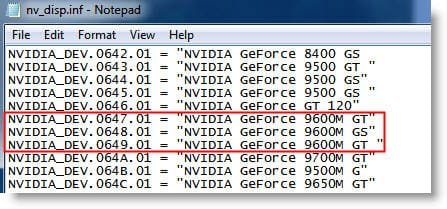
Try to download any nv_disp.inf file and open it with notepad, and you will find your card
listed there, for example:
Snap1.jpg

After that, you can choose your favorite version of the Nvidia driver and install it.

Good luck, and enjoy your graphic card as well as enjoy the W7.
 

My Computer

OS
Server 2008 R2 SP1, Win7 x64 Pro SP1
CPU
Intel Core 2 Duo E6700 @3.3GHz
Motherboard
ASUS P5W DH DELUXE
Memory
Transcend DDRII 800 4GB (2 x 2GB )
Graphics Card(s)
GeForce 7950GX2
Sound Card
Realtek ALC882M Integrated on board
Monitor(s) Displays
ACER AL2723 27" LCD
Screen Resolution
1920x1200
Hard Drives
WD 6401 AALS 640G x 1
Seagate 160 GB (Barracuda 7200.7) x 2
PSU
Zippy PSL-6720P(G1)720W
Case
Thermaltake Kandalf VA9000SWA
Cooling
Zalman CNPS9500
Keyboard
Standard
Mouse
Standard
Internet Speed
10M, Cable
Other Info
Above is one of my desktops.
Thanks for the tip, i mentioned that site when i told about "some other drivers", but i used the nv_disp TorrentG gave me, and now everything is right again.
 

My Computer

OS
Win 7 32 bit
Can anyone help me? I'm so frustrated with sony. I will never buy one of their products again! Their cutomer support is horrible! Every time i contact them, it's some idiot just reading from the sony website, like I can't do that myself. Anyway, I want to update my driver on my vgn-z520n with 9300m gs to the latest driver. I've tried nvidia mobility modder, and that doesn't work. Here's my hardware IDs

PCI\VEN_10DE&DEV_06E5&SUBSYS_9025104D&REV_A1
PCI\VEN_10DE&DEV_06E5&SUBSYS_9025104D
PCI\VEN_10DE&DEV_06E5&CC_030000
PCI\VEN_10DE&DEV_06E5&CC_0300
 
Last edited:

My Computer

Computer Manufacturer/Model Number
Sony vgn-z520n
OS
Windows 7 Pro 64bit
Memory
4gb DDR3
Graphics Card(s)
9300m gs
Back
Top