problem with opening my files again.

daanzuijdendorp

New member
Local time
11:07 PM
Messages
6
hello formers,

i got a problem with opening my files. it al started at the time i wanted to open one file with paint. then i exadently opend all files with paint now i can t put it back on normal can somone plz help me out because all my files open with it.

p.s. srry for the bad english can t help it im dutch. and still on school so.

thx. daan
 

My Computer

OS
windows 7 ultimate x64
hi daan...your english is ok.

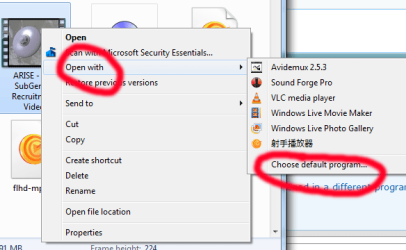
right-click on a file that you want opened in a different program, and then chose 'Open with...', then 'Choose default program' (or whatever it is in dutch) :)
 

Attachments

  • openwith.png
    openwith.png
    22.1 KB · Views: 1

My Computer

Computer Manufacturer/Model Number
mickey megabyte 1234
OS
ultimate 64 sp1
CPU
i5 2500K [email protected]
Motherboard
MSI P67A-GD53
Memory
8 gigs GSkill Ripjaws 1600
Graphics Card(s)
amd hd6950
Sound Card
creative x-fi gamer
Monitor(s) Displays
samsung 24"
Screen Resolution
1920x1080
Hard Drives
ocz vertex 2e 60 gig, samsung f3 1tb, buffalo 2tb ext
PSU
antec 550
Case
antec three hundred
Cooling
i'm a cooling fan
Keyboard
saitek eclipse ii
Mouse
logitech g3
Internet Speed
about 4 Mbps
Other Info
i love win7
ok i already tried but still everthing is opening with paint when i press internet explore it opens paint instead of I.E. and those default programs aren't every programs i need. when i want to play a game it opens paint its every time paint when i select another thing like word it opens every program with word. so plz do you know another solution? P.S. your picture with the cat pwnz.
 

My Computer

OS
windows 7 ultimate x64
ah sorry, i misunderstood your post.

do you have any system restore points saved?

you can run system restore (and not paint) by typing rstrui into the search-box at bottom of start-menu.

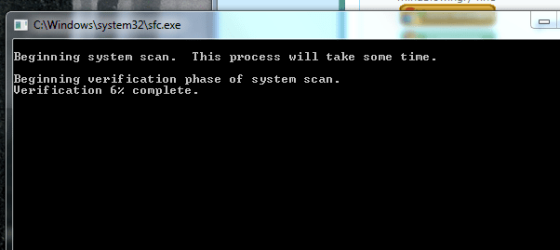
if that doesn't work, you can scan (and hopefully repair) system files by typing sfc /scannow into the same search-box. it will take a few minutes, but it sometimes repairs things.

good luck, and let us know if it worked.
 

My Computer

Computer Manufacturer/Model Number
mickey megabyte 1234
OS
ultimate 64 sp1
CPU
i5 2500K [email protected]
Motherboard
MSI P67A-GD53
Memory
8 gigs GSkill Ripjaws 1600
Graphics Card(s)
amd hd6950
Sound Card
creative x-fi gamer
Monitor(s) Displays
samsung 24"
Screen Resolution
1920x1080
Hard Drives
ocz vertex 2e 60 gig, samsung f3 1tb, buffalo 2tb ext
PSU
antec 550
Case
antec three hundred
Cooling
i'm a cooling fan
Keyboard
saitek eclipse ii
Mouse
logitech g3
Internet Speed
about 4 Mbps
Other Info
i love win7
  • Like
Reactions: JMH
no srry i do got restore points but those points are from this day and i dunno how to get like a month back because i have this isseu a month now and i really want to get rid of it now and that sfc/scannnow doesn't really work i get a black thingy that opens and quickly dissapears. but do you maby know how i can set a date or somthing in that system restore? btw. your already a great help. i already learnd a little bit more about comps.
 

My Computer

OS
windows 7 ultimate x64
ooh nvm about that black screen thingy its doing somthing now hope it works
 

My Computer

OS
windows 7 ultimate x64
well i thought it was working but nvm that thing is not working srry.
 

My Computer

OS
windows 7 ultimate x64
do you not see something like this?

i'm sorry but i know nothing about system restore (i've never used it myself - ever. :o)

other people on this forum will be able to help.

good luck
 

Attachments

  • sy.PNG
    sy.PNG
    10.9 KB · Views: 5

My Computer

Computer Manufacturer/Model Number
mickey megabyte 1234
OS
ultimate 64 sp1
CPU
i5 2500K [email protected]
Motherboard
MSI P67A-GD53
Memory
8 gigs GSkill Ripjaws 1600
Graphics Card(s)
amd hd6950
Sound Card
creative x-fi gamer
Monitor(s) Displays
samsung 24"
Screen Resolution
1920x1080
Hard Drives
ocz vertex 2e 60 gig, samsung f3 1tb, buffalo 2tb ext
PSU
antec 550
Case
antec three hundred
Cooling
i'm a cooling fan
Keyboard
saitek eclipse ii
Mouse
logitech g3
Internet Speed
about 4 Mbps
Other Info
i love win7
how can i get in contact with this poeple? how do they see this?
 

My Computer

OS
windows 7 ultimate x64

My Computer

Computer Manufacturer/Model Number
Toshiba Satellite S875D-S7239 laptop
OS
MS Windows 7 Ultimate SP1 64-bit
CPU
AMD A10-4600M
Motherboard
AMD Pumori (Socket FT1)
Memory
6.00 GB Dual-Channel DDR3 @ 798MHz (11-11-12-28)
Graphics Card(s)
AMD Radeon HD 7660G
Sound Card
High Definition Audio Device
Monitor(s) Displays
Generic PnP Monitor (1600x900@60Hz)
Screen Resolution
1600x900@60Hz
Hard Drives
SSD 119GB Corsair CSSD-V128GB2 ATA Device
Keyboard
Standard PS/2 Keyboard
Mouse
HP Wireless Optical Mobile Mouse Model FHA-3410
Internet Speed
What the local pub, local coffee shop offers.
Other Info
Optical Drive:MATSHITA BD-CMB UJ160B ATA Device


Also have an Asus ha1002xp netbook with Win 7 Ultimate installed.
lots of people are reading this post - you can see the names below.

also i've asked for help in a special thread that you can't see...
 

My Computer

Computer Manufacturer/Model Number
mickey megabyte 1234
OS
ultimate 64 sp1
CPU
i5 2500K [email protected]
Motherboard
MSI P67A-GD53
Memory
8 gigs GSkill Ripjaws 1600
Graphics Card(s)
amd hd6950
Sound Card
creative x-fi gamer
Monitor(s) Displays
samsung 24"
Screen Resolution
1920x1080
Hard Drives
ocz vertex 2e 60 gig, samsung f3 1tb, buffalo 2tb ext
PSU
antec 550
Case
antec three hundred
Cooling
i'm a cooling fan
Keyboard
saitek eclipse ii
Mouse
logitech g3
Internet Speed
about 4 Mbps
Other Info
i love win7
Vreemd... probeer eens als de computer opstart, vlak voor het windows laad scherm op F8 te drukken. ga dan in veilige modus en probeer dan eens iets te openen. dan zou je eventueel die scan opnieuw kunnen proberen. werkt dat niet herstart dan de pc opnieuw, dan weer F8, en dan laatste goede configuratie ofzo (sorry ik heb de engelse win7). als dat dan ook niet werkt, dan weer F8 met opstarten, en dan iets als (engels) Directory Service restore mode (als beschikbaar).

For people who can't talk dutch: Weird... Try when you start the computer, just before the loading screen,press F8. Then goto save mode and try to open something. you could also try the scan. if that doesn't work restart, and press F8 again. Then try last good know configuration. if that also doesn't work, then again f8 before the loading screen, and try Directory Service restore mode (if avalible).
 

My Computer

Computer Manufacturer/Model Number
Selfbuild
OS
Windows 7 Ultimate x86
CPU
AMD athlon II X2 250
Motherboard
MSI 760GM-E51
Memory
6GB DDR-3 RAM
Graphics Card(s)
ATI Raedon 5600 HD
Sound Card
Onboard Realtek .......
Monitor(s) Displays
Acer
Screen Resolution
1680X1050
Hard Drives
500GB WD 5000AADS SATA
PSU
Sweex 400Watt .........
Case
KONIG
Keyboard
Acer SK-9625
Mouse
Acer SM-9625
Internet Speed
15Mb/S (30MBPS) WiFi
Never mind.

I see kevies99 has things under control.:)
 

My Computer

Computer Manufacturer/Model Number
Hopalong/ Godzilla
OS
Windows7 Pro 64bit SP-1; Windows XP Pro 32bit
CPU
Intel Core i7-870 Lynnfield 2.93GHz LGA 1156 95W Quad-Core
Motherboard
ASUS P7P55D-E PRO
Memory
8GB@1400MHz Crucial Ballistix DDR3-1600 4x2GB
Graphics Card(s)
ASUS ENGTX460 DirectCU/2DI/1GD5 1GB 256-bit GDDR5
Sound Card
VIA Onboard
Monitor(s) Displays
Asus VS248H-P 24"; Samsung SyncMaster 941BW 19"ws
Screen Resolution
1920x1080; 1440x900
Hard Drives
Samsung 830 120GB SSD
Intel 320 120GB SSD
Western Digital Caviar Black WD7501AALS 750GB 7200 RPM SATA 3.0Gb/s
Western Digital Caviar Black WD6401AALS 640GB 7200 RPM SATA 3.0Gb/s
PSU
COOLER MASTER Silent Pro RS850-AMBAJ3-US 850W Modular
Case
COOLER MASTER HAF 932 RC-932-KKN5-GP Black
Cooling
Scythe "Mugen-2 Rev.B" (2 ScytheKaze-Jyuni PWM fans)
Keyboard
Logitech K-320
Mouse
Kensington
Antivirus
Avast Inernet Suite
Browser
IE 9 ; Chrome

My Computer

Computer Manufacturer/Model Number
Home built
OS
Windows 7 Ultimate 32 bit
CPU
Intel(R) Pentium(R) 4 CPU 3.00GHz
Motherboard
ASUS P4P800-VM Motherboard Chipset: Intel 865G + ICH5
Memory
2.50 GB RAM
Graphics Card(s)
NVIDIA GeForce 7600 GS
Sound Card
SoundMax Integrated Digital Audio (Chip)
Monitor(s) Displays
ViewSonic VX 1962 wm
Screen Resolution
1680 X 1050
Hard Drives
Seagate Barracuda 7200.10 80 GB
ST380215A ATA Device 18.6 GB
Western Digital "My Book" external hard drive 750 GB
Cooling
Fan based
Keyboard
Microsoft Comfort Curve Keyboard 2000 v10 USB
Mouse
Logitec optic USB
Internet Speed
3.01 Mb/s download 0.64 Mb/s upload

My Computer

Computer Manufacturer/Model Number
Toshiba Satellite S875D-S7239 laptop
OS
MS Windows 7 Ultimate SP1 64-bit
CPU
AMD A10-4600M
Motherboard
AMD Pumori (Socket FT1)
Memory
6.00 GB Dual-Channel DDR3 @ 798MHz (11-11-12-28)
Graphics Card(s)
AMD Radeon HD 7660G
Sound Card
High Definition Audio Device
Monitor(s) Displays
Generic PnP Monitor (1600x900@60Hz)
Screen Resolution
1600x900@60Hz
Hard Drives
SSD 119GB Corsair CSSD-V128GB2 ATA Device
Keyboard
Standard PS/2 Keyboard
Mouse
HP Wireless Optical Mobile Mouse Model FHA-3410
Internet Speed
What the local pub, local coffee shop offers.
Other Info
Optical Drive:MATSHITA BD-CMB UJ160B ATA Device


Also have an Asus ha1002xp netbook with Win 7 Ultimate installed.
You haven't made it clear if anything will open in another program except paint. To associate with the correct program to open a file, you have to browse into its Program File and choose the correct application. Sometimes the application will be abbreviated so you have to decipher it. Try to see if it the correct one to open the program, but don't choose it for all programs. You may need to do this for any programs you choose to open until they are all associated. I still have to associate files to programs I've not done this for yet.

If that doesn't work you have system problems and should use System Restore if you can make it show more restore points by clicking that box. Go back before the problem started.

If you read the System File Checker tutorial linked, it will show you how to open the Command Box as Administrator so it won't blink out.

As a last resort before reinstalling or factory restoring, try a http://www.sevenforums.com/tutorials/3413-repair-install.html?ltr=R
 
Back
Top