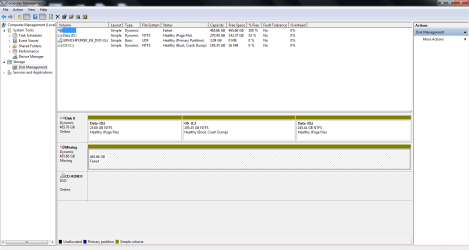
S smallworld New member Local time 7:51 PM Messages 3 May 19, 2013 #1 Can anyone guide my in the correct direction to fix the missing dynamic? I want to move all of the unused space to my current c: drive. Any help would be greatly appreciated, thank you. Attachments disk mg.png 29.7 KB · Views: 5 My Computer Computer typePC/DesktopComputer Manufacturer/Model NumberAsus G74sxOSWindows 7 home premium 64 bit
Can anyone guide my in the correct direction to fix the missing dynamic? I want to move all of the unused space to my current c: drive. Any help would be greatly appreciated, thank you.
SIW2 YTS GEEK Guru Gold Member VIP SF Team Local time 1:51 AM Messages 16,784 May 19, 2013 #2 In Disk Management, right-click the disk marked Missing. Click Reactivate Disk. My Computers System One System Two Computer typePC/DesktopOS7 X64CPUi5 8400Motherboardgigabyte b365m ds3hMemory2x8gb 3200mhzHard DrivesvariousPSUpure power 11 400w cmCaseCoolermasterCoolingcryorig m9i Computer typePC/DesktopOS7x64CPUg5400Motherboardga b365m ds3hMemory8gb ddr4 2400PSUxfx pro 450w
S smallworld New member Thread Starter Local time 7:51 PM Messages 3 May 20, 2013 #3 I've tried that, nothing happens. My Computer Computer typePC/DesktopComputer Manufacturer/Model NumberAsus G74sxOSWindows 7 home premium 64 bit
gregrocker New member Guru Local time 5:51 PM Messages 50,634 May 20, 2013 #4 Why do you have Dynamic disks, which are meant to span a data partition across multiple disks? If Win7 will not boot you can try to convert it to Basic using one of the non-destructive methods in Convert a Dynamic Disk to a Basic Disk. The method I use is here to convert dynamic disk to basic disk with Partition Wizard bootable CD. The last version this feature was free in is pw422.zip ISO - Windows Live. Download and burn ISO to CD using WIndows Image Burner, boot and follow the tutorial above. C is now missing both the System and Active flags so it may be necessary to Mark Partition Active and run Startup Repair - Run up to 3 Separate Times to see if Win7 will start.
Why do you have Dynamic disks, which are meant to span a data partition across multiple disks? If Win7 will not boot you can try to convert it to Basic using one of the non-destructive methods in Convert a Dynamic Disk to a Basic Disk. The method I use is here to convert dynamic disk to basic disk with Partition Wizard bootable CD. The last version this feature was free in is pw422.zip ISO - Windows Live. Download and burn ISO to CD using WIndows Image Burner, boot and follow the tutorial above. C is now missing both the System and Active flags so it may be necessary to Mark Partition Active and run Startup Repair - Run up to 3 Separate Times to see if Win7 will start.