
problem with photoshop in 7600

garbanzo

New member
Local time
5:42 AM
Messages
575
Location
budapest
been running photoshop cs4 without issue since built 7000. i'm now running 7600, and have a problem with some of the buttons and button menus in the title bar area - they turn light-gray on mouse-over, and i can't see the contents anymore. it's especially bad for the "arrange documents" button menu which i use a lot - the whole thing turns gray, and i can't see what's going on.

i'm certain this issue wasn't around in the last build i was running (7229)...

can anyone else reproduce this?
 

Attachments
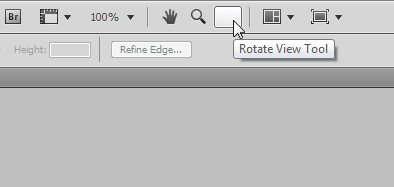
  • ps.png
    ps.png
    2.8 KB · Views: 11

My Computer My Computer

OS
7600 x86
CPU
Core 2 Duo e7200, 2.53 ghz
Motherboard
Micro-Star MS-7529
Memory
2x DDR2 PC5300 1gb, 667 mhz
Graphics Card(s)
GeForce 9500gt, 512mb
Monitor(s) Displays
22" LG Flatron w2234s
Screen Resolution
1680x1050
Hard Drives
Excelstor SATA-II 250gb 7200rpm, 8mb cache
PSU
CoolerMaster M520
Internet Speed
30/20 mbits
CS4 vid prob

been running photoshop cs4 without issue since built 7000. i'm now running 7600, and have a problem with some of the buttons and button menus in the title bar area - they turn light-gray on mouse-over, and i can't see the contents anymore. it's especially bad for the "arrange documents" button menu which i use a lot - the whole thing turns gray, and i can't see what's going on.

i'm certain this issue wasn't around in the last build i was running (7229)...

can anyone else reproduce this?

Not on my 32 bit and cs4 extended. Is your OS upgraded from or clean installed?

Ken
 

My Computer My Computer

Computer Manufacturer/Model Number
HP Pavillion dv-7 1005 Tx
OS
Win 8 Release candidate 8400
CPU
[email protected]
Memory
4 gigs
Graphics Card(s)
Nvidia 9600M
Sound Card
HD built-in
Monitor(s) Displays
17" Wxga
Screen Resolution
1440x900
Cooling
none
Internet Speed
45Mb down 5Mb up
clean install...
 

My Computer My Computer

OS
7600 x86
CPU
Core 2 Duo e7200, 2.53 ghz
Motherboard
Micro-Star MS-7529
Memory
2x DDR2 PC5300 1gb, 667 mhz
Graphics Card(s)
GeForce 9500gt, 512mb
Monitor(s) Displays
22" LG Flatron w2234s
Screen Resolution
1680x1050
Hard Drives
Excelstor SATA-II 250gb 7200rpm, 8mb cache
PSU
CoolerMaster M520
Internet Speed
30/20 mbits
photoshop problem

clean install...


Maybe a ps preference file? I know its a pita but a re-install would probably cure it.

Ken
 

My Computer My Computer

Computer Manufacturer/Model Number
HP Pavillion dv-7 1005 Tx
OS
Win 8 Release candidate 8400
CPU
[email protected]
Memory
4 gigs
Graphics Card(s)
Nvidia 9600M
Sound Card
HD built-in
Monitor(s) Displays
17" Wxga
Screen Resolution
1440x900
Cooling
none
Internet Speed
45Mb down 5Mb up
yeah tried that too. did a full uninstall with Revo and started over, but got the same issue.

very strange problem :confused:
 

My Computer My Computer

OS
7600 x86
CPU
Core 2 Duo e7200, 2.53 ghz
Motherboard
Micro-Star MS-7529
Memory
2x DDR2 PC5300 1gb, 667 mhz
Graphics Card(s)
GeForce 9500gt, 512mb
Monitor(s) Displays
22" LG Flatron w2234s
Screen Resolution
1680x1050
Hard Drives
Excelstor SATA-II 250gb 7200rpm, 8mb cache
PSU
CoolerMaster M520
Internet Speed
30/20 mbits
ok, now i'm really baffled.

after tons of googling, i finally hit the magic combination of keywords and found this:

Icons disappear from the Application Bar and Arrange Documents menu in Photoshop CS4 (Windows)

tried all the steps to no avail. no 3rd party plugins installed. preferences file is not the problem. latest graphics drivers. but Solution 5 - i couldn't figure out how to disable hardware acceleration for Photoshop...

anyway then i remembered that i got new graphics drivers when i installed 7600, so i rolled back to my old ones, but that didn't fix the problem either.

now what?
 

My Computer My Computer

OS
7600 x86
CPU
Core 2 Duo e7200, 2.53 ghz
Motherboard
Micro-Star MS-7529
Memory
2x DDR2 PC5300 1gb, 667 mhz
Graphics Card(s)
GeForce 9500gt, 512mb
Monitor(s) Displays
22" LG Flatron w2234s
Screen Resolution
1680x1050
Hard Drives
Excelstor SATA-II 250gb 7200rpm, 8mb cache
PSU
CoolerMaster M520
Internet Speed
30/20 mbits
you didn't forget disabling 'Desktop Composition' and the alike did you Garbanzo?
(I realise you probably did this first but sometimes the more obvious slips our minds!)

:)


b**ch @ me thru PM's if ya wish lol! :D

Hope you sort it mate, I shall watch this thread with great intrest...
 

My Computer My Computer

Computer Manufacturer/Model Number
Self Built
OS
XP Pro SP3 x86/Vista SP2 x64/Win7 x64 Triple-boot
CPU
AMD64 X2 AM2 5000+
Motherboard
Asus MSN-X Plus
Memory
Corsair TWX 2Gb (2x1Gb) DDR2 800Mhz
Graphics Card(s)
PCI-X 2.0 Inno3D (NVidia) 9500GT 1Gb DDR2
Sound Card
Onboard Realtec ALC662-GR
Monitor(s) Displays
Relisys 17' CRT (model unknown)
Screen Resolution
1024x768
Hard Drives
750Gb Samsung 7200-3Gb/s 32Mb Cache SATA
PSU
500W
Cooling
Standard AMD CPU Fan, One side, front and rear case fan.
Keyboard
Microsoft Multimedia Keyboard
Mouse
Samsung Optical
Internet Speed
10M
try ticking "Disable Desktop Composition" on photoshop.exe properties ;o


EDIT: WTF I WAS FIRST D=
 

My Computer My Computer

OS
Windows 7 32bit RTM

My Computer My Computer

Computer Manufacturer/Model Number
Self Built
OS
XP Pro SP3 x86/Vista SP2 x64/Win7 x64 Triple-boot
CPU
AMD64 X2 AM2 5000+
Motherboard
Asus MSN-X Plus
Memory
Corsair TWX 2Gb (2x1Gb) DDR2 800Mhz
Graphics Card(s)
PCI-X 2.0 Inno3D (NVidia) 9500GT 1Gb DDR2
Sound Card
Onboard Realtec ALC662-GR
Monitor(s) Displays
Relisys 17' CRT (model unknown)
Screen Resolution
1024x768
Hard Drives
750Gb Samsung 7200-3Gb/s 32Mb Cache SATA
PSU
500W
Cooling
Standard AMD CPU Fan, One side, front and rear case fan.
Keyboard
Microsoft Multimedia Keyboard
Mouse
Samsung Optical
Internet Speed
10M
haha thanks to you both :D

i guess i should have mentioned that i already tried disabling themes and desktop composition, along with just about every other compatibility mode. nothing helps.
 

My Computer My Computer

OS
7600 x86
CPU
Core 2 Duo e7200, 2.53 ghz
Motherboard
Micro-Star MS-7529
Memory
2x DDR2 PC5300 1gb, 667 mhz
Graphics Card(s)
GeForce 9500gt, 512mb
Monitor(s) Displays
22" LG Flatron w2234s
Screen Resolution
1680x1050
Hard Drives
Excelstor SATA-II 250gb 7200rpm, 8mb cache
PSU
CoolerMaster M520
Internet Speed
30/20 mbits
haha thanks to you both :D

i guess i should have mentioned that i already tried disabling themes and desktop composition, along with just about every other compatibility mode. nothing helps.

I thought you would have but ya never know!

Damn, hope this can be sorted... really don't need to upgrade and find out I can't run the chuffing thing. :confused:

Are you sure the menus aren't there, sometimes my '3d Max' bums out with the right-click (context menus) where they dont get drawn on-screen but if I move my mouse over where there ment to be it draws them as I move my mouse over where they should be..
 

My Computer My Computer

Computer Manufacturer/Model Number
Self Built
OS
XP Pro SP3 x86/Vista SP2 x64/Win7 x64 Triple-boot
CPU
AMD64 X2 AM2 5000+
Motherboard
Asus MSN-X Plus
Memory
Corsair TWX 2Gb (2x1Gb) DDR2 800Mhz
Graphics Card(s)
PCI-X 2.0 Inno3D (NVidia) 9500GT 1Gb DDR2
Sound Card
Onboard Realtec ALC662-GR
Monitor(s) Displays
Relisys 17' CRT (model unknown)
Screen Resolution
1024x768
Hard Drives
750Gb Samsung 7200-3Gb/s 32Mb Cache SATA
PSU
500W
Cooling
Standard AMD CPU Fan, One side, front and rear case fan.
Keyboard
Microsoft Multimedia Keyboard
Mouse
Samsung Optical
Internet Speed
10M
lol oh well =/

can't think of any other solution...

good luck :)
 

My Computer My Computer

OS
Windows 7 32bit RTM
Back
Top