Problem with Recent Programs list.

Jophess

New member
Local time
12:43 AM
Messages
16
Hello, yesterday I did a clean installation of Windows 7 Professional 64-bit that I received through MSDNAA. Everything has been working perfectly except for the recent programs list in the start menu.

The only programs that ever show up are the ones that are there to begin with, such as Internet Explorer, Calculator, Sticky Notes, etc.

In the start menu properties, the "Store and display recently opened programs in the Start Menu" box is checked, but the programs do not show up.

Has anybody else experienced this problem, or maybe have a solution to it?

Thanks for your time.
 
Last edited:

My Computer

OS
Windows 7 Professional 64-bit
CPU
Intel i7 920 @ 4.0GHz
Motherboard
Asus P6X58D Premium
Memory
6gb G.Skill
Graphics Card(s)
ATI HD 5850
Sound Card
Asus Essence STX
Hard Drives
128GB Crucial c300 SSD / 1TB WD Caviar Black
PSU
XFX 750w Black Edition
Case
Coolermaster 690
In The Privacy Bar Do You Have Both Things Checked.
 

My Computer

Computer Manufacturer/Model Number
Acer Aspire 8730-6951
OS
Windows 7 Build 7600 64bit/Ubuntu/Leopard
Memory
4 GB
Graphics Card(s)
NVidia Geforce 9600m GT
Yes, both boxes under Privacy are checked.
 

My Computer

OS
Windows 7 Professional 64-bit
CPU
Intel i7 920 @ 4.0GHz
Motherboard
Asus P6X58D Premium
Memory
6gb G.Skill
Graphics Card(s)
ATI HD 5850
Sound Card
Asus Essence STX
Hard Drives
128GB Crucial c300 SSD / 1TB WD Caviar Black
PSU
XFX 750w Black Edition
Case
Coolermaster 690

My Computer

Computer type
PC/Desktop
Computer Manufacturer/Model Number
Self built custom
OS
64-bit Windows 11 Pro for Workstations
CPU
Intel i7-8700K OC'd to 5 GHz
Motherboard
ASUS ROG Maximus XI Formula Z390
Memory
64 GB (4x16GB) G.SKILL TridentZ RGB DDR4 3600 MHz
Graphics Card(s)
ASUS ROG-STRIX-GTX1080TI-O11G-GAMING
Sound Card
Integrated
Monitor(s) Displays
2 x Samsung Odyssey G7 27"
Screen Resolution
2560x1440
Hard Drives
1TB Samsung 990 PRO M.2,
4TB Samsung 990 PRO PRO M.2,
TerraMaster F8 SSD Plus NAS
PSU
Seasonic Prime Titanium 850W
Case
Thermaltake Core P3
Cooling
Corsair Hydro H115i
Keyboard
Logitech wireless K800
Mouse
Logitech MX Master 4
Internet Speed
2 Gb/s Download and 100 Mb/s Upload
Antivirus
Malwarebyte Anti-Malware Premium
Browser
Google Chrome
Other Info
Logitech Z625 speaker system,
Logitech BRIO 4K Pro webcam,
HP Color LaserJet Pro MFP M477fdn,
APC SMART-UPS RT 1000 XL - SURT1000XLI,
Galaxy S23 Plus phone
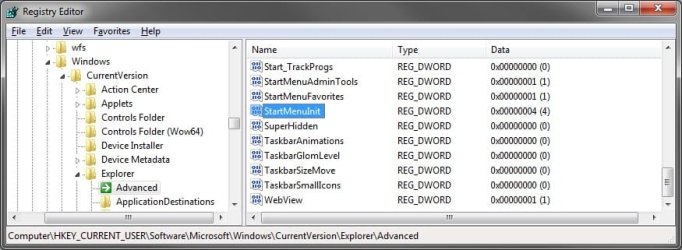
I just went through the tutorial and changing it both ways, with the download and manually, the value of StartMenuInit goes back to 4 after a restart or log out.
 

My Computer

OS
Windows 7 Professional 64-bit
CPU
Intel i7 920 @ 4.0GHz
Motherboard
Asus P6X58D Premium
Memory
6gb G.Skill
Graphics Card(s)
ATI HD 5850
Sound Card
Asus Essence STX
Hard Drives
128GB Crucial c300 SSD / 1TB WD Caviar Black
PSU
XFX 750w Black Edition
Case
Coolermaster 690
Jophess,

That's perfectly normal. Changing it to 3 causes Windows 7 to reset Recent Programs in the Start Menu. Afterwards it automatically changes back to 4. Did everything in the red warning box check out ok?
 

My Computer

Computer type
PC/Desktop
Computer Manufacturer/Model Number
Self built custom
OS
64-bit Windows 11 Pro for Workstations
CPU
Intel i7-8700K OC'd to 5 GHz
Motherboard
ASUS ROG Maximus XI Formula Z390
Memory
64 GB (4x16GB) G.SKILL TridentZ RGB DDR4 3600 MHz
Graphics Card(s)
ASUS ROG-STRIX-GTX1080TI-O11G-GAMING
Sound Card
Integrated
Monitor(s) Displays
2 x Samsung Odyssey G7 27"
Screen Resolution
2560x1440
Hard Drives
1TB Samsung 990 PRO M.2,
4TB Samsung 990 PRO PRO M.2,
TerraMaster F8 SSD Plus NAS
PSU
Seasonic Prime Titanium 850W
Case
Thermaltake Core P3
Cooling
Corsair Hydro H115i
Keyboard
Logitech wireless K800
Mouse
Logitech MX Master 4
Internet Speed
2 Gb/s Download and 100 Mb/s Upload
Antivirus
Malwarebyte Anti-Malware Premium
Browser
Google Chrome
Other Info
Logitech Z625 speaker system,
Logitech BRIO 4K Pro webcam,
HP Color LaserJet Pro MFP M477fdn,
APC SMART-UPS RT 1000 XL - SURT1000XLI,
Galaxy S23 Plus phone
Yeah, everything seems like it should be working, but recently opened programs still don't appear on the list.
 

My Computer

OS
Windows 7 Professional 64-bit
CPU
Intel i7 920 @ 4.0GHz
Motherboard
Asus P6X58D Premium
Memory
6gb G.Skill
Graphics Card(s)
ATI HD 5850
Sound Card
Asus Essence STX
Hard Drives
128GB Crucial c300 SSD / 1TB WD Caviar Black
PSU
XFX 750w Black Edition
Case
Coolermaster 690
If toggling Recent Programs and Items off and on does not help, then you might create a new administrator account to see if it works ok in it instead.
 

My Computer

Computer type
PC/Desktop
Computer Manufacturer/Model Number
Self built custom
OS
64-bit Windows 11 Pro for Workstations
CPU
Intel i7-8700K OC'd to 5 GHz
Motherboard
ASUS ROG Maximus XI Formula Z390
Memory
64 GB (4x16GB) G.SKILL TridentZ RGB DDR4 3600 MHz
Graphics Card(s)
ASUS ROG-STRIX-GTX1080TI-O11G-GAMING
Sound Card
Integrated
Monitor(s) Displays
2 x Samsung Odyssey G7 27"
Screen Resolution
2560x1440
Hard Drives
1TB Samsung 990 PRO M.2,
4TB Samsung 990 PRO PRO M.2,
TerraMaster F8 SSD Plus NAS
PSU
Seasonic Prime Titanium 850W
Case
Thermaltake Core P3
Cooling
Corsair Hydro H115i
Keyboard
Logitech wireless K800
Mouse
Logitech MX Master 4
Internet Speed
2 Gb/s Download and 100 Mb/s Upload
Antivirus
Malwarebyte Anti-Malware Premium
Browser
Google Chrome
Other Info
Logitech Z625 speaker system,
Logitech BRIO 4K Pro webcam,
HP Color LaserJet Pro MFP M477fdn,
APC SMART-UPS RT 1000 XL - SURT1000XLI,
Galaxy S23 Plus phone
Gee, I just checked and I don't have that registry key (startmenuinit). Is that key really supposed to be there by default in Win 7 at the location specified in the Vista tutorial linked above?
 

My Computer

Computer Manufacturer/Model Number
HP DV8t quad
OS
Windows 7 Ultimate x64 (Retail)
CPU
i7-Q 720
Motherboard
Motherboard Chipset Intel Ibex Peak-M PM55, Intel Lynnfield
Memory
6 GB
Graphics Card(s)
nVidia GeForce GT 230M (1GB)
Sound Card
IDT High Definition Audio CODEC
Monitor(s) Displays
18.4 inch HP Infinity FHD (Samsung 184HT03-001)
Screen Resolution
1920 x 1080
Hard Drives
Hitachi 500GB 7200 rpm (x2)
Seagate FreeAgent 1.5 TB External USB (x2)
Thermaltake BlacX eSATA/USB 2.0 3.5/2.5 HD dock
Cooling
Zalman NC-2000 notebook cooling pad
Keyboard
laptop
Mouse
Logitech VX Revolution
Other Info
Backup Unit: Lenovo T61p
Hello Peter,

It should be there by default like below. If not, then you can do the download in STEP TWO at that link to restore it. Are you having any problems with Recent Programs?

StartMenuInit.jpg
 

My Computer

Computer type
PC/Desktop
Computer Manufacturer/Model Number
Self built custom
OS
64-bit Windows 11 Pro for Workstations
CPU
Intel i7-8700K OC'd to 5 GHz
Motherboard
ASUS ROG Maximus XI Formula Z390
Memory
64 GB (4x16GB) G.SKILL TridentZ RGB DDR4 3600 MHz
Graphics Card(s)
ASUS ROG-STRIX-GTX1080TI-O11G-GAMING
Sound Card
Integrated
Monitor(s) Displays
2 x Samsung Odyssey G7 27"
Screen Resolution
2560x1440
Hard Drives
1TB Samsung 990 PRO M.2,
4TB Samsung 990 PRO PRO M.2,
TerraMaster F8 SSD Plus NAS
PSU
Seasonic Prime Titanium 850W
Case
Thermaltake Core P3
Cooling
Corsair Hydro H115i
Keyboard
Logitech wireless K800
Mouse
Logitech MX Master 4
Internet Speed
2 Gb/s Download and 100 Mb/s Upload
Antivirus
Malwarebyte Anti-Malware Premium
Browser
Google Chrome
Other Info
Logitech Z625 speaker system,
Logitech BRIO 4K Pro webcam,
HP Color LaserJet Pro MFP M477fdn,
APC SMART-UPS RT 1000 XL - SURT1000XLI,
Galaxy S23 Plus phone
Now that you mention it, yes, I think so. They seem to show up eventually but not following the first access of a given program. I just manually added that key and value to the registry but haven't rebooted yet. I guess I'll see if that helps after next time I reboot. I already had recent programs properly set in start menu, properties, customize.

The only other key I have in the "advanced" folder is "taskbarsizemove." That seems odd considering all the stuff in there in your screenshot. However, I do have the "administrative tools" item showing up on the start menu, even though there is nothing about that in that advanced folder.
 

My Computer

Computer Manufacturer/Model Number
HP DV8t quad
OS
Windows 7 Ultimate x64 (Retail)
CPU
i7-Q 720
Motherboard
Motherboard Chipset Intel Ibex Peak-M PM55, Intel Lynnfield
Memory
6 GB
Graphics Card(s)
nVidia GeForce GT 230M (1GB)
Sound Card
IDT High Definition Audio CODEC
Monitor(s) Displays
18.4 inch HP Infinity FHD (Samsung 184HT03-001)
Screen Resolution
1920 x 1080
Hard Drives
Hitachi 500GB 7200 rpm (x2)
Seagate FreeAgent 1.5 TB External USB (x2)
Thermaltake BlacX eSATA/USB 2.0 3.5/2.5 HD dock
Cooling
Zalman NC-2000 notebook cooling pad
Keyboard
laptop
Mouse
Logitech VX Revolution
Other Info
Backup Unit: Lenovo T61p
That's strange Peter. As a test, create a new administrator account to see if you have more than that in the Advanced folder while logged on to the new account.
 

My Computer

Computer type
PC/Desktop
Computer Manufacturer/Model Number
Self built custom
OS
64-bit Windows 11 Pro for Workstations
CPU
Intel i7-8700K OC'd to 5 GHz
Motherboard
ASUS ROG Maximus XI Formula Z390
Memory
64 GB (4x16GB) G.SKILL TridentZ RGB DDR4 3600 MHz
Graphics Card(s)
ASUS ROG-STRIX-GTX1080TI-O11G-GAMING
Sound Card
Integrated
Monitor(s) Displays
2 x Samsung Odyssey G7 27"
Screen Resolution
2560x1440
Hard Drives
1TB Samsung 990 PRO M.2,
4TB Samsung 990 PRO PRO M.2,
TerraMaster F8 SSD Plus NAS
PSU
Seasonic Prime Titanium 850W
Case
Thermaltake Core P3
Cooling
Corsair Hydro H115i
Keyboard
Logitech wireless K800
Mouse
Logitech MX Master 4
Internet Speed
2 Gb/s Download and 100 Mb/s Upload
Antivirus
Malwarebyte Anti-Malware Premium
Browser
Google Chrome
Other Info
Logitech Z625 speaker system,
Logitech BRIO 4K Pro webcam,
HP Color LaserJet Pro MFP M477fdn,
APC SMART-UPS RT 1000 XL - SURT1000XLI,
Galaxy S23 Plus phone
That's strange Peter. As a test, create a new administrator account to see if you have more than that in the Advanced folder while logged on to the new account.
Tried that and the Advanced folder in the new administrator account did seem to have the full number of items one would expect. 21 to be exact.

This is very odd, now I'm not sure what to do. Maybe run sfc?
 

My Computer

Computer Manufacturer/Model Number
HP DV8t quad
OS
Windows 7 Ultimate x64 (Retail)
CPU
i7-Q 720
Motherboard
Motherboard Chipset Intel Ibex Peak-M PM55, Intel Lynnfield
Memory
6 GB
Graphics Card(s)
nVidia GeForce GT 230M (1GB)
Sound Card
IDT High Definition Audio CODEC
Monitor(s) Displays
18.4 inch HP Infinity FHD (Samsung 184HT03-001)
Screen Resolution
1920 x 1080
Hard Drives
Hitachi 500GB 7200 rpm (x2)
Seagate FreeAgent 1.5 TB External USB (x2)
Thermaltake BlacX eSATA/USB 2.0 3.5/2.5 HD dock
Cooling
Zalman NC-2000 notebook cooling pad
Keyboard
laptop
Mouse
Logitech VX Revolution
Other Info
Backup Unit: Lenovo T61p
Peter,

You can copy the contents of you old account's user folders into the corresponding new account's user folders. If everything checks out ok in the new account afterwards, then you can delete the old account from within the new one.
 

My Computer

Computer type
PC/Desktop
Computer Manufacturer/Model Number
Self built custom
OS
64-bit Windows 11 Pro for Workstations
CPU
Intel i7-8700K OC'd to 5 GHz
Motherboard
ASUS ROG Maximus XI Formula Z390
Memory
64 GB (4x16GB) G.SKILL TridentZ RGB DDR4 3600 MHz
Graphics Card(s)
ASUS ROG-STRIX-GTX1080TI-O11G-GAMING
Sound Card
Integrated
Monitor(s) Displays
2 x Samsung Odyssey G7 27"
Screen Resolution
2560x1440
Hard Drives
1TB Samsung 990 PRO M.2,
4TB Samsung 990 PRO PRO M.2,
TerraMaster F8 SSD Plus NAS
PSU
Seasonic Prime Titanium 850W
Case
Thermaltake Core P3
Cooling
Corsair Hydro H115i
Keyboard
Logitech wireless K800
Mouse
Logitech MX Master 4
Internet Speed
2 Gb/s Download and 100 Mb/s Upload
Antivirus
Malwarebyte Anti-Malware Premium
Browser
Google Chrome
Other Info
Logitech Z625 speaker system,
Logitech BRIO 4K Pro webcam,
HP Color LaserJet Pro MFP M477fdn,
APC SMART-UPS RT 1000 XL - SURT1000XLI,
Galaxy S23 Plus phone
Well, I decided to just reinstall Windows 7 since I literally only had Firefox installed and the Recent Programs list is working as normal.

Thanks again for the help.
 

My Computer

OS
Windows 7 Professional 64-bit
CPU
Intel i7 920 @ 4.0GHz
Motherboard
Asus P6X58D Premium
Memory
6gb G.Skill
Graphics Card(s)
ATI HD 5850
Sound Card
Asus Essence STX
Hard Drives
128GB Crucial c300 SSD / 1TB WD Caviar Black
PSU
XFX 750w Black Edition
Case
Coolermaster 690
Peter,

You can copy the contents of you old account's user folders into the corresponding new account's user folders. If everything checks out ok in the new account afterwards, then you can delete the old account from within the new one.
I'll give that a try. I would try anything to avoid doing a clean install as I have so many apps installed and tweaked, it would take me at least a couple of days of work to do a clean install and get everything the way I want it.

Could you be more specific about which folders I should copy from the old registry into the new registry? Or do you just mean, my user account folder that's not in the registry at all?
 

My Computer

Computer Manufacturer/Model Number
HP DV8t quad
OS
Windows 7 Ultimate x64 (Retail)
CPU
i7-Q 720
Motherboard
Motherboard Chipset Intel Ibex Peak-M PM55, Intel Lynnfield
Memory
6 GB
Graphics Card(s)
nVidia GeForce GT 230M (1GB)
Sound Card
IDT High Definition Audio CODEC
Monitor(s) Displays
18.4 inch HP Infinity FHD (Samsung 184HT03-001)
Screen Resolution
1920 x 1080
Hard Drives
Hitachi 500GB 7200 rpm (x2)
Seagate FreeAgent 1.5 TB External USB (x2)
Thermaltake BlacX eSATA/USB 2.0 3.5/2.5 HD dock
Cooling
Zalman NC-2000 notebook cooling pad
Keyboard
laptop
Mouse
Logitech VX Revolution
Other Info
Backup Unit: Lenovo T61p
Well I tried doing what Shawn suggested above by copying my old user account over to the new administrator account's user account. Before it even completed the copying process (which would have taken all day according to the estimated time displayed), it changed the registry entry we were discussing above so it only contained the same (now two) entries that my original user account's registry contained. So the procedure did not have the desired effect and I canceled it before completion.

Unfortunately, I could not tell which item it was that was being copied over which caused the registry to change like that.

In the meantime, I toggled the store and display recent files checkboxes on and off and recent files are at least properly being retained and displayed, at least until the total number of items allowed is reached. After that I have a feeling it will go back to not replacing the oldest item with the most recent item very quickly again. At least everything else seems to be working normally without all those missing registry entries as far as I can tell.
 

My Computer

Computer Manufacturer/Model Number
HP DV8t quad
OS
Windows 7 Ultimate x64 (Retail)
CPU
i7-Q 720
Motherboard
Motherboard Chipset Intel Ibex Peak-M PM55, Intel Lynnfield
Memory
6 GB
Graphics Card(s)
nVidia GeForce GT 230M (1GB)
Sound Card
IDT High Definition Audio CODEC
Monitor(s) Displays
18.4 inch HP Infinity FHD (Samsung 184HT03-001)
Screen Resolution
1920 x 1080
Hard Drives
Hitachi 500GB 7200 rpm (x2)
Seagate FreeAgent 1.5 TB External USB (x2)
Thermaltake BlacX eSATA/USB 2.0 3.5/2.5 HD dock
Cooling
Zalman NC-2000 notebook cooling pad
Keyboard
laptop
Mouse
Logitech VX Revolution
Other Info
Backup Unit: Lenovo T61p
Peter,

You will be copying the contents of the old user account's C:\Users\(user-name) folders into the corresponding new account's C:\Users\(user-name) folders. Not anything to do with the registry.
 

My Computer

Computer type
PC/Desktop
Computer Manufacturer/Model Number
Self built custom
OS
64-bit Windows 11 Pro for Workstations
CPU
Intel i7-8700K OC'd to 5 GHz
Motherboard
ASUS ROG Maximus XI Formula Z390
Memory
64 GB (4x16GB) G.SKILL TridentZ RGB DDR4 3600 MHz
Graphics Card(s)
ASUS ROG-STRIX-GTX1080TI-O11G-GAMING
Sound Card
Integrated
Monitor(s) Displays
2 x Samsung Odyssey G7 27"
Screen Resolution
2560x1440
Hard Drives
1TB Samsung 990 PRO M.2,
4TB Samsung 990 PRO PRO M.2,
TerraMaster F8 SSD Plus NAS
PSU
Seasonic Prime Titanium 850W
Case
Thermaltake Core P3
Cooling
Corsair Hydro H115i
Keyboard
Logitech wireless K800
Mouse
Logitech MX Master 4
Internet Speed
2 Gb/s Download and 100 Mb/s Upload
Antivirus
Malwarebyte Anti-Malware Premium
Browser
Google Chrome
Other Info
Logitech Z625 speaker system,
Logitech BRIO 4K Pro webcam,
HP Color LaserJet Pro MFP M477fdn,
APC SMART-UPS RT 1000 XL - SURT1000XLI,
Galaxy S23 Plus phone
Yes, thanks. As I said above, I tried that and it changed the new registry to look just like the old one before it even got through copying the entire user account.
 

My Computer

Computer Manufacturer/Model Number
HP DV8t quad
OS
Windows 7 Ultimate x64 (Retail)
CPU
i7-Q 720
Motherboard
Motherboard Chipset Intel Ibex Peak-M PM55, Intel Lynnfield
Memory
6 GB
Graphics Card(s)
nVidia GeForce GT 230M (1GB)
Sound Card
IDT High Definition Audio CODEC
Monitor(s) Displays
18.4 inch HP Infinity FHD (Samsung 184HT03-001)
Screen Resolution
1920 x 1080
Hard Drives
Hitachi 500GB 7200 rpm (x2)
Seagate FreeAgent 1.5 TB External USB (x2)
Thermaltake BlacX eSATA/USB 2.0 3.5/2.5 HD dock
Cooling
Zalman NC-2000 notebook cooling pad
Keyboard
laptop
Mouse
Logitech VX Revolution
Other Info
Backup Unit: Lenovo T61p
Yes, thanks. As I said above, I tried that and it changed the new registry to look just like the old one before it even got through copying the entire user account.

If you copied the registry, then yes it will have messed everything up. Did you copy only the user folders (suppose to), registry, or both?
 

My Computer

Computer type
PC/Desktop
Computer Manufacturer/Model Number
Self built custom
OS
64-bit Windows 11 Pro for Workstations
CPU
Intel i7-8700K OC'd to 5 GHz
Motherboard
ASUS ROG Maximus XI Formula Z390
Memory
64 GB (4x16GB) G.SKILL TridentZ RGB DDR4 3600 MHz
Graphics Card(s)
ASUS ROG-STRIX-GTX1080TI-O11G-GAMING
Sound Card
Integrated
Monitor(s) Displays
2 x Samsung Odyssey G7 27"
Screen Resolution
2560x1440
Hard Drives
1TB Samsung 990 PRO M.2,
4TB Samsung 990 PRO PRO M.2,
TerraMaster F8 SSD Plus NAS
PSU
Seasonic Prime Titanium 850W
Case
Thermaltake Core P3
Cooling
Corsair Hydro H115i
Keyboard
Logitech wireless K800
Mouse
Logitech MX Master 4
Internet Speed
2 Gb/s Download and 100 Mb/s Upload
Antivirus
Malwarebyte Anti-Malware Premium
Browser
Google Chrome
Other Info
Logitech Z625 speaker system,
Logitech BRIO 4K Pro webcam,
HP Color LaserJet Pro MFP M477fdn,
APC SMART-UPS RT 1000 XL - SURT1000XLI,
Galaxy S23 Plus phone
Back
Top