Problem with replacing corrupted system files

Gwaihir

Member
Member
VIP
Local time
9:48 PM
Messages
135
I decided to run the System File Checker, not because the system had misbehaved but just as a routine check. It reported files that it couldn't repair. I looked on the Microsoft support site and found an item here on how to identify and manually repair corrupted files by extracting the relevent information from the CBS.log file. The resulting file, sfcdetails.txt, shows that the failure to effect a repair is due to the affected files also being corrupted in the dllcache store. I've attached the sfcdetails.txt file for reference.


I have a second PC running an identical version of Windows (Professional 64-bit) and ran SFC on that to see if I could repair the files by copying from it. That run was successful so I did a search for the corrupted files on the affected system only to find multiple copies of each. I've no idea which should be replaced or, indeed, if all of them should. The files are:


msado25.tlb - 8 copies found
pdh.dll - 6 copies
mssitlb.dll - 6 copies
wups.dll - 16 copies


I don't know how vital any of these files are but I would like to effect a repair if possible. Would it be feasible to simply copy the dllcache store from the other machine in its entirety and then run SFC again? Any suggestions and/or advice would be gratefully received.
 

Attachments

My Computer

Computer type
PC/Desktop
Computer Manufacturer/Model Number
Home build
OS
Windows 7 Professional 64-bit SP1
CPU
Pentium Core i5-2500 3.3GHz
Motherboard
Gigabyte P61-USB3-B3
Memory
2 x 4GB DDR3 1333MHz
Graphics Card(s)
Asus GT440 1GB GDDR5
Sound Card
Realtek integrated sound
Monitor(s) Displays
LG L1942PE
Screen Resolution
1280 x 1024 @ 60Hz
Hard Drives
2 x 1TB Western Digital WD10EARS, 1 x 1TB Seagate ST1000DM010
PSU
EVGA 450BR
Case
Novatech Panther ATX
Cooling
Sharkoon Silent Eagle 1000 120mm in case rear extracting
Keyboard
Logitech K120
The problem replacing files is the one your copying from the same exact level with updates I not the files may be wrong as updates change files
 

My Computer

Computer type
PC/Desktop
OS
win 8 32 bit
Open a CMD window as administrator and type:
chkdsk C: /f
It will say your disk is in use and if you want to schedule to next start = Yes
Restart
I would do a Repair Install.
You run setup.exe under windows.
It will replace Windows and keep your programs and data.
For the updates, use Simplix
Simplix


If you don't have a Win 7 SP1 installation files let us know so I can give you a M$ link to you download it.
 

My Computers

System One System Two

  • Computer type
    PC/Desktop
    Computer Manufacturer/Model Number
    custom build
    OS
    Windows 7 HP 64
    CPU
    i5 6600K - 800MHz to 4200MHz
    Motherboard
    GA-Z170-HD3P
    Memory
    4+4G GSkill DDR4 3000
    Graphics Card(s)
    IG - Intel 530
    Monitor(s) Displays
    Samsung 226BW
    Screen Resolution
    1680x1050
    Hard Drives
    (1) -1 SM951 – 128GB M.2 AHCI PCIe SSD drive for Windows 7 and Lubuntu
    (2) -1 WD SATA 3 - 1T for Data
    (3) -1 WD SATA 3 - 1T for backup
    PSU
    Thermaltake 450W TR2 gold
    Keyboard
    Old and good Chicony mechanical keyboard
    Mouse
    Logitech mX performance - 9 buttons (had to disable some)
    Internet Speed
    500Mb/s
    Browser
    Firefox 64
    Other Info
    TinyWall firewall
  • Computer type
    Laptop
    System Manufacturer/Model Number
    Asus Q550LF
    OS
    Windows 7 Pro
    CPU
    i7-4500U 800MHz to 3.0GHz
    Motherboard
    Asus Q550LF
    Memory
    (4+4)G DDR3 1600
    Graphics Card(s)
    IG intel 4400 + NVIDIA GeForce GT 745M
    Sound Card
    Realtek
    Monitor(s) Displays
    LG Display LP156WF4-SPH1
    Screen Resolution
    1920 x 1080
    Hard Drives
    BX500 120G SSD for Windows and programs +
    1T HDD for data
    Internet Speed
    500 Mb/s
    Browser
    Firefox
    Other Info
    TinyWall firewall
Hi Megahertz07, thanks for your response. I've already done the chkdsk c: /f and that didn't report any errors. I do have my original OEM installation CD so can use that for the repair but will that mean that all updates will be erased?
 

My Computer

Computer type
PC/Desktop
Computer Manufacturer/Model Number
Home build
OS
Windows 7 Professional 64-bit SP1
CPU
Pentium Core i5-2500 3.3GHz
Motherboard
Gigabyte P61-USB3-B3
Memory
2 x 4GB DDR3 1333MHz
Graphics Card(s)
Asus GT440 1GB GDDR5
Sound Card
Realtek integrated sound
Monitor(s) Displays
LG L1942PE
Screen Resolution
1280 x 1024 @ 60Hz
Hard Drives
2 x 1TB Western Digital WD10EARS, 1 x 1TB Seagate ST1000DM010
PSU
EVGA 450BR
Case
Novatech Panther ATX
Cooling
Sharkoon Silent Eagle 1000 120mm in case rear extracting
Keyboard
Logitech K120
Hi Megahertz07, thanks for your response. I've already done the chkdsk c: /f and that didn't report any errors. I do have my original OEM installation CD so can use that for the repair but will that mean that all updates will be erased?

It will replace the current Windows, so yes, you need all updates.
WU install updates in the order they were released so many updates will be updated many times.
That is why I suggested Simplix. Better and much faster. And it doesn't install the telemetry and other trash.
Very good.
 

My Computers

System One System Two

  • Computer type
    PC/Desktop
    Computer Manufacturer/Model Number
    custom build
    OS
    Windows 7 HP 64
    CPU
    i5 6600K - 800MHz to 4200MHz
    Motherboard
    GA-Z170-HD3P
    Memory
    4+4G GSkill DDR4 3000
    Graphics Card(s)
    IG - Intel 530
    Monitor(s) Displays
    Samsung 226BW
    Screen Resolution
    1680x1050
    Hard Drives
    (1) -1 SM951 – 128GB M.2 AHCI PCIe SSD drive for Windows 7 and Lubuntu
    (2) -1 WD SATA 3 - 1T for Data
    (3) -1 WD SATA 3 - 1T for backup
    PSU
    Thermaltake 450W TR2 gold
    Keyboard
    Old and good Chicony mechanical keyboard
    Mouse
    Logitech mX performance - 9 buttons (had to disable some)
    Internet Speed
    500Mb/s
    Browser
    Firefox 64
    Other Info
    TinyWall firewall
  • Computer type
    Laptop
    System Manufacturer/Model Number
    Asus Q550LF
    OS
    Windows 7 Pro
    CPU
    i7-4500U 800MHz to 3.0GHz
    Motherboard
    Asus Q550LF
    Memory
    (4+4)G DDR3 1600
    Graphics Card(s)
    IG intel 4400 + NVIDIA GeForce GT 745M
    Sound Card
    Realtek
    Monitor(s) Displays
    LG Display LP156WF4-SPH1
    Screen Resolution
    1920 x 1080
    Hard Drives
    BX500 120G SSD for Windows and programs +
    1T HDD for data
    Internet Speed
    500 Mb/s
    Browser
    Firefox
    Other Info
    TinyWall firewall
One way that often works is to re install sp1 as that will replace files. looking at the files none are esential under normal use.
you could run
reg query HKLM\SOFTWARE\Classes /s /f whatever.dll


to see if the dll is registered and were it is it may tell you the right one on the other pc.


People used to write software and install all the dll it needed as well. the idea behind .net was you dont need to install a lot of dll as you can call function in .net dll knowing its written by MS and safe
 

My Computer

Computer type
PC/Desktop
OS
win 8 32 bit
msado25.tlb - 8 copies found
pdh.dll - 6 copies
mssitlb.dll - 6 copies
wups.dll - 16 copies

You would want to copy the component store elements from the good machine
For example

Code:
C:\Windows\winsxs\x86_microsoft-windows-m..do-backcompat-tlb25_31bf3856ad364e35_6.1.7601.23403_none_ed7bc15369970f34\msado25.tlb
C:\Windows\winsxs\amd64_microsoft-windows-m..do-backcompat-tlb25_31bf3856ad364e35_6.1.7601.23403_none_499a5cd721f4806a\msado25.tlb
C:\Windows\winsxs\x86_microsoft-windows-m..do-backcompat-tlb25_31bf3856ad364e35_6.1.7601.22012_none_ed70004d69a00391\msado25.tlb
C:\Windows\winsxs\x86_microsoft-windows-m..do-backcompat-tlb25_31bf3856ad364e35_6.1.7601.17857_none_ecc04d22509e1efc\msado25.tlb
C:\Windows\winsxs\amd64_microsoft-windows-m..do-backcompat-tlb25_31bf3856ad364e35_6.1.7601.22012_none_498e9bd121fd74c7\msado25.tlb
C:\Windows\winsxs\amd64_microsoft-windows-m..do-backcompat-tlb25_31bf3856ad364e35_6.1.7601.17857_none_48dee8a608fb9032\msado25.tlb

C:\Windows\winsxs\wow64_microsoft-windows-p..rastructureconsumer_31bf3856ad364e35_6.1.7601.23717_none_1ce3b05f948d7551\pdh.dll
C:\Windows\winsxs\amd64_microsoft-windows-p..rastructureconsumer_31bf3856ad364e35_6.1.7601.23717_none_128f060d602cb356\pdh.dll
C:\Windows\winsxs\wow64_microsoft-windows-p..rastructureconsumer_31bf3856ad364e35_6.1.7601.23403_none_1cea79719488fc8f\pdh.dll
C:\Windows\winsxs\amd64_microsoft-windows-p..rastructureconsumer_31bf3856ad364e35_6.1.7601.23403_none_1295cf1f60283a94\pdh.dll

C:\Windows\winsxs\wow64_windowssearchengine_31bf3856ad364e35_7.0.7601.24561_none_dc25188c7fbeeba8\mssitlb.dll
C:\Windows\winsxs\amd64_windowssearchengine_31bf3856ad364e35_7.0.7601.24561_none_d1d06e3a4b5e29ad\mssitlb.dll
C:\Windows\winsxs\wow64_windowssearchengine_31bf3856ad364e35_7.0.7601.23403_none_dc680d8a7f8c5fe8\mssitlb.dll
C:\Windows\winsxs\amd64_windowssearchengine_31bf3856ad364e35_7.0.7601.23403_none_d21363384b2b9ded\mssitlb.dll


C:\Windows\winsxs\wow64_microsoft-windows-w..owsupdateclient-aux_31bf3856ad364e35_7.6.7601.24542_none_d82fabc7c671958f\wups.dll
C:\Windows\winsxs\amd64_microsoft-windows-w..owsupdateclient-aux_31bf3856ad364e35_7.6.7601.24542_none_cddb01759210d394\wups.dll
C:\Windows\winsxs\wow64_microsoft-windows-w..owsupdateclient-aux_31bf3856ad364e35_7.6.7601.23435_none_d83d9173c666aedb\wups.dll
C:\Windows\winsxs\amd64_microsoft-windows-w..owsupdateclient-aux_31bf3856ad364e35_7.6.7601.23435_none_cde8e7219205ece0\wups.dll
C:\Windows\winsxs\wow64_microsoft-windows-w..owsupdateclient-aux_31bf3856ad364e35_7.6.7601.19161_none_d78f7ff0ad65033a\wups.dll
C:\Windows\winsxs\amd64_microsoft-windows-w..owsupdateclient-aux_31bf3856ad364e35_7.6.7601.19161_none_cd3ad59e7904413f\wups.dll


Otherwise, you can :


1. backup the activation SEE HERE

2. Do a repair install

3. Run Simplix update pack

I would strongly recommend using the net framework add-on with simplix.
Just place it in the same folder/directory as the simplix updatepack7R2.exe and it will be integrated.
Release v2020.10.13 . abbodi1406/dotNetFx4xW7A . GitHub
dotNetFx4xW7A-LANGUGAE-PACKS

4. Restore activation
 
Last edited:

My Computers

System One System Two

  • Computer type
    PC/Desktop
    OS
    7 X64
    CPU
    i5 8400
    Motherboard
    gigabyte b365m ds3h
    Memory
    2x8gb 3200mhz
    Hard Drives
    various
    PSU
    pure power 11 400w cm
    Case
    Coolermaster
    Cooling
    cryorig m9i
  • Computer type
    PC/Desktop
    OS
    7x64
    CPU
    g5400
    Motherboard
    ga b365m ds3h
    Memory
    8gb ddr4 2400
    PSU
    xfx pro 450w
I may have those files, I'll check.
Too much junk in sfcdetails.txt
This is much more thorough, easier to locate missing files & may repair them, SFCFix.exe
Please download, run and post log that that will open in notepad, & be saved to your desktop.
I can't fix registry errors if there are any unfortunately.

Snick
 

My Computer

Computer type
PC/Desktop
Computer Manufacturer/Model Number
HP Desktop & Compaq Laptop
OS
Win 10 x64, Linux Lite, Win 7 x64, BlackArch, & Kali
Hard Drives
Samsung 850 Pro 256Gb,
Hitachi HDD 1Tb,
Crucial MX SSD 250Gb
Segate 3Tb USB 3.0 Ext. Backup HDD
Internet Speed
150Mbps dn, 20Mbps up
Antivirus
Avast Free, Malwarebytes Anti-Exploit & Anti-Ransomware
Browser
Firefox, Chrome, Opera, & VPN
I may have those files, I'll check.

They need to be the same versions that are damaged on the OP machine. My post was just an example.
 

My Computers

System One System Two

  • Computer type
    PC/Desktop
    OS
    7 X64
    CPU
    i5 8400
    Motherboard
    gigabyte b365m ds3h
    Memory
    2x8gb 3200mhz
    Hard Drives
    various
    PSU
    pure power 11 400w cm
    Case
    Coolermaster
    Cooling
    cryorig m9i
  • Computer type
    PC/Desktop
    OS
    7x64
    CPU
    g5400
    Motherboard
    ga b365m ds3h
    Memory
    8gb ddr4 2400
    PSU
    xfx pro 450w
Thanks for all the suggestions guys, my head's spinning a bit :confused:

I think I'll try the repair from the CD followed by Simplix. My Windows Update was broken (with the common failure to complete the download) long before support ceased for W7. I managed to get it working again the first time using the Update Readiness Tool but shortly after it broke again and I couldn't fix it so eventually just got fed up with it and turned updates off entirely. If Simplix works as described that looks a good way to go.

I'm in no hurry though, since samuria says the damaged files are not essential. Once I've got something further to report I'll get back here.
 

My Computer

Computer type
PC/Desktop
Computer Manufacturer/Model Number
Home build
OS
Windows 7 Professional 64-bit SP1
CPU
Pentium Core i5-2500 3.3GHz
Motherboard
Gigabyte P61-USB3-B3
Memory
2 x 4GB DDR3 1333MHz
Graphics Card(s)
Asus GT440 1GB GDDR5
Sound Card
Realtek integrated sound
Monitor(s) Displays
LG L1942PE
Screen Resolution
1280 x 1024 @ 60Hz
Hard Drives
2 x 1TB Western Digital WD10EARS, 1 x 1TB Seagate ST1000DM010
PSU
EVGA 450BR
Case
Novatech Panther ATX
Cooling
Sharkoon Silent Eagle 1000 120mm in case rear extracting
Keyboard
Logitech K120
Gwaihir

Being that you said you are experiencing issue with Win Update, Repair Install is your best choice.

Does your CD/DVD contain SP1? If not you may borrow a copy from my OneDrive. I extracted the contents of the ISO with 7-Zip to a folder. I downloaded it from the now defunct Microsoft official download site Digital River. You have to unzip/decompress the zip folder.

Win7x64 Folder.zip

Here's an excellent video Repair Install to Fix Windows 7 Without Reformatting by Britec. Disregard part about uninstalling SP1.

Simplix does not install updates for Microsoft products, such as Office, you will have to use Win Update for that.

Snick
 
Last edited:

My Computer

Computer type
PC/Desktop
Computer Manufacturer/Model Number
HP Desktop & Compaq Laptop
OS
Win 10 x64, Linux Lite, Win 7 x64, BlackArch, & Kali
Hard Drives
Samsung 850 Pro 256Gb,
Hitachi HDD 1Tb,
Crucial MX SSD 250Gb
Segate 3Tb USB 3.0 Ext. Backup HDD
Internet Speed
150Mbps dn, 20Mbps up
Antivirus
Avast Free, Malwarebytes Anti-Exploit & Anti-Ransomware
Browser
Firefox, Chrome, Opera, & VPN
Hi Snick,

Thanks for the offer but I'm ok, my DVD is SP1.

The video is useful in showing what to expect as the process proceeds. Does the section "Get important updates for installation" still apply or will I still need to use Simplix or run Windows Update afterwards?

I have a system partition image that I took with Reflect a while back. I haven't had any updates since then but wonder if I should take another before starting the repair, even though I'd be imaging the corrupted files and dllcache store. It's quite likely they are corrupted on the existing image anyway. Any thoughts?
 

My Computer

Computer type
PC/Desktop
Computer Manufacturer/Model Number
Home build
OS
Windows 7 Professional 64-bit SP1
CPU
Pentium Core i5-2500 3.3GHz
Motherboard
Gigabyte P61-USB3-B3
Memory
2 x 4GB DDR3 1333MHz
Graphics Card(s)
Asus GT440 1GB GDDR5
Sound Card
Realtek integrated sound
Monitor(s) Displays
LG L1942PE
Screen Resolution
1280 x 1024 @ 60Hz
Hard Drives
2 x 1TB Western Digital WD10EARS, 1 x 1TB Seagate ST1000DM010
PSU
EVGA 450BR
Case
Novatech Panther ATX
Cooling
Sharkoon Silent Eagle 1000 120mm in case rear extracting
Keyboard
Logitech K120
Run setup.exe from your DVD and don't connect to the internet.
When you are asked to set WU, set it to never check.
When you finish the Repair install, run simplix. It will reboot some times and afterwords will do a cleanup.
Then manually check WU, but don't install anything related to windows as they are the telemetry and trash. You may update IE, and framework. You can also install Edge for Win 7 as IE11 is outdated.
 

My Computers

System One System Two

  • Computer type
    PC/Desktop
    Computer Manufacturer/Model Number
    custom build
    OS
    Windows 7 HP 64
    CPU
    i5 6600K - 800MHz to 4200MHz
    Motherboard
    GA-Z170-HD3P
    Memory
    4+4G GSkill DDR4 3000
    Graphics Card(s)
    IG - Intel 530
    Monitor(s) Displays
    Samsung 226BW
    Screen Resolution
    1680x1050
    Hard Drives
    (1) -1 SM951 – 128GB M.2 AHCI PCIe SSD drive for Windows 7 and Lubuntu
    (2) -1 WD SATA 3 - 1T for Data
    (3) -1 WD SATA 3 - 1T for backup
    PSU
    Thermaltake 450W TR2 gold
    Keyboard
    Old and good Chicony mechanical keyboard
    Mouse
    Logitech mX performance - 9 buttons (had to disable some)
    Internet Speed
    500Mb/s
    Browser
    Firefox 64
    Other Info
    TinyWall firewall
  • Computer type
    Laptop
    System Manufacturer/Model Number
    Asus Q550LF
    OS
    Windows 7 Pro
    CPU
    i7-4500U 800MHz to 3.0GHz
    Motherboard
    Asus Q550LF
    Memory
    (4+4)G DDR3 1600
    Graphics Card(s)
    IG intel 4400 + NVIDIA GeForce GT 745M
    Sound Card
    Realtek
    Monitor(s) Displays
    LG Display LP156WF4-SPH1
    Screen Resolution
    1920 x 1080
    Hard Drives
    BX500 120G SSD for Windows and programs +
    1T HDD for data
    Internet Speed
    500 Mb/s
    Browser
    Firefox
    Other Info
    TinyWall firewall
Follow Megahertz07's instructions.
:thumbsup:
 

My Computer

Computer type
PC/Desktop
Computer Manufacturer/Model Number
HP Desktop & Compaq Laptop
OS
Win 10 x64, Linux Lite, Win 7 x64, BlackArch, & Kali
Hard Drives
Samsung 850 Pro 256Gb,
Hitachi HDD 1Tb,
Crucial MX SSD 250Gb
Segate 3Tb USB 3.0 Ext. Backup HDD
Internet Speed
150Mbps dn, 20Mbps up
Antivirus
Avast Free, Malwarebytes Anti-Exploit & Anti-Ransomware
Browser
Firefox, Chrome, Opera, & VPN
Ok, will do.
 

My Computer

Computer type
PC/Desktop
Computer Manufacturer/Model Number
Home build
OS
Windows 7 Professional 64-bit SP1
CPU
Pentium Core i5-2500 3.3GHz
Motherboard
Gigabyte P61-USB3-B3
Memory
2 x 4GB DDR3 1333MHz
Graphics Card(s)
Asus GT440 1GB GDDR5
Sound Card
Realtek integrated sound
Monitor(s) Displays
LG L1942PE
Screen Resolution
1280 x 1024 @ 60Hz
Hard Drives
2 x 1TB Western Digital WD10EARS, 1 x 1TB Seagate ST1000DM010
PSU
EVGA 450BR
Case
Novatech Panther ATX
Cooling
Sharkoon Silent Eagle 1000 120mm in case rear extracting
Keyboard
Logitech K120
Make sure you have your 25 character activation key, you will need it for activation.
You want to choose UPGRADE when you get to that screen!

Capture.JPG

Snick
 

My Computer

Computer type
PC/Desktop
Computer Manufacturer/Model Number
HP Desktop & Compaq Laptop
OS
Win 10 x64, Linux Lite, Win 7 x64, BlackArch, & Kali
Hard Drives
Samsung 850 Pro 256Gb,
Hitachi HDD 1Tb,
Crucial MX SSD 250Gb
Segate 3Tb USB 3.0 Ext. Backup HDD
Internet Speed
150Mbps dn, 20Mbps up
Antivirus
Avast Free, Malwarebytes Anti-Exploit & Anti-Ransomware
Browser
Firefox, Chrome, Opera, & VPN
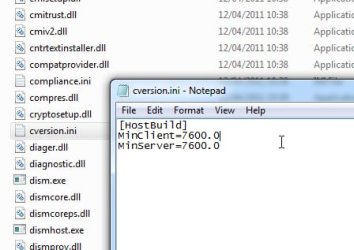
It is possible to repair install an sp0 installation with sp1 media.

Just need to change the minclient in sources cversion.ini from 7601.0 to 7600.0

minclient.jpg
 

My Computers

System One System Two

  • Computer type
    PC/Desktop
    OS
    7 X64
    CPU
    i5 8400
    Motherboard
    gigabyte b365m ds3h
    Memory
    2x8gb 3200mhz
    Hard Drives
    various
    PSU
    pure power 11 400w cm
    Case
    Coolermaster
    Cooling
    cryorig m9i
  • Computer type
    PC/Desktop
    OS
    7x64
    CPU
    g5400
    Motherboard
    ga b365m ds3h
    Memory
    8gb ddr4 2400
    PSU
    xfx pro 450w
Ok, I understand. Thanks again Snick.


I'll let you know how I get on with it in due course.
 

My Computer

Computer type
PC/Desktop
Computer Manufacturer/Model Number
Home build
OS
Windows 7 Professional 64-bit SP1
CPU
Pentium Core i5-2500 3.3GHz
Motherboard
Gigabyte P61-USB3-B3
Memory
2 x 4GB DDR3 1333MHz
Graphics Card(s)
Asus GT440 1GB GDDR5
Sound Card
Realtek integrated sound
Monitor(s) Displays
LG L1942PE
Screen Resolution
1280 x 1024 @ 60Hz
Hard Drives
2 x 1TB Western Digital WD10EARS, 1 x 1TB Seagate ST1000DM010
PSU
EVGA 450BR
Case
Novatech Panther ATX
Cooling
Sharkoon Silent Eagle 1000 120mm in case rear extracting
Keyboard
Logitech K120
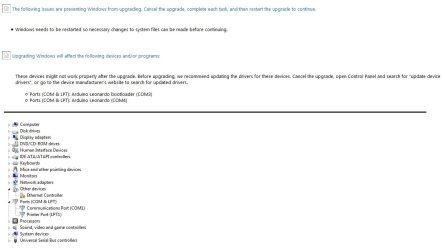
Well, I finally got around to trying this and fell at the first Hurdle. I opted not to search for updates before going into "Upgrade" and received the attached error message apparently relating to one or more device drivers. However, as can be seen, the named driver doesn't exist in the Devices list. In fact the Leonardo bootloader is a piece of code buried in the Leonardo board so I've no idea what this is all about. The communication with the board is actually carried out using a USB connection with a driver that makes it look like a COM port.

Needless to say the installation stopped at this point and I could get no further. Any ideas?

Edit: On further consideration maybe the simplest answer would be to uninstall the Arduino stuff, do the repair, then re-install.
 

Attachments

  • Snag.jpg
    Snag.jpg
    115.8 KB · Views: 2
Last edited:

My Computer

Computer type
PC/Desktop
Computer Manufacturer/Model Number
Home build
OS
Windows 7 Professional 64-bit SP1
CPU
Pentium Core i5-2500 3.3GHz
Motherboard
Gigabyte P61-USB3-B3
Memory
2 x 4GB DDR3 1333MHz
Graphics Card(s)
Asus GT440 1GB GDDR5
Sound Card
Realtek integrated sound
Monitor(s) Displays
LG L1942PE
Screen Resolution
1280 x 1024 @ 60Hz
Hard Drives
2 x 1TB Western Digital WD10EARS, 1 x 1TB Seagate ST1000DM010
PSU
EVGA 450BR
Case
Novatech Panther ATX
Cooling
Sharkoon Silent Eagle 1000 120mm in case rear extracting
Keyboard
Logitech K120
A rainy afternoon here gave me the incentive to have another go at this. I uninstalled the Arduino software using Revo Uninstaller to clean up the junk - why does the Windows installer not do this? Why do the designers and coders think it's ok to leave orphaned bits of application settings and folders scattered around the system?


I then ran Windows Setup again from the CD. During the compatibility check phase I was surprised to see it still warn of problems with the Arduino COM3 and COM4 ports but at least this time it didn't prevent me from continuing. I kept my hands off, as instructed in the YouTube video, and let it run to completion. I was absolutely staggered by how slowly it progressed. At times the % indication stayed static for up to 5 minutes. It was getting on for 2 hours by the time it was finished, activated and ready for me to log in again.


The first thing I noticed was it had lost my custom desktop theme. That wasn't a major problem, I just found the image and set it up again, but I couldn't find how to reset the taskbar colour. The main problem, however, was that MSE was complaining it's virus definitions were out of date and it kept failing to update them, complaining of a connection error even though my internet connection was working fine, and stating the obvious, that Windows 7 was no longer supported, and promoting Windows 10 and giving the message "Microsoft Security Essentials reached end of service on January 14, 2020 and is no longer available as a download. Microsoft will continue to release signature updates (including engine) to service systems currently running Microsoft Security Essentials untill 2023" so since it was already installed I don't understand why it wouldn't just update itself.


I didn't want to have to install a third-party anti-virus as they constantly nag you to buy their all-singing-and-dancing version with lots of useless junk added on so I disconnected from my wi-fi whilst deciding what to do. I eventually decided to abandon the repair and reinstate my original installation. I had used Macrium Reflect to create backup images of the system on one of the internal drives and also on two external drives and to create a recovery DVD so I booted up from this, restored the system and was relieved to see it come back as if nothing had happened. So after nearly 3 hours I was back where I started and I won't be trying that again any time soon.


Nevertheless thanks to everyone who contributed to this thread even though it was a fruitless exercise in the end.
 
Last edited:

My Computer

Computer type
PC/Desktop
Computer Manufacturer/Model Number
Home build
OS
Windows 7 Professional 64-bit SP1
CPU
Pentium Core i5-2500 3.3GHz
Motherboard
Gigabyte P61-USB3-B3
Memory
2 x 4GB DDR3 1333MHz
Graphics Card(s)
Asus GT440 1GB GDDR5
Sound Card
Realtek integrated sound
Monitor(s) Displays
LG L1942PE
Screen Resolution
1280 x 1024 @ 60Hz
Hard Drives
2 x 1TB Western Digital WD10EARS, 1 x 1TB Seagate ST1000DM010
PSU
EVGA 450BR
Case
Novatech Panther ATX
Cooling
Sharkoon Silent Eagle 1000 120mm in case rear extracting
Keyboard
Logitech K120
Back
Top