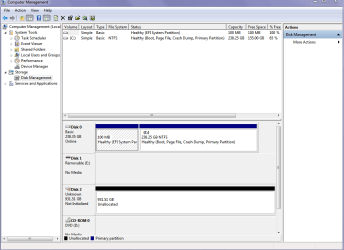
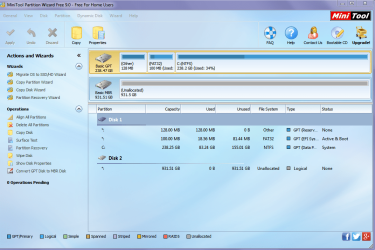
Now I have a second drive I want to put into the new laptop but cannot get it to be recognized as anything but unallocated. I have tried formatting it but Windows says it cannot do it in the pics is what I get now get.
I just want to use it for imaging and data back up say in two partitions. So any advise is welcome.
Attachments
SECOND DRIVE 2.PNG
26.4 KB
· Views: 0
SECOND DRIVE.PNG
183.7 KB
· Views: 0
My Computer
Computer type
PC/Desktop
Computer Manufacturer/Model Number
Own build (new) Desk1 / Asus ROG Win 7 / Desk2 1st build
OS
Desk1 7 Home Prem / Desk2 10 Pro / Main lap Asus ROG 10 Pro 2 laptop Toshiba 7 Pro Asus P2520 7 & 10
One other Desktop (tester) and spare Toshba laptop both with SSD's
Running Kaspersky 2016 ISS on all machines config'd identically
Logitec audio stereo systems on each machine (x3)
Canon MG5250MFC
Router/modem TP-Link running WPA2SK
I did not get anything jumanji everything was greyed out the only thing I cold do was list it is DISKPART and clean all else will not do anything.
The only error message was what I got in post #1 Windows cannot format this disk.
The drive was attached to this machine in both pics which were taken by snip one after the other and I am wondering if the problem has something to do with the EUFI BIOS?
The drive is a brand new Seagate SSHD ST1000M014
My Computer
Computer type
PC/Desktop
Computer Manufacturer/Model Number
Own build (new) Desk1 / Asus ROG Win 7 / Desk2 1st build
OS
Desk1 7 Home Prem / Desk2 10 Pro / Main lap Asus ROG 10 Pro 2 laptop Toshiba 7 Pro Asus P2520 7 & 10
One other Desktop (tester) and spare Toshba laptop both with SSD's
Running Kaspersky 2016 ISS on all machines config'd identically
Logitec audio stereo systems on each machine (x3)
Canon MG5250MFC
Router/modem TP-Link running WPA2SK
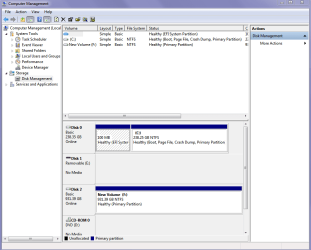
Well I rebooted the machine and tried it again and it let me make a simple partition see pic - maybe it was because I was trying to see what was in some spare SSD's I had??
Attachments
SECOND DRIVE 3.PNG
26.7 KB
· Views: 0
My Computer
Computer type
PC/Desktop
Computer Manufacturer/Model Number
Own build (new) Desk1 / Asus ROG Win 7 / Desk2 1st build
OS
Desk1 7 Home Prem / Desk2 10 Pro / Main lap Asus ROG 10 Pro 2 laptop Toshiba 7 Pro Asus P2520 7 & 10
One other Desktop (tester) and spare Toshba laptop both with SSD's
Running Kaspersky 2016 ISS on all machines config'd identically
Logitec audio stereo systems on each machine (x3)
Canon MG5250MFC
Router/modem TP-Link running WPA2SK
Hmm I must admit I didn't really take that much notice of it being straight out of the sealed anti static bag it just had those diagonal lines across the partition Jumanji anyway I have done a test Macrium system image on it and it worked fine.
Thanks to you both for being so patient as it is not one of my strong points - partitioning.
My Computer
Computer type
PC/Desktop
Computer Manufacturer/Model Number
Own build (new) Desk1 / Asus ROG Win 7 / Desk2 1st build
OS
Desk1 7 Home Prem / Desk2 10 Pro / Main lap Asus ROG 10 Pro 2 laptop Toshiba 7 Pro Asus P2520 7 & 10
One other Desktop (tester) and spare Toshba laptop both with SSD's
Running Kaspersky 2016 ISS on all machines config'd identically
Logitec audio stereo systems on each machine (x3)
Canon MG5250MFC
Router/modem TP-Link running WPA2SK