

Hello-
I currently have a shortcut on my desktop ["C:\Windows\System 32\shutdown.exe -r -t 00"] and it works beautifully. I do, however, want to have a shortcut to Restart in 1) the desktop context menu and 2) a desktop application called RocketDock. I've attempted these thinking that it would be very straight-forward, however, I ran into the same snag for both locations.
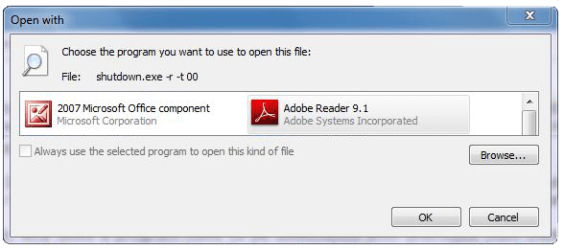
If you're not familiar with RocketDock it is basically an application launcher which allows you to identify the target path to the program you want launched. When you click on the designated icon, the program should launch. In RocketDock, when Restart is attempted with the same target path as the desktop shortcut, the all-too-familiar "Open with" popup window:
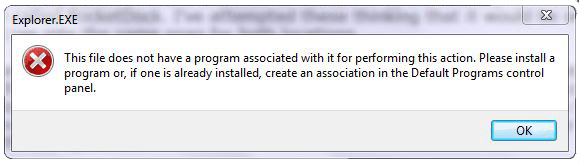
In the registry I created the target path value "C:\Windows\System 32\shutdown.exe -r -t 00"] in HKEY_Local_Machine\Software\Classes\Directory\Background\shell\RESTART\cmd [I know this is the correct location as I've made shortcuts to my browsers and image editor here]. When I click on RESTART from the desktop context menu I get practically the same popup window:
The only thing that I can think of is the actual System 32 file being pointed to is the shutdown.exe file and that the shortcut to the desktop identifier [–r –t 00] is not recognizable by either. May be a reach.
So my questions are, why does a program have to be associated with shortcuts from these two locations and what program would I have to associate with these two locations to make the shortcuts work?
I hope I've been clear, but if you need further explanations, please respond.
Thank you in advance.
-Mark
I currently have a shortcut on my desktop ["C:\Windows\System 32\shutdown.exe -r -t 00"] and it works beautifully. I do, however, want to have a shortcut to Restart in 1) the desktop context menu and 2) a desktop application called RocketDock. I've attempted these thinking that it would be very straight-forward, however, I ran into the same snag for both locations.
If you're not familiar with RocketDock it is basically an application launcher which allows you to identify the target path to the program you want launched. When you click on the designated icon, the program should launch. In RocketDock, when Restart is attempted with the same target path as the desktop shortcut, the all-too-familiar "Open with" popup window:
In the registry I created the target path value "C:\Windows\System 32\shutdown.exe -r -t 00"] in HKEY_Local_Machine\Software\Classes\Directory\Background\shell\RESTART\cmd [I know this is the correct location as I've made shortcuts to my browsers and image editor here]. When I click on RESTART from the desktop context menu I get practically the same popup window:
The only thing that I can think of is the actual System 32 file being pointed to is the shutdown.exe file and that the shortcut to the desktop identifier [–r –t 00] is not recognizable by either. May be a reach.
So my questions are, why does a program have to be associated with shortcuts from these two locations and what program would I have to associate with these two locations to make the shortcuts work?
I hope I've been clear, but if you need further explanations, please respond.
Thank you in advance.
-Mark
My Computer
- Computer type
- PC/Desktop
- Computer Manufacturer/Model Number
- Custom
- OS
- Windows 7 Home Premium x64
- CPU
- AMD A6-6400K APU
- Motherboard
- Gigabyte F2A88XM-D3H
- Memory
- 8.0GB DDR3-1600
- Graphics Card(s)
- Radeon Onboard Graphics
- Sound Card
- Realtek High Def
- Monitor(s) Displays
- Acer K242HQL
- Screen Resolution
- 1920x1080
- Hard Drives
- Samsung 850 EVO SSD 250GB
- PSU
- Corsair 430W
- Case
- Silverstone PS-08
- Cooling
- Enermax fans (120mm-intake, 80mm-exhaust)
- Keyboard
- Logitech K360
- Mouse
- Logitech M305 Cordless Optical
- Internet Speed
- Download 60.19Mbps Upload 6.71Mbps
- Antivirus
- AVG
- Browser
- Iron Version 51.0.2700.0 (64-bit)





 but i can not open the iShutConfig.exe folder i get this error
 i am just wondering if i am supposed to. :huh: