Solved Problem with shortcuts program icon in users account

waltdisneypixar

New member
Member
Local time
8:28 PM
Messages
20
hi

i have two accounts created in windows 7
when i installed a program in my account it creates a shortcut icon in my desktop
and if i go to the other account and to the desktop i see the icon and if i delete the icon then i gets deleted in my desktop too

why?
 

My Computer

OS
7
In your own account, try rightclicking on the Program File's .exe to Send to Desktop.

It's likely that the program's installer writes the desktop icon to all User Desktops if it's installed for all users. But creating a shortcut in your User account should limit itself to your desktop.
 
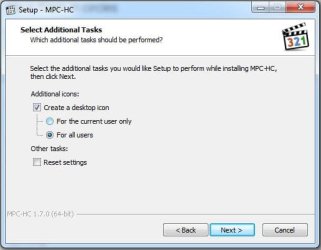
You must have installed the program for "All Users" rather than just the "Current User". If you install for all, the icon will show up on every account's desktop. Getting rid of the program will remove it from every user.

If you want anything to be installed for a particular user, then you must choose to install for that user only. Be aware that some installers aren't sophisticated enough to allow you to do this, they default to all users. I can't seem to find a way to force a program to install for only one user, unless the installer is written that way.

Someone else may know of a method.

LOL. And as I'm trying to answer the question, gregrocker answers it the right way. Good job, Greg.
 

My Computer

Computer type
PC/Desktop
Computer Manufacturer/Model Number
Mellon Labs (custom build)
OS
Win 7 Pro x64/Win 10 Pro x64 dual boot
CPU
AMD FX 8350 Vishera @ 4200
Motherboard
ASUS M5A97 R2.0
Memory
16 GB Mushkin Blackline DDR3-2400 @ 1866 (9-10-10-10-31)
Graphics Card(s)
XFX Radeon R9 280 Double D Black Edition
Sound Card
Realtek HD Audio on MB. Sounds great.
Monitor(s) Displays
Acer 24", Acer 22"
Screen Resolution
3840 x 1080
Hard Drives
1 x Mushkin Chronos 120 GB SSD (Win 10)
1 x Samsung 850 EVO 250 GB SSD (Win 7)
1 x WD 1TB SATA Blue
1 x WD 1TB SATA Green
PSU
Corsair TX-750
Case
CoolerMaster HAF 912+
Cooling
Coolermaster Seidon 240M Liquid AIO. 6 case fans
Keyboard
Logitech G710+
Mouse
Logitech G500s
Internet Speed
Much better since I got fiber, but still way overpriced.
Antivirus
MSE, Malware Bytes for scanning
Browser
Firefox
Other Info
Corsair VOID USB headphones.

A Mellon Labs X-1 - LCD Smartie driven system status display.

Brought to you by the letter E
Hello Walt,

In addition:

(Current user Desktop folder)
C:\Users\(user-name)\Desktop


(All users Desktop hidden folder)
C:\Users\Public\Desktop
 

My Computer

Computer type
PC/Desktop
Computer Manufacturer/Model Number
Self built custom
OS
64-bit Windows 11 Pro for Workstations
CPU
Intel i7-8700K OC'd to 5 GHz
Motherboard
ASUS ROG Maximus XI Formula Z390
Memory
64 GB (4x16GB) G.SKILL TridentZ RGB DDR4 3600 MHz
Graphics Card(s)
ASUS ROG-STRIX-GTX1080TI-O11G-GAMING
Sound Card
Integrated
Monitor(s) Displays
2 x Samsung Odyssey G7 27"
Screen Resolution
2560x1440
Hard Drives
1TB Samsung 990 PRO M.2,
4TB Samsung 990 PRO PRO M.2,
TerraMaster F8 SSD Plus NAS
PSU
Seasonic Prime Titanium 850W
Case
Thermaltake Core P3
Cooling
Corsair Hydro H115i
Keyboard
Logitech wireless K800
Mouse
Logitech MX Master 4
Internet Speed
2 Gb/s Download and 100 Mb/s Upload
Antivirus
Malwarebyte Anti-Malware Premium
Browser
Google Chrome
Other Info
Logitech Z625 speaker system,
Logitech BRIO 4K Pro webcam,
HP Color LaserJet Pro MFP M477fdn,
APC SMART-UPS RT 1000 XL - SURT1000XLI,
Galaxy S23 Plus phone
so the problem is with the installer that should ask if i want to install only for me or for all users

right?

is not windows' fault?
 

My Computer

OS
7
Correct.

If you're not sure whether the program offered choice of users for install then you can uninstall it and reinstall if possible only for the Users you want.

But if you know for sure it doesn't offer the choice, then copy the Program's .exe shortcut per Brink's post only to your User Desktop and not Public Desktop.
 
Keep in mind if all users is not chosen, this will usually prevent the software from running under the other account. I would install for all users, but have the other accounts as standard or limited users.

This way they could not delete the icon. If both accounts are admin, then it will do what everyone stated above. Admins would have the right to delete the icon, thus deleting it from all users Public desktop. This would of course cause the icon to disappear on everyone else's accounts.

But if the user is limited or standard they would not be able to remove the desktop icon themselves. Unless you put in your password on uac and elevated them, or you went to their desktop folder and removed it.
Most installers reluctantly do not offer the install for only your user or everyone option.
At least, the programs I install don't.
 

My Computer

Computer type
PC/Desktop
Computer Manufacturer/Model Number
Custom Built
OS
Windows 10 Pro
CPU
AMD Ryzen 5 2400G Processor with Radeon RX Vega 11 Graphics
Motherboard
ASRock X470 Master SLI/AC AM4 AMD Promontory X470 SATA 6Gb/s
Memory
G.SKILL Ripjaws V Series 16GB (2 x 8GB) 288-Pin DDR4 SDRAM D
Graphics Card(s)
2047MB NVIDIA GeForce GTX 1060 6GB (EVGA)
Sound Card
Motherboard Built in
Monitor(s) Displays
Acer R240HY bidx 23.8-Inch IPS HDMI DVI VGA (1920 x 1080) Wi
Screen Resolution
1920 x 1080
Hard Drives
1TB Sandisk SSD PLUS (Main drive)
500 GB Seagate 7200 RPM (Games)
500 GB Western Digital 7200 RPM (Virtual Machines)
PSU
CORSAIR TX Series TX650M 650W 80+ Gold Modular Power Supply
Case
CORSAIR CARBIDE SPEC-02 Mid-Tower Gaming Case, Red LED Fan
Cooling
220mm, two 120mm, and four 60mm fans
Keyboard
Wired Dell keyboard
Mouse
Wireless Logitech mouse
Internet Speed
250mb down, 30mb up
Antivirus
Panda Cloud Antivirus
Browser
Chrome-ish x64
Other Info
Your awesome for reading this.
Admins would have the right to delete the icon, thus deleting it from all users Public desktop. This would of course cause the icon to disappear on everyone else's accounts.


that is the saddest part you delete the icon in public desktop and yours got deleted as well

:mad:
 

My Computer

OS
7
Back
Top