Problem with sound card driver

Joker1994

New member
Local time
9:18 PM
Messages
6
Well i have a 5.1 PCI surround cart SL-8866-SRD and we i install the driver it says "Can't find your device. Please plug in your device and press Retry to continue" what should i do?

PS:I have connected the sound card, that's why i am confused.
 

My Computer

OS
windows

My Computer

Computer type
PC/Desktop
Computer Manufacturer/Model Number
Custom Build
OS
Windows 10 Pro x64, Arch Linux
CPU
Intel Core 2 Quad Q8200 OC'd 3.08GHz
Motherboard
Asus Rampage formula LGA775
Memory
8GB DDR2 900Mhz
Graphics Card(s)
MSI GT730 2GB GDDR5 (Kepler)
Sound Card
Supreme FX2
Monitor(s) Displays
Samsung LS22F350 LED
Screen Resolution
1080P
Hard Drives
Kingston SSDNow UV400 120GB, 500GB Hitachi, 2TB Samsung, 500GB Seagate FreeAgent, 640GB Samsung, 160GB Toshiba (Arch)
PSU
AeroCool 500W Bronze
Cooling
Cooler Master V6 + 3X fans
Keyboard
Prolink keyboard
Mouse
Logitech M705
Internet Speed
1MiB/s
Browser
Chrome Beta
Try getting the driver from windows update :)

Get the driver here: SPEEDLINK / Products / PC Accessories / Sound Cards / Stage 5.1 PCI Soundcard
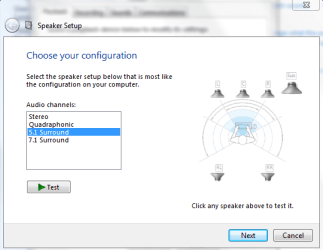
Ok the driver works perfect but i have another problem now, all of my speakers work in the Test(sub and the 5 speakers) but when i am listening to music only 2 speakers and the sub work!
Can you help me?

Go to Start>Control Panel>Hardware and Sound>Sound
Select your speaker then click configure
Select 5.1 then click Next and Finish
 

Attachments

  • Capture.PNG
    Capture.PNG
    19.9 KB · Views: 1,037

My Computer

Computer type
PC/Desktop
Computer Manufacturer/Model Number
Custom Build
OS
Windows 10 Pro x64, Arch Linux
CPU
Intel Core 2 Quad Q8200 OC'd 3.08GHz
Motherboard
Asus Rampage formula LGA775
Memory
8GB DDR2 900Mhz
Graphics Card(s)
MSI GT730 2GB GDDR5 (Kepler)
Sound Card
Supreme FX2
Monitor(s) Displays
Samsung LS22F350 LED
Screen Resolution
1080P
Hard Drives
Kingston SSDNow UV400 120GB, 500GB Hitachi, 2TB Samsung, 500GB Seagate FreeAgent, 640GB Samsung, 160GB Toshiba (Arch)
PSU
AeroCool 500W Bronze
Cooling
Cooler Master V6 + 3X fans
Keyboard
Prolink keyboard
Mouse
Logitech M705
Internet Speed
1MiB/s
Browser
Chrome Beta
i have another problem now, all of my speakers work in the Test(sub and the 5 speakers) but when i am listening to music only 2 speakers and the sub work!

Then things are working as they should. Unless the source is encoded in 5.1, without using some kind of upmix (speaker fill, X-Ear 3D as it is called on C-Media based cards, CMSS3D on Creative cards, etc) is used all you will get is stereo.
 

My Computer

Computer type
PC/Desktop
Computer Manufacturer/Model Number
Me
OS
Win 7 Ultimate x64
CPU
FX-8350 @ 4.6 GHz so far
Motherboard
Asus M5A97 EVO
Memory
ADATA XPG V1 Series Black 8GB DDR3 1600
Graphics Card(s)
Sapphire R9 270x Dual-X
Sound Card
Xonar DGX w/ Corsair Vengence 1300
Monitor(s) Displays
Acer S232HL Abid
Screen Resolution
1920x1080
Hard Drives
120 GB OCZ Vertex 3
500 GB Seagate 7200.12
PSU
Antec Earthwatts 650W Green
Case
Antec Three Hundred
Cooling
Cooler Master 212 EVO
Keyboard
Logitech G510
Mouse
Logitech G500s
Internet Speed
35000/3000
ayuda, yo solía tener Win XP, pero puse el Ultimate 7 Win, y ahora por 3 meses de no coger el sound.and tratar muchos conductores y nada Help me estoy desesperado :cry:
 

My Computer

OS
Wimdows 7 Ultimate
Back
Top