Problem with startup menu

izzy2012

New member
Local time
9:43 PM
Messages
3
Hi

i cleaned my computer with one of the cleaning programs and since then, programs that used to startup automatically wont startup anymore including my anti virus !!
i have to click on them one by one manually.

I've looked into the startup folder and they are all there !
any help?

thank you
Izzy
 

My Computer

Computer Manufacturer/Model Number
Home assembled PC
OS
ultimate 64
CPU
Intel
Motherboard
Gygabite
Memory
4 G
Graphics Card(s)
500M
Sound Card
on board
Monitor(s) Displays
lcd
Hard Drives
SSD + 3 X HDD
PSU
regular
Case
regular
Cooling
regular
What is that program ? Some of these like Tuneup Utilities do have a mechanism to add a startup entry. Check if there is some option in your program, add it back, and uninstall that cleaner.

If you dont have that mechanism, reinstall your antivirus.
 

My Computer

Computer type
PC/Desktop
Computer Manufacturer/Model Number
Self Assembled
OS
Microsoft Windows 10 Pro Insider Preview 64-bit
CPU
Intel(R) Core(TM) i3-4130 CPU @ 3.40GHz
Motherboard
Gigabyte Technology Co., Ltd. B85M-D3H
Memory
Corsair Vengence 4GB x2 (8.00GB Dual-Channel DDR3 @ 798MHz)
Graphics Card(s)
2047MB GeForce GTS 450 (ZOTAC International)
Sound Card
Onboard (Realtek High Definition Audio)
Monitor(s) Displays
LG Flatron E2040T
Screen Resolution
1600x900
Hard Drives
Western Digital 1 TB
Seagate 500 GB
PSU
Corsair VS550
Case
Cooler Master K380
Cooling
Cooler Master Seidon 120V Plus
Keyboard
Logitech MK260r
Mouse
Logitech MK260r
Internet Speed
PMPL Broadband
Antivirus
Windows Defender + MBAM
Browser
Firefox
Other Info
Dell Studio 15" Laptop
Hi

it's Tuneup utility 2012 and yes i am aware. my problem is not only the anti virus but other utilities as well such as a speller, PC temperature control etc.
i removed the tuneup utility but no help.
will try to re-install the anti virus and will see
 

My Computer

Computer Manufacturer/Model Number
Home assembled PC
OS
ultimate 64
CPU
Intel
Motherboard
Gygabite
Memory
4 G
Graphics Card(s)
500M
Sound Card
on board
Monitor(s) Displays
lcd
Hard Drives
SSD + 3 X HDD
PSU
regular
Case
regular
Cooling
regular
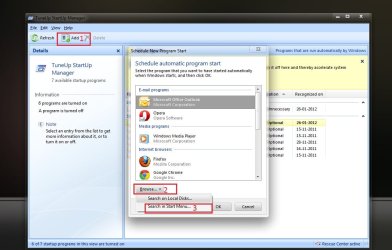
In tuneup utilities, Open TuneUp Startup Manager. Click on the "add" button. It will open a new dialog "Schedule new program Start". Click on the "Browse button, and srarch in local disk, i.e. C: Program Files and C: Program Files (x86). What you are to browse to is the .exe file of the appropriate program's folder. With this process, you can add all the startup entries back.

Untitled.jpg

As you see, I have TuneUp. Long term habit actually :( In windows 7, this thing is nothing but a problem creator. I use it to change the logon backgrounds only.
 

My Computer

Computer type
PC/Desktop
Computer Manufacturer/Model Number
Self Assembled
OS
Microsoft Windows 10 Pro Insider Preview 64-bit
CPU
Intel(R) Core(TM) i3-4130 CPU @ 3.40GHz
Motherboard
Gigabyte Technology Co., Ltd. B85M-D3H
Memory
Corsair Vengence 4GB x2 (8.00GB Dual-Channel DDR3 @ 798MHz)
Graphics Card(s)
2047MB GeForce GTS 450 (ZOTAC International)
Sound Card
Onboard (Realtek High Definition Audio)
Monitor(s) Displays
LG Flatron E2040T
Screen Resolution
1600x900
Hard Drives
Western Digital 1 TB
Seagate 500 GB
PSU
Corsair VS550
Case
Cooler Master K380
Cooling
Cooler Master Seidon 120V Plus
Keyboard
Logitech MK260r
Mouse
Logitech MK260r
Internet Speed
PMPL Broadband
Antivirus
Windows Defender + MBAM
Browser
Firefox
Other Info
Dell Studio 15" Laptop
i removed it and i intened not to use it again.
i did reinstall the anti virus and walla,all my programs are back !! dont understand why and how !!
another issue i have is with outlook (2010) when i boot the machine, i can see it's logo on the startup portion of the computer but it fails to open no matter what i do
 

My Computer

Computer Manufacturer/Model Number
Home assembled PC
OS
ultimate 64
CPU
Intel
Motherboard
Gygabite
Memory
4 G
Graphics Card(s)
500M
Sound Card
on board
Monitor(s) Displays
lcd
Hard Drives
SSD + 3 X HDD
PSU
regular
Case
regular
Cooling
regular
Back
Top