Problem with switch and LAN

rider15

New member
Local time
3:21 PM
Messages
3
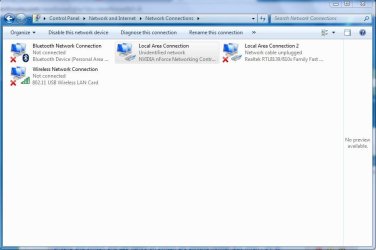
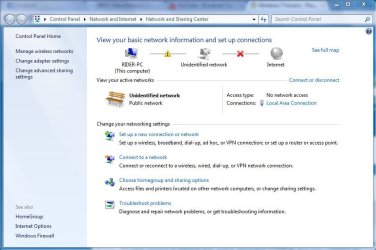
Hi guys i am new here but i need your help,here is my situation ,i am using wireless internet and i am connected to my ISP ap over Mikrotik 5GHz antena problem is,3 day's ago everything worked fine but i disconnected my antena and switch from power and now i can't connect to internet over switch and before i could do that,now i connect my antena and switch and LED light's on switch are blinking normal ,but when i try to connect my computer and switch i get error something like"Unidentified network,and LAN dosen't have valid ip configuration,i don't have ip address from and i should obtain ip address automatically,do i need to reinstall my drivers of network card can u please help me sorry for my bad english,what i need to do to have internet again over switch so here is some photos .
 

Attachments
  • da1.JPG
    da1.JPG
    65.8 KB · Views: 38
  • fdsf.JPG
    fdsf.JPG
    46.9 KB · Views: 28
  • daasd.JPG
    daasd.JPG
    91.2 KB · Views: 33

My Computer

OS
Windows 7 32bit
CPU
Amd Athlon X2 64 2,7 GHz
Motherboard
Gigabyte GA-M57-SLI-S4
Memory
Apcer 2GB
Graphics Card(s)
Zotac 9500 gt 1 GB
Monitor(s) Displays
Asus
Hard Drives
WD Wester Digital 500GB
PSU
Gigabyte 550w SUPERB
Please can anyone help me ?
 

My Computer

OS
Windows 7 32bit
CPU
Amd Athlon X2 64 2,7 GHz
Motherboard
Gigabyte GA-M57-SLI-S4
Memory
Apcer 2GB
Graphics Card(s)
Zotac 9500 gt 1 GB
Monitor(s) Displays
Asus
Hard Drives
WD Wester Digital 500GB
PSU
Gigabyte 550w SUPERB
it sounds like your pc is unable to get an ip address from your router. When you are talking about switch do you actually mean router? Many routers nowadays have 4 or 5 switch ports built in to them so consumers do not need to purchase a seperate switch.
 

My Computer

Computer Manufacturer/Model Number
Custom
OS
Windows 8 Professional
CPU
AMD Phenom II X6
Motherboard
ASUS
Memory
8 GB
Graphics Card(s)
XFX ATI Radeon 4890
Monitor(s) Displays
Dual 22" LCD
Screen Resolution
1680x1050
Hard Drives
PC Drives

HD0 = Crucial SSD 128gb Sata III
HD1 = 300gb (Seagate Barracuda)

NAS

HD0 = 1.5TB (Maxtor) Raid1
HD1 = 1.5TB (Maxtor) Raid1
HD2 = 1TB (Segate) Raid5
HD3 = 1TB (Segate) Raid5
HD4 = 1TB (Segate) Raid5
HD5 = 1TB (Segate) Raid5
PSU
750 watt
Mouse
Razr Mamba
Internet Speed
50 down 35 up FIOS
it sounds like your pc is unable to get an ip address from your router. When you are talking about switch do you actually mean router? Many routers nowadays have 4 or 5 switch ports built in to them so consumers do not need to purchase a seperate switch.
That i also thinks it is my problem,no i have outdor antena ,and from that antena network cable is going to my POE adapter,and from lan i should connect my switch and antena POE adapter together,but i don't realize how 2-3 days ago everything worked fine and know something is wrong,what could be the problem please help me what to do ::cry:
 

My Computer

OS
Windows 7 32bit
CPU
Amd Athlon X2 64 2,7 GHz
Motherboard
Gigabyte GA-M57-SLI-S4
Memory
Apcer 2GB
Graphics Card(s)
Zotac 9500 gt 1 GB
Monitor(s) Displays
Asus
Hard Drives
WD Wester Digital 500GB
PSU
Gigabyte 550w SUPERB
Back
Top