
My problem is 2fold:
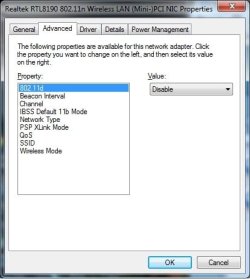
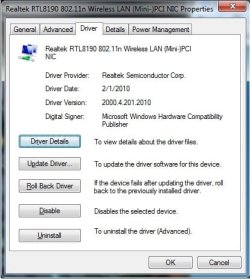
1. I recently moved to a new city. Prior to moving my desktop wireless nic(Realtek 8190 802.11N) was operating flawlessly in the N spectrum. I unplugged the PC, boxed it, shipped it to new address, unboxed it, plugged it in(once the new cable/internet connection was installed in the new apartment(different company)). The PC is just 10 feet away from the Wifi router, a ASUS RT-N66U, and I'm only getting 72Mbs speeds. This is completely inadequate to game online as all my games either can't authenticate due to timeouts or timeout immediately after authenticating. My laptop is getting 144Mbs at any location in the apartment. I have gone through all settings and don't see why it's so slow as it was working just fine.
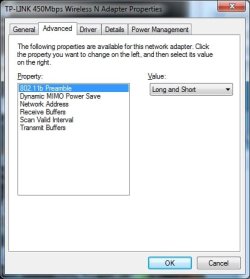
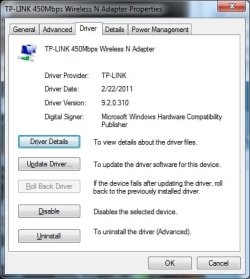
2. Because I have not been able to fix my original Wifi nic, I bought a TP-WDN4800 450Mbs nic and installed it.
I loaded the driver for this nic, the system recognizes the card, however, using this nic the system does not see any networks. The driver is the most current, however windows is reporting there is a problem with the driver even though the system recognizes the card and the card itself is indicating successful driver install with a slow flashing LED as per the manual.
Please help...
1. I recently moved to a new city. Prior to moving my desktop wireless nic(Realtek 8190 802.11N) was operating flawlessly in the N spectrum. I unplugged the PC, boxed it, shipped it to new address, unboxed it, plugged it in(once the new cable/internet connection was installed in the new apartment(different company)). The PC is just 10 feet away from the Wifi router, a ASUS RT-N66U, and I'm only getting 72Mbs speeds. This is completely inadequate to game online as all my games either can't authenticate due to timeouts or timeout immediately after authenticating. My laptop is getting 144Mbs at any location in the apartment. I have gone through all settings and don't see why it's so slow as it was working just fine.
2. Because I have not been able to fix my original Wifi nic, I bought a TP-WDN4800 450Mbs nic and installed it.
I loaded the driver for this nic, the system recognizes the card, however, using this nic the system does not see any networks. The driver is the most current, however windows is reporting there is a problem with the driver even though the system recognizes the card and the card itself is indicating successful driver install with a slow flashing LED as per the manual.
Please help...
Attachments
My Computer
- Computer type
- PC/Desktop
- Computer Manufacturer/Model Number
- Custom
- OS
- Windows 7 Pro x64
- CPU
- Phenom II x4 945
- Motherboard
- Asus M4a77TD
- Memory
- 4gb
- Graphics Card(s)
- ATI Radeon HD 5750
- Hard Drives
- Western Digital 750GB
- Antivirus
- AVG Antivirus
- Browser
- Chrome


