Problem With Themes - Windows XP Mode.

mintsmike

New member
Local time
5:36 AM
Messages
2
Hello,

I have a problem with the desktop theme of my Windows XP mode implementation. Every time i try to open a virtual application published to windows 7 or login in the full virtual machine mode, the theme defaults to the horrible windows Classic theme. I then set it to Windows XP normal theme (the blue one), but when i hibernate the machine, and then say, open a virtual application, the window is in the theme of windows classic!?!

Is there any way that i can set it to the default blue Windows XP theme and make it stay that way, without reverting to Windows Classic?

Thanks in advance,
Regards,
mintsmike
 

My Computer

OS
Windows 7 Professional x64
CPU
Intel Core i7 920 @ 2.67 GHz
Motherboard
Asus P6T SE
Memory
Ballistix 6GB - XMP @ 16000MHz
Graphics Card(s)
Sapphire Radeon HD 4890 (1GB)
Sound Card
Onboard Realtek Hi-Def Audio
Hard Drives
Seagate Barracuda 1TB
Hello Mintsmike, welcome to the Seven Forums.

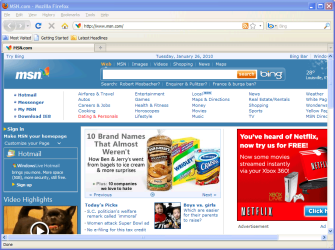
I tried to reproduce your issue, but couldn't. When I launch XP Mode applications, XP Mode keeps it's chosen theme as shown here:

XPM_Firefox.PNG

The screenshot shows XP Mode application (Firefox) running on my Seven desktop. You can clearly see it's maintaining the chosen XP Blue theme.

Could you take a screenshot and post it here, showing a XP Mode application running on Seven desktop.

Kari
 

My Computer

Computer type
Laptop
Computer Manufacturer/Model Number
HP ENVY 17-1150eg
OS
Windows 10 Pro x64 EN-GB
CPU
1.6 GHz Intel Core i7-720QM Processor
Memory
6 GB
Graphics Card(s)
ATI Mobility Radeon HD 5850 Graphics
Sound Card
Beats sound system with integrated subwoofer
Monitor(s) Displays
17" laptop display, 22" LED and 32" Full HD TV through HDMI
Screen Resolution
1600*900 (1), 1920*1080 (2&3)
Hard Drives
Internal: 2 x 500 GB SATA Hard Disk Drive 7200 rpm
External: 2TB for backups, 3TB USB3 network drive for media
Cooling
As Envy runs a bit warm, I have it on a Cooler Master pad
Keyboard
Logitech diNovo Media Desktop Laser (bluetooth)
Mouse
Logitech Performance Mouse MX
Internet Speed
50/10 Mbps VDSL
Antivirus
Windows Defender 4.3.9431.0
Browser
Maxthon 3.5.2., IE11
moz-screenshot.png
See what i mean:

Untitled-1.gif

ugly, huh

Regards,
mintsmike
 

Attachments

  • Untitled-1.gif
    Untitled-1.gif
    60.2 KB · Views: 110

My Computer

OS
Windows 7 Professional x64
CPU
Intel Core i7 920 @ 2.67 GHz
Motherboard
Asus P6T SE
Memory
Ballistix 6GB - XMP @ 16000MHz
Graphics Card(s)
Sapphire Radeon HD 4890 (1GB)
Sound Card
Onboard Realtek Hi-Def Audio
Hard Drives
Seagate Barracuda 1TB
OK, I can see what you mean. But I really don't have a clue why that's happening. As I told above, it's working fine for me, XP Mode keeping the chosen theme.

I'll check if I can find some explanation. I'll be back if I can find something.

Kari
 

My Computer

Computer type
Laptop
Computer Manufacturer/Model Number
HP ENVY 17-1150eg
OS
Windows 10 Pro x64 EN-GB
CPU
1.6 GHz Intel Core i7-720QM Processor
Memory
6 GB
Graphics Card(s)
ATI Mobility Radeon HD 5850 Graphics
Sound Card
Beats sound system with integrated subwoofer
Monitor(s) Displays
17" laptop display, 22" LED and 32" Full HD TV through HDMI
Screen Resolution
1600*900 (1), 1920*1080 (2&3)
Hard Drives
Internal: 2 x 500 GB SATA Hard Disk Drive 7200 rpm
External: 2TB for backups, 3TB USB3 network drive for media
Cooling
As Envy runs a bit warm, I have it on a Cooler Master pad
Keyboard
Logitech diNovo Media Desktop Laser (bluetooth)
Mouse
Logitech Performance Mouse MX
Internet Speed
50/10 Mbps VDSL
Antivirus
Windows Defender 4.3.9431.0
Browser
Maxthon 3.5.2., IE11
Hey,

Did you ever find a solution to this? Seems to be happening to me.

Paul.
 

My Computer

OS
Windows 7 64 Bit
Back
Top