problem with user name

A Night King

New member
Local time
4:02 PM
Messages
17
Location
Dubai
My laptop came pre-configured from the manufacturer (Digital Storm, though that isn't relevant) and they assumed that the name of the default, admin account would be the name of the purchaser (my Brother). Since it's -my- computer, I would prefer to have it in my name.

The name of the account I've changed to my name from Control Panel.
but the path to my documents is still C:\Users\***
there is no option to change the name of the folder there is no (RENAME) in the list
I have already changed the name of the user account as appropriate
 
Last edited:

My Computer

Computer Manufacturer/Model Number
System Manufacturer
OS
Microsoft Windows 7 Ultimate
CPU
P5
Motherboard
Asus Branded
Memory
4.00GB
Graphics Card(s)
Ati Catalyst 1gb
Monitor(s) Displays
NEC 1720vm
Hard Drives
C, D
PSU
standard
Case
e-view
Cooling
80MM
Hello Fazza,

Unfortunately you cannot change the name of the actual C:\Users\(user-name) folder. Only the name that appears for the account at log on and in the Start Menu.

A workaround for this is to create a new administrator account with the name you want. Next copy the contents of all of the folders (including contents in hidden AppData subfolders) in the old account's C:\Users\(user-name) folder into the corresponding new account's C:\Users\(user-name) folder. After everything checks out ok, you can delete the old account from within the new one.

Hope this help,
Shawn
 

My Computer

Computer type
PC/Desktop
Computer Manufacturer/Model Number
Self built custom
OS
64-bit Windows 11 Pro for Workstations
CPU
Intel i7-8700K OC'd to 5 GHz
Motherboard
ASUS ROG Maximus XI Formula Z390
Memory
64 GB (4x16GB) G.SKILL TridentZ RGB DDR4 3600 MHz
Graphics Card(s)
ASUS ROG-STRIX-GTX1080TI-O11G-GAMING
Sound Card
Integrated
Monitor(s) Displays
2 x Samsung Odyssey G7 27"
Screen Resolution
2560x1440
Hard Drives
1TB Samsung 990 PRO M.2,
4TB Samsung 990 PRO PRO M.2,
TerraMaster F8 SSD Plus NAS
PSU
Seasonic Prime Titanium 850W
Case
Thermaltake Core P3
Cooling
Corsair Hydro H115i
Keyboard
Logitech wireless K800
Mouse
Logitech MX Master 4
Internet Speed
2 Gb/s Download and 100 Mb/s Upload
Antivirus
Malwarebyte Anti-Malware Premium
Browser
Google Chrome
Other Info
Logitech Z625 speaker system,
Logitech BRIO 4K Pro webcam,
HP Color LaserJet Pro MFP M477fdn,
APC SMART-UPS RT 1000 XL - SURT1000XLI,
Galaxy S23 Plus phone
My laptop came pre-configured from the manufacturer (Digital Storm, though that isn't relevant) and they assumed that the name of the default, admin account would be the name of the purchaser (my Brother). Since it's -my- computer, I would prefer to have it in my name.

The name of the account I've changed to my name from Control Panel.
but the path to my documents is still C:\Users\***
there is no option to change the name of the folder there is no (RENAME) in the list
I have already changed the name of the user account as appropriate

Create a new admin level account for yourself, copy the files out of the old account and then destroy it...

Control Panel -> User Accounts.
 

My Computer

Computer Manufacturer/Model Number
Homebrew
OS
XP Pro SP3 X86 / Win7 Pro X86
CPU
Amd 64 x2 4200 (2.4ghz)
Motherboard
Asus M2N-MX SE Plus
Memory
Kingston DDR2 800 2gb
Graphics Card(s)
Nvidia GF-8400
Sound Card
Realtek on Motherboard
Monitor(s) Displays
Acer x-193bw
Screen Resolution
1440 x 900
Hard Drives
Western Digital 500g
PSU
350watt In-Win
Case
In-Win
Cooling
Air
Keyboard
yes
Mouse
yes
Internet Speed
5mpbs
Other Info
Also ASRock ION 330 as HTPC (on XP).
Acer Aspire as GP netbook (on XP).
When copying data to a new account, it looks like there are no longer any files you have to avoid copying like there was in XP:

NTUSER.DAT
NTUSER.DAT.LOG
ntuser.ini

Is this true? Sure would make this easier.
 

My Computer

Computer type
PC/Desktop
Computer Manufacturer/Model Number
Lenovo IdeaCenter 450
OS
Windows 10 Pro X64
CPU
Intel Quad Core i7-4770 @ 3.4Ghz
Memory
16.0GB PC3-12800 DDR3 SDRAM 1600 MHz
Graphics Card(s)
Intel Integrated HD Graphics
Sound Card
Realtek HD Audio
Monitor(s) Displays
HP 22" LCD
Screen Resolution
1680 x 1050
Hard Drives
250GB Samsung EVO SATA-3 SSD
2TB Seagate ST2000DM001 SATA-2
1.5TB Seagate ST3150041AS SATA
Keyboard
Dell USB
Mouse
Lenovo USB
Internet Speed
Cable via Road Runner 3MB Upload, 30MB Download
Antivirus
Windows Defender, MBAM Pro, MBAE
Browser
Seamonkey
Other Info
UEFI/GPT
PLDS DVD-RW DH16AERSH
When copying data to a new account, it looks like there are no longer any files you have to avoid copying like there was in XP:

NTUSER.DAT
NTUSER.DAT.LOG
ntuser.ini

Is this true? Sure would make this easier.

Yeah, they're still there...
but you're not going to copy from one user account to another ....
you're going to copy "Documents" to "Documents", "Music" to "Music" etc.

The setup in win7 is different enough that I strongly advise against just grabbing all the files in one home folder and dumping them into another... too many things to go broken doing that.
 

My Computer

Computer Manufacturer/Model Number
Homebrew
OS
XP Pro SP3 X86 / Win7 Pro X86
CPU
Amd 64 x2 4200 (2.4ghz)
Motherboard
Asus M2N-MX SE Plus
Memory
Kingston DDR2 800 2gb
Graphics Card(s)
Nvidia GF-8400
Sound Card
Realtek on Motherboard
Monitor(s) Displays
Acer x-193bw
Screen Resolution
1440 x 900
Hard Drives
Western Digital 500g
PSU
350watt In-Win
Case
In-Win
Cooling
Air
Keyboard
yes
Mouse
yes
Internet Speed
5mpbs
Other Info
Also ASRock ION 330 as HTPC (on XP).
Acer Aspire as GP netbook (on XP).
Hello Fazza,

Unfortunately you cannot change the name of the actual C:\Users\(user-name) folder. Only the name that appears for the account at log on and in the Start Menu.

Actually you can, but the process is painful, and im not about to type for an hour explaining it.

lets just say it has alot to do with modifying registry values and editing the .dat files themselves.
 

My Computer

OS
Windows 7
CPU
Core i7 920 D0
Motherboard
Rampage II Gene
Memory
Corsair Dominator 1600
Graphics Card(s)
Geforce GTX 275
Sound Card
Auzentech Prelude
Monitor(s) Displays
BenQ G2400WD
Screen Resolution
1920x1200
Hard Drives
WD AAKS 500GB
WD 1TB
Seagate 160GB
PSU
Corsair HX620
Case
NZXT Rogue
Cooling
TRUE Copper
Keyboard
Logitech G15
Internet Speed
Anywhere from 2.5 to 3.5mb
Very long path names using dir in Command Prompt

I use the dir command from a Command Prompt a lot to locate files. When ever I do from my account folder, I get dozens of the following:

The directory name C:\Users\xxxxxxxx\AppData\Local\Application Data\Application Data\Application Data\Application Data\Application Data\Application Data\App
pplication Data\Application Data\Application Data\Application Data\Application Data\Adobe\Acrobat\9.0\Updater is too long.

What causes this? Is it something to do with Junction Points that are now used in your account directory tree?

Reduces the usefulness of the dir command.

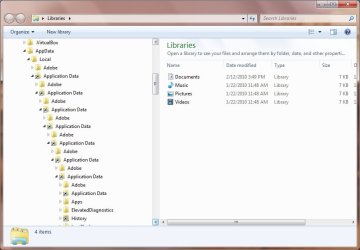
When I look at the same path in Windows Explorer, it doesn't show unless I uncheck Hide protected operating system files in Folder Options, View tab. Then, I can click on Application Data till the cows come home and it just keeps opening up another level identical to the existing level.
 

My Computer

Computer type
PC/Desktop
Computer Manufacturer/Model Number
Lenovo IdeaCenter 450
OS
Windows 10 Pro X64
CPU
Intel Quad Core i7-4770 @ 3.4Ghz
Memory
16.0GB PC3-12800 DDR3 SDRAM 1600 MHz
Graphics Card(s)
Intel Integrated HD Graphics
Sound Card
Realtek HD Audio
Monitor(s) Displays
HP 22" LCD
Screen Resolution
1680 x 1050
Hard Drives
250GB Samsung EVO SATA-3 SSD
2TB Seagate ST2000DM001 SATA-2
1.5TB Seagate ST3150041AS SATA
Keyboard
Dell USB
Mouse
Lenovo USB
Internet Speed
Cable via Road Runner 3MB Upload, 30MB Download
Antivirus
Windows Defender, MBAM Pro, MBAE
Browser
Seamonkey
Other Info
UEFI/GPT
PLDS DVD-RW DH16AERSH
I use the dir command from a Command Prompt a lot to locate files. When ever I do from my account folder, I get dozens of the following:

The directory name C:\Users\xxxxxxxx\AppData\Local\Application Data\Application Data\Application Data\Application Data\Application Data\Application Data\App
pplication Data\Application Data\Application Data\Application Data\Application Data\Adobe\Acrobat\9.0\Updater is too long.

What causes this? Is it something to do with Junction Points that are now used in your account directory tree?

Nope... it's an NTFS limitation that's been there since Win2000. The Directory Records only have space for a 255 character filename. To ensure that path names don't exceed the NTFS limit Windows limits them to 260 characters ( D:\ + <pathname> + NULL) If you're looking in the windows documentation it's defined in the MAX_PATH constant.
 

My Computer

Computer Manufacturer/Model Number
Homebrew
OS
XP Pro SP3 X86 / Win7 Pro X86
CPU
Amd 64 x2 4200 (2.4ghz)
Motherboard
Asus M2N-MX SE Plus
Memory
Kingston DDR2 800 2gb
Graphics Card(s)
Nvidia GF-8400
Sound Card
Realtek on Motherboard
Monitor(s) Displays
Acer x-193bw
Screen Resolution
1440 x 900
Hard Drives
Western Digital 500g
PSU
350watt In-Win
Case
In-Win
Cooling
Air
Keyboard
yes
Mouse
yes
Internet Speed
5mpbs
Other Info
Also ASRock ION 330 as HTPC (on XP).
Acer Aspire as GP netbook (on XP).
I don't think that's the case here. I know about the 255 path limit.

Use Windows Explorer to look at the path I showed. It isn't that the path is too long, it's a never ending repetition, which is why I think it has something to do with Junction Points which Win 7 (and probably Vista) use in the user directory tree. Here is a picture of what I mean.

RepFolders.jpg
 

My Computer

Computer type
PC/Desktop
Computer Manufacturer/Model Number
Lenovo IdeaCenter 450
OS
Windows 10 Pro X64
CPU
Intel Quad Core i7-4770 @ 3.4Ghz
Memory
16.0GB PC3-12800 DDR3 SDRAM 1600 MHz
Graphics Card(s)
Intel Integrated HD Graphics
Sound Card
Realtek HD Audio
Monitor(s) Displays
HP 22" LCD
Screen Resolution
1680 x 1050
Hard Drives
250GB Samsung EVO SATA-3 SSD
2TB Seagate ST2000DM001 SATA-2
1.5TB Seagate ST3150041AS SATA
Keyboard
Dell USB
Mouse
Lenovo USB
Internet Speed
Cable via Road Runner 3MB Upload, 30MB Download
Antivirus
Windows Defender, MBAM Pro, MBAE
Browser
Seamonkey
Other Info
UEFI/GPT
PLDS DVD-RW DH16AERSH
I don't think that's the case here. I know about the 255 path limit.

Use Windows Explorer to look at the path I showed. It isn't that the path is too long, it's a never ending repetition, which is why I think it has something to do with Junction Points which Win 7 (and probably Vista) use in the user directory tree. Here is a picture of what I mean.

View attachment 67654

If you delete that... does it come back?

Also there are shortcuts to folders in the folder tree.... generally that's a no-no.

I wouldn't think this is a windows7 problem... more likely it's an adobe problem...
 

My Computer

Computer Manufacturer/Model Number
Homebrew
OS
XP Pro SP3 X86 / Win7 Pro X86
CPU
Amd 64 x2 4200 (2.4ghz)
Motherboard
Asus M2N-MX SE Plus
Memory
Kingston DDR2 800 2gb
Graphics Card(s)
Nvidia GF-8400
Sound Card
Realtek on Motherboard
Monitor(s) Displays
Acer x-193bw
Screen Resolution
1440 x 900
Hard Drives
Western Digital 500g
PSU
350watt In-Win
Case
In-Win
Cooling
Air
Keyboard
yes
Mouse
yes
Internet Speed
5mpbs
Other Info
Also ASRock ION 330 as HTPC (on XP).
Acer Aspire as GP netbook (on XP).
No, nothing to do with Adobe. Application Data is a Junction Point or Symbolic Link (not sure which) that points to AppData, so clicking on it just takes you round in circles. From what I just read, it's there for legacy apps that expect to see a Application Data directory. See here:

detect junction point xp - Google Search

My question was, and still is, is there any way to bypass or negate this when using the dir command from a Command Prompt?
 

My Computer

Computer type
PC/Desktop
Computer Manufacturer/Model Number
Lenovo IdeaCenter 450
OS
Windows 10 Pro X64
CPU
Intel Quad Core i7-4770 @ 3.4Ghz
Memory
16.0GB PC3-12800 DDR3 SDRAM 1600 MHz
Graphics Card(s)
Intel Integrated HD Graphics
Sound Card
Realtek HD Audio
Monitor(s) Displays
HP 22" LCD
Screen Resolution
1680 x 1050
Hard Drives
250GB Samsung EVO SATA-3 SSD
2TB Seagate ST2000DM001 SATA-2
1.5TB Seagate ST3150041AS SATA
Keyboard
Dell USB
Mouse
Lenovo USB
Internet Speed
Cable via Road Runner 3MB Upload, 30MB Download
Antivirus
Windows Defender, MBAM Pro, MBAE
Browser
Seamonkey
Other Info
UEFI/GPT
PLDS DVD-RW DH16AERSH
Apparently no way to bypass Junction Point problem

Looks like I'll have to give up on using the dir command if I want to search the Users directory tree. I found this post by Raymond Chen which is pretty clear:

Windows Confidential - Junction Dysfunction

Darn shame MS crippled a very useful tool, at least in this one instance. I understand why they did it though.
 

My Computer

Computer type
PC/Desktop
Computer Manufacturer/Model Number
Lenovo IdeaCenter 450
OS
Windows 10 Pro X64
CPU
Intel Quad Core i7-4770 @ 3.4Ghz
Memory
16.0GB PC3-12800 DDR3 SDRAM 1600 MHz
Graphics Card(s)
Intel Integrated HD Graphics
Sound Card
Realtek HD Audio
Monitor(s) Displays
HP 22" LCD
Screen Resolution
1680 x 1050
Hard Drives
250GB Samsung EVO SATA-3 SSD
2TB Seagate ST2000DM001 SATA-2
1.5TB Seagate ST3150041AS SATA
Keyboard
Dell USB
Mouse
Lenovo USB
Internet Speed
Cable via Road Runner 3MB Upload, 30MB Download
Antivirus
Windows Defender, MBAM Pro, MBAE
Browser
Seamonkey
Other Info
UEFI/GPT
PLDS DVD-RW DH16AERSH
Back
Top