
Problem with W7 Pro and USB device ?

trinaz

New member
Member
VIP
Local time
10:21 PM
Messages
477
Location
Phoenix
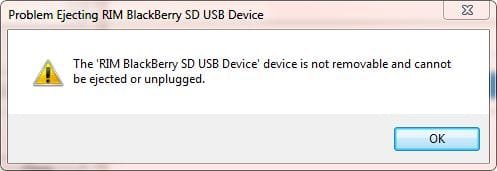
Hope this is the proper forum...maybe a BB user out there...?....Have Windows 7 Pro PC and BB 8330 (Device Manager 5.0.1.28)...every time I click the W7 USB removal/disconnect/eject icon I get the following error:

"The 'Rim Blackberry SD USB Device' device is not removable and cannot be ejected or unplugged"

Have read where improper USB disconnecting from Windows USB port can damage/corrupt data and or USB device ?

Is there a patch or correction for my 8330 and/or Windows Seven so the BB is recognized and allowed to properly "eject" from Windows Seven usb ports ?

Thanks...
 

Attachments
  • usb.JPG
    usb.JPG
    18.5 KB · Views: 9

My Computer

Computer type
PC/Desktop
Computer Manufacturer/Model Number
Self built
OS
Windows 7 Pro 64bit SP1
CPU
AMD FX-6100 Six-Core Processor
Motherboard
M5A78L-M LX PLUS
Memory
2ea Corsair-1333MHz-PC3-10666-240-pin-CMX4GX3M1A1333C9
Graphics Card(s)
NVIDIA GeForce GT 630 - 1023MB (EVGA)
Sound Card
OnBoard Via High Def Audio
Monitor(s) Displays
Samsung 204B main - ASUS VS228 secondary
Screen Resolution
1920x1080 main - 1920x1080 secondary
Hard Drives
Samsung SSD 840 128GB Win7 Pro 64bit - Western Digital WDC 465GB - Seagate 640GB Sata B/U - Maxtor 500GB Sata B/U - Maxtor 200GB Sata
PSU
Antec 650 watt
Cooling
Multiple case fans
Keyboard
MS USB dual Wireless Keyboard - IntelliType Pro
Mouse
MS USB dual Wireless Mouse - IntelliPoint
Internet Speed
Cox Cable
Antivirus
Bitdefender IS 2014
Browser
FireFox Primary - IE 11
Other Info
Hauppaguge Win TV HVR-1250 (Model 22xxx, Hybrid ATSC/QAM)
Samsung HD103SI USB 1TB Desktop Drive - Backup & Disk Image storage
Find out which process issues that message (use Process Explorer). Then we might be able to get closer to the problem.

Here is how PE works:

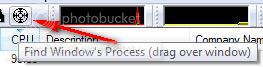
If you open PE, on the top you find an icon that looks like a radio button. You grab this icon and drop it over the message window. In PE, the process that has issued the message will be highlighted in light blue. If the process name does not mean anything to you, I suggest you Google the name. You can always find a definition on the web. You can also right click on it and go to Properties - then you get more info.


targeticon.png
 

My Computer

Computer Manufacturer/Model Number
HP, Dell, Gateway, Toshiba - 4 laptops and 2 desktops
OS
Vista, Windows7, Mint Mate, Zorin, Windows 8
CPU
from 1.6GHz Duo to i7
Monitor(s) Displays
2x HP w2207
Hard Drives
5x HDD, 7x SSD, 12x Externals
Keyboard
with trackball - no mices
Mouse
Trackball mice
Internet Speed
DSL 6000
Took a little bit to figure PE out...This is the screen shot of the action that pops up ? ( Also noticed there's a number of other items in the "light blue" ...does it matter ? )

In addition to this problem...when I plug the BB into the USB port...I do not get the USB REMOVAL icon to pop up as it does with other USB devices that are plugged into any USB slot ?

Have tried this in various USB ports...always the same....I do get the Windows little sound notification both plugging in/out...but no USB eject icon appears ?

Also...all USB boot options are disabled in the BIOS. Device shows up in Device Manager/USB Controllers and has latest Windows drivers.

Thanks for your help....
 

Attachments

  • 0025.jpg
    0025.jpg
    103.5 KB · Views: 53

My Computer

Computer type
PC/Desktop
Computer Manufacturer/Model Number
Self built
OS
Windows 7 Pro 64bit SP1
CPU
AMD FX-6100 Six-Core Processor
Motherboard
M5A78L-M LX PLUS
Memory
2ea Corsair-1333MHz-PC3-10666-240-pin-CMX4GX3M1A1333C9
Graphics Card(s)
NVIDIA GeForce GT 630 - 1023MB (EVGA)
Sound Card
OnBoard Via High Def Audio
Monitor(s) Displays
Samsung 204B main - ASUS VS228 secondary
Screen Resolution
1920x1080 main - 1920x1080 secondary
Hard Drives
Samsung SSD 840 128GB Win7 Pro 64bit - Western Digital WDC 465GB - Seagate 640GB Sata B/U - Maxtor 500GB Sata B/U - Maxtor 200GB Sata
PSU
Antec 650 watt
Cooling
Multiple case fans
Keyboard
MS USB dual Wireless Keyboard - IntelliType Pro
Mouse
MS USB dual Wireless Mouse - IntelliPoint
Internet Speed
Cox Cable
Antivirus
Bitdefender IS 2014
Browser
FireFox Primary - IE 11
Other Info
Hauppaguge Win TV HVR-1250 (Model 22xxx, Hybrid ATSC/QAM)
Samsung HD103SI USB 1TB Desktop Drive - Backup & Disk Image storage
Back
Top