Problem with windows 7

Cignandrea

New member
Local time
6:56 AM
Messages
4
Sorry in advance for my english.
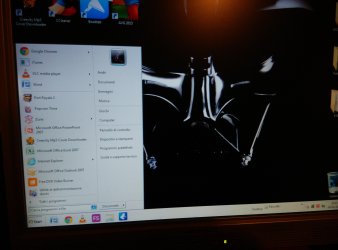
I nave had an issue with windows 7 and now the layout changed.. I'll show it in althe picture. Can you help me?
 

Attachments

  • IMG_20150404_205520.jpg
    IMG_20150404_205520.jpg
    499.4 KB · Views: 5

My Computer

Computer type
PC/Desktop
OS
windows 7 32 bit
And i can't connect to the internet
 

My Computer

Computer type
PC/Desktop
OS
windows 7 32 bit
I see nothing wrong with your start menu except that you have a lot of recent programs displayed.

Regarding the internet problem you have to provide more details.
 

My Computer

Computer Manufacturer/Model Number
HP, Dell, Gateway, Toshiba - 4 laptops and 2 desktops
OS
Vista, Windows7, Mint Mate, Zorin, Windows 8
CPU
from 1.6GHz Duo to i7
Monitor(s) Displays
2x HP w2207
Hard Drives
5x HDD, 7x SSD, 12x Externals
Keyboard
with trackball - no mices
Mouse
Trackball mice
Internet Speed
DSL 6000

My Computer

Computer type
PC/Desktop
Computer Manufacturer/Model Number
Home made Desktop
OS
Windows 10 Pro. 64/ version 1709 Windows 7 Pro/64
CPU
Intel i7-6800K @ 4.3
Motherboard
ASUS X-99 Deluxe II
Memory
Corsair Platinum 16 gig @2400
Graphics Card(s)
EVGA GTX 1070 OC
Monitor(s) Displays
Asus 27" LED LCD/VE278Q
Screen Resolution
1920-1080 or 1280-720 HDMI
Hard Drives
INTEL SSD 730-240 Gb Sata 3.0/
PSU
EVGA Platium 1200W
Case
Phanteks Luxe Tempered Glass 8 fans/ one radiator
Cooling
XSPC/ Water Cooled CPU
Keyboard
Das 4 Professional
Mouse
Logitech M705/MX Anywhere 2-S
Internet Speed
100 mbits
Antivirus
Microsoft Security Essentials/ Malwarebytes Premium 3.0/ SAS
Browser
I.E. 11 default/Firefox/ ISP Time Warner Cable/Spectrum
Other Info
LG BluRay Burner/
Sound system-KLipsch-THX/
Icy Dock ssd Hot Swap bays.
Can you explain what issues you are facing more clearly?

From the layout problems you mentioned, I'm going to take a guess and assume you mean the windows-98 style start menu look being an issue?
If that's so, you may have triggered windows classic theme by mistake. Can be easily corrected.
Go to your desktop, right click any open area and choose 'Personalisation'
There choose any theme under Aero, or Windows 7 Basic.

If your issue is with icon size, I'm sure your resolution is okay, just right click on your desktop, In the view option, Choose between Large, Medium and small.

If you are meaning the 'Desktop, Raccolte' box on your taskbar, thats simple to get rid of too.
Right click your taskbar, choose toolbar, and in the next sub-menu, untick the desktop.

For your internet problems, It won't hurt to start from the groundup, Check if your wire is connected properly (If only I got money everytime that happened to me :cry:)
Please elaborate what you think may have triggered this.
 

My Computer

Computer type
PC/Desktop
Computer Manufacturer/Model Number
Custom Build
OS
Windows 7 Ultimate 64bit
CPU
Intel i7 4790
Memory
16 GB DDR3
Graphics Card(s)
Asus GTX 970
The problemi is the theme. I can't select the aero themes, they are black and white. I'll show it in the picture. Thank you all for the replies.:p
 

Attachments

  • IMG_20150405_175303_HDR.jpg
    IMG_20150405_175303_HDR.jpg
    1 MB · Views: 0

My Computer

Computer type
PC/Desktop
OS
windows 7 32 bit
Could you read my post #4 and comply?
 

My Computer

Computer type
PC/Desktop
Computer Manufacturer/Model Number
Home made Desktop
OS
Windows 10 Pro. 64/ version 1709 Windows 7 Pro/64
CPU
Intel i7-6800K @ 4.3
Motherboard
ASUS X-99 Deluxe II
Memory
Corsair Platinum 16 gig @2400
Graphics Card(s)
EVGA GTX 1070 OC
Monitor(s) Displays
Asus 27" LED LCD/VE278Q
Screen Resolution
1920-1080 or 1280-720 HDMI
Hard Drives
INTEL SSD 730-240 Gb Sata 3.0/
PSU
EVGA Platium 1200W
Case
Phanteks Luxe Tempered Glass 8 fans/ one radiator
Cooling
XSPC/ Water Cooled CPU
Keyboard
Das 4 Professional
Mouse
Logitech M705/MX Anywhere 2-S
Internet Speed
100 mbits
Antivirus
Microsoft Security Essentials/ Malwarebytes Premium 3.0/ SAS
Browser
I.E. 11 default/Firefox/ ISP Time Warner Cable/Spectrum
Other Info
LG BluRay Burner/
Sound system-KLipsch-THX/
Icy Dock ssd Hot Swap bays.
Yes, i'll give my computer informations in some minutes
 

My Computer

Computer type
PC/Desktop
OS
windows 7 32 bit
In addition I would not use AVG and would uninstall it using the special removal tool required of bloatware AV's: AVG uninstaller | Download tools and utilities

I suggest you try a free lightweight AV like Microsoft Security Essentials or the slightly more aggressive Panda Cloud Antivirus free download

Download, install, decline trial, run a full scan with Malwarebytes and SUPERAntiSpyware.

Look in your browser Tools under Add-Ons and Extensions to disable everything except Shockwave flash and a reader helper.

Report back these results.
 
Back
Top
