problem with windows home basic , plz help

loverlion2010

New member
Local time
5:26 AM
Messages
6
hi all,
i want to personalize my desktop and do change on that theme to another ,,
how i can change themes ??? (windows home not ultimate)
 

My Computer

OS
windows 7 home basic
Well, some features of Windows 7 are disabled in the Home Basic edition, but to change themes (if you can) you right click on the desktop and from the menu that appears you select Personalize. From there select the theme you want.
 

My Computer

Computer Manufacturer/Model Number
Zen Productions
OS
Windows 7 Ultimate x64
CPU
Intel i7-860
Motherboard
Gigabyte GA-P55A-UD4P
Memory
Corsair Dominator 1600Mhz, 8-8-8-24 1.65v 2x2GB
Graphics Card(s)
ATI Radeon 5770 HD
Sound Card
Intel High Definition Sound
Monitor(s) Displays
Samsung P2570HD
Screen Resolution
1920x1080
Hard Drives
Western Digital Caviar Black 500gb
PSU
Corsair CMPSU-750HX 750W
Case
Antec p183
Cooling
Corsair H50 Water Cooler
Keyboard
Logitech G110
Mouse
Logitech MX Revolution
Internet Speed
768 mb/s
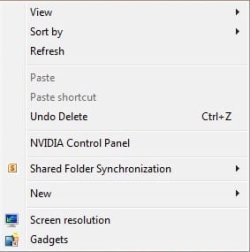
i did it but Personalize not be in that menu ,,see this pic
 

Attachments

  • win7.jpg
    win7.jpg
    9 KB · Views: 2,542

My Computer

OS
windows 7 home basic
Looks like you cant change this then. Check for it in control panel. Look for Personalisation or Appearance and Themes.
 

My Computer

Computer Manufacturer/Model Number
Packard Bell MH36-U300
OS
Windows 7 Ultimate 64-Bit
CPU
Intel(R) Pentium(R) Dual CPU T3400 @ 2.16GHz
Memory
2GB DDR2
Graphics Card(s)
Mobile Intel(R) 4 Series Express Chipset
Sound Card
Realtek High Definition Audio
Monitor(s) Displays
15" LCD
Screen Resolution
1280 x 800
Hard Drives
320GB Western Digital
Case
Notebook
Internet Speed
10Mbps
hi loverlion2010, and welcome to sevenforums,

exactly which version of 7 have you got? unfortunately, if you are using windows 7 starter version, you will not be able to change themes/wallpaper.

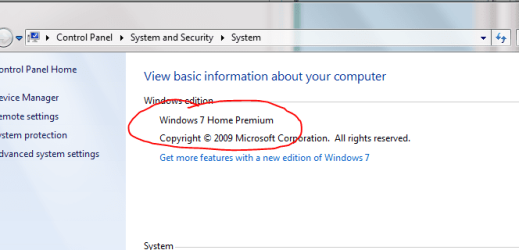
one way to find out which version you have is to go to control panel >> system and security >> system (as in picture below).
 

Attachments

  • prem.PNG
    prem.PNG
    19.4 KB · Views: 299

My Computer

Computer Manufacturer/Model Number
mickey megabyte 1234
OS
ultimate 64 sp1
CPU
i5 2500K [email protected]
Motherboard
MSI P67A-GD53
Memory
8 gigs GSkill Ripjaws 1600
Graphics Card(s)
amd hd6950
Sound Card
creative x-fi gamer
Monitor(s) Displays
samsung 24"
Screen Resolution
1920x1080
Hard Drives
ocz vertex 2e 60 gig, samsung f3 1tb, buffalo 2tb ext
PSU
antec 550
Case
antec three hundred
Cooling
i'm a cooling fan
Keyboard
saitek eclipse ii
Mouse
logitech g3
Internet Speed
about 4 Mbps
Other Info
i love win7
Then yeah, you can't change theme. If I'm reading Microsoft right, you can change your wallpaper though. Just right click on an image and click the "Set as desktop" option.
 

My Computer

Computer Manufacturer/Model Number
Zen Productions
OS
Windows 7 Ultimate x64
CPU
Intel i7-860
Motherboard
Gigabyte GA-P55A-UD4P
Memory
Corsair Dominator 1600Mhz, 8-8-8-24 1.65v 2x2GB
Graphics Card(s)
ATI Radeon 5770 HD
Sound Card
Intel High Definition Sound
Monitor(s) Displays
Samsung P2570HD
Screen Resolution
1920x1080
Hard Drives
Western Digital Caviar Black 500gb
PSU
Corsair CMPSU-750HX 750W
Case
Antec p183
Cooling
Corsair H50 Water Cooler
Keyboard
Logitech G110
Mouse
Logitech MX Revolution
Internet Speed
768 mb/s
Back
Top