Problem with wireless adapter or access point

I dont know if that cts protection type was the reason I still cant connect .post #20...but i unplugged my ethernet cable and restarted my router and still cant connect wirelessly
 

My Computer

Computer type
Laptop
Computer Manufacturer/Model Number
Dell 1750
OS
windows 7 home premium 64 bit
Hi jessica143,

I have checked the router settings and it appears CTS protection is automatically managed by router. I would suggest you to try changing the channel to 11 or 6 Under Wireless settings and see if that makes any difference. Also, try changing the security options between AES, TKIP or Mixed (AES + TKIP). If possible, try to keep the wireless security to None or open and see if you are able to connect to router.

If you are able to connect to router without security, I would suggest you to change the router security passphrase and then try connecting your computer with new passphrase.

Please share what exactly happens when you try to connect to the wireless network on laptop. Does it ask for password or it simply refuses to connect.

 

My Computer

Computer type
PC/Desktop
Computer Manufacturer/Model Number
Dell
OS
Windows 7 Enterprise x86 SP1
I went in and tried channel 6 and 11..nothing..I switched the security from tkip+aes to none..and nothing..so I switched it back to tkip+aes and switched the password..nothing..It never even asked me for the new password it just refused to connect...but my signal is strong
 

My Computer

Computer type
Laptop
Computer Manufacturer/Model Number
Dell 1750
OS
windows 7 home premium 64 bit
Hi jessica143,

As the wireless is not asking for new password, it might be an issue with wireless profile. I would suggest you to delete existing wireless network profiles, once you have changed the security type and password. You may follow the steps below :

  • Click Start->Control Panel, Select Network and Internet, and then click Network and Sharing Center
  • In the task list, please choose Manage wireless networks.
  • In the Network table, please select the existing profiles and click Remove.
  • You may see a warning dialog box, just click OK.
  • Go back to Network and Sharing Center and choose Change adapter settings -> right click Wireless Network Connection -> click Connect/Disconnect.
  • Click the refresh button to view available wireless networks. Highlight the network which you want to connect, double click it or click Connect button.

Hope this helps.
 

My Computer

Computer type
PC/Desktop
Computer Manufacturer/Model Number
Dell
OS
Windows 7 Enterprise x86 SP1
i unplugged my ethernet cable before I did this so it could search for my wireless internet after i did this...so I went in and did all those changes as listed and still couldnt connect to the internet...BUT it did ask me for my password...while i was in change adapter settings i clicked on diagnose this connection and this came up...you have no preferred wireless networks??
 

My Computer

Computer type
Laptop
Computer Manufacturer/Model Number
Dell 1750
OS
windows 7 home premium 64 bit
Hi jessica143,

Please try changing Intel wireless card advanced settings by following the steps below and see if it makes any difference :

  • Open Device Manager
  • Right Click on wireless card and click on properties
  • Click the Advanced tab
  • Disable 802.11n Mode
  • Change Ad Hoc Channel 802.11b/g to 6
  • Change Ad Hoc QoS Mode to WMM Enabled
  • Change Mixed Mode Protection to RTS/CTS Enabled
  • Change Roaming Aggressiveness to Highest
  • Change Transmit Power to Highest
  • Click on OK to save the changes and restart the computer

Hope this helps.
 

My Computer

Computer type
PC/Desktop
Computer Manufacturer/Model Number
Dell
OS
Windows 7 Enterprise x86 SP1
WGR614v9 - Is this your router?
Check the router setup screen and see if the firmware version is what's being provided. If not, you may have to flash the new firmware into your router. You can find where to upload a new firmware file (surprisingly enough, look like Recovered file fragments) on the Maintenance screen of your router.

Do not use the wireless connection to upgrade the firmware! Use an Ethernet connection attached to port "1" on the router.

Firmware version should be: 1.2.32
   Information
  1. Fixed the DNS Flooding issue

That router has been discontinued long ago, and not sold or supported anymore, so you might also consider getting a new WiFi router with Wireless-N capability.
 

My Computer

Computer type
PC/Desktop
Computer Manufacturer/Model Number
Custom
OS
Microsoft Windows 7 Home Premium 64-bit Service Pack 1
CPU
AMD A10-6800K APU with Radeon(tm)™ HD Graphics 4100
Motherboard
ASRock FM2A85X Extreme4-M
Memory
(2) G.Skill F3-12800CL10-8GBXL
Graphics Card(s)
ASUS R7 250 Series (0x6610)
Sound Card
Realtek High Definition Audio
Monitor(s) Displays
Acer X213H LCD monitor, 21"
Screen Resolution
1920 x 1080 x 32 bits @ 60 Hz
Hard Drives
WD Black, 1.0TB, WDC WD1002FAEX-00Z3A0
PSU
Rosewill Quark-650
Case
Raidmax Comet SECC Steel ATX Mid Tower Computer Case
Cooling
1 x 80mm + 2 x 120mm + Stock cooler
Mouse
Gear Head Wireless Optical 5-button mouse
Internet Speed
FTTx 6000 / 1000
Antivirus
Avast! Free Antivirus 2015.10.0.2208
Browser
Google Chrome Version 40.0.2214.115
Other Info
*AMD Dual-Graphics
*Uses OpenDNS
*Uses Folding@Home
*HP 16x Super-Multi DVD Writer
*Superspeed 74-in-1 Card Reader
*Maximum overclock has not been determined.
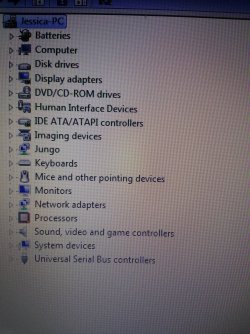
sundeep b ..wireless card isnt in my list on the device manager????? this is what i have when i open it i attached it to this post on what you see when i open my device manager..

honeycombAG..yes that is my router and it is an older one..ive had it for a while..but all other wireless devices are working and i have a strong signal on my laptop..im just not picking up the internet for some reason,.,but I will check out the firmware
 

Attachments

  • 20130924_115556.jpg
    20130924_115556.jpg
    647 KB · Views: 0

My Computer

Computer type
Laptop
Computer Manufacturer/Model Number
Dell 1750
OS
windows 7 home premium 64 bit
HoneycombAG...I went into the router upgrade and it checked for firmware updates and it said no new firmware version available...also I tried to download netgear smartwizard and was unsuccessful with it for some reason..i couldnt open it..now for some reason a message pops up when i restart my laptop..netgear smart wizard..internal error:without VIDPID registry key!! dont know what that is about because i thought i deleted it out of my laptop when it wouldnt open..
 

My Computer

Computer type
Laptop
Computer Manufacturer/Model Number
Dell 1750
OS
windows 7 home premium 64 bit
Hi jessica143,

Wireless card should be listed under Network adapters in Device Manager by the name Intel(R) WiFi Link 5100 AGN.
 

My Computer

Computer type
PC/Desktop
Computer Manufacturer/Model Number
Dell
OS
Windows 7 Enterprise x86 SP1
didnt work sundeep b...do you need me to switch everything back the way it was or keep it where its at??
 

My Computer

Computer type
Laptop
Computer Manufacturer/Model Number
Dell 1750
OS
windows 7 home premium 64 bit
Hi jessica143,

Please share the Service Tag of system and name on account via Private Message (Click on my name and click on Send a private message). I will look into the details and determine further course of action.
 

My Computer

Computer type
PC/Desktop
Computer Manufacturer/Model Number
Dell
OS
Windows 7 Enterprise x86 SP1
Hi,

Would like to update everyone that we had tried almost all troubleshooting steps and eventually re-installed OS as well, however, the wireless card was not working. We isolated the issue to be related to wireless card hardware and jessica will be replacing the wireless card.
 

My Computer

Computer type
PC/Desktop
Computer Manufacturer/Model Number
Dell
OS
Windows 7 Enterprise x86 SP1
I'm facing the same exact problem, and I did every steps you mentioned, but it didn't work, so I guess I have to renew the wireless card on my system? yes?

and guys, thank you so much for all this info, really helpful. :)
 

My Computer

Computer type
Laptop
Computer Manufacturer/Model Number
Dell
OS
Window7 ,SP1, 64 bit,
Back
Top