Problem with wireless adapter or access point.

bored2death97

New member
Local time
1:59 PM
Messages
5
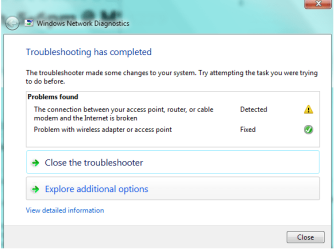
I will be online and click on a page and it won't load. I do the troubleshooter and it says that there is a problem with the wireless adapter or access point. It will fix it in that moment, but it happens multiple times in a day. I have reset the router, doesn't help. I think it may be my computer because when it happens I can still visit sites on my phone. I have a HP laptop (HP G61), and I have tried uninstalling and reinstalling both network adapters in the device panel. I really need this fixed because I have an online class and I keep getting disconnected.

Also, I'm not the best with computers, so please try to be specific with any solutions.

Thank you.

Also, the router has been changed multiple times and the problem has persisted.
 
Last edited:

My Computer

Computer type
Laptop
Computer Manufacturer/Model Number
HP G61-408CA
OS
Microsoft Windows 7 Home Premium 64-bit
CPU
AMD Athlon(tm) II Dual-Core M300
Motherboard
Hewlett-Packard 363F
Graphics Card(s)
AMD M880G with ATI Mobility Radeon HD 4200
Sound Card
1) ATI High Definition Audio Device (2) IDT High Definitio
Screen Resolution
1366 x 768
Antivirus
Kapersky
Browser
Chrome
You'll have to provide more inforamtion, such as the router model and mfgr, as well as the model of your HP laptop (see the link in my signature: Ez systems specs )

Details on what the trouble shooter finds/fixes would also be helpful. Once armed with details, members can begin to provide suggestions.
 

My Computer

Computer type
Laptop
Computer Manufacturer/Model Number
HP Pavilion dv6-6c10us
OS
x64 (6.3.9600) Win8.1 Pro & soon dual boot x64 (6.1.7601) Win7_SP1 HomePrem
CPU
AMD A6-3420M APU with Radeon(tm) HD Graphics
Motherboard
Hewlett-Packard 1805
Memory
6.00 GB
Graphics Card(s)
AMD Radeon(TM) HD 6520G
Sound Card
(1) AMD High Definition Audio Device (2) IDT High Definiti
Monitor(s) Displays
HP W2072a 20" LCD (1600 x 900) @ 60 Hz
Screen Resolution
1366 x 768 x 32 bits (4294967296 colors) @ 60 Hz
Hard Drives
ST640LM0 00 HM641JI SATA Disk Device
Keyboard
Logitech k520 wireless KB
Mouse
Logitech m320 wireless mouse (bundled with KB)
Internet Speed
15/5 | 54 MB Wireless 'n'
Antivirus
Realtime: Defender or Avast | On-demand: Malwarebytes, ESET
Browser
IE 11 on Win8, IE 10 on win 7
Other Info
Media: [Gimp, Audacity, VLC] || Comm: [WEmail 2012, Skype] || Productivity: [OpenOffice,| Textpad] || Utils: [Sysinternals, cCleaner, Speccy, Defraggler]
Welcome to Seven Forums,

Yes, some info and output will be helpful in order for us to assist you, please start here and we'll be glad to help.
 

My Computer

Computer Manufacturer/Model Number
Lenovo Desktop/Samsung Laptop
OS
Win7 & Win8 64bit
CPU
Intel i5
Internet Speed
Charter-20 Mbps
Antivirus
Avast
Browser
FF, IE9 and Chrome

Attachments

  • hjghdsdsfsh.png
    hjghdsdsfsh.png
    17.7 KB · Views: 29

My Computer

Computer type
Laptop
Computer Manufacturer/Model Number
HP G61-408CA
OS
Microsoft Windows 7 Home Premium 64-bit
CPU
AMD Athlon(tm) II Dual-Core M300
Motherboard
Hewlett-Packard 363F
Graphics Card(s)
AMD M880G with ATI Mobility Radeon HD 4200
Sound Card
1) ATI High Definition Audio Device (2) IDT High Definitio
Screen Resolution
1366 x 768
Antivirus
Kapersky
Browser
Chrome
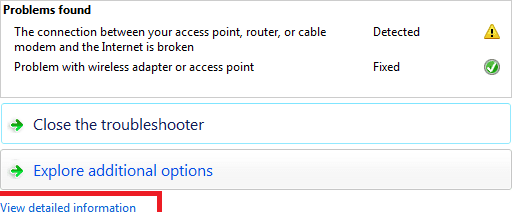
any chance you might show the detailed information to me?

Thanks
 

Attachments

  • ap.png
    ap.png
    4.8 KB · Views: 29

My Computer

Computer type
Laptop
Computer Manufacturer/Model Number
HP Pavilion dv6-6c10us
OS
x64 (6.3.9600) Win8.1 Pro & soon dual boot x64 (6.1.7601) Win7_SP1 HomePrem
CPU
AMD A6-3420M APU with Radeon(tm) HD Graphics
Motherboard
Hewlett-Packard 1805
Memory
6.00 GB
Graphics Card(s)
AMD Radeon(TM) HD 6520G
Sound Card
(1) AMD High Definition Audio Device (2) IDT High Definiti
Monitor(s) Displays
HP W2072a 20" LCD (1600 x 900) @ 60 Hz
Screen Resolution
1366 x 768 x 32 bits (4294967296 colors) @ 60 Hz
Hard Drives
ST640LM0 00 HM641JI SATA Disk Device
Keyboard
Logitech k520 wireless KB
Mouse
Logitech m320 wireless mouse (bundled with KB)
Internet Speed
15/5 | 54 MB Wireless 'n'
Antivirus
Realtime: Defender or Avast | On-demand: Malwarebytes, ESET
Browser
IE 11 on Win8, IE 10 on win 7
Other Info
Media: [Gimp, Audacity, VLC] || Comm: [WEmail 2012, Skype] || Productivity: [OpenOffice,| Textpad] || Utils: [Sysinternals, cCleaner, Speccy, Defraggler]
Run through this form Rogers ISP site:
Help Index - Rogers Yahoo!

It's a fairly good checklist, the only difference I'd offer is to untick LMhost in step 4.5... unless of course you use LanManger. I particularly like the fact that they tell you to disable NetBios - most don't but it's a very old protocol that simply isn't need in most cases.
 

My Computer

Computer type
Laptop
Computer Manufacturer/Model Number
HP Pavilion dv6-6c10us
OS
x64 (6.3.9600) Win8.1 Pro & soon dual boot x64 (6.1.7601) Win7_SP1 HomePrem
CPU
AMD A6-3420M APU with Radeon(tm) HD Graphics
Motherboard
Hewlett-Packard 1805
Memory
6.00 GB
Graphics Card(s)
AMD Radeon(TM) HD 6520G
Sound Card
(1) AMD High Definition Audio Device (2) IDT High Definiti
Monitor(s) Displays
HP W2072a 20" LCD (1600 x 900) @ 60 Hz
Screen Resolution
1366 x 768 x 32 bits (4294967296 colors) @ 60 Hz
Hard Drives
ST640LM0 00 HM641JI SATA Disk Device
Keyboard
Logitech k520 wireless KB
Mouse
Logitech m320 wireless mouse (bundled with KB)
Internet Speed
15/5 | 54 MB Wireless 'n'
Antivirus
Realtime: Defender or Avast | On-demand: Malwarebytes, ESET
Browser
IE 11 on Win8, IE 10 on win 7
Other Info
Media: [Gimp, Audacity, VLC] || Comm: [WEmail 2012, Skype] || Productivity: [OpenOffice,| Textpad] || Utils: [Sysinternals, cCleaner, Speccy, Defraggler]
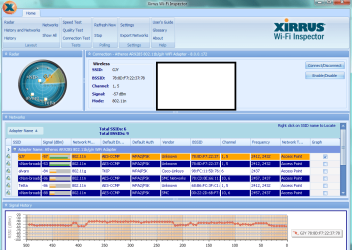
Thanks for the info provided. Can you also post the Xirrus screen capture by following the instruction from the link that I gave you?
 

My Computer

Computer Manufacturer/Model Number
Lenovo Desktop/Samsung Laptop
OS
Win7 & Win8 64bit
CPU
Intel i5
Internet Speed
Charter-20 Mbps
Antivirus
Avast
Browser
FF, IE9 and Chrome
Run through this form Rogers ISP site:
Help Index - Rogers Yahoo!

It's a fairly good checklist, the only difference I'd offer is to untick LMhost in step 4.5... unless of course you use LanManger. I particularly like the fact that they tell you to disable NetBios - most don't but it's a very old protocol that simply isn't need in most cases.

Tried it, seems to be about the same.

Thanks for the info provided. Can you also post the Xirrus screen capture by following the instruction from the link that I gave you?

It all looks to be normal on the screenshot.

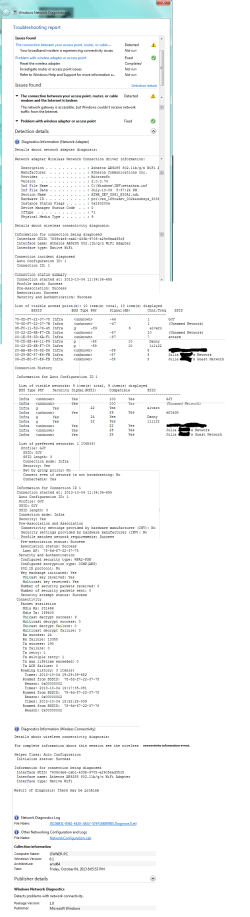
A lot of the times the wifi doesn't fully disconnect. By that I mean that I will be loading pages, and it will take forever to load. Then finally comes up as saying I'll have to reload the page. When I do the troubleshooter those times, by the time it is done, the page has finally loaded. This happens more often than the wifi fully disconnecting. When it does, and I run the troubleshoot, the screenshot I posted earlier is what comes up, or it will reconnect by itself. The wifi has fully disconnected a couple of times since then, but I haven't been able to reach the screen where it says 'access point fixed.' When that occurs I will click advanced information and post.
 

Attachments

  • osgfhdfsghdfh.png
    osgfhdfsghdfh.png
    52.7 KB · Views: 4
Last edited:

My Computer

Computer type
Laptop
Computer Manufacturer/Model Number
HP G61-408CA
OS
Microsoft Windows 7 Home Premium 64-bit
CPU
AMD Athlon(tm) II Dual-Core M300
Motherboard
Hewlett-Packard 363F
Graphics Card(s)
AMD M880G with ATI Mobility Radeon HD 4200
Sound Card
1) ATI High Definition Audio Device (2) IDT High Definitio
Screen Resolution
1366 x 768
Antivirus
Kapersky
Browser
Chrome
Thanks,

I tried to divine the model number based on your system specs, but a few too many matched.

Could you please identify which model HP laptop you have? Put that in your system specs so others don't have to troll the thread.

I'm asking so that I and other members can look up technical information about your machine and compare that to what you're running.

Bill
 

My Computer

Computer type
Laptop
Computer Manufacturer/Model Number
HP Pavilion dv6-6c10us
OS
x64 (6.3.9600) Win8.1 Pro & soon dual boot x64 (6.1.7601) Win7_SP1 HomePrem
CPU
AMD A6-3420M APU with Radeon(tm) HD Graphics
Motherboard
Hewlett-Packard 1805
Memory
6.00 GB
Graphics Card(s)
AMD Radeon(TM) HD 6520G
Sound Card
(1) AMD High Definition Audio Device (2) IDT High Definiti
Monitor(s) Displays
HP W2072a 20" LCD (1600 x 900) @ 60 Hz
Screen Resolution
1366 x 768 x 32 bits (4294967296 colors) @ 60 Hz
Hard Drives
ST640LM0 00 HM641JI SATA Disk Device
Keyboard
Logitech k520 wireless KB
Mouse
Logitech m320 wireless mouse (bundled with KB)
Internet Speed
15/5 | 54 MB Wireless 'n'
Antivirus
Realtime: Defender or Avast | On-demand: Malwarebytes, ESET
Browser
IE 11 on Win8, IE 10 on win 7
Other Info
Media: [Gimp, Audacity, VLC] || Comm: [WEmail 2012, Skype] || Productivity: [OpenOffice,| Textpad] || Utils: [Sysinternals, cCleaner, Speccy, Defraggler]
Thanks,

Could you please identify which model HP laptop you have? Put that in your system specs so others don't have to troll the thread.

Updated the model number.
 

My Computer

Computer type
Laptop
Computer Manufacturer/Model Number
HP G61-408CA
OS
Microsoft Windows 7 Home Premium 64-bit
CPU
AMD Athlon(tm) II Dual-Core M300
Motherboard
Hewlett-Packard 363F
Graphics Card(s)
AMD M880G with ATI Mobility Radeon HD 4200
Sound Card
1) ATI High Definition Audio Device (2) IDT High Definitio
Screen Resolution
1366 x 768
Antivirus
Kapersky
Browser
Chrome
Does Kaspersky update at various times of the day? You might take a look in the task manager when this happens, just to see which program is using the most memory and CPU.
 

My Computer

Computer type
PC/Desktop
Computer Manufacturer/Model Number
Bruce ... somewhere in his 40's
OS
Windows 7 Ultimate 32bit SP1
CPU
Intel(R) Core(TM)2 Quad CPU @ 2.40GHz, 2400 MHz
Motherboard
INTEL/D975XBX2
Memory
4 GB
Graphics Card(s)
ATI Radeon HD 2600 Pro
Monitor(s) Displays
Samsung SyncMaster 914v
Screen Resolution
1280 x 1024
Hard Drives
2/500GB each ... ST3500630AS ATA Device.
One is not connected
PSU
Rocketfish 700 W
Case
G.Skill Gigabyte Chassis
Keyboard
Standard PS/2 Keyboard
Mouse
Microsoft PS/2 Mouse
Internet Speed
DSL
Antivirus
Avira Internet Security
Browser
IE 11
Other Info
ATI HDMI Audio
The problem continue occurring with Kapersky update disabled (subscription ran out). So I do not think that has an effect on it.

Detailed report of troubleshoot.
 

Attachments

  • detailed report.png
    detailed report.png
    86.8 KB · Views: 5

My Computer

Computer type
Laptop
Computer Manufacturer/Model Number
HP G61-408CA
OS
Microsoft Windows 7 Home Premium 64-bit
CPU
AMD Athlon(tm) II Dual-Core M300
Motherboard
Hewlett-Packard 363F
Graphics Card(s)
AMD M880G with ATI Mobility Radeon HD 4200
Sound Card
1) ATI High Definition Audio Device (2) IDT High Definitio
Screen Resolution
1366 x 768
Antivirus
Kapersky
Browser
Chrome
Thanks for updating model info. Here are the HP pages. I tend to start with the manufacture's pages to see if there's anything there - most of the time it's fruitless, but somethimes I learn something.

Have you tried a wired connection - does that exhibit the same issue?

Sometimes Bluetooth gets in the way - do you use Bluetooth connectivity (I haven't looked ot see if your machine has BT).
 

My Computer

Computer type
Laptop
Computer Manufacturer/Model Number
HP Pavilion dv6-6c10us
OS
x64 (6.3.9600) Win8.1 Pro & soon dual boot x64 (6.1.7601) Win7_SP1 HomePrem
CPU
AMD A6-3420M APU with Radeon(tm) HD Graphics
Motherboard
Hewlett-Packard 1805
Memory
6.00 GB
Graphics Card(s)
AMD Radeon(TM) HD 6520G
Sound Card
(1) AMD High Definition Audio Device (2) IDT High Definiti
Monitor(s) Displays
HP W2072a 20" LCD (1600 x 900) @ 60 Hz
Screen Resolution
1366 x 768 x 32 bits (4294967296 colors) @ 60 Hz
Hard Drives
ST640LM0 00 HM641JI SATA Disk Device
Keyboard
Logitech k520 wireless KB
Mouse
Logitech m320 wireless mouse (bundled with KB)
Internet Speed
15/5 | 54 MB Wireless 'n'
Antivirus
Realtime: Defender or Avast | On-demand: Malwarebytes, ESET
Browser
IE 11 on Win8, IE 10 on win 7
Other Info
Media: [Gimp, Audacity, VLC] || Comm: [WEmail 2012, Skype] || Productivity: [OpenOffice,| Textpad] || Utils: [Sysinternals, cCleaner, Speccy, Defraggler]
Run Windows Update (WU) manualy and see if there are any optional components offered. Sometimes peopel miss hardware updates provided by WU if they only get automatic updates.

Intermittent issues are difficult to resolve, so we'll just have to run down the list to eliminate the usual suspects.

I'm looking around for information on your cable modem, but all I find are press releases similar to what you posted.
Reaching New Heights - Rogers Launches its Most Extensive Wi-Fi Yet | Hitron Technologies Americas Inc.

This might take a while and I'm on Internet life support. If I don't post, it's probably because I can't get to the Internet.

Have you called Rogers? They can do some testing from their side and if necessary come on-site to diagnose hte connection using your machine.

Please post the following system information: Speccy snapshot


How to publish a Speccy snapshot:
Click on the Speccy file menu and select Publish Snapshot. This method removes sensitive information and provides you with a link to the report.

Copy the link returned from Publish Snapshot and paste it in a post on this thread so members have more information to better assist you.

picture.php

Thanks

Speccy snapshot of my machine: http://speccy.piriform.com/results/CHlegp43qppad1Ua8dOLDAj

Bill
 

My Computer

Computer type
Laptop
Computer Manufacturer/Model Number
HP Pavilion dv6-6c10us
OS
x64 (6.3.9600) Win8.1 Pro & soon dual boot x64 (6.1.7601) Win7_SP1 HomePrem
CPU
AMD A6-3420M APU with Radeon(tm) HD Graphics
Motherboard
Hewlett-Packard 1805
Memory
6.00 GB
Graphics Card(s)
AMD Radeon(TM) HD 6520G
Sound Card
(1) AMD High Definition Audio Device (2) IDT High Definiti
Monitor(s) Displays
HP W2072a 20" LCD (1600 x 900) @ 60 Hz
Screen Resolution
1366 x 768 x 32 bits (4294967296 colors) @ 60 Hz
Hard Drives
ST640LM0 00 HM641JI SATA Disk Device
Keyboard
Logitech k520 wireless KB
Mouse
Logitech m320 wireless mouse (bundled with KB)
Internet Speed
15/5 | 54 MB Wireless 'n'
Antivirus
Realtime: Defender or Avast | On-demand: Malwarebytes, ESET
Browser
IE 11 on Win8, IE 10 on win 7
Other Info
Media: [Gimp, Audacity, VLC] || Comm: [WEmail 2012, Skype] || Productivity: [OpenOffice,| Textpad] || Utils: [Sysinternals, cCleaner, Speccy, Defraggler]
Back
Top