Hi Folks,
I own an ASUS P8Z68-V LE Motheboard.
I made an downgrade of the bios. It went OK till the end but when reset the PC after the end of the procedure, the PC won't go. I can see the fans working and the power LED on but nothing comes on the screen and also i do not hear any bios Beep.
Please anybody can help me to solve the problem?
Thanks in advance.
Enzo.
A bad BIOS flash can "brick" a computer. Let us now hope that is not the case.
First: try a CLRTC procedure:
Shut down the computer > remove the power cord.
Remove the 3v battery.
Move the CLRTC jumper from pins 1-2 to 2-3.
Touch a metal part of the case and Press and Hold the reset button for approx. 30 seconds to discharge all power from the board.
Put the CLRTC jumper back on pins 1-2.
Replace the 3v battery > replace the power cord > boot.
Immediately go back into BIOS and reset all your preferred settings. If the CLRTC worked you will need to reset the date and time.
If you cannot get back into the BIOS after the CLRTC, then your next step will be to replace the BIOS chip.
You can order a chip from ASUS and solder it to the board yourself (or if you are fortunate, the chip will be the plug-in kind), or you can have a reputable service guy do it, or send the board back to ASUS for repair.
Sorry to be the bearer of bad news.
My Computer
Computer type
PC/Desktop
Computer Manufacturer/Model Number
Home Built - Jan 2013
OS
Windows 7 64 Bit Home Premium SP1
CPU
i7-3820
Motherboard
Asus P9X79-PRO - Bios 4608
Memory
GSkill F3-14900CL9Q - 16GB
Graphics Card(s)
EVGA GeForce GTX660 - Driver 352.86
Sound Card
On board Realtek ALC898
Monitor(s) Displays
Acer S271HL
Screen Resolution
1920 x 1080
Hard Drives
#1- Samsung 840 Pro Series
#2- Western Digital WD1002FAEX Sata3 Black
#3- Western Digital WD1002FAEX Sata3 Black
PSU
Corsair CMPSU-850TX-V2 - 850 watt (by Seasonic)
Case
Corsair Obsidian 550D
Cooling
Standard 3 120mm case fans, Cooler Master Hyper 212 EVO
Asus has a BIOS restoration utility, but you have to be able to get into the BIOS setup to run it.
Clearing the CMOS (as mentioned by TVeblen) may help. It shouldn't be necessary to remove the battery, but it can't hurt (unless you break something while removing it.)
If all else fails, the Asus e-store sells replacement BIOS chips (programmed with the latest non-beta BIOS) for $15.
Thanks guys for your help.
TVeblen unfortunately your suggestion did't work.
For both of you:
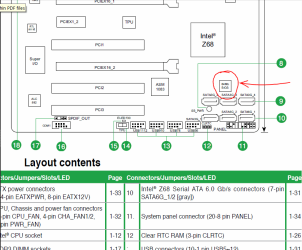
Can you tell me where the Bios is placed on the Mainboard?
i had a look on the mainboard and found one small chip on
a socket.Could it be the one?
On the chip i can just read WINBORD.
I have an eprom programmer EP32 by Grifo.
Can i re programm it?
If yes which file to use?
thanks in advance to both for the help
Enzo
Good luck with however you approach this. I've always stayed away from flashing firmware - except my Nuvi GPS - so can't offer much advice beyond what you already got about clearing CMOS.
But don't get discouraged. New Bios Chip Asus P8Z68-V LE | eBay
If you do this, you might want to buy a chip puller - they're cheap.
My Computer
Computer Manufacturer/Model Number
Home Built
OS
Windows 7 Ultimate x64
CPU
QuadCore Intel Core i7 920, 2666 MHz (20 x 133)
Motherboard
Asus P6T
Memory
6134 MB (DDR3-1333 DDR3 SDRAM)
Graphics Card(s)
(2 - SLI) NVIDIA GeForce GTS 250 (1024 MB)
Sound Card
Onboard Realtek ALC888/1200 @ Intel 82801JB IC
Monitor(s) Displays
HDMII
Screen Resolution
1280 x 800
Hard Drives
Crucial M4 (64 GB SSD)
WD Caviar Blacks
WD5001AALS-00J7B1 ATA Device (465 GB)
WD5001AALS-00J7B1 ATA Device (465 GB)
WD5001AALS-00L3B2 ATA Device (465 GB)
WD Elements USB External (250 GB)