Problems burning DVD movies

michaellanfield

New member
Local time
9:29 AM
Messages
6
Hi,

I have problems burning almost all dvd movies. I do have anydvd enabled and it works. I am not able to burn movies in Nero, but I am able to burn movies successfully in Ashampoo 6 free, however I can not play the movie on any dvd player.

I have windows 7 home premium (64-bit)
and a new computer. HP Pavillion dv7
ever since I got the new laptop it has given me issues with burning. I am able to burn any movie, but like I said it does not play afterwards.

I am so frustrated as I am wasting many discs trying to burn. I burnt many movies with other computers with no problems... Please help.

If you need any other information, I'll try to provide. Thanks!!!!

Note: Burning audio CDs works fine for me... Just movies is the problem... Even movies that are not protected...
 
Last edited:

My Computer My Computer

Computer Manufacturer/Model Number
HP Pavillion dv7
OS
windows 7
CPU
AMD Athlon II M320
Motherboard
Hewlett-Packard 3638 (Socket S1G3)
Memory
4.0GB Dual-Channel DDR2 @ 400MHz
Graphics Card(s)
ATI Mobility Radeon HD 4200
Sound Card
IDT High Definition Audio CODEC
Monitor(s) Displays
17.3" LED LCD
Hard Drives
320 7,200
Hitachi Hitachi HTS725032A9A364 ATA Device (IDE)
PSU
N/A
Case
N/A
Cooling
N/A
Are you copying a protected movie DVD? If so, your attempt WILL FAIL. DVD have CSS protection which encrypts the content, copying the content directly will get you the "corrupted" version... You said copying audio CD is OK, then your writer is fine, the problem lies with your source.

zzz2496
 

My Computer My Computer

Computer Manufacturer/Model Number
Self Built
OS
Windows7 Ultimate 64bit
CPU
Intel Core 2 Quad Q6600
Motherboard
Abit IN9-32X-MMAX
Memory
DDR2 Adata 4GB
Graphics Card(s)
Nvidia GeForce GTX 285 1024 and Nvidia GeForce 8800GT 512
Sound Card
Asus Xonar HDAV 1.3
Monitor(s) Displays
Dell 2407WFP and BenQ 2400v and Philips 150v3
Screen Resolution
3840x1200 and 1024x768
Hard Drives
2 WDC 1TB
1 WDC 1.5TB
1 WDC 640GB
1 WDC 320GB
1 Seagate 200GB
PSU
Corsair TX 850W
Case
Cooler Master HAF932
Cooling
Arctic Cooling Freezer Extreme and plenty of fans...
Keyboard
MicrosoftNaturalKeyboard 4000/Apple Alu keyboard/Dinovo mini
Mouse
Logitech G5/MarbleMouseTrackball/PerformanceMX/SpacePilotPRO
Internet Speed
1.5Mbps down/384Kbps up
Other Info
APC SURT 1000XL
Logitech Z-560
Wiimote
Mikrotik Router
Linksys (now Cisco) SD2008 8 port Gigabit switch
Linksys WRT54G (acting as AP)
Apple wireless Aluminium keyboard
Apple Magic Mouse
Xbox360 wired controller
You can try DVD Flick which always worked well for me. But as was said, it will not work with a protected source.
 

My Computer My Computer

Computer Manufacturer/Model Number
HP, Dell, Gateway, Toshiba - 4 laptops and 2 desktops
OS
Vista, Windows7, Mint Mate, Zorin, Windows 8
CPU
from 1.6GHz Duo to i7
Monitor(s) Displays
2x HP w2207
Hard Drives
5x HDD, 7x SSD, 12x Externals
Keyboard
with trackball - no mices
Mouse
Trackball mice
Internet Speed
DSL 6000
all dvds with or without protection don't play, but almost all movies burn with ashampoo.
I have anydvd which always take off the protection. it runs in the background and it works on other computers.
It also works on my laptop with windows 7. Most movies burn fine, but they don't play either on my laptop DVD burner or on a standalone dvd connected to a TV. It's strange.

WHS I mean copy a dvd to dvd.
 

My Computer My Computer

Computer Manufacturer/Model Number
HP Pavillion dv7
OS
windows 7
CPU
AMD Athlon II M320
Motherboard
Hewlett-Packard 3638 (Socket S1G3)
Memory
4.0GB Dual-Channel DDR2 @ 400MHz
Graphics Card(s)
ATI Mobility Radeon HD 4200
Sound Card
IDT High Definition Audio CODEC
Monitor(s) Displays
17.3" LED LCD
Hard Drives
320 7,200
Hitachi Hitachi HTS725032A9A364 ATA Device (IDE)
PSU
N/A
Case
N/A
Cooling
N/A
michaellanfield, as you said, you copy dvd to dvd. "anydvd" as far as I know only works for on-the-fly situations, where you load the disk into a DVD player app and this app reads the DVD as a video data, the read operation of the DVD player app will be intercepted by anydvd and it'll do it's job. It's a different case when you read the DVD data in "raw", as in sector per sector. In "raw" read mode, anydvd doesn't do it's job, because NERO burning rom is not a DVD player, it's not asking to read a DVD as a video data, thus you get corrupted copies. Yes the copy process will continue as if everything is fine, but the fact still stands, the data you copy is in an encrypted state. Why don't you try the app whs linked you, make a simple dvd video off one of your video files stored in your HDD, see if it burns and plays normally. If it does play... Well, I made my point.

zzz2496

Edit: I don't know where you live, but DVD video that's unprotected can mean two types, one is self made DVD using DVD authoring software, and two - a bootleg copy. Assuming this is the first type, if you can't copy it disk to disk, you can always copy the content of the disk to your HDD, try playing the copied data, if it plays normally, burn the extracted data... As simple as that. As for the second type... Good luck with it...
 

My Computer My Computer

Computer Manufacturer/Model Number
Self Built
OS
Windows7 Ultimate 64bit
CPU
Intel Core 2 Quad Q6600
Motherboard
Abit IN9-32X-MMAX
Memory
DDR2 Adata 4GB
Graphics Card(s)
Nvidia GeForce GTX 285 1024 and Nvidia GeForce 8800GT 512
Sound Card
Asus Xonar HDAV 1.3
Monitor(s) Displays
Dell 2407WFP and BenQ 2400v and Philips 150v3
Screen Resolution
3840x1200 and 1024x768
Hard Drives
2 WDC 1TB
1 WDC 1.5TB
1 WDC 640GB
1 WDC 320GB
1 Seagate 200GB
PSU
Corsair TX 850W
Case
Cooler Master HAF932
Cooling
Arctic Cooling Freezer Extreme and plenty of fans...
Keyboard
MicrosoftNaturalKeyboard 4000/Apple Alu keyboard/Dinovo mini
Mouse
Logitech G5/MarbleMouseTrackball/PerformanceMX/SpacePilotPRO
Internet Speed
1.5Mbps down/384Kbps up
Other Info
APC SURT 1000XL
Logitech Z-560
Wiimote
Mikrotik Router
Linksys (now Cisco) SD2008 8 port Gigabit switch
Linksys WRT54G (acting as AP)
Apple wireless Aluminium keyboard
Apple Magic Mouse
Xbox360 wired controller
I understand...
What I don't understand is my older computers with XP and Vista worked fine. It burned perfectly, but as soon as I got the Windows 7, movies don't play (when I burned them). I mean anydvd works fine on XP and Vista, but doesn't work for windows 7.

With the program WHS recommended, can I burn the whole dvd disc movie, into my computer somehow? Because I tried copying the whole movie onto the HDD but it doesn't play. so for some reason it must be when the movie goes onto a disc or is copied on my hdd it doesn't play. It transfers alright, but doesn't play.

very strange. Out of my 5 years burning movies, I never had such problems.
 

My Computer My Computer

Computer Manufacturer/Model Number
HP Pavillion dv7
OS
windows 7
CPU
AMD Athlon II M320
Motherboard
Hewlett-Packard 3638 (Socket S1G3)
Memory
4.0GB Dual-Channel DDR2 @ 400MHz
Graphics Card(s)
ATI Mobility Radeon HD 4200
Sound Card
IDT High Definition Audio CODEC
Monitor(s) Displays
17.3" LED LCD
Hard Drives
320 7,200
Hitachi Hitachi HTS725032A9A364 ATA Device (IDE)
PSU
N/A
Case
N/A
Cooling
N/A
zzz. I tried to copy the all the data on the disc. the disc is original bbc video for example, it transfers fine to the computer hdd (my laptop with win 7), but when I play back with VLC media player, windows media player or any other player, it does not play. It's so choppy and squares all over the screen and it freezes and the voice is okay, i can hear the narrator and music and such but the video is destroyed...
 

My Computer My Computer

Computer Manufacturer/Model Number
HP Pavillion dv7
OS
windows 7
CPU
AMD Athlon II M320
Motherboard
Hewlett-Packard 3638 (Socket S1G3)
Memory
4.0GB Dual-Channel DDR2 @ 400MHz
Graphics Card(s)
ATI Mobility Radeon HD 4200
Sound Card
IDT High Definition Audio CODEC
Monitor(s) Displays
17.3" LED LCD
Hard Drives
320 7,200
Hitachi Hitachi HTS725032A9A364 ATA Device (IDE)
PSU
N/A
Case
N/A
Cooling
N/A
Is there any chance that your "anydvd" isn't fully compatible with Windows 7? What I'm seeing here is the symptoms of failed decryption...

zzz2496
 

My Computer My Computer

Computer Manufacturer/Model Number
Self Built
OS
Windows7 Ultimate 64bit
CPU
Intel Core 2 Quad Q6600
Motherboard
Abit IN9-32X-MMAX
Memory
DDR2 Adata 4GB
Graphics Card(s)
Nvidia GeForce GTX 285 1024 and Nvidia GeForce 8800GT 512
Sound Card
Asus Xonar HDAV 1.3
Monitor(s) Displays
Dell 2407WFP and BenQ 2400v and Philips 150v3
Screen Resolution
3840x1200 and 1024x768
Hard Drives
2 WDC 1TB
1 WDC 1.5TB
1 WDC 640GB
1 WDC 320GB
1 Seagate 200GB
PSU
Corsair TX 850W
Case
Cooler Master HAF932
Cooling
Arctic Cooling Freezer Extreme and plenty of fans...
Keyboard
MicrosoftNaturalKeyboard 4000/Apple Alu keyboard/Dinovo mini
Mouse
Logitech G5/MarbleMouseTrackball/PerformanceMX/SpacePilotPRO
Internet Speed
1.5Mbps down/384Kbps up
Other Info
APC SURT 1000XL
Logitech Z-560
Wiimote
Mikrotik Router
Linksys (now Cisco) SD2008 8 port Gigabit switch
Linksys WRT54G (acting as AP)
Apple wireless Aluminium keyboard
Apple Magic Mouse
Xbox360 wired controller
help me understand what you want to do specifically so i can solve yer issue ....
you have a disc and you want to 'rip' and watch on computer ????
you have a disc and want a burned copy ,,, (orginal may be protected or not)???
you have video files you want on DVD ????

first make sure you have the most up to date graphics card drivers
 

My Computer My Computer

Computer Manufacturer/Model Number
Custom built super system & Fujitsu Lifebook (Lap)
OS
Win7 Ultimate (32) & Win7 Pro (64)
CPU
i7-860 (2.8 Ghz Overclocked) & intel centrino duo
Motherboard
Asus P7P55D & standard fujitsu
Memory
4 GB (Patriot) & 2 GB
Graphics Card(s)
nivida GeForce GTS 250 & standard
Sound Card
Creative Sound Blaster X-Fi Xtreme Audio & default fujitsu
Monitor(s) Displays
View Sonic , Samsung
Hard Drives
1 TB Caviar Black
1 TB Caviar Green
1/2 TB WD (my book thing)
60 gig Hitachi Travel star in the fuji lifebook
(I administer multiple systems but these are mine and usually they are not the ones with problems ---because theyre mine)
PSU
THERMALTAKE Toughpower 750 & Standard
Case
Cooler Master Sniper
Cooling
Standard
hey drew. I have a pal DVD of bbc 3 discs (original) I want to be able to burn the original DVD movie to another blank disc so I can watch it on my DVD player connected to my TV. I tried everything. Maybe anyDVD doesn't work with my windows 7, maybe I should updated the software? but it seems to work, otherwise how else can it work?
 

My Computer My Computer

Computer Manufacturer/Model Number
HP Pavillion dv7
OS
windows 7
CPU
AMD Athlon II M320
Motherboard
Hewlett-Packard 3638 (Socket S1G3)
Memory
4.0GB Dual-Channel DDR2 @ 400MHz
Graphics Card(s)
ATI Mobility Radeon HD 4200
Sound Card
IDT High Definition Audio CODEC
Monitor(s) Displays
17.3" LED LCD
Hard Drives
320 7,200
Hitachi Hitachi HTS725032A9A364 ATA Device (IDE)
PSU
N/A
Case
N/A
Cooling
N/A
Have you tried DVD Shrink or DVDFab 5 ? Just a thought :)
 

My Computer My Computer

Computer type
PC/Desktop
Computer Manufacturer/Model Number
Built them myself, Science Experiments !
OS
Win7 Enterprise, Win7 x86 (Ult 7600), Win7 x64 Ult 7600, TechNet RTM on AMD x64 (2.8Ghz)
CPU
AMD fx8350 4ghz, AMD-32 2400mhz, AMD-64 3200mhz, AMDx64 2.8G
Motherboard
SIS 755, ECS-K8M890M-M (Ult 7600), GigaByte & others
Memory
2gb, 4gb on the Ult 7600, 4gb on Technet RTM, 32gb on FX8350
Graphics Card(s)
Draw my own Graphics, several nVidia cards
Sound Card
on motherboard
Monitor(s) Displays
19" flat scr, 28" I-Inc widescr,22" Emprex Widescr, 23" Acer
Screen Resolution
1280 x 1024, 1440 x 900, 1920 x 1080
Hard Drives
6 pata Ide HD's & 2 Sata HD's
added 80gb external on Ult 7600 computer,
numerous extra 1tb, 2TB, 3Tb SATA HD's
A collection of ext HD Docks w/ HDs
PSU
430w, 550w, 600w, 700, 800, etc
Case
All Generic Full Towers
Cooling
Open Air & a few fans, some w/ colored LEDs
Keyboard
Compaq & Dell recycled from GoodWill
Mouse
Made in China Optical Wired Mouse
Internet Speed
Fast Cable InterNet
Antivirus
AVG Free on 24 different Desktops, NO Problems!
Browser
IE 8 is preferred, but use FireFox sometimes
Other Info
Linksys Routers, switches, & Hubs
Too Many USB Flash Drives to count, Biggest is 64GB !
Eight computers in my home network.
Sixteen computers at my business network.
Linked via TeamViewer !
Lots of old used spare computer parts everywhere!
I think you hit the problem there the PAL format is specific to europe and dvd players in the states are region 1 usually strictly ntsc therefore simply copying the disc may result in an unplayable disc . I would say to 'rip' the disc to a common video format the 2 most widely used best formats are
1. Xvid avi - xvid is open source with conversion and compression quality equal or better to divx and divx always needs codecs are always changing .... anyway open source
2. h.264 is quickly becoming the industry standard for quality and compression brings hd back to reasonable sizes you can read up on it

anyway convert to one of these and then back to .vobs and burn
or maybe your dvd program has a setting somewhere to burn nstc ... but if its already in pal i dunno
anyway I think thats the issue

ohhh and install this decryptor ... it does what it should and you dont need to worry about it super small on the fly decryption >>>> DVD43 and DVD43 Plug-in - Download Sites
 

My Computer My Computer

Computer Manufacturer/Model Number
Custom built super system & Fujitsu Lifebook (Lap)
OS
Win7 Ultimate (32) & Win7 Pro (64)
CPU
i7-860 (2.8 Ghz Overclocked) & intel centrino duo
Motherboard
Asus P7P55D & standard fujitsu
Memory
4 GB (Patriot) & 2 GB
Graphics Card(s)
nivida GeForce GTS 250 & standard
Sound Card
Creative Sound Blaster X-Fi Xtreme Audio & default fujitsu
Monitor(s) Displays
View Sonic , Samsung
Hard Drives
1 TB Caviar Black
1 TB Caviar Green
1/2 TB WD (my book thing)
60 gig Hitachi Travel star in the fuji lifebook
(I administer multiple systems but these are mine and usually they are not the ones with problems ---because theyre mine)
PSU
THERMALTAKE Toughpower 750 & Standard
Case
Cooler Master Sniper
Cooling
Standard
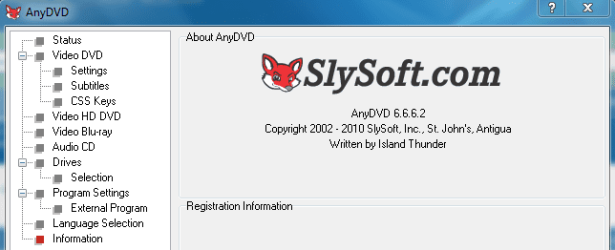
What version of Anydvd are you running?

Click on the fox icon, when the main window appears click on the information directory on the left side.
 

Attachments

  • Capture 2.PNG
    Capture 2.PNG
    11.1 KB · Views: 8

My Computer My Computer

Computer Manufacturer/Model Number
Toshiba P300
OS
Windows 8 Pro
CPU
Intel Centrino Dual Core P7450 2.13GHz
Memory
4gb
Graphics Card(s)
ATI Mobility Raedon HD3650
Hard Drives
Toshiba MK3252GSX ATA
Internet Speed
Wish it were faster
If your DVD burner is burning them in PAL and you're trying to run them on an US dvd player then they will not work, as Drewbie said.

I would check the settings to make sure it's burning to the correct format for wherever you are.

As WHS pointed out, DVD Flick is a good program and for me it has worked well for converting between PAL & NTSC.

Basically, if one format doesn't work, try burning it in the other. If that still doesn't work, I would give another program a try.

DVD Flick
 

My Computer My Computer

Computer type
PC/Desktop
Computer Manufacturer/Model Number
Dell Hell oh Well
OS
Win 7 32 Home Premium, Win 7 64 Pro, Win 8.1, Win 10
CPU
Intel Core 2 Duo 2.93GHz
Memory
Not much with my ADHD
Graphics Card(s)
ATI Radeon HD 4350
Monitor(s) Displays
24" HDTV/Monitor
Screen Resolution
Blurry after a Scotch or 2
Hard Drives
1 HDD 250 GB, 1 HDD 1 TB, 3 - 1 TB Externals
Case
Don't get on my case...man :D
Cooling
I have an Air Conditioner & Diet Pepsi
Keyboard
Saitek Cyborg
Mouse
10 yr old MS optical mouse that still works
Internet Speed
Never fast enough
Antivirus
Various
Browser
Various
Back
Top