Solved Problems Cloning Hard Drive On A Dell 755 Optiplex Dt

robbietpa

New member
Local time
5:44 PM
Messages
6
Hello
I have the Dell 755 OptiPlex large Tower. It had a small 250 Gb hard drive and I put a 1000 Gb hard drive in and loaded windows 7. The computer will not boot into the new hard drive, I have tried everything, including taking out the battery for a an hour or so, updating the bios to the A22 what ever is the latest Bios, I have checked all the Bios settings and from what I know it all looks good. I have tried changing the pin settings on the drive and so on. Tried boot order in different orders and so on. If I put the old hard drive back in, it will boot just fine, the only problem is that hard drive keeps saying it is going to fail. It's a Maxtor. The one hard drive I'm trying to install is the green 1 Tb western Digital Green Power. I have built several computers and installed a many operating systems and have never ran into this problem. It did belong to a business I bought it from. Is it possible it has some pin settings on the board for like maybe raid or something I'm missing? I'm at a loss. I have no external usb's plugged in except for a mouse and standard keyboard. No extra cards are installed at this time. Everything is standard across the board as far as I know. I have also tried cloning the Hard Drive with Bios set at Raid AutoDetect / ATA and it will not boot. Like I said though I can put the old hard drive in and it boots just fine with windows 7 ultimate 32 bit. Can anyone give me some advice please.
 

My Computer My Computer

At a glance

Windows 7 Ultimate 32 Bit755 DT4GBOn Board
Computer type
PC/Desktop
Computer Manufacturer/Model Number
Dell
OS
Windows 7 Ultimate 32 Bit
CPU
755 DT
Memory
4GB
Graphics Card(s)
On Board
Hard Drives
250 GB
Antivirus
System Mechanic
Browser
Internet Explorer
Sounds to me like your boot files are on the small hard drive and the rest of Windows is on the large drive. So both drives are needed.

I'm guessing you had both drives connected when you installed to the large drive?

If I'm right, that would not have happened if you had disconnected the small drive before installing to the large drive.

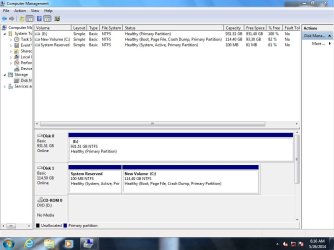
A screen shot of Windows Disk Management might tell us more.


You say "loaded" and you also say "cloning", so it's not really clear what you did.
 

My Computer My Computer

At a glance

Windows 7 Home Premium SP1, 64-bitIntel Skylake i5-6600K, not overclocked8 GB HyperX DDR4-2666 (2 x 4 GB)none; graphics are integrated on CPU
Computer type
PC/Desktop
Computer Manufacturer/Model Number
Ignatz Special; 4 speed manual gearbox; factory air conditioning; one of one
OS
Windows 7 Home Premium SP1, 64-bit
CPU
Intel Skylake i5-6600K, not overclocked
Motherboard
AsRock Z170M Extreme 4, micro ATX
Memory
8 GB HyperX DDR4-2666 (2 x 4 GB)
Graphics Card(s)
none; graphics are integrated on CPU
Sound Card
onboard: Realtek ALC1150; external: USB Behringer UF0-202
Monitor(s) Displays
Dell S2340M 23 inch IPS
Screen Resolution
1600 x 900
Hard Drives
System: Crucial MX100 series SSD, 128 GB;
Data: Samsung Spinpoint 103SJ, 1 TB;
Backup: WD Caviar Green WD30EZRX-00D8PB0, 3 TB
PSU
Rosewill SilentNight 500 watt fanless, semi-modular
Case
Antec Solo II
Cooling
Noctua NH-U12S; Noctua F12 intake, Noctua S12A exhaust
Keyboard
Microsoft 200 6JH-00001 USB
Mouse
Dell or Microsoft optical wired; USB
Antivirus
Microsoft Security Essentials and Malwarebytes Premium
Browser
Pale Moon
Other Info
All fans PWM; speeds at idle: CPU circa 500 rpm; intake circa 600 rpm; exhaust circa 600 rpm; CPU temps 27 idle and 47 C load in a warm room (27 C/81 F) when running Intel Extreme Tuning Utility stress test.
Ok here is what happened. The computer came preloaded with windows 7 ultimate 32 bit on a 250 Gb hard drive Maxtor and works fine except for error messages saying the hard drive is going to fail. I wanted to upgrade to a 1Tb hard drive anyway. So I disconnected the 250 Gb Maxtor and connected the 1 Tb Hard Drive and tried to load windows 7 ultimate 32 bit and it would never work and would not boot into the hard drive, I tried several different bios settings in the drive section meaning raid and ata and so on. Still would not boot after trying to load win 7. So I reformatted the 1 Tb hard drive and hooked the 250 Gb Maxtor back up with that being the primary and the 1 Tb being the secondary. I then tried cloning the 250 Gb Maxtor to the western digital 1 Tb Hard drive. Could not get that to work either. Seems like it does not have a boot sector installed properly or something. Also I did this in the auto detect ata in the bios. I hope I have explained this a little better for your understanding? I am at a total loss now. In another forum they said you should install a raid patch from windows 10.01.08 in which I just did that but have not tried recloning yet? They also said I should change the bios back to A19 and try it, but they also said you cannot load any bios on the 755 with windows 7, but instead I should be using Xp. I have already installed the A22 bios using windows 7. So I am not too sure what to do at this point? Thank You for any help. Robb
 

My Computer My Computer

At a glance

Windows 7 Ultimate 32 Bit755 DT4GBOn Board
Computer type
PC/Desktop
Computer Manufacturer/Model Number
Dell
OS
Windows 7 Ultimate 32 Bit
CPU
755 DT
Memory
4GB
Graphics Card(s)
On Board
Hard Drives
250 GB
Antivirus
System Mechanic
Browser
Internet Explorer
Connect both drives, boot the machine, and post a screen shot of Windows Disk Management.

Has this PC ever used a RAID configuration or were you just playing with the RAID settings in the BIOS in hopes it would help?

Did you download an Ultimate 32 bit ISO from Digital River, burn it to a disk, and attempt to install from that disk?
 

My Computer My Computer

At a glance

Windows 7 Home Premium SP1, 64-bitIntel Skylake i5-6600K, not overclocked8 GB HyperX DDR4-2666 (2 x 4 GB)none; graphics are integrated on CPU
Computer type
PC/Desktop
Computer Manufacturer/Model Number
Ignatz Special; 4 speed manual gearbox; factory air conditioning; one of one
OS
Windows 7 Home Premium SP1, 64-bit
CPU
Intel Skylake i5-6600K, not overclocked
Motherboard
AsRock Z170M Extreme 4, micro ATX
Memory
8 GB HyperX DDR4-2666 (2 x 4 GB)
Graphics Card(s)
none; graphics are integrated on CPU
Sound Card
onboard: Realtek ALC1150; external: USB Behringer UF0-202
Monitor(s) Displays
Dell S2340M 23 inch IPS
Screen Resolution
1600 x 900
Hard Drives
System: Crucial MX100 series SSD, 128 GB;
Data: Samsung Spinpoint 103SJ, 1 TB;
Backup: WD Caviar Green WD30EZRX-00D8PB0, 3 TB
PSU
Rosewill SilentNight 500 watt fanless, semi-modular
Case
Antec Solo II
Cooling
Noctua NH-U12S; Noctua F12 intake, Noctua S12A exhaust
Keyboard
Microsoft 200 6JH-00001 USB
Mouse
Dell or Microsoft optical wired; USB
Antivirus
Microsoft Security Essentials and Malwarebytes Premium
Browser
Pale Moon
Other Info
All fans PWM; speeds at idle: CPU circa 500 rpm; intake circa 600 rpm; exhaust circa 600 rpm; CPU temps 27 idle and 47 C load in a warm room (27 C/81 F) when running Intel Extreme Tuning Utility stress test.
Problem Cloning Dell Optiplex 755 windows 7 Ultimate

in another forum I was told to change the bios settings to auto detect raid/ Ata, the guy said he installs and works on the 755 everyday at his job in which they have over 50 pcs that are Dell OptiPlex 755 Dt. I am not sure if they ever used the raid before as I bought the machine from a business that was upgrading there pc's. Also I know nothing of what your talking about with Digital River and I have not burned anything to disk or tried it. I will boot it up and attempt to get you a screenshot of disk management. Thanks Robb
 

My Computer My Computer

At a glance

Windows 7 Ultimate 32 Bit755 DT4GBOn Board
Computer type
PC/Desktop
Computer Manufacturer/Model Number
Dell
OS
Windows 7 Ultimate 32 Bit
CPU
755 DT
Memory
4GB
Graphics Card(s)
On Board
Hard Drives
250 GB
Antivirus
System Mechanic
Browser
Internet Explorer
I uploaded the file (Screenshot) and wondered if you received it? Thanks Robb
 

Attachments

  • Screenshot.jpg
    Screenshot.jpg
    74.8 KB · Views: 4

My Computer My Computer

At a glance

Windows 7 Ultimate 32 Bit755 DT4GBOn Board
Computer type
PC/Desktop
Computer Manufacturer/Model Number
Dell
OS
Windows 7 Ultimate 32 Bit
CPU
755 DT
Memory
4GB
Graphics Card(s)
On Board
Hard Drives
250 GB
Antivirus
System Mechanic
Browser
Internet Explorer
There are many questions that remain unanswered in the problem description like what media you used to install Windows 7 and at what stage the installation failed and what program you used to clone your failing drive and the methodology adopted to clone it to the new drive etc.,

Anyway without seeking answers to all those questions, your intention being to get the current failing but still working drive on to the new drive, I shall straight away venture into indicating a probable method which can succeed.

For all intents and purposes your new drive appears to be ok as seen in the Windows Disk Management.

But to be sure - since it has gone through many attempts at installing the OS, - I would prefer a thorough cleaning and formatting of the drive. Since you have said that the present System drive is failing it would do well if further use of the drive is stopped forthwith so that it doesn't get worse.

1. Run the Westerndigital Data Lifeguard diagnostic for DOS and check your 1TB WD drive.If it passes the test, write zeros to all sectors using the same program. (For this you will prepare a DOS bootable pendrive with Rufus, extract the diagnostic zip file into that bootable pendrive boot from it , type dlgdiag5.exe against the command prompt and press enter.)

http://rufus.akeo.ie/ (Select Create bootable disk using MSDOS from the dropdown arrow menu)

WD Support / Downloads / SATA & SAS / WD Green / GP


2. Once you have written zeros to all sectors in that drive, format it by running Partition Wizard Home Editionv 8.1.1 bootable CD version ISO, again from a bootable pen drive. Again create your bootable pen drive with that ISO using Rufus but now selecting ISO in the drop down menu and showing it the location of downloaded ISO)
Free download Magic Partition Manager Software, partition magic alternative, free partition magic, partition magic Windows 7 and server partition software - Partition Wizard Online

3. With all that ready, clone your system drive on to the 1 TB drive using the following procedure.

Tool: ddrescue Source: SystemRescueCD

1. Download the SystemRescueCD from Download - SystemRescueCd systemrescuecd-x86-4.2.0.iso 380MB and create a bootable pen drive with that ISO using Rufus Rufus - Create bootable USB drives the easy way

2. Boot your computer with that pen drive with your source disk (your current failing system disk) and a destination disk (formatted empty disk of capacity not less than that of your source disk) plugged in. (OK, those are already inside your PC :))

3.Against the command prompt type: fdisk -l [ENTER] This will list all your drives. Note the nomenclature of your source disk(250GB System drive) and destination disk ( 1TB WD Green drive). The option is lower case L = l and not one 1

4. Next against the command prompt type: ddrescue -r3 -n -v /dev/sdb /dev/sdc recovery.log [ENTER]
( Note: ddrescue[space]-r3[space]-n[space]-v[space]/dev/sdb[space]/dev/sdc[space]recovery.log

Note: Replace sdb and sdc with the correct device nomenclature of Source disk and Destination disk as obtained in step 3.

Make doubly sure that you replace sdb with the correct nomenclature of your 250GB system drive (source drive), and sdc with the correct nomenclature of the 1 TB WD drive (destination drive)

5. Sit back and relax. The cloning process may take hours/days depending upon how bad your Source disk is. The saving grace is you can stop the process any time with Ctrl -C and then restart. It will take the cue from the log file and start from where it left

Once the cloning is over, reboot, enter bios setup ,change boot Priority to the 1TB drive and reboot.

Check whether all is well.

Good Luck.
 
Last edited:

My Computer My Computer

At a glance

Windows 7 Home Premium 32 bit
OS
Windows 7 Home Premium 32 bit
Cloning Dell 755

Hello
Just wanted to Thank you and everyone for there valuable opinions. I took them all in and made on more decision first. I bought Acronis True Image Home Edition and installed it with 3 licenses from E-Bay for $40.00 and ran the cloning software and it worked perfect. I had already flashed the Dell 755 OptiPlex with Bios A22 running Windows 7 Professional and it all went perfect. I appreciate all the feedback. Thanks Again.
Robb
 

My Computer My Computer

At a glance

Windows 7 Ultimate 32 Bit755 DT4GBOn Board
Computer type
PC/Desktop
Computer Manufacturer/Model Number
Dell
OS
Windows 7 Ultimate 32 Bit
CPU
755 DT
Memory
4GB
Graphics Card(s)
On Board
Hard Drives
250 GB
Antivirus
System Mechanic
Browser
Internet Explorer
That's good news.:) That it came about with your own efforts should make it all the more satisfying. Thanks for sharing your joy.
 

My Computer My Computer

At a glance

Windows 7 Home Premium 32 bit
OS
Windows 7 Home Premium 32 bit
Back
Top