
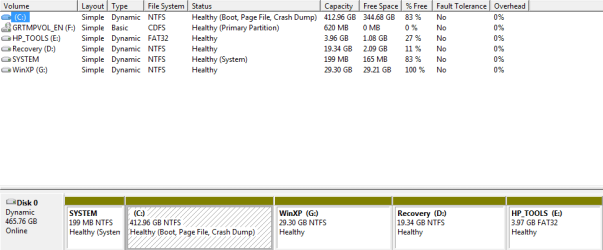
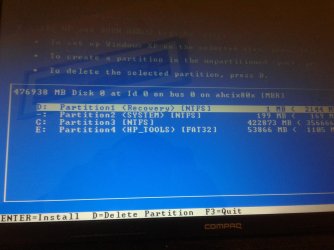
This is turning out to be a right pain in the behind, My laptop came with 7HP installed, I created a new partition for XP and ran the XP CD, It got to the point of "Starting setup" then I got a BSOD. I found out I needed SATA drivers, do downloaded them and slipstreamed the CD with Nlite, same problem BSOD, So got a version of XP with all SATA drivers included and hey presto it worked, However then issue I have now is the partition I created for XP does not show up in setup, it shows various recovery partitions etc but not the partition created for XP.
I deleted the partition and went into XP setup and pressed C to create partition in the unallocated space but C didn't do anything, the only option I have is to install on drive C over the top of 7, anyone any ideas as I am beat.
I deleted the partition and went into XP setup and pressed C to create partition in the unallocated space but C didn't do anything, the only option I have is to install on drive C over the top of 7, anyone any ideas as I am beat.
Attachments
My Computer
- OS
- W7

