
Problems Formatting HDD

Spikemaul

New member
Local time
4:20 PM
Messages
12
Hey guys, I have two HDD in my computer, a WD 1TB Black with Windows 7 Professional on it and an older WD 320GB. The 320 was used as a backup for vista when I had it installed and now that I have 7 installed I would like to format that drive and use it as a backup for 7. When I try to format the 320 windows says it can't format the drive. Why? There is nothing that I need anymore on this drive and would really like to prepare it for backing up my 1TB. FYI.....I did a clean install of 7 from the upgrade version of 7......if this makes any diference. I did have the 320 plugged in while the clean install was taking place. I thought Iread something about this a few months ago but I can't seem to find what I maybe read. Thanks in advance.
 

My Computer

OS
Windows 7 Professional X64
CPU
AMD Athlon 6000+ @3.33 GHZ
Motherboard
Gigabyte Ga-MA78G-DS3H
Memory
8 GB OCZ Platnium
Graphics Card(s)
EVGA GTX 275SC
Monitor(s) Displays
Samsung T220
Screen Resolution
1680 x 1050
Hard Drives
WD Cavair Black 1TB
WD 320GB
PSU
OCZ 750W Game Extream
Case
Gigabyte Poseidon
Cooling
Noctua NHU-12P fans and Heat Sink Cooler
Keyboard
Logitech MX 5000, Logitech G13
Mouse
Logitech MX 1000
Other Info
Logitech G13 Gamepad and Logitech Z-2300 Speakers
If you really don't need anything on the drive start "Computer Management" then click on "Disk Management" highlight the 320GB Drive and delete the partition. Once that is done re-create the partition and format it. Note: You will need to do this with Administrator Rights.
 

My Computer

Computer type
PC/Desktop
Computer Manufacturer/Model Number
Dell OP7010
OS
Windows 7 Enterprise (x64); Windows Server 2008 R2 (x64)
Memory
16GB
Monitor(s) Displays
4 Dell 24" LCD
Screen Resolution
1280x1024
Keyboard
Dell
Mouse
Dell Optical
Internet Speed
40meg
Perhaps the new install is using the old drive as the boot drive. Attaching a picture of your Disk Management window might help us see what is happening.
 

My Computer

Computer Manufacturer/Model Number
Homebuilt
OS
Windows 7 x64
CPU
i7-2600K
Motherboard
Asus P8Z77-v Pro
Memory
8 G
Graphics Card(s)
GTX 480
Sound Card
Onboard
Monitor(s) Displays
LG W2753V
Screen Resolution
1920x1080
Hard Drives
Crucial M4 128 G SSD
It's likely the 320gb contains the boot critical files for Win7 if it won't delete in Disk Mgmt.

Post back a screenshot of your full Disk Management drive map, using the Snipping Tool in Start Menu, attaching file using paper clip in Reply box. We can advise you the exact steps to fix this then.

Normally the procedure is to mark the drive inactive, mark Win7 HD active, then run Startup Repair from the booted Win7 DVD up to 3 separate times with reboots to write the MBR to the Win7 partition.

However we need to see the screenshot to advise you with certainty.
 
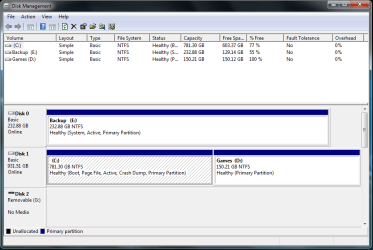
Here's the Disk Managment.
1-16-2010 12-41-06 AM.png

Now I remember what I read about that but I still need to fix it.
 

My Computer

OS
Windows 7 Professional X64
CPU
AMD Athlon 6000+ @3.33 GHZ
Motherboard
Gigabyte Ga-MA78G-DS3H
Memory
8 GB OCZ Platnium
Graphics Card(s)
EVGA GTX 275SC
Monitor(s) Displays
Samsung T220
Screen Resolution
1680 x 1050
Hard Drives
WD Cavair Black 1TB
WD 320GB
PSU
OCZ 750W Game Extream
Case
Gigabyte Poseidon
Cooling
Noctua NHU-12P fans and Heat Sink Cooler
Keyboard
Logitech MX 5000, Logitech G13
Mouse
Logitech MX 1000
Other Info
Logitech G13 Gamepad and Logitech Z-2300 Speakers
Normally the procedure is to mark the drive inactive, mark Win7 HD active, then run Startup Repair from the booted Win7 DVD up to 3 separate times with reboots to write the MBR to the Win7 partition.

How do I mark the 320 as inactive and the 1TB with Windows 7 on it as active?
 

My Computer

OS
Windows 7 Professional X64
CPU
AMD Athlon 6000+ @3.33 GHZ
Motherboard
Gigabyte Ga-MA78G-DS3H
Memory
8 GB OCZ Platnium
Graphics Card(s)
EVGA GTX 275SC
Monitor(s) Displays
Samsung T220
Screen Resolution
1680 x 1050
Hard Drives
WD Cavair Black 1TB
WD 320GB
PSU
OCZ 750W Game Extream
Case
Gigabyte Poseidon
Cooling
Noctua NHU-12P fans and Heat Sink Cooler
Keyboard
Logitech MX 5000, Logitech G13
Mouse
Logitech MX 1000
Other Info
Logitech G13 Gamepad and Logitech Z-2300 Speakers
First set Win7 HD as first HD to boot in BIOS, or swap HD cables, making sure Win7 HD is first HD to boot in BIOS boot order, after DVD drive.

Boot into Win7 DVD, select Repair my Computer on second screen, click through to Recovery Tools list, open a Command line and type:

DISKPART
LIST DISK
SELECT DISK # (# for Backup HD)
LIST PARTITION
SELECT PARTITION # (# for Backup partition)
INACTIVE
SELECT DISK # (for Win7 HD)
LIST PARTITION
SELECT PARTITION # (# for Win7 partition)
ACTIVE
EXIT

Now return to DVD Recovery Tools list, run Startup Repair up to 3 separate times with reboot to write the MBR to Win7 partition.
 
Last edited:
Boot into Win7 DVD, select Repair my Computer on second screen, click through to Recovery Tools list, open a Command line and type:

DISKPART
LIST DISK
SELECT DISK # (# for Backup HD)
LIST PARTITION
SELECT PARTITION # (# for Backup partition)
INACTIVE
SELECT DISK # (for Win7 HD)
LIST PARTITION
SELECT PARTITION # (# for Win7 partition)
ACTIVE
EXIT

Now return to DVD Recovery Tools list, run Startup Repair up to 3 separate times with reboot to write the MBR to Win7 partition.

I list disk 0 as inactive and disk one as active? Why is disk 0 the backup? Wouldn't the drive with 7 on it be listed as 0?
 

My Computer

OS
Windows 7 Professional X64
CPU
AMD Athlon 6000+ @3.33 GHZ
Motherboard
Gigabyte Ga-MA78G-DS3H
Memory
8 GB OCZ Platnium
Graphics Card(s)
EVGA GTX 275SC
Monitor(s) Displays
Samsung T220
Screen Resolution
1680 x 1050
Hard Drives
WD Cavair Black 1TB
WD 320GB
PSU
OCZ 750W Game Extream
Case
Gigabyte Poseidon
Cooling
Noctua NHU-12P fans and Heat Sink Cooler
Keyboard
Logitech MX 5000, Logitech G13
Mouse
Logitech MX 1000
Other Info
Logitech G13 Gamepad and Logitech Z-2300 Speakers
I list disk 0 as inactive and disk one as active? Why is disk 0 the backup? Wouldn't the drive with 7 on it be listed as 0?

It has to do with what port you plugged HD's on mobo.

The screenshot shows Backup partition as System Active which means the MBR was derailed to there during Win7 install, as installer looks for first active partition to place MBR. It now needs to be marked inactive using diskpart or free bootable Partition Wizard CD, so that MBR can be recovered to Win7 partition where it belongs.

If you want to make Backup DISK1 so that it can't derail the boot again by accidentally becoming marked active, then swap the cables to HD's. Make sure Win7 is HD set to boot first in BIOS boot order, after DVD.

using DISKPART commands given earlier or Partition Wizard booted CD, Determine which HD is which by size and partitioning, then select backup partition to mark inactive using exact DISKPART commands given or rightclick in PW to Modify>Set Inactive.

As Win7 partition is already marked active, as long as it is set first HD to boot in BIOS boot order (after DVD), the MBR should be recovered by booting Win7 DVD Repair console to run Startup Repair up to 3 separate times with reboot, to write the MBR to Win7 partition.
 
Thanks for all your help so far. I've done everything you told me but I still can't format the 320 gb HDD.
 

My Computer

OS
Windows 7 Professional X64
CPU
AMD Athlon 6000+ @3.33 GHZ
Motherboard
Gigabyte Ga-MA78G-DS3H
Memory
8 GB OCZ Platnium
Graphics Card(s)
EVGA GTX 275SC
Monitor(s) Displays
Samsung T220
Screen Resolution
1680 x 1050
Hard Drives
WD Cavair Black 1TB
WD 320GB
PSU
OCZ 750W Game Extream
Case
Gigabyte Poseidon
Cooling
Noctua NHU-12P fans and Heat Sink Cooler
Keyboard
Logitech MX 5000, Logitech G13
Mouse
Logitech MX 1000
Other Info
Logitech G13 Gamepad and Logitech Z-2300 Speakers
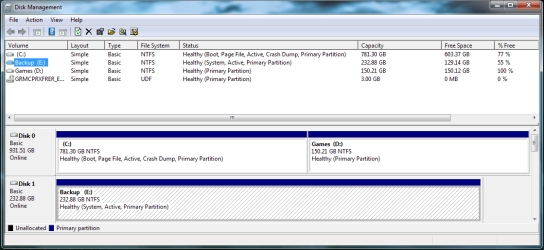
Here's another screenshot of Disk Managment after I set the WD 1TB with W7P on it as the first boot partition after the DVD drive in the Bios. I then did the DISKPART stuff to set the 320GB as inactive and the 1TB as active. Then I ran the startup repair Three times and booted into windows. Do I have to set the 320GB as active again to format?

1-16-2010 7-18-29 PM.png

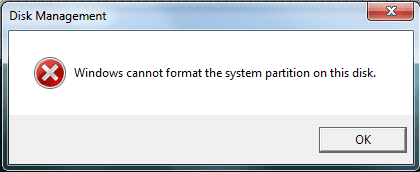
Here's what windows tells me after trying to format the 320GB.

1-16-2010 7-21-45 PM.png
 

My Computer

OS
Windows 7 Professional X64
CPU
AMD Athlon 6000+ @3.33 GHZ
Motherboard
Gigabyte Ga-MA78G-DS3H
Memory
8 GB OCZ Platnium
Graphics Card(s)
EVGA GTX 275SC
Monitor(s) Displays
Samsung T220
Screen Resolution
1680 x 1050
Hard Drives
WD Cavair Black 1TB
WD 320GB
PSU
OCZ 750W Game Extream
Case
Gigabyte Poseidon
Cooling
Noctua NHU-12P fans and Heat Sink Cooler
Keyboard
Logitech MX 5000, Logitech G13
Mouse
Logitech MX 1000
Other Info
Logitech G13 Gamepad and Logitech Z-2300 Speakers
As you can see, the old drive is still the system drive, which means it is still shown as the primary drive in the bios. You need to change the disk priority in the bios.

You could also disconnect the old drive which will make the new drive primary. Once you boot that way, it will stay primary even if you reattach the old drive.

If you do get it switched so the other drive is primary, be ready because your system will not boot, until you do a startup repair 2 or 3 times.

Once you do that, you will be able to format the old drive.
 

My Computer

Computer Manufacturer/Model Number
Homebuilt
OS
Windows 7 x64
CPU
i7-2600K
Motherboard
Asus P8Z77-v Pro
Memory
8 G
Graphics Card(s)
GTX 480
Sound Card
Onboard
Monitor(s) Displays
LG W2753V
Screen Resolution
1920x1080
Hard Drives
Crucial M4 128 G SSD
As you can see, the old drive is still the system drive, which means it is still shown as the primary drive in the bios. You need to change the disk priority in the bios.

You could also disconnect the old drive which will make the new drive primary. Once you boot that way, it will stay primary even if you reattach the old drive.

If you do get it switched so the other drive is primary, be ready because your system will not boot, until you do a startup repair 2 or 3 times.

Once you do that, you will be able to format the old drive.

I disconnected the old drive and then ran the startup repair twice and now everything's working properly. I formatted the 320GB drive and an currently doing my first backup onto it.

Thank you guys very much for your help with my problem. I discovered these forums about five months ago and have used them many times for problems that I have encountered. I have learnt alot here and I am having fun doing it.

SevenForums Kicks Ass!!! :D
 

My Computer

OS
Windows 7 Professional X64
CPU
AMD Athlon 6000+ @3.33 GHZ
Motherboard
Gigabyte Ga-MA78G-DS3H
Memory
8 GB OCZ Platnium
Graphics Card(s)
EVGA GTX 275SC
Monitor(s) Displays
Samsung T220
Screen Resolution
1680 x 1050
Hard Drives
WD Cavair Black 1TB
WD 320GB
PSU
OCZ 750W Game Extream
Case
Gigabyte Poseidon
Cooling
Noctua NHU-12P fans and Heat Sink Cooler
Keyboard
Logitech MX 5000, Logitech G13
Mouse
Logitech MX 1000
Other Info
Logitech G13 Gamepad and Logitech Z-2300 Speakers
Back
Top