Problems in dota

funtwo

New member
Hello to everyone i have some problems in dota.Usually when i play a game even if i have 50-60 ping i have lag , when we are making a gank my pc begin to lag and i can't do anything.If you need something to show you just tell me and i will provide it.

Those problems i didn't haved them on xp.

Ah yes i use windows 7 rc 7100
 
Last edited:

My Computer

OS
windows seven x64
CPU
AMD Athlon 64 3200+ @ 2000 MHz
Motherboard
Asus M2V
Memory
2560 MB
Graphics Card(s)
Radeon X300/X550/X1050 Series
Monitor(s) Displays
21"
I have same problem and I know it's not internet connection problem. Feels like it's firewall preventing or something, but even w/ firewall and everything turned off, it still give 3-5 second lag spike ever 5 seconds (patterned).
 

My Computer

Computer Manufacturer/Model Number
Toshiba Satellite
OS
Windows 7
Do you have the same problem when playing on other maps,like solo or other RPG maps? You need to find out if it's War3 causing the problem or it's only a dota issue. Dota is more resource consuming compared to other maps,but War3 is an old game too,so it should be a piece of cake for most pcs nowadays.
 

My Computer

Computer Manufacturer/Model Number
Thinkpad
OS
Windows 7 Ultimate 64bit
Mouse
Logitech MX518
Internet Speed
570kb/s :(
if you are playing on Garena or in Battle net the issue would be on your connection im playing wc3 dota maps in 7 with no problems
 

My Computer

OS
Windows 7 RTM Ultimate x64
CPU
AMD Athlon 64 x2 Dual Core Processor 5200+ 2.70ghz
Motherboard
MSI K9AGM4-L
Memory
2gb
Graphics Card(s)
ATI Radeon HD 3400
Monitor(s) Displays
1
Screen Resolution
1024 x 768
Hard Drives
250gb Seagate
Internet Speed
2mbps :(
This is what I would call knuckle bottle phenomena. I got that problem too not only in dota but other games as well
Here is what I did, hopefully It helps u too.
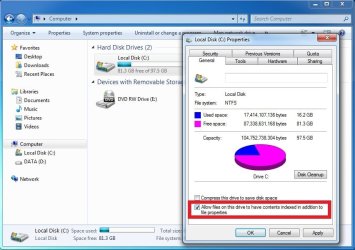
1/Turn off search index function in every partitions:

Turn off the tick mark as indicated
2/Turn off some others activities related to search function in every partitions
Windows Error Reporting Service
Windows Media Center Service Launcher
Windows Search
TCP/IP NetBIOS Helper
Diagnostic Policy Service
Distributed Link Tracking Client
IP Helper
Offline Files
Portable Device Enumerator Service
Print Spooler (only if u not using printer)
Protected Storage
Remote Registry
Secondary Logon
Security Center
Tablet PC Input Service
This can be applied to any operating systems because it turn off unnessesary applications to get better performance. Hopefully it helps somehow
 

Attachments

  • index1.jpg
    index1.jpg
    125 KB · Views: 737

My Computer

Computer Manufacturer/Model Number
Lenovo T400 2767 2JU
OS
Microsoft Window 7 Professional 32 bit
CPU
Intel Centrino2 vPro
Memory
2GB DDR3
Graphics Card(s)
ATI Radeon 3400
Sound Card
Conexant 20561 SmartAudio HD
Monitor(s) Displays
Thinkpad Display
Screen Resolution
1280x800x49 hertz
Case
Magnisium, Fe, etc..
Keyboard
embeded
Mouse
Logitech
Internet Speed
54Kb/s
I have same problem and I know it's not internet connection problem. Feels like it's firewall preventing or something, but even w/ firewall and everything turned off, it still give 3-5 second lag spike ever 5 seconds (patterned).
i also experience the same thing! i get only 30 ping on all hosts, and i still get the lag, 3-5 seconds, i thought it was my internet, so i googled alot, but i observed that its like my system is the one having the problem. i had an old laptop which had 1gb ram and 256mb video card, it didnt have these problems (well it had graphics problems with 256mb). Now with my new laptop, i5 430m, 2gb ram, intel hd graphics core i5, i get these long lags. can anyone help us?
 

My Computer

Computer Manufacturer/Model Number
Lenovo z460
OS
Windows 7 home premium (64 bit) Build 7600
CPU
Intel(R) Core(TM) i5 CPU M430 @ 2.27GHz (4CPUs).
Memory
2GB ram
Graphics Card(s)
Intel(R) HD Graphics (Core i5)
This is what I would call knuckle bottle phenomena. I got that problem too not only in dota but other games as well
Here is what I did, hopefully It helps u too.
1/Turn off search index function in every partitions:

Turn off the tick mark as indicated
2/Turn off some others activities related to search function in every partitions
Windows Error Reporting Service
Windows Media Center Service Launcher
Windows Search
TCP/IP NetBIOS Helper
Diagnostic Policy Service
Distributed Link Tracking Client
IP Helper
Offline Files
Portable Device Enumerator Service
Print Spooler (only if u not using printer)
Protected Storage
Remote Registry
Secondary Logon
Security Center
Tablet PC Input Service
This can be applied to any operating systems because it turn off unnessesary applications to get better performance. Hopefully it helps somehow

i cant find "2/" downwards, please give us step by step info. sorry , im not a techy guy. lol thanks =) :cry:
 

My Computer

Computer Manufacturer/Model Number
Lenovo z460
OS
Windows 7 home premium (64 bit) Build 7600
CPU
Intel(R) Core(TM) i5 CPU M430 @ 2.27GHz (4CPUs).
Memory
2GB ram
Graphics Card(s)
Intel(R) HD Graphics (Core i5)
This is what I would call knuckle bottle phenomena. I got that problem too not only in dota but other games as well
Here is what I did, hopefully It helps u too.
1/Turn off search index function in every partitions:

Turn off the tick mark as indicated
2/Turn off some others activities related to search function in every partitions
Windows Error Reporting Service
Windows Media Center Service Launcher
Windows Search
TCP/IP NetBIOS Helper
Diagnostic Policy Service
Distributed Link Tracking Client
IP Helper
Offline Files
Portable Device Enumerator Service
Print Spooler (only if u not using printer)
Protected Storage
Remote Registry
Secondary Logon
Security Center
Tablet PC Input Service
This can be applied to any operating systems because it turn off unnessesary applications to get better performance. Hopefully it helps somehow


Hi ttran, I already did what you suggested but they don't help.

I'm also having this dota lag problem as 'funtwo' and 'wzhuo2'.
Actually my friend who is using Windows7 32-bit has no problem at all with his dota, while I'm using 64-bit. Is this a compatibility issue with the 64-bit only? If so, I already did the compatibility testing and set to XP, but still it was pointless.

This lags/spikes issue has been quite irritating coz apparently (after searching in other forums) there is no fixed solution (I haven't found it at least)...Any idea? Or anyone know someone who has managed to fix this kind of problem?
 

My Computer

Computer Manufacturer/Model Number
HP
OS
Windows 7 Home Premium 64-bit (6.1, Build 7600)
CPU
i5 M430 @2.3Ghz
Memory
4GB RAM
Graphics Card(s)
Intel(R) Graphics Media Accelarator HD (Core i5)
Dota Problem solved

I've searched and searched for a solution, and finally found the solution to the problem. The problem was the graphics card and the standard display driver model that comes with the lab top. I had Intel graphics card with the Intel accelerated graphic display driver model, which sucks. Most of the time you can't download a new display driver model software, because it isn't compatible with the graphics card hardware, so you'll need to get a new graphics card. Nvidia is a good brand for graphics card. For future knowledge, don't get the graphics card that's built in, make sure it has external graphics card.
 

My Computer

Computer Manufacturer/Model Number
Toshiba Satellite
OS
Windows 7
I've searched and searched for a solution, and finally found the solution to the problem. The problem was the graphics card and the standard display driver model that comes with the lab top. I had Intel graphics card with the Intel accelerated graphic display driver model, which sucks. Most of the time you can't download a new display driver model software, because it isn't compatible with the graphics card hardware, so you'll need to get a new graphics card. Nvidia is a good brand for graphics card. For future knowledge, don't get the graphics card that's built in, make sure it has external graphics card.

So you changed your graphic card in your laptop and no more lag playing dota?
 

My Computer

Computer Manufacturer/Model Number
HP
OS
Windows 7 Home Premium 64-bit (6.1, Build 7600)
CPU
i5 M430 @2.3Ghz
Memory
4GB RAM
Graphics Card(s)
Intel(R) Graphics Media Accelarator HD (Core i5)
I've searched and searched for a solution, and finally found the solution to the problem. The problem was the graphics card and the standard display driver model that comes with the lab top. I had Intel graphics card with the Intel accelerated graphic display driver model, which sucks. Most of the time you can't download a new display driver model software, because it isn't compatible with the graphics card hardware, so you'll need to get a new graphics card. Nvidia is a good brand for graphics card. For future knowledge, don't get the graphics card that's built in, make sure it has external graphics card.

but i have an intel HD Graphics card(i5) on my new laptop. giving around 750mb of video memory. like i said in my earlier posts, i had an old laptop with around 256mb of video memory and doesnt experience this 3-5 seconds of lag. so i guess its not my video card then?
 

My Computer

Computer Manufacturer/Model Number
Lenovo z460
OS
Windows 7 home premium (64 bit) Build 7600
CPU
Intel(R) Core(TM) i5 CPU M430 @ 2.27GHz (4CPUs).
Memory
2GB ram
Graphics Card(s)
Intel(R) HD Graphics (Core i5)
This is in no way related to your video cards. Can you guys post these? -- CPU, GPU (graphics processor), version of Windows 7 used (edition/RC), memory, internet connection and ISP (i.e. AreaTech, Globe)
 

My Computer

Computer Manufacturer/Model Number
Lenovo IdeaPad Y460
OS
64-Bit Windows 7 - Home Premium Edition; Linux Mint 11
CPU
2.67-GHz Intel Core i7-620M
Motherboard
Lenovo KL2
Memory
8-GB DDR3 RAM
Graphics Card(s)
1-GB ATI Radeon HD 5650M; Intel HD Series
Sound Card
Realtek High Definition Audio; Dolby Home Theater 3
Screen Resolution
1366 X 768 (Default); 1280 X 720 (For Video Gaming)
Hard Drives
656-GB Samsung Hybrid HDD (With Integrated 32-GB SSD); 1-TB Seagate HDD (In A.C. Ryan Enclosure And USB)
Mouse
Logitech M305 Wireless Mouse
Internet Speed
2 Mbps (Globe DSL); 1 Mbps (Sun Broadband Wireless Postpaid)

My Computer

Computer Manufacturer/Model Number
Lenovo T400 2767 2JU
OS
Microsoft Window 7 Professional 32 bit
CPU
Intel Centrino2 vPro
Memory
2GB DDR3
Graphics Card(s)
ATI Radeon 3400
Sound Card
Conexant 20561 SmartAudio HD
Monitor(s) Displays
Thinkpad Display
Screen Resolution
1280x800x49 hertz
Case
Magnisium, Fe, etc..
Keyboard
embeded
Mouse
Logitech
Internet Speed
54Kb/s
Yes, I actually changed a laptop with Nvidia graphics card and the problem was fixed. no more lag in Dota or any other 3D graphics games. I'm 100% sure it's the graphics card that's caused the lag in this case, if firewall or internet connection isn't the problem.
 

My Computer

Computer Manufacturer/Model Number
Toshiba Satellite
OS
Windows 7
FYI.... Intel have very shitty graphic card and display driver model.
 

My Computer

Computer Manufacturer/Model Number
Toshiba Satellite
OS
Windows 7
Yeap, so I've tried about everything out there...no fix. Called Lenovo support; they basically can't do anything other than replace my system with different OS/specs/etc (I have a 64 bit)...So is this an issue that Microsoft should / is going to fix...
 

My Computer

Computer Manufacturer/Model Number
Lenovo L412
OS
Windows 7: 64-bit
Graphics Card(s)
Intel GMA HD
FYI.... Intel have very shitty graphic card and display driver model.
It's not even a graphics "card". It's a part of your motherboard.

I currently use an Intel 4500MHD chipset. No lags here. As for its (latest) display driver, I wouldn't call it shit, compared to its old version counterpart. It's a huge improvement so far. I don't know why Intel wouldn't bother to update the drivers of its other non-HD GPUs with this new one.

EDIT: I however remember a problem rooting from the crappy Intel GPU's driver itself, which CAN be fixed. If you guys with this lag problem have Intel GPUs, please tell me.
 

My Computer

Computer Manufacturer/Model Number
Lenovo IdeaPad Y460
OS
64-Bit Windows 7 - Home Premium Edition; Linux Mint 11
CPU
2.67-GHz Intel Core i7-620M
Motherboard
Lenovo KL2
Memory
8-GB DDR3 RAM
Graphics Card(s)
1-GB ATI Radeon HD 5650M; Intel HD Series
Sound Card
Realtek High Definition Audio; Dolby Home Theater 3
Screen Resolution
1366 X 768 (Default); 1280 X 720 (For Video Gaming)
Hard Drives
656-GB Samsung Hybrid HDD (With Integrated 32-GB SSD); 1-TB Seagate HDD (In A.C. Ryan Enclosure And USB)
Mouse
Logitech M305 Wireless Mouse
Internet Speed
2 Mbps (Globe DSL); 1 Mbps (Sun Broadband Wireless Postpaid)
For those who have Intel HD graphics, try this
1. Be sure you have the LATEST driver
2. Go to Intel's graphics properties
3. Go to 3D settings
4A. Try adjusting the 3D Preference to "Performance"
4B. Better yet, try changing the custom settings

  1. Texture Quality to Balance (for those with X3100 and lower, I suggest you go with Performance, but please note the reduced texture and model quality in your games when you go for this)
  2. Anisotropic Filtering to Application Settings
  3. Vertex Processing to either Default or Enable Software Processing (this depends on the type of GPU and CPU you use; I recommend you test each setting and see what performs best)
  4. Vertical Sync to Application Settings (Important Note: Setting the Vertical Sync on always result to LAG)
 

My Computer

Computer Manufacturer/Model Number
Lenovo IdeaPad Y460
OS
64-Bit Windows 7 - Home Premium Edition; Linux Mint 11
CPU
2.67-GHz Intel Core i7-620M
Motherboard
Lenovo KL2
Memory
8-GB DDR3 RAM
Graphics Card(s)
1-GB ATI Radeon HD 5650M; Intel HD Series
Sound Card
Realtek High Definition Audio; Dolby Home Theater 3
Screen Resolution
1366 X 768 (Default); 1280 X 720 (For Video Gaming)
Hard Drives
656-GB Samsung Hybrid HDD (With Integrated 32-GB SSD); 1-TB Seagate HDD (In A.C. Ryan Enclosure And USB)
Mouse
Logitech M305 Wireless Mouse
Internet Speed
2 Mbps (Globe DSL); 1 Mbps (Sun Broadband Wireless Postpaid)
For those who have Intel HD graphics, try this
1. Be sure you have the LATEST driver
2. Go to Intel's graphics properties
3. Go to 3D settings
4A. Try adjusting the 3D Preference to "Performance"
4B. Better yet, try changing the custom settings

  1. Texture Quality to Balance (for those with X3100 and lower, I suggest you go with Performance, but please note the reduced texture and model quality in your games when you go for this)
  2. Anisotropic Filtering to Application Settings
  3. Vertex Processing to either Default or Enable Software Processing (this depends on the type of GPU and CPU you use; I recommend you test each setting and see what performs best)
  4. Vertical Sync to Application Settings (Important Note: Setting the Vertical Sync on always result to LAG)


Setting to the 'performance' level helps a bit, however the frequent lag is still there. I am not sure yet whether I should change my graphic card or not. I used to have windows xp with intel graphic card and it went well with dota.
I've tried to look at the other forums and tried evrything they suggested, but so far none of them works.

As shown in 'dxdiag', my system specs:
Operating System: Windows 7 Home Premium 64-bit (6.1, Build 7600) (7600.win7_gdr.100226-1909)
System Manufacturer: Hewlett-Packard
System Model: HP Pavilion dv4 Notebook PC
Processor: Intel(R) Core(TM) i5 CPU M 430 @ 2.27GHz (4 CPUs), ~2.3GHz
Memory: 4096MB RAM

My display info:
Card name: Intel(R) Graphics Media Accelerator HD
Manufacturer: Intel Corporation
Chip type: Intel(R) Graphics Media Accelerator HD (Core i5)
Display Memory: 1696 MB
Dedicated Memory: 64 MB
Shared Memory: 1632 MB
Current Mode: 1280 x 800 (32 bit) (60Hz)
Monitor Name: Generic PnP Monitor
Monitor Model: unknown
Native Mode: 1280 x 800(p) (59.994Hz)
Driver Name: igdumd64.dll,igd10umd64.dll,igdumdx32,igd10umd32
Driver File Version: 8.15.0010.1986 (English)
Driver Version: 8.15.10.1986
DDI Version: 10
Driver Model: WDDM 1.1
Driver Attributes: Final Retail
Driver Date/Size: 10/30/2009 15:23:10, 5956608 bytes

 

My Computer

Computer Manufacturer/Model Number
HP
OS
Windows 7 Home Premium 64-bit (6.1, Build 7600)
CPU
i5 M430 @2.3Ghz
Memory
4GB RAM
Graphics Card(s)
Intel(R) Graphics Media Accelarator HD (Core i5)
Back
Top