Problems in Dual Boot win 7 from win XP

carlton

New member
Local time
12:29 PM
Messages
2
Location
Mumbai, India
Hi,
I have Windows XP installed and I tried to install Windows 7 to do a Dual boot with Windows 7 and XP.
There was no problem during installation of Windows 7 but now I am unable to ascess Windows XP.

I checked many online solutions to do a Dual boot.
Most of them required to resize the Win XP partition and create a new one for Win 7.

I have a single hard drive with 3 partitions.
C: 30GB System Primary Partition
D: 134GB Logical Drive
E: 130GB Logical Drive
F: 4GB Logical Drive (resized E drive)

I have XP installed on F Drive logical partition .
Then I installed Win 7 on C drive primary partition.
But now i can only run Win 7.

Is it that I need to install both the OS's on the Primary Partition???. :confused:

Will the dual boot work in the way I am tried to install it. :(
Are there any ways to do it how the way I did it.
 

My Computer

OS
windows xp
CPU
intel core 2 duo processor e6320 1.86ghz 1066 mhz FSB 4MB L2
Motherboard
Intel DG965ry DESKTOP SERIES
Memory
6GB
Graphics Card(s)
Nvidia 8600GT 256MB 128Bit
Sound Card
onboard
Monitor(s) Displays
samtron 12"
Hard Drives
320GB Sata hard Drive
Attaching a snipping tool picture of your disk management window might help.

If you have only one primary partition, the boot files must be there. Win 7 should have just incorporated the XP boot files into its own. But the requested picture will help.

You might also check the partitions and make sure the XP install is still where you think it is. And I am assuming when you say you can't access XP, you mean no boot menu option and not an error message when trying.
 

My Computer

Computer Manufacturer/Model Number
Homebuilt
OS
Windows 7 x64
CPU
i7-2600K
Motherboard
Asus P8Z77-v Pro
Memory
8 G
Graphics Card(s)
GTX 480
Sound Card
Onboard
Monitor(s) Displays
LG W2753V
Screen Resolution
1920x1080
Hard Drives
Crucial M4 128 G SSD
The XP MBR could not be updated by Win7 during install because it is on a logical partition.

It is likely you can add XP to the dual boot by installing EasyBCD 2.0 beta to Win7, adding XP on Add/Remove tab, accept XP boot files, restart.

We can advise you for certain if you'll post back a screenshot of your full Disk management drive map, using Snipping Tool in Start Menu, attach file using paper clip in reply box.
 
Last edited:
Hi,
I have Windows XP installed and I tried to install Windows 7 to do a Dual boot with Windows 7 and XP.
There was no problem during installation of Windows 7 but now I am unable to ascess Windows XP.

I checked many online solutions to do a Dual boot.
Most of them required to resize the Win XP partition and create a new one for Win 7.

I have a single hard drive with 3 partitions.
C: 30GB System Primary Partition
D: 134GB Logical Drive
E: 130GB Logical Drive
F: 4GB Logical Drive (resized E drive)

I have XP installed on F Drive logical partition .
Then I installed Win 7 on C drive primary partition.
But now i can only run Win 7.

Is it that I need to install both the OS's on the Primary Partition???. :confused:

Will the dual boot work in the way I am tried to install it. :(
Are there any ways to do it how the way I did it.


Personally, I would partition the Win 7 partition no less than 100gb, the Win XP partition no less than 8gb.
 

My Computer

OS
ME/XP/Vista/Win7
Windows XP can be installed on a extended (logical ) partiton but the boot loader must be and will be on a primary and active partition. I suspect that the boot loader for XP was on the C: partition and if you formated that partition during the Window 7 intall, it erased the XP boot. You can get a free program called EasyBCD and add XP as an operating system, thus creating a dual boot.
 

My Computer

Computer type
PC/Desktop
Computer Manufacturer/Model Number
Custom Built
OS
Windows 10 Pro x64, Windows 8.1 Pro x64, Windows 7 Ultimate x64 SP1,
CPU
INTEL i9-7920X LGA 2066
Motherboard
Gigabyte X299-WU8 F3
Memory
64 GB (4 X 16 GB) G-Skill V Series DDR4 3200 Quad Channel
Graphics Card(s)
EVGA GTX 1060 SC 3 GB
Sound Card
Realtek Onboard ALC1220
Monitor(s) Displays
2 x Samsung S27E310
Screen Resolution
1920x1080
Hard Drives
Samsung 2 x 970 EVO Plus 500 GB NVMe
1 x 6TB WD 6003FZBX SATA
1 x 6TB WD 60EFRX SATA
12 x 3TB WD 30EFRX SATA
PSU
Seasonic X-1050
Case
Thermaltake Armor+
Cooling
Corsair H80i V2 Liquid AOI Cooler
Keyboard
Logitech G510s
Mouse
Logitech MX Master 2S
Internet Speed
200 Mb/s
Antivirus
ESET NOD32 13.1
Browser
EDGE (Dev, Canary, Beta), Chrome
Other Info
ASUS RT-AC68U router
Malwarebytes 4.0.4
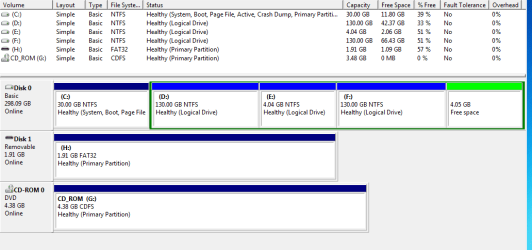
Here is the disk management screenshot......

Windows 7 is on C drive

Windows XP is installed on E drive ...And I did format C drive during Win 7 Setup cause there were some extra folders that I wanted deleted.

Now If I want Xp on logical E Drive and Win 7 on Primary C Drive...what do I DO?

I dont see any Win XP selection on startup nor any error.

I still havent used Easy BCD or VistaBootPro.....
 

Attachments

  • disk management.PNG
    disk management.PNG
    15.2 KB · Views: 40

My Computer

OS
windows xp
CPU
intel core 2 duo processor e6320 1.86ghz 1066 mhz FSB 4MB L2
Motherboard
Intel DG965ry DESKTOP SERIES
Memory
6GB
Graphics Card(s)
Nvidia 8600GT 256MB 128Bit
Sound Card
onboard
Monitor(s) Displays
samtron 12"
Hard Drives
320GB Sata hard Drive
You will need to put the XP boot files (ntdetect, ntldr, boot.ini) back on the system partition. You will need to alter boot.ini so it shows partition(3) or (4) depending on where XP really is.

After that, you will need to add the option to the boot menu using bcdedit.

EasyBCD will do all this for you. If you want to use bcdedit, there are tutorials showing how to add XP.
 

My Computer

Computer Manufacturer/Model Number
Homebuilt
OS
Windows 7 x64
CPU
i7-2600K
Motherboard
Asus P8Z77-v Pro
Memory
8 G
Graphics Card(s)
GTX 480
Sound Card
Onboard
Monitor(s) Displays
LG W2753V
Screen Resolution
1920x1080
Hard Drives
Crucial M4 128 G SSD
Install EasyBCD 2.0 beta after doing quick registration to use beta.

Add XP on Add/Remove tab, accept offered boot files, Save, restart.

You should have Dual Boot Menu. If not, post back screenshot of your Easy listings.

The best arrangement would have been to make a new Primary partition for XP, using free Partition Wizard CD if necessary.
 
Back
Top