Problems in Personalizing Desktop

rowbh91

New member
Local time
2:06 PM
Messages
9
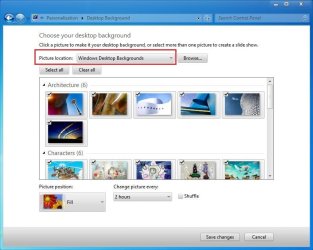
Hi, good day everyone. Normally when you right click desktop > click on personalize > then click your theme > click on "Desktop Background", then u can normally see your own customized desktop background. The problem lies here, it keeps on automatically showing "Solid Color" instead of My Pictures folder, and when ever i try to change the folder path, it says this "No items match your search.".

I have try every single step and make sure i chose/picked/typed in the correct folder path and click on "Save Changes" but it still the same by showing "No items match your search".

The day before this works normally and now something is wrong. Can anyone help me please?
 

My Computer

OS
Windows 7 Professional
I dont know which folder path you trying but....They all have to be in c:\users\your name\ application data\local\microsoft\windows\theme
 

My Computer

Computer Manufacturer/Model Number
Mesh
OS
win7 ultimate 32 , 64 ,XP
CPU
3.40
Memory
4 GB
Graphics Card(s)
GeForce GTX 480
Sound Card
Realtek
Monitor(s) Displays
LG 28" LCD
Screen Resolution
1600X1024
Hard Drives
2X500GB HDD sata
Western Digital Usb 2TB
PSU
650w
Keyboard
Wireless Logitech
Mouse
Wireless Logitech
Internet Speed
50 MB
I dont know which folder path you trying but....They all have to be in c:\users\your name\ application data\local\microsoft\windows\theme

Thank you for replying but, are you sure is ...\application data\.. cause i couldn't locate it :sarc:

ops sorry, my bad..have to allow hidden files to be viewed.. but still it hasn't solved my problem :'(
 
Last edited by a moderator:

My Computer

OS
Windows 7 Professional
Application data is a hidden folder.. you have to unhide it from >tools> folder option>view>show hidden folder
 

My Computer

Computer Manufacturer/Model Number
Mesh
OS
win7 ultimate 32 , 64 ,XP
CPU
3.40
Memory
4 GB
Graphics Card(s)
GeForce GTX 480
Sound Card
Realtek
Monitor(s) Displays
LG 28" LCD
Screen Resolution
1600X1024
Hard Drives
2X500GB HDD sata
Western Digital Usb 2TB
PSU
650w
Keyboard
Wireless Logitech
Mouse
Wireless Logitech
Internet Speed
50 MB
Try a simple way . Go to a folder location where your images are stored , right click on a particular image, and set it as wallpaper .

BTW ... the default wallpaper location is C:\Windows\Web\Wallpaper
 
Last edited by a moderator:

My Computer

Computer type
PC/Desktop
Computer Manufacturer/Model Number
Self Assembled
OS
Microsoft Windows 10 Pro Insider Preview 64-bit
CPU
Intel(R) Core(TM) i3-4130 CPU @ 3.40GHz
Motherboard
Gigabyte Technology Co., Ltd. B85M-D3H
Memory
Corsair Vengence 4GB x2 (8.00GB Dual-Channel DDR3 @ 798MHz)
Graphics Card(s)
2047MB GeForce GTS 450 (ZOTAC International)
Sound Card
Onboard (Realtek High Definition Audio)
Monitor(s) Displays
LG Flatron E2040T
Screen Resolution
1600x900
Hard Drives
Western Digital 1 TB
Seagate 500 GB
PSU
Corsair VS550
Case
Cooler Master K380
Cooling
Cooler Master Seidon 120V Plus
Keyboard
Logitech MK260r
Mouse
Logitech MK260r
Internet Speed
PMPL Broadband
Antivirus
Windows Defender + MBAM
Browser
Firefox
Other Info
Dell Studio 15" Laptop
Is the problem here Theme or wallpaper ?????
C:\Windows\Web\Wallpaper is for Default Aero theme or call it wallpaper
c:\users\your name\ application data\local\microsoft\windows\theme... for other theme
 

My Computer

Computer Manufacturer/Model Number
Mesh
OS
win7 ultimate 32 , 64 ,XP
CPU
3.40
Memory
4 GB
Graphics Card(s)
GeForce GTX 480
Sound Card
Realtek
Monitor(s) Displays
LG 28" LCD
Screen Resolution
1600X1024
Hard Drives
2X500GB HDD sata
Western Digital Usb 2TB
PSU
650w
Keyboard
Wireless Logitech
Mouse
Wireless Logitech
Internet Speed
50 MB
Is the problem here Theme or wallpaper ?????
C:\Windows\Web\Wallpaper is for Default Aero theme or call it wallpaper
c:\users\your name\ application data\local\microsoft\windows\theme... for other theme
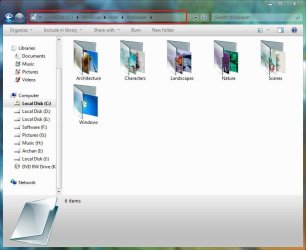
C:\Windows\Web\Wallpaper : all the default themes' wallpapers , categorically in different folders .

Capture1.JPG

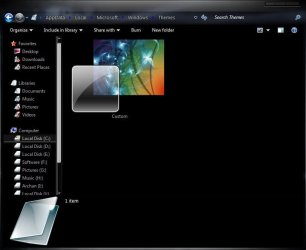
c:\users\your name\ application data\local\microsoft\windows\theme... : Only the custom theme at present in use . Changed as the theme is changed

Capture.JPG Capture2.JPG

If rowbh91 tells us what is the theme he is trying to apply, and attach a screenshot of the window hwere the changing wallpaper is not permitted, I hope we could help him better :D
 

My Computer

Computer type
PC/Desktop
Computer Manufacturer/Model Number
Self Assembled
OS
Microsoft Windows 10 Pro Insider Preview 64-bit
CPU
Intel(R) Core(TM) i3-4130 CPU @ 3.40GHz
Motherboard
Gigabyte Technology Co., Ltd. B85M-D3H
Memory
Corsair Vengence 4GB x2 (8.00GB Dual-Channel DDR3 @ 798MHz)
Graphics Card(s)
2047MB GeForce GTS 450 (ZOTAC International)
Sound Card
Onboard (Realtek High Definition Audio)
Monitor(s) Displays
LG Flatron E2040T
Screen Resolution
1600x900
Hard Drives
Western Digital 1 TB
Seagate 500 GB
PSU
Corsair VS550
Case
Cooler Master K380
Cooling
Cooler Master Seidon 120V Plus
Keyboard
Logitech MK260r
Mouse
Logitech MK260r
Internet Speed
PMPL Broadband
Antivirus
Windows Defender + MBAM
Browser
Firefox
Other Info
Dell Studio 15" Laptop
Thank you for reply madmansam and arc, i really appreciate it :).

This is what happen when i try to create a pictures slide show as my desktop wallpaper.


As you can see it does not have any pictures in the Folder under C:\Users\Han\Pictures and i can confirm there is some folder containing pictures inside C:\Users\Han\Pictures. Why is it not appearing there? :sarc:
 

My Computer

OS
Windows 7 Professional
Try to brows picture library not my picture.
 

My Computer

Computer Manufacturer/Model Number
Mesh
OS
win7 ultimate 32 , 64 ,XP
CPU
3.40
Memory
4 GB
Graphics Card(s)
GeForce GTX 480
Sound Card
Realtek
Monitor(s) Displays
LG 28" LCD
Screen Resolution
1600X1024
Hard Drives
2X500GB HDD sata
Western Digital Usb 2TB
PSU
650w
Keyboard
Wireless Logitech
Mouse
Wireless Logitech
Internet Speed
50 MB
Try to brows picture library not my picture.
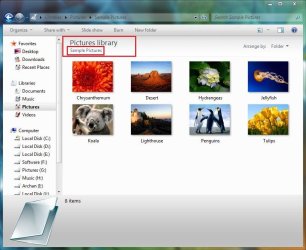
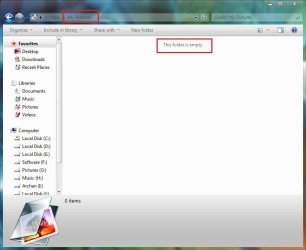
I second ! These are the actual locations with default setup :
Capture.JPG Capture1.JPG

So Pictures library includes some default sample pictures, whereas my pictures folder remain empty. But athre is another location : windows desktop background (manual browse link was C:\windows\Web\Wallpaper )
Capture2.JPG

Whatever it may be, If you dont use desktop slideshow, the best option for you is to browse to the picture manually, right click on it and set it as desktop wallpaper / background .
 

My Computer

Computer type
PC/Desktop
Computer Manufacturer/Model Number
Self Assembled
OS
Microsoft Windows 10 Pro Insider Preview 64-bit
CPU
Intel(R) Core(TM) i3-4130 CPU @ 3.40GHz
Motherboard
Gigabyte Technology Co., Ltd. B85M-D3H
Memory
Corsair Vengence 4GB x2 (8.00GB Dual-Channel DDR3 @ 798MHz)
Graphics Card(s)
2047MB GeForce GTS 450 (ZOTAC International)
Sound Card
Onboard (Realtek High Definition Audio)
Monitor(s) Displays
LG Flatron E2040T
Screen Resolution
1600x900
Hard Drives
Western Digital 1 TB
Seagate 500 GB
PSU
Corsair VS550
Case
Cooler Master K380
Cooling
Cooler Master Seidon 120V Plus
Keyboard
Logitech MK260r
Mouse
Logitech MK260r
Internet Speed
PMPL Broadband
Antivirus
Windows Defender + MBAM
Browser
Firefox
Other Info
Dell Studio 15" Laptop
Mmm, i chose "Picture Library" instead of "My Pictures" it's still the same. The only different is when i chose "My Pictures" is shows :"No item match your search" where as "Picture Library" shows nothing at all, its like bugged. It worked normally last time, and im not sure is it settings fault or bugged.

Actually whatever folder you picked from "browse" the system will at least show/list out all the picture in that folder in order to make a picture slide show. Feels like giving up on this problem and just use plain normal wallpaper instead of slide show ~.~ .
 

My Computer

OS
Windows 7 Professional
Mmm, i chose "Picture Library" instead of "My Pictures" it's still the same. The only different is when i chose "My Pictures" is shows :"No item match your search" where as "Picture Library" shows nothing at all, its like bugged. It worked normally last time, and im not sure is it settings fault or bugged.

Actually whatever folder you picked from "browse" the system will at least show/list out all the picture in that folder in order to make a picture slide show. Feels like giving up on this problem and just use plain normal wallpaper instead of slide show ~.~ .

If it seems to you that there may be a settings fault, run http://www.sevenforums.com/tutorials/1538-sfc-scannow-command-system-file-checker.html to get all the settings checked and corrected, and get them back to windows default .
 

My Computer

Computer type
PC/Desktop
Computer Manufacturer/Model Number
Self Assembled
OS
Microsoft Windows 10 Pro Insider Preview 64-bit
CPU
Intel(R) Core(TM) i3-4130 CPU @ 3.40GHz
Motherboard
Gigabyte Technology Co., Ltd. B85M-D3H
Memory
Corsair Vengence 4GB x2 (8.00GB Dual-Channel DDR3 @ 798MHz)
Graphics Card(s)
2047MB GeForce GTS 450 (ZOTAC International)
Sound Card
Onboard (Realtek High Definition Audio)
Monitor(s) Displays
LG Flatron E2040T
Screen Resolution
1600x900
Hard Drives
Western Digital 1 TB
Seagate 500 GB
PSU
Corsair VS550
Case
Cooler Master K380
Cooling
Cooler Master Seidon 120V Plus
Keyboard
Logitech MK260r
Mouse
Logitech MK260r
Internet Speed
PMPL Broadband
Antivirus
Windows Defender + MBAM
Browser
Firefox
Other Info
Dell Studio 15" Laptop
okay, thanks for the advise and hopefully it works !! :D
 

My Computer

OS
Windows 7 Professional

My Computer

Computer type
PC/Desktop
Computer Manufacturer/Model Number
Self Assembled
OS
Microsoft Windows 10 Pro Insider Preview 64-bit
CPU
Intel(R) Core(TM) i3-4130 CPU @ 3.40GHz
Motherboard
Gigabyte Technology Co., Ltd. B85M-D3H
Memory
Corsair Vengence 4GB x2 (8.00GB Dual-Channel DDR3 @ 798MHz)
Graphics Card(s)
2047MB GeForce GTS 450 (ZOTAC International)
Sound Card
Onboard (Realtek High Definition Audio)
Monitor(s) Displays
LG Flatron E2040T
Screen Resolution
1600x900
Hard Drives
Western Digital 1 TB
Seagate 500 GB
PSU
Corsair VS550
Case
Cooler Master K380
Cooling
Cooler Master Seidon 120V Plus
Keyboard
Logitech MK260r
Mouse
Logitech MK260r
Internet Speed
PMPL Broadband
Antivirus
Windows Defender + MBAM
Browser
Firefox
Other Info
Dell Studio 15" Laptop
It's an old thread, but since I didn't find anything else related, I'm using this one.

As for the original issue, it's definitely bugged, a lot it seems.
I have the same problem, but it my case, it's only the default "Windows desktop backgrounds" list being empty.
I haven't done anything that could possibly cause this, AFAIK. Apart from adding some of my own directories to the selection of locations to choose from. What's more important, it's affecting ALL users, including admin..

And here comes another glitch - one of my custom folders completely disappeared from the selection. There is just something wrong.

I tried anything I could think of, including deleting custom added folders from registry. Well, that gets rid of my custom folders, but problem with default background list being empty persists.

I noticed one registry hive:
Code:
[HKEY_LOCAL_MACHINE\SOFTWARE\Microsoft\Windows\CurrentVersion\Explorer\Wallpapers\knownfolders\0\Windows Wallpapers\MergeFolders]
"%SystemRoot%\web\wallpaper"=hex(2):00,00
"%SystemRoot%\web\wallpaper\Characters"=hex(2):00,00
"%SystemRoot%\web\wallpaper\Landscapes"=hex(2):00,00
"%SystemRoot%\web\wallpaper\Nature"=hex(2):00,00
"%SystemRoot%\web\wallpaper\Scenes"=hex(2):00,00
"%SystemRoot%\web\wallpaper\Windows"=hex(2):00,00
"%SystemRoot%\web\wallpaper\Architecture"=hex(2):00,00
Sure enough, deleting it will also get rid of "Windows desktop backgrounds" from the folder selection.
So, if it's properly in the registry, why is the list empty? I also tried renaming one of the reg. entries to point directly to the specified folder, just in case it has a problem with %systemroot% var, to no avail.

I wonder what else can be involved. :-?
 

My Computer

OS
7even Pro x64 retail
regards to this matter, somehow, after sometime (not sure how long:sarc:) it returned back to normal. As in every folder is back with all the pictures in it without any glitch, or bug, like brand new :D. Not sure how it is done tho..or what i did to make it happen, sorry cant help much here.

The only problem now is, how do i delete the duplicated folder name in the personalize > Desktop background > Pictures Location.
 

My Computer

OS
Windows 7 Professional
Hmm, maybe you're not aware of it, but you pointed me to the right direction. The fact, that it fixed itself in your case in time made me think. What changes in time? Icon cache? Well, let's delete it. Bingo! Problem fixed, list is now properly populated with all default backgrounds in it.
BUT. I deleted only my (standard) user's account cache, but it fixed the problem for 2 other users, including admin. My guess is, that if the cache is missing for one user, Win tries to generate new one for all users. Other than that, I have no explanation. So thanx! :geek:

As for deleting your custom folders from the list, AFAIK, there is only one way:
Code:
HKEY_CURRENT_USER\Software\Microsoft\Windows\CurrentVersion\Explorer\Wallpapers\Images
Delete either the whole images key, or just some of it's contents. Unfortunately, key names make absolutely no sense regarding the folders location, so one doesn't know which folder gets removed from the list upon deleting particular key. :(
 

My Computer

OS
7even Pro x64 retail
if i delete via registry entry, will it remove all my pictures as well (ex in C:\Library\Picture) something like that? or just those custom personalize?
 

My Computer

OS
Windows 7 Professional
If you delete some entries in the images key I posted above, it will only delete respective folders from the list of available backgrounds. It' will NOT delete any files.

And if you delete the whole images key, only the default background groups will be available to choose from. Again, no actual files will be deleted.

Simple button for removing particular folder from the list would be helpful though. Time for enhancement request? Well, it's not Linux, but maybe they will think about it. :D
 

My Computer

OS
7even Pro x64 retail
haha, thanks for "discovering" a way to fix this simple yet..uncommon glitch? i guess..lol
 

My Computer

OS
Windows 7 Professional
Back
Top