
snowstargraze
New member
- Local time
- 5:38 AM
- Messages
- 1
Problems installing a program and using "open containning folder"
Hey all,
recently I came across alot of themes on the internet and I decided to change my old one, I also replaced my explorer.exe and explorerframe.dll, everything seems to be fine until I tried installing a program or using the "open containning folder" function in firefox download manager.
(This is the pre-load program of Diablo 3)
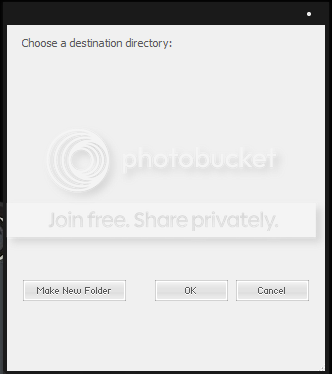
I cannot select or navigate to where I want to install programs anymore
As for using "open containning folder" function in firefox
a error message will pop out and say "class not registered", once I click ok I cant interact with the download manager (it doesnt freeze, just doesnt response to my mouse right click anymore, double left click still works) and only about 10 seconds later my download folder would pop up.
Not just this, I been unable to download some games that uses a client though I am not sure if it is blocked by my college's firewall or is a problem related to my original question.
does anyone know how to solve this? thanks in advance!
System: Windows 7 Ultimate 64 Bit
Tried solutions:
Changing themes (doesnt help)
Changing explorer.exe and explorerframe.dll (not sure if I did it all right but my buttons are back to normal)
Hey all,
recently I came across alot of themes on the internet and I decided to change my old one, I also replaced my explorer.exe and explorerframe.dll, everything seems to be fine until I tried installing a program or using the "open containning folder" function in firefox download manager.
(This is the pre-load program of Diablo 3)
I cannot select or navigate to where I want to install programs anymore
As for using "open containning folder" function in firefox
a error message will pop out and say "class not registered", once I click ok I cant interact with the download manager (it doesnt freeze, just doesnt response to my mouse right click anymore, double left click still works) and only about 10 seconds later my download folder would pop up.
Not just this, I been unable to download some games that uses a client though I am not sure if it is blocked by my college's firewall or is a problem related to my original question.
does anyone know how to solve this? thanks in advance!
System: Windows 7 Ultimate 64 Bit
Tried solutions:
Changing themes (doesnt help)
Changing explorer.exe and explorerframe.dll (not sure if I did it all right but my buttons are back to normal)
My Computer
- OS
- Windows 7 Ultimate x64

