Problems installing browsers

mach04

New member
Pro User
Local time
10:20 PM
Messages
367
I am facing some issues with installing browsers such as Chrome and Opera on my laptop.
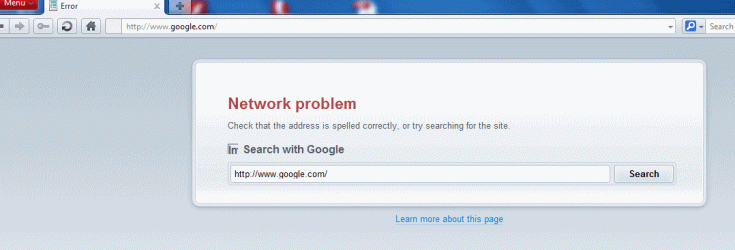
Opera has been installed but every time I want to use it, it shows an error message that can not get started, after several attempts it starts but doesn't show any pages. I have made a screenshot so you can see what it shows.

Chrome does not even start the installation process, and at the beginning it says that it can not connect to the internet, I have even given an exception to Windows firewall for its setup program.

I am not sure why its happening, can it be that there are some programs ( I don't mean spywares or viruses) causing this incompatibility between some programs? I have installed few programs since I got this laptop for more than a month ago, and there are no problems with them.

I use Windows 7 x64, with 4 gb RAM.

Any helps are appreciated to solve these problems.
 

Attachments
  • ScreenShot005.gif
    ScreenShot005.gif
    33.6 KB · Views: 15

My Computer

Computer type
Laptop
Computer Manufacturer/Model Number
Acer Aspire 5750G
OS
Windows 7 Home Premium x64, Windows 8 Pro
CPU
i5-2430M
Motherboard
Acer JE50_HR
Memory
8 Gb
Graphics Card(s)
nVidia GeForce 610M
Sound Card
Realtek High Definition Audio
Antivirus
Avast
Browser
Chrome
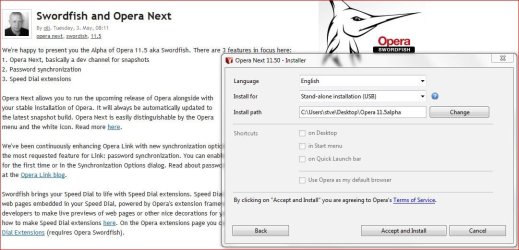
You could try installing Opera as a portable version, when the installer loads choose options & change the install path to another folder & then change install for to USB portable.
 

Attachments

  • Opera portable.JPG
    Opera portable.JPG
    93.8 KB · Views: 5

My Computer

Computer type
PC/Desktop
Computer Manufacturer/Model Number
self build
OS
Windows 7 Ultimate 64 bit
CPU
Intel Core i7 4770K overclocked to 4.7GHz Quad Core Haswell
Motherboard
Asus Z87 Pro (Socket 1150) ATX Motherboard
Memory
16GB Team Group Vulcan Gold 2133MHz
Graphics Card(s)
ATI Radeon HD 7880 Series Display adapter
Monitor(s) Displays
NEC LCD2690WUXi2
Screen Resolution
26" 1920 x 1200
Hard Drives
Samsung 500GB SSD 840 EVO SATA 6Gb/s
Samsung 250GB SSD 840 EVO SATA 6Gb/s
PSU
Corsair AX760 Platinum
Case
Cooler Master HAF X Gaming Tower
Cooling
XSPC RayStorm 750 RS360 Water cooling
Mouse
Razer Death Adder left handed
Internet Speed
126Mb download 11.5Mb up
Antivirus
Avast free
Browser
Opera
Other Info
Main Browser is Opera
Favorite software Adobe Lightroom & Photoshop
best plugins Nik software
Firewall : Private firewall 7
The first thing I would worry about would be a virus or such. Many of them will shut down your browsers so you can't get help or download a program to get rid of the virus. Run a complete scan with your anti virus and Malwarebytes Anti Malware. You might have to down load them from another computer to a thumb or disc. You can try this some times it will get you online so that computer can get help.Go to Start and in the search type in this and hit enter.
"hh http://www.microsoft.com/" without the quotation marks.
 

My Computer

Computer type
PC/Desktop
Computer Manufacturer/Model Number
Home made Desktop
OS
Windows 10 Pro. 64/ version 1709 Windows 7 Pro/64
CPU
Intel i7-6800K @ 4.3
Motherboard
ASUS X-99 Deluxe II
Memory
Corsair Platinum 16 gig @2400
Graphics Card(s)
EVGA GTX 1070 OC
Monitor(s) Displays
Asus 27" LED LCD/VE278Q
Screen Resolution
1920-1080 or 1280-720 HDMI
Hard Drives
INTEL SSD 730-240 Gb Sata 3.0/
PSU
EVGA Platium 1200W
Case
Phanteks Luxe Tempered Glass 8 fans/ one radiator
Cooling
XSPC/ Water Cooled CPU
Keyboard
Das 4 Professional
Mouse
Logitech M705/MX Anywhere 2-S
Internet Speed
100 mbits
Antivirus
Microsoft Security Essentials/ Malwarebytes Premium 3.0/ SAS
Browser
I.E. 11 default/Firefox/ ISP Time Warner Cable/Spectrum
Other Info
LG BluRay Burner/
Sound system-KLipsch-THX/
Icy Dock ssd Hot Swap bays.
I have my Windows updated to the latest, have ran Avira antivirus, Avira rootkiller, Malwarebytes, Superantispyware with the latest updates.
I can though use IE9 and FF, but other browsers seems to have a problem to start or even get installed.

stve:
I have tried it with a portable version of Opera, it gives the same error message and won't start.
 

My Computer

Computer type
Laptop
Computer Manufacturer/Model Number
Acer Aspire 5750G
OS
Windows 7 Home Premium x64, Windows 8 Pro
CPU
i5-2430M
Motherboard
Acer JE50_HR
Memory
8 Gb
Graphics Card(s)
nVidia GeForce 610M
Sound Card
Realtek High Definition Audio
Antivirus
Avast
Browser
Chrome
Back
Top