problems installing .net framework 4

seife96

New member
Local time
7:06 AM
Messages
21
Location
Texas
it sais this after installing


OS Version = 6.1.7600, Platform 2
OS Description = Windows 7 - x64 Ultimate Edition
CommandLine = E:\f2b8711db5360e709e5a33\\Setup.exe /x86 /x64
Using Simultaneous Download and Install mechanism
Operation: Installing
Package Name = Microsoft .NET Framework 4 Setup
Package Version = 4.0.30319
User Experience Data Collection Policy: AlwaysUploaded
Number of applicable items: 11
Exe (E:\f2b8711db5360e709e5a33\SetupUtility.exe) succeeded.
Exe Log File: dd_SetupUtility.txt
ServiceControl operation succeeded!
Exe (E:\f2b8711db5360e709e5a33\Windows6.1-KB958488-v6001-x64.msu) failed with 0x424 - The specified service does not exist as an installed service. .
Final Result: Installation failed with error code: (0x00000424), "The specified service does not exist as an installed service. " (Elapsed time: 0 00:01:08).


Windows update is not woking too!
I NEED HELP!!!!!!!
 

My Computer

OS
Windows 7
CPU
AMD x4 3.4 ghz CPU
Motherboard
Biostar
Memory
4 GB
Graphics Card(s)
Nvidia geforce 8800 gts
Monitor(s) Displays
2 asus 1680x1050
Screen Resolution
1680x1050 all add up 3360x1050
Keyboard
German standard
Mouse
A nice microsoft mouse
it sais this after installing


OS Version = 6.1.7600, Platform 2
OS Description = Windows 7 - x64 Ultimate Edition
CommandLine = E:\f2b8711db5360e709e5a33\\Setup.exe /x86 /x64
Using Simultaneous Download and Install mechanism
Operation: Installing
Package Name = Microsoft .NET Framework 4 Setup
Package Version = 4.0.30319
User Experience Data Collection Policy: AlwaysUploaded
Number of applicable items: 11
Exe (E:\f2b8711db5360e709e5a33\SetupUtility.exe) succeeded.
Exe Log File: dd_SetupUtility.txt
ServiceControl operation succeeded!
Exe (E:\f2b8711db5360e709e5a33\Windows6.1-KB958488-v6001-x64.msu) failed with 0x424 - The specified service does not exist as an installed service. .
Final Result: Installation failed with error code: (0x00000424), "The specified service does not exist as an installed service. " (Elapsed time: 0 00:01:08).


Windows update is not woking too!
I NEED HELP!!!!!!!

Try downloading the full offline installer and running it instead: Download details: Microsoft .NET Framework 4 (Standalone Installer)

Something is physically blocking the WSUA.exe service from running to install .net 4 by the method you tried.

Do you have an Anti-Virus/Firewall? If so, what?

Can you turn Windows Update ON or does that not work either? Does Windows Update completely not work at all? If so, is it giving you any error messages? If so, what are those errors?
 

My Computer

OS
Windows 7 Ultimate 64-bit
CPU
AMD Phenom II X6 1090T 3.2GHZ
Motherboard
MSI 890FXA-GD70
Memory
G.SKILL RipJaw 3x2GB DDR3-1066
Graphics Card(s)
2x HIS Radeon HD 6850 1 GB
Sound Card
VIA 8-channel
Monitor(s) Displays
2x 20 inch Acer LCDs, 1x 32" Sony LCD TV
Screen Resolution
4480x900
Hard Drives
1x Crucial 64GB SSD
3x 1TB HDDs (WD, Seagate, Hitatchi)
1x 500GB Seagate External
PSU
Kingwin 1000W Modular
Case
Coolermaster HAF 932
Cooling
1x 120mm, 3x 200mm, CoolerMaster Hyper 212+
Keyboard
Microsoft Wireless Keyboard 1000
Mouse
Microsoft Wiresless Mouse 5000
Internet Speed
20mbps
Other Info
Samsung BD-ROM/DVD-RW
Try downloading the full offline installer and running it instead: Download details: Microsoft .NET Framework 4 (Standalone Installer)

Something is physically blocking the WSUA.exe service from running to install .net 4 by the method you tried.

Do you have an Anti-Virus/Firewall? If so, what?

Can you turn Windows Update ON or does that not work either? Does Windows Update completely not work at all? If so, is it giving you any error messages? If so, what are those errors?


i have no firewall and avira antivir personal. (i installed it today i had no i know that that is not good)

the version you send me doesent work either!

and i cannot turn on the windows update at all!
Is sas: ("check for updates for your computer") Then there is a button check for updates and it sas: ("windows Update cannot currently check for updates, because the service is not running. you may need to restard your computer.")

if i restart it i still sas the same thing!
 

My Computer

OS
Windows 7
CPU
AMD x4 3.4 ghz CPU
Motherboard
Biostar
Memory
4 GB
Graphics Card(s)
Nvidia geforce 8800 gts
Monitor(s) Displays
2 asus 1680x1050
Screen Resolution
1680x1050 all add up 3360x1050
Keyboard
German standard
Mouse
A nice microsoft mouse

My Computer

Computer Manufacturer/Model Number
Samsung NP550P5C-S02IN
OS
Windows 7 Ultimate - 64-bit | Windows 8 Pro - 64-bit
CPU
Intel® Core™ i7 Processor 3,610QM (2.30Hz, 6MB L3 Cach
Memory
8 GB
Graphics Card(s)
NVIDIA® GeForce® GT 650M 2GB Graphics, Optimus™ techno
Sound Card
SoundAlive™ JBL 3 Speakers (With sub-Woofer)
Monitor(s) Displays
39.62cm (15.6) SuperBright 300nit HD+ LED Display
Screen Resolution
1,600 x 900, Anti-Reflective
Hard Drives
1TB S-ATA II Hard Drive (5,400RPM)
Try downloading the full offline installer and running it instead: Download details: Microsoft .NET Framework 4 (Standalone Installer)


and i cannot turn on the windows update at all!
Is sas: ("check for updates for your computer") Then there is a button check for updates and it sas: ("windows Update cannot currently check for updates, because the service is not running. you may need to restard your computer.")

if i restart it i still sas the same thing!

Do what Jack Sparrow said, and if that doesn't work try this:

Go to Start, type "services" (only one entry should show up, services.msc) and hit enter.

UAC may prompt you.

Scroll down to the bottom and check the Windows Update entry like the image below:

Services_Panel_Windows_Update_Entry.JPG


Double-click it to open it's settings.

Services_Windows_Update.JPG


Look to see if A) it is started and B) the startup type. If it's not started, try to start it. If it starts ok, set the startup type to Automatic (delayed).

If all works there, restart your machine and try Windows Update again. If Windows Update works, try either .NET 4 package again.

Let us know what happens. :D
 

My Computer

OS
Windows 7 Ultimate 64-bit
CPU
AMD Phenom II X6 1090T 3.2GHZ
Motherboard
MSI 890FXA-GD70
Memory
G.SKILL RipJaw 3x2GB DDR3-1066
Graphics Card(s)
2x HIS Radeon HD 6850 1 GB
Sound Card
VIA 8-channel
Monitor(s) Displays
2x 20 inch Acer LCDs, 1x 32" Sony LCD TV
Screen Resolution
4480x900
Hard Drives
1x Crucial 64GB SSD
3x 1TB HDDs (WD, Seagate, Hitatchi)
1x 500GB Seagate External
PSU
Kingwin 1000W Modular
Case
Coolermaster HAF 932
Cooling
1x 120mm, 3x 200mm, CoolerMaster Hyper 212+
Keyboard
Microsoft Wireless Keyboard 1000
Mouse
Microsoft Wiresless Mouse 5000
Internet Speed
20mbps
Other Info
Samsung BD-ROM/DVD-RW
Try downloading the full offline installer and running it instead: Download details: Microsoft .NET Framework 4 (Standalone Installer)


and i cannot turn on the windows update at all!
Is sas: ("check for updates for your computer") Then there is a button check for updates and it sas: ("windows Update cannot currently check for updates, because the service is not running. you may need to restard your computer.")

if i restart it i still sas the same thing!

Do what Jack Sparrow said, and if that doesn't work try this:

Go to Start, type "services" (only one entry should show up, services.msc) and hit enter.

UAC may prompt you.

Scroll down to the bottom and check the Windows Update entry like the image below:

Services_Panel_Windows_Update_Entry.JPG


Double-click it to open it's settings.

Services_Windows_Update.JPG


Look to see if A) it is started and B) the startup type. If it's not started, try to start it. If it starts ok, set the startup type to Automatic (delayed).

If all works there, restart your machine and try Windows Update again. If Windows Update works, try either .NET 4 package again.

Let us know what happens. :D


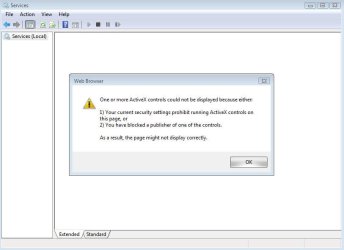
i came this fur and when i press ok it just doesent show anything!
Capture.JPG
 

My Computer

OS
Windows 7
CPU
AMD x4 3.4 ghz CPU
Motherboard
Biostar
Memory
4 GB
Graphics Card(s)
Nvidia geforce 8800 gts
Monitor(s) Displays
2 asus 1680x1050
Screen Resolution
1680x1050 all add up 3360x1050
Keyboard
German standard
Mouse
A nice microsoft mouse
Back
Top