problems networking and/or HomeGroup

rabies

New member
Local time
7:01 AM
Messages
11
I have Win7 Ultimate on my desktop (Dell Inspiron 531S). I have Win7 Home Prem on my wireless laptop (ASUS K60IJ series). I recently had Charter come out and setup a wireless router (NETGEAR Wireless Cable Modem Gateway CG814GCMR).

The internet connections on both machines is fine so far. I am having problems with the networking and/or Homegroups. My laptop was unable to see the desktop from the [start --> windows explorer --> network] or via pinging the IP.

The desktop is able to see the laptop, however.

When I view the active networks for each computer, they are part of two different networks ('Home 6' and '3622').

Also, I have McAfee Internet Security installed which enables the firewall by default.

I have tried running the diagnostic/trouble-shooter to no avail and have minimal networking experience.

Is there anything basic I am missing? I just want to be able to share some folders between the two machines in my HomeGroup...

Other strange thing is now I can't view the full map from [Control Panel\Network and Internet\Network Map] for both computers. Why is this happening? This was working yesterday? I will try rebooting both PCs again.... thx.
 

My Computer My Computer

At a glance

Win7 Ultimate, Win7 Home Prem
OS
Win7 Ultimate, Win7 Home Prem
The pic below is the current full map for the laptop. I still can't ping the desktop (ANGELOFTHELORD).

fullMap_from_laptop.jpg
 

My Computer My Computer

At a glance

Win7 Ultimate, Win7 Home Prem
OS
Win7 Ultimate, Win7 Home Prem
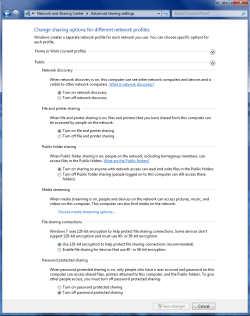
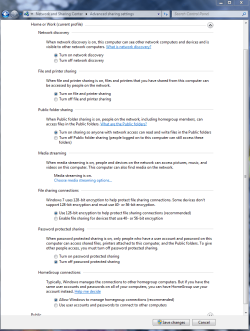
You may need to enable a few more settings on one of the machines. This can be accomplished in the Advanced settings console. McAfee may also cause problems for you unless it's completely disabled or uninstalled.

Be careful with the public sharing password setting, you will want that turned on "password required" most of the time and you won't need it enabled for Homegroups to function properly.
 

Attachments

  • public sharing enabled all.PNG
    public sharing enabled all.PNG
    39.7 KB · Views: 276
  • Home or work homegroup enable.PNG
    Home or work homegroup enable.PNG
    45 KB · Views: 193

My Computer My Computer

At a glance

Windows 7 Ult, Windows 8.1 Pro,Q9650-4.275GHz, E8600 4.5GHz, E6750-3.8GHzG.Skill PC2 9600 1200Mhz 5 5 5 15 2TGTX480
Computer type
PC/Desktop
Computer Manufacturer/Model Number
Home built
OS
Windows 7 Ult, Windows 8.1 Pro,
CPU
Q9650-4.275GHz, E8600 4.5GHz, E6750-3.8GHz
Motherboard
Evga 780i FTW
Memory
G.Skill PC2 9600 1200Mhz 5 5 5 15 2T
Graphics Card(s)
GTX480
Sound Card
Asus Xonar D2
Monitor(s) Displays
HannsG
Screen Resolution
1680X1050
Hard Drives
GSkill Phoenix Pro 120GB SSD
PSU
ThermalTake Toughpower 1000Watt modular
Case
ThermalTake XaserV
Cooling
Xigmatek S1283
Keyboard
Logitech G15
Mouse
Logitech G9
Internet Speed
T1
ok, so I tried that and am still seeing: "Windows cannot discover any computer or device" when I click the full map link on my desktop PC.
 

My Computer My Computer

At a glance

Win7 Ultimate, Win7 Home Prem
OS
Win7 Ultimate, Win7 Home Prem
why should I have to completely uninstall my AV software for networking to work properly? Then my PCs won't be protected.
 

My Computer My Computer

At a glance

Win7 Ultimate, Win7 Home Prem
OS
Win7 Ultimate, Win7 Home Prem
I disabled McAfee's firewall on both PCs and the problem seems to be fixed (I can ping the other PC now and the home group's shared folders are displaying properly in windows explorer).

Should I now turn on windows firewall instead of McAfee firewall? Isn't it unsafe security-wise to not use a firewall??
 

My Computer My Computer

At a glance

Win7 Ultimate, Win7 Home Prem
OS
Win7 Ultimate, Win7 Home Prem
I just tried several times on both PCs to turn on windows firewall and it does not take. Keeps reporting that I have no firewall active. why is this happening and how can i now activate windows firewall?

also, does the NETGEAR wireless cable modem gateway have its own firewall?

from this description it sounds like it does but does window 7 know about it and how can I check status and/or configure the firewall from NETGEAR?

"This gateway features an extensive suite of filtering and firewall capabilities, to restrict URL's and otherwise protect your system from unwanted sites or intruders. "

NETGEAR CG814GCMR Wireless Cable Router: Data Sheet: MyOpenRouter
 

My Computer My Computer

At a glance

Win7 Ultimate, Win7 Home Prem
OS
Win7 Ultimate, Win7 Home Prem
Back
Top