Solved Problems of visualisation about window

sanjibmandal

Banned
Local time
5:02 AM
Messages
16
Location
Calcutta, India
I have been facing a problem after system restore. I can't explain everything in this thread. If I dragged any smaller size window in desktop it can't dragged along with cursor but showing a rectangular area same size as the window which I dragging. It means showing a area which has four arms only,in middle everything is transparent.
No problems about that but it looks so weird, like old days.
What I'm gonna do??? :cry: :cry:
 

My Computer

OS
Windows 7 Ultimate x64
CPU
Intel Dual Core 3ghz E5700 (2mb)
Motherboard
MB ASUS P5G41T-M LX3
Memory
2GB
Monitor(s) Displays
TFT Monitor LG 16'' wide W1643C
Screen Resolution
1360*768
Hard Drives
HDD SEAGATE 250GB SATA
Case
Frontech passion
Keyboard
Microsoft Wired Keyboard 500
Mouse
Microsoft Basic Optical Mouse v2.0
Hi sanjibmandl, I'm afraid it's really a bit hard to understand quite what you mean. I think you're referring to an issue to do with 'Visualisation' (or in the USA 'visualization'). Note - Windows help on mine finds on;y the 2nd spelling.

You might try the Aero troubleshooter (search Windows Help for Visualization, read the text under
'Why are some visual elements being automatically turned off?', and then run the troubleshooter (link at the bottom).

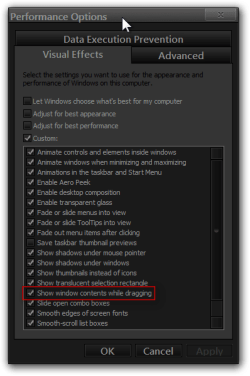
Or in Control Panel, go to Performance Information and Tools, and click Adjust Visual Effects and see if 'Show Window Contents while Dragging is not checked. If you want window contents to remain displayed (better performance PC/graphics card), check it.

Post back and say if this solved your problem, or I else I suggest you post with a screenshot.
 

My Computer

Computer Manufacturer/Model Number
HP G60 laptop
OS
Vista Ultimate 32 bit (EN)

My Computer

Computer type
Laptop
Computer Manufacturer/Model Number
Sager NP9170
OS
Win 7 Pro x64 / Win 10 Pro
CPU
Intel(R) Core(TM) i7-3630QM CPU @ 2.40GHz
Motherboard
CLEVO P170EM
Memory
12 GB
Graphics Card(s)
(1) Intel(R) HD Graphics 4000 (2) NVIDIA GeForce GTX 675M
Sound Card
(1) Realtek High Definition Audio (2) Intel(R) Display Aud
Monitor(s) Displays
17.3
Screen Resolution
1920x1080
Hard Drives
(1) Samsung 860 EVO 500GB(OS) (1) Samsung 860 EVO 500GB(Data)
Keyboard
Backlite
Antivirus
MSE, Malwarebytes Pro
Browser
Firefox
Other Info
DESKTOP: Custom-built.
OS: Win 10 Pro x64.
CASE: Rosewill R5.
CPU: Intel I5 4670K CPU @ 3.40GHz.
CPU COOLER: Cool Master Hyper 212 EVO.
MOTHERBOARD: Asus Z87-A.
MEMORY: Kingston HyperX 2x4 GB.
GPU: Nvidia Geforce 650 TI.
PSU: Corsair TX750.
DRIVES: (1) Samsung 840 120 GB SSD (2) Western Digital blue 500 GB 7200 RPM.
Problem is solved..
Thanks Bongo..
 

My Computer

OS
Windows 7 Ultimate x64
CPU
Intel Dual Core 3ghz E5700 (2mb)
Motherboard
MB ASUS P5G41T-M LX3
Memory
2GB
Monitor(s) Displays
TFT Monitor LG 16'' wide W1643C
Screen Resolution
1360*768
Hard Drives
HDD SEAGATE 250GB SATA
Case
Frontech passion
Keyboard
Microsoft Wired Keyboard 500
Mouse
Microsoft Basic Optical Mouse v2.0
You're Welcome
 

My Computer

Computer type
Laptop
Computer Manufacturer/Model Number
Sager NP9170
OS
Win 7 Pro x64 / Win 10 Pro
CPU
Intel(R) Core(TM) i7-3630QM CPU @ 2.40GHz
Motherboard
CLEVO P170EM
Memory
12 GB
Graphics Card(s)
(1) Intel(R) HD Graphics 4000 (2) NVIDIA GeForce GTX 675M
Sound Card
(1) Realtek High Definition Audio (2) Intel(R) Display Aud
Monitor(s) Displays
17.3
Screen Resolution
1920x1080
Hard Drives
(1) Samsung 860 EVO 500GB(OS) (1) Samsung 860 EVO 500GB(Data)
Keyboard
Backlite
Antivirus
MSE, Malwarebytes Pro
Browser
Firefox
Other Info
DESKTOP: Custom-built.
OS: Win 10 Pro x64.
CASE: Rosewill R5.
CPU: Intel I5 4670K CPU @ 3.40GHz.
CPU COOLER: Cool Master Hyper 212 EVO.
MOTHERBOARD: Asus Z87-A.
MEMORY: Kingston HyperX 2x4 GB.
GPU: Nvidia Geforce 650 TI.
PSU: Corsair TX750.
DRIVES: (1) Samsung 840 120 GB SSD (2) Western Digital blue 500 GB 7200 RPM.
Back
Top