Problems playing downloaded BBC IPlayer ??

Arcadian

New member
Member
VIP
Local time
11:42 PM
Messages
199
Hi new to BBC IPlayer so downloaded it ok then tried to play on default Win Media Player without any picture or sound, finally VLC was the same. It's displaying the moving minutes/hour button along the bottom bar ok, so no idea why there's no sound or picture ?

Any help much appreciated ....

Thanks :)
 

My Computer

Computer type
Laptop
Computer Manufacturer/Model Number
HP Presario CQ 56
OS
Windows 7 Home Premium 64bit
Antivirus
Zone Alarm
Browser
Firefox
I went to the BBC IPlayer site and seems it is an online player, works in the browser. But the choices I made of things to look at came up with a message about them not working, probably is an issue with the site. I didn't have to install anything.
BBC iPlayer
 

My Computer

Computer type
PC/Desktop
Computer Manufacturer/Model Number
Customs, Dell, Gateway, HP, Toshiba, Acer, ASUS
OS
Windows 7 Ultimate 64-bit, Windows 8.1 64-bit, Mac OS X 10.10, Linux Mint 17, Windows 10 Pro TP
Keyboard
Microsoft
Mouse
Microsoft
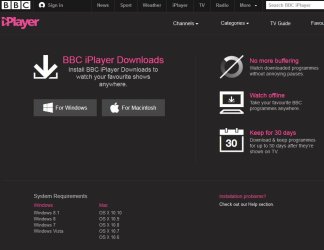
While most people watch iPlayer in a browser (both live TV and catchup), you can also download programs to watch offline, but you have to download their app 'BBC iPlayer Downloads' and the downloads open in a player. The downloads are located in 'C:\users\yourname\Videos\BBC iPlayer Downloads', but they don't play in WMP, VLC etc. I guess they're protected somehow. See pic

iplayer.jpg

The app is located at C:\users\yourname\AppData\Local\BBC\. You get desktop s/c etc.
 

My Computer

Computer type
PC/Desktop
Computer Manufacturer/Model Number
self build
OS
Windows 7 Pro x64 sp1
CPU
i7 4770K
Motherboard
MSI B85M-E45
Memory
8GB Corsair Vengeance 1600MHz
Graphics Card(s)
onboard
Monitor(s) Displays
LG 27MP35
Screen Resolution
1920-1080
Hard Drives
Seagate 2TB
PSU
Cooler Master GX 750
Case
Antec 300
Cooling
Seidon 120V
Internet Speed
60/18
Antivirus
MSE
Browser
Firefox
Thank you both. After a lot of hassle I think the problem is due to living in a very rural area plus a long way from the nearest telephone exchange, so download speeds at peak periods are very poor and slow which could explain the intermittent sound and no picture even though it was playing ok. I need to check it say early one morning to make sure because if it is then we're not due for any major upgrades for at least another year or two.

I've read of modem boosters could they be of any help....?
 

My Computer

Computer type
Laptop
Computer Manufacturer/Model Number
HP Presario CQ 56
OS
Windows 7 Home Premium 64bit
Antivirus
Zone Alarm
Browser
Firefox
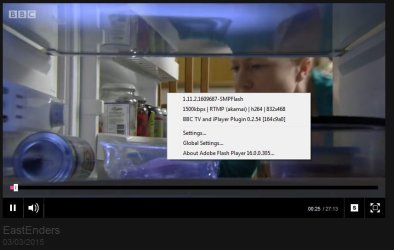
As it says in the pic, downloading + watching offline should cure buffering. Then watch using the BBC app. I've got fibre but can't watch the downloaded content in VLC etc, just in their player - DRM ? See this snip - you need ~ 1500k to watch iPlayer stream

bbc_bandwidth.jpg

I guess downloading overnight, and watching next day is your best bet.

> maybe I shouldn't be posting jpegs if you have low bandwidth
 

My Computer

Computer type
PC/Desktop
Computer Manufacturer/Model Number
self build
OS
Windows 7 Pro x64 sp1
CPU
i7 4770K
Motherboard
MSI B85M-E45
Memory
8GB Corsair Vengeance 1600MHz
Graphics Card(s)
onboard
Monitor(s) Displays
LG 27MP35
Screen Resolution
1920-1080
Hard Drives
Seagate 2TB
PSU
Cooler Master GX 750
Case
Antec 300
Cooling
Seidon 120V
Internet Speed
60/18
Antivirus
MSE
Browser
Firefox
I'd decided the same to download overnight as well after testing the same programme early this morning when it played straight through without any problems or buffering at all. I think the reason it will only play on their player might be because the Beeb's pre-programmed it to self-erase after their 30 days grace period, so I suppose they must have added something to prevent it working with VLC etc. ?

Thanks for the tips :)
 

My Computer

Computer type
Laptop
Computer Manufacturer/Model Number
HP Presario CQ 56
OS
Windows 7 Home Premium 64bit
Antivirus
Zone Alarm
Browser
Firefox
Back
Top