Solved Problems re-formatting SATA Drive

petermacgregor3

New member
Local time
9:12 PM
Messages
10
I had a PC with a 1TB Samsung Serial ATA HDD. The mother board packed up so I bought a new machine. I took the HD out of the old one and mounted it in an external drive housing. Over a number of weeks I managed to recover around 80% of the data from the old disk. I then decided to use that old disk as an external backup/archive drive. I thought the first thing to do would be to format it to clean it of any rubbish and start with a blank drive. However, although I have made several attempts I have failed! I keep getting a window that says I need to format it but when I click Format it says it can't format the drive!
There were no jumpers fitted to it when I removed it from the old machine and I can't see anything else that might need "adjusting" to enable me to format it.
As I said the drive is a Samsung Serial ATA around 2 years old.


It isn't recognised at all - I'd even use it without reformatting if that's my only option as at least it was mine from new!!


Both the original machine and my new one were/are working under Windows 7 - 64bit.

Has anyone got the magic spell to help me out of this fix please?
Thanks
Peter
 

My Computer

Computer type
PC/Desktop
Computer Manufacturer/Model Number
Custom Build
OS
Windows 7 64 bit
Memory
8 Gb
Hard Drives
1 x 2Tb
Antivirus
Avast Paid for
Browser
Firefox
Here's a screen shot (in a Word document) of what I get. Hope it helps. At the moment I have no other auxiliary HDs attached - only the SATA I want to format and of course the fixed DVD drive. I normally have a Seagate Free Agent drive (500 Gb) attached, but have taken that out while I try and sort this problem.
Thanks for your interest and help.
Peter
 

Attachments

My Computer

Computer type
PC/Desktop
Computer Manufacturer/Model Number
Custom Build
OS
Windows 7 64 bit
Memory
8 Gb
Hard Drives
1 x 2Tb
Antivirus
Avast Paid for
Browser
Firefox
I click Format it says it can't format the drive!
There were no jumpers fitted to it when I removed it from the old machine and I can't see anything else that might need "adjusting" to enable me to format it.

aCapture dm.PNG

1) Needs to have power to show in DM.
 

My Computer

OS
ME/XP/Vista/Win7
The Power is on - the Pilot Light on the housing is glowing red and when I first switch on it comes on and I can hear the disk spinning up to speed. I have actually got two housings and same results with both of them. Also, before you ask (LOL) yes, there's a USB connection to the PC in place - and I've changed the cable on that just in case!! Also tried different USB sockets on the PC - both of which work perfectly for anything else I stick in them.
It's time for me to leave this for tonight - I've had a long day! Back tomorrow guys. Thanks for your suggestions so far.
Peter

Peter
 

My Computer

Computer type
PC/Desktop
Computer Manufacturer/Model Number
Custom Build
OS
Windows 7 64 bit
Memory
8 Gb
Hard Drives
1 x 2Tb
Antivirus
Avast Paid for
Browser
Firefox
It would be good to know why it took 2 weeks to recover the data off the drive, and why you only recovered 80% - choice or failure?
 

My Computer

Computer type
PC/Desktop
Computer Manufacturer/Model Number
Home Built - Jan 2013
OS
Windows 7 64 Bit Home Premium SP1
CPU
i7-3820
Motherboard
Asus P9X79-PRO - Bios 4608
Memory
GSkill F3-14900CL9Q - 16GB
Graphics Card(s)
EVGA GeForce GTX660 - Driver 352.86
Sound Card
On board Realtek ALC898
Monitor(s) Displays
Acer S271HL
Screen Resolution
1920 x 1080
Hard Drives
#1- Samsung 840 Pro Series
#2- Western Digital WD1002FAEX Sata3 Black
#3- Western Digital WD1002FAEX Sata3 Black
PSU
Corsair CMPSU-850TX-V2 - 850 watt (by Seasonic)
Case
Corsair Obsidian 550D
Cooling
Standard 3 120mm case fans, Cooler Master Hyper 212 EVO
Keyboard
MS KC-0405
Mouse
Intellimouse 5-button
Internet Speed
56 Mbits/Sec (on a good day)
Antivirus
Avast & Malwarebytes
Browser
Firefox
Other Info
Asus DVD - DRW-24B1ST 24X
Good Question! It was a case of available time - had to do it in dribs and drabs - and the fact that I wanted to "sort" the data as I recovered it - so I suppose, Choice. But some Failure too as I didn't manage to get everything back -though in fairness what I didn't get was mostly disposable anyway! For some reason some Folders were unreadable!
 

My Computer

Computer type
PC/Desktop
Computer Manufacturer/Model Number
Custom Build
OS
Windows 7 64 bit
Memory
8 Gb
Hard Drives
1 x 2Tb
Antivirus
Avast Paid for
Browser
Firefox

My Computer

Computer type
PC/Desktop
Computer Manufacturer/Model Number
Home Built - Jan 2013
OS
Windows 7 64 Bit Home Premium SP1
CPU
i7-3820
Motherboard
Asus P9X79-PRO - Bios 4608
Memory
GSkill F3-14900CL9Q - 16GB
Graphics Card(s)
EVGA GeForce GTX660 - Driver 352.86
Sound Card
On board Realtek ALC898
Monitor(s) Displays
Acer S271HL
Screen Resolution
1920 x 1080
Hard Drives
#1- Samsung 840 Pro Series
#2- Western Digital WD1002FAEX Sata3 Black
#3- Western Digital WD1002FAEX Sata3 Black
PSU
Corsair CMPSU-850TX-V2 - 850 watt (by Seasonic)
Case
Corsair Obsidian 550D
Cooling
Standard 3 120mm case fans, Cooler Master Hyper 212 EVO
Keyboard
MS KC-0405
Mouse
Intellimouse 5-button
Internet Speed
56 Mbits/Sec (on a good day)
Antivirus
Avast & Malwarebytes
Browser
Firefox
Other Info
Asus DVD - DRW-24B1ST 24X
The machine had two identical drives in - I'm having the same problem with both. Very unlikely to get two go together I think - especially as they were only about 12 months old!
Peter
 

My Computer

Computer type
PC/Desktop
Computer Manufacturer/Model Number
Custom Build
OS
Windows 7 64 bit
Memory
8 Gb
Hard Drives
1 x 2Tb
Antivirus
Avast Paid for
Browser
Firefox
Oh - and No. Haven't run the Diagnostics. I will try that.
Thanks
Peter
 

My Computer

Computer type
PC/Desktop
Computer Manufacturer/Model Number
Custom Build
OS
Windows 7 64 bit
Memory
8 Gb
Hard Drives
1 x 2Tb
Antivirus
Avast Paid for
Browser
Firefox
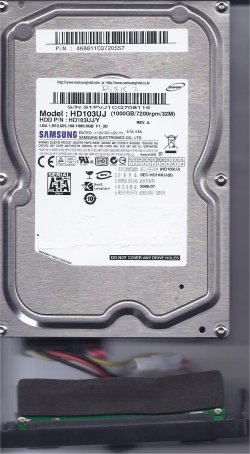
Haven't been able to run the diagnostics. Using the Diagnostic link supplied by TVeblen, when I go to the Samsung Site it asks for product so I chose Memory and Storage but it doesn't recognise the HD Model number! Keeeps reverting back to Yet I've entered it exactly as shown on the label copy of which is attached here. Not sure where to go from here! Although not afraid to tackle this sort of thing I'm certainly no expert.
In case anyone asks - the "attachement" to the drive in the illustration is the connection panel from the HD External enclosure.
Peter
 

Attachments

  • Disk Label.jpg
    Disk Label.jpg
    187.5 KB · Views: 0

My Computer

Computer type
PC/Desktop
Computer Manufacturer/Model Number
Custom Build
OS
Windows 7 64 bit
Memory
8 Gb
Hard Drives
1 x 2Tb
Antivirus
Avast Paid for
Browser
Firefox
Run the Hitachi Drive Fitness Test. It works on almost all drives.
Best to burn an ISO to a CD and then boot with it.
 

My Computer

Computer type
PC/Desktop
Computer Manufacturer/Model Number
Home Built - Jan 2013
OS
Windows 7 64 Bit Home Premium SP1
CPU
i7-3820
Motherboard
Asus P9X79-PRO - Bios 4608
Memory
GSkill F3-14900CL9Q - 16GB
Graphics Card(s)
EVGA GeForce GTX660 - Driver 352.86
Sound Card
On board Realtek ALC898
Monitor(s) Displays
Acer S271HL
Screen Resolution
1920 x 1080
Hard Drives
#1- Samsung 840 Pro Series
#2- Western Digital WD1002FAEX Sata3 Black
#3- Western Digital WD1002FAEX Sata3 Black
PSU
Corsair CMPSU-850TX-V2 - 850 watt (by Seasonic)
Case
Corsair Obsidian 550D
Cooling
Standard 3 120mm case fans, Cooler Master Hyper 212 EVO
Keyboard
MS KC-0405
Mouse
Intellimouse 5-button
Internet Speed
56 Mbits/Sec (on a good day)
Antivirus
Avast & Malwarebytes
Browser
Firefox
Other Info
Asus DVD - DRW-24B1ST 24X
Ok, Thanks. I'll try that - going away now, back Tuesday. Will let you know.
Peter
 

My Computer

Computer type
PC/Desktop
Computer Manufacturer/Model Number
Custom Build
OS
Windows 7 64 bit
Memory
8 Gb
Hard Drives
1 x 2Tb
Antivirus
Avast Paid for
Browser
Firefox
Wel,, back on this a bit later than I hoped - but still tearing my hair out!
The Hitachi Drive Fitness Test also won't find the drive when it is connected at switched on. I've tried both the Samsung 1TB drives I have in three different USB ports and also tried a Seagate 200 Gb drive but it won't recognise that in any of the USB sockets.
However, it happily recognises a Seagate Free Agent 500 Gb Drive in any of the USB sockets - which says to me there is nothing wrong with the sockets. I also for good measure tried a WD 500 Gb Passport Drive in all the sockets and it recognised that!
It seems to have an allergy to Samsung Drives for some reason. I'm reluctant to throw away 2 relatively unused 1Tb drives - and in any case don't know for sure what's on them so would like to clean them first!
Has anyone got any other possible solution? I need to get the project I want these for up and running.
Peter.
 

My Computer

Computer type
PC/Desktop
Computer Manufacturer/Model Number
Custom Build
OS
Windows 7 64 bit
Memory
8 Gb
Hard Drives
1 x 2Tb
Antivirus
Avast Paid for
Browser
Firefox
But have you tried the Samsung on a couple of different computers? I keep External USB HDD cases or adapters on hand just for that purpose, a couple are for PATA drives and a couple for SATA drives. One I keep connected for SATA drives is a Thermaltake BlacX, accepts both 2.5" and 3.5" drives.
 

My Computer

Computer type
PC/Desktop
Computer Manufacturer/Model Number
Customs, Dell, Gateway, HP, Toshiba, Acer, ASUS
OS
Windows 7 Ultimate 64-bit, Windows 8.1 64-bit, Mac OS X 10.10, Linux Mint 17, Windows 10 Pro TP
Keyboard
Microsoft
Mouse
Microsoft
Thanks for your input. Yes - I tried them on an XP Desktop I have that works fine. It wouldn't recognise them either! I have them in proper external housings and I can hear them start to "spin up" when I first switch them on, so it seems everything is working. There are no jumpers fitted - and never were. Given they worked fine when they were the two drives in a desktop machine I had, I just can't figure out why they aren't recognised now. As I said earlier, I was able to get data off them when the original chassis went down and I used them in their housings on my laptop. It was when I finished that exercise and decided to format them the trouble started!!
Think I'll take one to a local PC repair place and see if they can do anything - if they are successful they can do the other one! Just don't like being beaten by a damned machine!! LOL
Peter
 

My Computer

Computer type
PC/Desktop
Computer Manufacturer/Model Number
Custom Build
OS
Windows 7 64 bit
Memory
8 Gb
Hard Drives
1 x 2Tb
Antivirus
Avast Paid for
Browser
Firefox
Back
Top