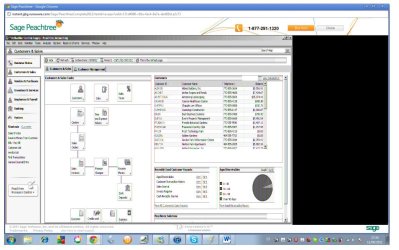
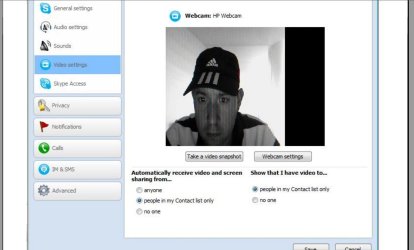
P patinom11 New member Local time 8:56 PM Messages 3 Location quito Jun 11, 2011 #1 anyone knows how to fix a problem running webcam videos and java aplications. Video comes out fuzzy. see picture attachment for example. help needed. Attachments fuzzy video hp computer.pdf fuzzy video hp computer.pdf 436.2 KB · Views: 21 My Computer OSwindows 7 home premium
anyone knows how to fix a problem running webcam videos and java aplications. Video comes out fuzzy. see picture attachment for example. help needed.
Zen00 New member Guru VIP Local time 6:56 PM Messages 1,360 Location Utah Jun 11, 2011 #2 A .pdf? Is it clean? My Computer Computer Manufacturer/Model NumberZen ProductionsOSWindows 7 Ultimate x64CPUIntel i7-860MotherboardGigabyte GA-P55A-UD4PMemoryCorsair Dominator 1600Mhz, 8-8-8-24 1.65v 2x2GBGraphics Card(s)ATI Radeon 5770 HDSound CardIntel High Definition SoundMonitor(s) DisplaysSamsung P2570HDScreen Resolution1920x1080Hard DrivesWestern Digital Caviar Black 500gbPSUCorsair CMPSU-750HX 750WCaseAntec p183CoolingCorsair H50 Water CoolerKeyboardLogitech G110MouseLogitech MX RevolutionInternet Speed768 mb/s
P patinom11 New member Thread Starter Local time 8:56 PM Messages 3 Location quito Jun 11, 2011 #3 yes. I created it with screen shots of my computer for explanation My Computer OSwindows 7 home premium
D derekimo New member SF Team Local time 5:56 PM Messages 16,779 Location Shasta County Jun 11, 2011 #4 patinom11 said: yes. I created it with screen shots of my computer for explanation Click to expand... Here's a better way, http://www.sevenforums.com/tutorials/9733-screenshots-files-upload-post-seven-forums.html Attachments 1.JPG 49.2 KB · Views: 1 2.JPG 117.8 KB · Views: 3 3.JPG 85.2 KB · Views: 5 My Computer Computer typePC/DesktopComputer Manufacturer/Model NumberSelf BuiltOSWin 10 Pro x64CPUIntel I5-2500K @3.3GHzMotherboardAsrock P67 Extreme4Memory16GB G.Skill Ripjaws X (4x4GB)Graphics Card(s)EVGA GeForce 750 Ti SC 2GBSound CardASUS Xonar DG 5.1 Channels 24-bit 96KHz PCI Interface SoundMonitor(s) Displaysauria eq2367Screen Resolution1920 x 1080Hard Drives250GB Samsung 850 EVO SSD 1TB WD Blue 1TB HitachiPSUSeaSonic X 650W 80 Plus GoldCaseCorsair Obsidian 750DCoolingCorsair H60, Three 140mm case fansKeyboardLogitech Wireless Keyboard K520MouseLogitech Wireless Mouse M310Internet SpeedWave Broadband ~ 100 dn 5 upAntivirusWindows Defender, Malwarebytes PremiumBrowserEdge, IE11, ChromeOther InfoLaptop specs: HP g7-1365dx / CPU: AMD A6-3420M APU with Radeon(tm) HD Graphics / RAM: Crucial 8Gb (2x4Gb) / SSD: Crucial M4-CT128M4SSD2 ATA Device/ FW 000F / GFX: AMD Radeon HD 6520G / OS: Windows 10 Pro x64
patinom11 said: yes. I created it with screen shots of my computer for explanation Click to expand... Here's a better way, http://www.sevenforums.com/tutorials/9733-screenshots-files-upload-post-seven-forums.html
P patinom11 New member Thread Starter Local time 8:56 PM Messages 3 Location quito Jun 14, 2011 #5 anybody knows how to fix this??? I´ve search and updated everything int his computer, and it´s not working. My Computer OSwindows 7 home premium
anybody knows how to fix this??? I´ve search and updated everything int his computer, and it´s not working.