Problems since installing windows 7 ultimate

contecrux

New member
Local time
4:24 AM
Messages
4
I have recently installed Windows 7 ultimate onto my 'HP pavilion tx1250ea' laptop - Ive got nearly everything working. But there is a couple of problems. Whenever i try to install anything on the laptop the screen goes completely black for about 2minutes and then back to Normal, the only thing i can think of is that it has something to do with the graphics driver - 'Nvidia geforce 6150' (windows update). I tried to install this manually from the nvidia site but once ive downloaded the driver for windows 7 32bit it says it is not compatible. What am I doing wrong?!

Also - (sorry) The Laptop has 2gb RAM, since ive installed windows 7 it now only shows as 1gb. would this also have something to do with my black screen problem..

Nightmare, but any help would be greatly appreciated.
 

My Computer

Computer Manufacturer/Model Number
HP Pavilion tx1250ea
OS
windows 7 ultimate 32bit
Memory
2gb RAM
Graphics Card(s)
Nvidia Geforce 6150
Sound Card
Realtx HD Audio
contecrux,
Welcome to Seven Forums.

Reseat the memory boards.

Sure hope you didn't sit the laptop in a puddle of water.

Water can play havoc with laptops.

After reseating the ram, if the laptop still only recognizes 1 GB, then
WIN | type MDSCHED | ENTER
Choose to reboot immediately.

WIN is the key with the wavy flag.

When the memory diagnostic program starts, you can use the F1 key to change how many tests are run.
 

My Computer

Computer Manufacturer/Model Number
Toshiba Satellite S875D-S7239 laptop
OS
MS Windows 7 Ultimate SP1 64-bit
CPU
AMD A10-4600M
Motherboard
AMD Pumori (Socket FT1)
Memory
6.00 GB Dual-Channel DDR3 @ 798MHz (11-11-12-28)
Graphics Card(s)
AMD Radeon HD 7660G
Sound Card
High Definition Audio Device
Monitor(s) Displays
Generic PnP Monitor (1600x900@60Hz)
Screen Resolution
1600x900@60Hz
Hard Drives
SSD 119GB Corsair CSSD-V128GB2 ATA Device
Keyboard
Standard PS/2 Keyboard
Mouse
HP Wireless Optical Mobile Mouse Model FHA-3410
Internet Speed
What the local pub, local coffee shop offers.
Other Info
Optical Drive:MATSHITA BD-CMB UJ160B ATA Device


Also have an Asus ha1002xp netbook with Win 7 Ultimate installed.
I know this is more of a work-around than a fix, but this is something to consider.

Capture.PNG
 

My Computer

Computer Manufacturer/Model Number
Custom
OS
Windows 7 Professional x64
CPU
Intel i7 2600K OC'd @ 4620 MHz
Motherboard
Asus P8Z68-V Pro
Memory
16GB GSkill Sniper 2133 Mhz (4x4GB)
Graphics Card(s)
EVGA GeForce GTX 480 SuperClocked+
Sound Card
Realtek High Definition Audio
Monitor(s) Displays
2x Acer S273HLbmii 27"
Screen Resolution
2 x 1920x1080
Hard Drives
64GB Crucial M4 SSD

Storage: Hitachi 1TB 5400RPM, Samsung 1.5TB 5400RPM
PSU
Corsair HW Series 750w (modular)
Case
Cooler Master HAF 932 Advanced Blue Edition
Cooling
CM Hyper 212+ CPU cooler, 3x 230mm + 1x 140mm case fans
Keyboard
Logitech MK320 (wireless)
Mouse
Logitech MK320 (wireless)
Internet Speed
30 Mb/s : 2 Mb/s
Did you maybe answer the wrong post as his problem has zero to do with UAC.
 

My Computer

Computer Manufacturer/Model Number
Toshiba Satellite S875D-S7239 laptop
OS
MS Windows 7 Ultimate SP1 64-bit
CPU
AMD A10-4600M
Motherboard
AMD Pumori (Socket FT1)
Memory
6.00 GB Dual-Channel DDR3 @ 798MHz (11-11-12-28)
Graphics Card(s)
AMD Radeon HD 7660G
Sound Card
High Definition Audio Device
Monitor(s) Displays
Generic PnP Monitor (1600x900@60Hz)
Screen Resolution
1600x900@60Hz
Hard Drives
SSD 119GB Corsair CSSD-V128GB2 ATA Device
Keyboard
Standard PS/2 Keyboard
Mouse
HP Wireless Optical Mobile Mouse Model FHA-3410
Internet Speed
What the local pub, local coffee shop offers.
Other Info
Optical Drive:MATSHITA BD-CMB UJ160B ATA Device


Also have an Asus ha1002xp netbook with Win 7 Ultimate installed.
The Laptop is well looked after and has never been wet..
It is only since i installed windows 7 this has happened.

As for reseating the memory boards, where would i start?

Thanks for your jelp by the way.. Kudos
 

My Computer

Computer Manufacturer/Model Number
HP Pavilion tx1250ea
OS
windows 7 ultimate 32bit
Memory
2gb RAM
Graphics Card(s)
Nvidia Geforce 6150
Sound Card
Realtx HD Audio
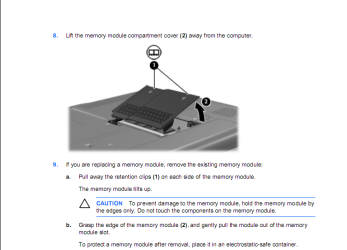
You will about a #3 Phillips screwdriver.

Now your guess is as good as mine. I don't have an HP but if the memory is on the bottom, then

Turn the laptop upside down so that you are looking at the bottom.

There should be a "cover plate" that you can remove to access the memory chips.

When I think about it, if you've never done anything like this before then if you've got a techie friend ask him to make sure the ram chips are seated correctly.

Or you can go to the HP site and download the manual for your laptop and see if the manual shows changing memory chips. If not, then google replace ram on HP pavilion tx1250ea. You just might run across a video showing how.

If you get that far, then take the chips out, blow off any dust and dirt and reinsert the chips.

You might feel more comfortable starting with the memory diagnostic program. There is a much more powerful memory test program but the Win 7 program, mdsched, should be sufficient.
 

My Computer

Computer Manufacturer/Model Number
Toshiba Satellite S875D-S7239 laptop
OS
MS Windows 7 Ultimate SP1 64-bit
CPU
AMD A10-4600M
Motherboard
AMD Pumori (Socket FT1)
Memory
6.00 GB Dual-Channel DDR3 @ 798MHz (11-11-12-28)
Graphics Card(s)
AMD Radeon HD 7660G
Sound Card
High Definition Audio Device
Monitor(s) Displays
Generic PnP Monitor (1600x900@60Hz)
Screen Resolution
1600x900@60Hz
Hard Drives
SSD 119GB Corsair CSSD-V128GB2 ATA Device
Keyboard
Standard PS/2 Keyboard
Mouse
HP Wireless Optical Mobile Mouse Model FHA-3410
Internet Speed
What the local pub, local coffee shop offers.
Other Info
Optical Drive:MATSHITA BD-CMB UJ160B ATA Device


Also have an Asus ha1002xp netbook with Win 7 Ultimate installed.
The Laptop is well looked after and has never been wet..
It is only since i installed windows 7 this has happened.

As for reseating the memory boards, where would i start?

Thanks for your jelp by the way.. Kudos

If you decide to reseat the RAM, make sure that first you power off the laptop, and remove the battery. Also, after you have removed the battery, hold the power button down for about 15 seconds to remove any residual power.
 

Attachments

  • Capture.PNG
    Capture.PNG
    28.7 KB · Views: 4
  • Capture1.PNG
    Capture1.PNG
    20.3 KB · Views: 5

My Computer

Computer Manufacturer/Model Number
HP dv6519tx
OS
Windows 7 Ultimate x64
CPU
1.80 GHz Intel Core 2 Duo processor T7100
Memory
3 gig ddr2
Graphics Card(s)
NVIDIA GeForce 8400M GS
Sound Card
Realtek High Definition Audio
Monitor(s) Displays
15.4” WXGA High Definition BrightView Widescreen
Screen Resolution
1280 x 800
Hard Drives
Hitachi 320 GB (5400 rpm)
PSU
90 W AC Power Adapter
Cooling
Kitchen plate under the lappy
Keyboard
101 key compatible
Mouse
Touch Pad with On/Off button and dedicated vertical Scroll
Internet Speed
Three Wireless internet prepaid using E160G USB dongle
Thanks Guys!!
 

My Computer

Computer Manufacturer/Model Number
HP Pavilion tx1250ea
OS
windows 7 ultimate 32bit
Memory
2gb RAM
Graphics Card(s)
Nvidia Geforce 6150
Sound Card
Realtx HD Audio
Let us know the end result.
 

My Computer

Computer Manufacturer/Model Number
Toshiba Satellite S875D-S7239 laptop
OS
MS Windows 7 Ultimate SP1 64-bit
CPU
AMD A10-4600M
Motherboard
AMD Pumori (Socket FT1)
Memory
6.00 GB Dual-Channel DDR3 @ 798MHz (11-11-12-28)
Graphics Card(s)
AMD Radeon HD 7660G
Sound Card
High Definition Audio Device
Monitor(s) Displays
Generic PnP Monitor (1600x900@60Hz)
Screen Resolution
1600x900@60Hz
Hard Drives
SSD 119GB Corsair CSSD-V128GB2 ATA Device
Keyboard
Standard PS/2 Keyboard
Mouse
HP Wireless Optical Mobile Mouse Model FHA-3410
Internet Speed
What the local pub, local coffee shop offers.
Other Info
Optical Drive:MATSHITA BD-CMB UJ160B ATA Device


Also have an Asus ha1002xp netbook with Win 7 Ultimate installed.
Jesus dude, 2gb Ram with Windows 7?? You better go back to Vista, lol! What is better in Win7 that everyone wants to install it? I don't get it, since I'm on win7 I'm only complaining for all its bugs and lack of various options which has been removed from Vista... and there are a lot of drivers issues too!
 

My Computer

OS
Windows 7 x64
CPU
AMD Phenom II X4 945 3.0Ghz
Motherboard
M4A785TD-V EVO
Memory
8Gb DDR3 G-Skill
Graphics Card(s)
Asus NVidia Geforce GT240/DI/1GD3/A
Monitor(s) Displays
Acer X223HQ
Screen Resolution
Full HD
Hard Drives
640 Gb Western Digital
PSU
700 W
Cooling
ARCTIC-COOLING Freezer XTREME Rev2

My Computer

Computer Manufacturer/Model Number
Hopalong/ Godzilla
OS
Windows7 Pro 64bit SP-1; Windows XP Pro 32bit
CPU
Intel Core i7-870 Lynnfield 2.93GHz LGA 1156 95W Quad-Core
Motherboard
ASUS P7P55D-E PRO
Memory
8GB@1400MHz Crucial Ballistix DDR3-1600 4x2GB
Graphics Card(s)
ASUS ENGTX460 DirectCU/2DI/1GD5 1GB 256-bit GDDR5
Sound Card
VIA Onboard
Monitor(s) Displays
Asus VS248H-P 24"; Samsung SyncMaster 941BW 19"ws
Screen Resolution
1920x1080; 1440x900
Hard Drives
Samsung 830 120GB SSD
Intel 320 120GB SSD
Western Digital Caviar Black WD7501AALS 750GB 7200 RPM SATA 3.0Gb/s
Western Digital Caviar Black WD6401AALS 640GB 7200 RPM SATA 3.0Gb/s
PSU
COOLER MASTER Silent Pro RS850-AMBAJ3-US 850W Modular
Case
COOLER MASTER HAF 932 RC-932-KKN5-GP Black
Cooling
Scythe "Mugen-2 Rev.B" (2 ScytheKaze-Jyuni PWM fans)
Keyboard
Logitech K-320
Mouse
Kensington
Antivirus
Avast Inernet Suite
Browser
IE 9 ; Chrome
Ahhh, sorry didn't mean to offend anyone. But seriously this guy probably will go nowhere with win7 on this laptop, if there are any problems with hardware or drivers compatibility. I would only consider to install another os (best would be actually the Vista) and check for few days if everything goes ok, and if so, that would mean the hardware is ok. Or google for solutions and loose all nerves, hairs and patience, like I did with my graphic card for over 6 months without a good luck. For me, if he can see only 1gb Ram of 2, there is for sure the drivers or hardware problem going on in there! To understand if it's hardware or driver issue the fastest way is to try on another system. Oh wait, have you got perhaps integrated graphic card? Maybe there is an issue with memory assignments for video graphic card? Can You check bios settings?
 

My Computer

OS
Windows 7 x64
CPU
AMD Phenom II X4 945 3.0Ghz
Motherboard
M4A785TD-V EVO
Memory
8Gb DDR3 G-Skill
Graphics Card(s)
Asus NVidia Geforce GT240/DI/1GD3/A
Monitor(s) Displays
Acer X223HQ
Screen Resolution
Full HD
Hard Drives
640 Gb Western Digital
PSU
700 W
Cooling
ARCTIC-COOLING Freezer XTREME Rev2
Jesus dude, 2gb Ram with Windows 7?? You better go back to Vista, lol! What is better in Win7 that everyone wants to install it? I don't get it, since I'm on win7 I'm only complaining for all its bugs and lack of various options which has been removed from Vista... and there are a lot of drivers issues too!
Speed, compatibility issues. There are some really nice new features in it too.

What are these bugs you are having trouble with? Perhaps we can deal with them -- Windows 7 is known to be quite good about bugs.

Go ahead and start a new thread, and send me a link to it.
 

My Computer

Computer Manufacturer/Model Number
Custom
OS
Windows 7 Professional x64
CPU
Intel i7 2600K OC'd @ 4620 MHz
Motherboard
Asus P8Z68-V Pro
Memory
16GB GSkill Sniper 2133 Mhz (4x4GB)
Graphics Card(s)
EVGA GeForce GTX 480 SuperClocked+
Sound Card
Realtek High Definition Audio
Monitor(s) Displays
2x Acer S273HLbmii 27"
Screen Resolution
2 x 1920x1080
Hard Drives
64GB Crucial M4 SSD

Storage: Hitachi 1TB 5400RPM, Samsung 1.5TB 5400RPM
PSU
Corsair HW Series 750w (modular)
Case
Cooler Master HAF 932 Advanced Blue Edition
Cooling
CM Hyper 212+ CPU cooler, 3x 230mm + 1x 140mm case fans
Keyboard
Logitech MK320 (wireless)
Mouse
Logitech MK320 (wireless)
Internet Speed
30 Mb/s : 2 Mb/s
I never installed Vista, I went from Windows XP Proffesional straight to Win7 Ultimate, at to be honest, I have never looked back, it is the best OS to come out of Microsoft for years...just my opinion though, I love it!
 

My Computer

Computer Manufacturer/Model Number
INTEL
OS
7 ultimate 64 bit
CPU
Core i 5 -750 3.8 GHz
Motherboard
Asus P7P55D
Memory
Kingston DDR3 1600MHz (4GB)
Graphics Card(s)
Asus Nvidia 9400 GT
Sound Card
NA
Monitor(s) Displays
ACER 22" LCD
Hard Drives
Seagate, 80GB system
Seaate 180GB transfer
Seagate 1TB storage
PSU
Cooler Master 750W
Case
Rubbish - Tsunami with no sides and the front missing
Cooling
Cooler Master Hyper 212 Plus
Keyboard
Genius ...ahem....
Mouse
Kensington Pilot Mini wireless
Internet Speed
6MB/512
Other Info
Lots of cigarette ash everywhere and beer bottle stains.
if he can see only 1gb Ram of 2, there is for sure the drivers or hardware problem going on in there! To understand if it's hardware or driver issue the fastest way is to try on another system. Oh wait, have you got perhaps integrated graphic card? Maybe there is an issue with memory assignments for video graphic card? Can You check bios settings?

how do i do it and what should i check for?

Thanks for all your help
 

My Computer

Computer Manufacturer/Model Number
HP Pavilion tx1250ea
OS
windows 7 ultimate 32bit
Memory
2gb RAM
Graphics Card(s)
Nvidia Geforce 6150
Sound Card
Realtx HD Audio
Well, start Your computer and enter bios setup (pressing "del" or "f12" button) Look there for RAM memory installed, and if it shows 2gb then search in there for integral graphic settings, I can't help You much in this question as very bios interface differs from each other. Look in there for graphic dedicated memory, if it's set up to 1gb then it explains why under windows You can see only 1gb. There is still my concern for the screen going blank though... as far as I think it has something to do with the drivers. You said before to have some problems with driver update, did You try this software Guru3D - Driver Sweeper yet? There is link to new nvidia drivers: NVIDIA DRIVERS 260.99 WHQL hope they help to resolve it. You can still try to ask people from Nvidia forums if they know something regardless Your problem.
I've been on HP site, and sincerely cannot see nothing about win7 compatibility for this notebook which can mean You might have other drivers issues, like for chipset, disk controllers, sound card or witch ever. HP Pavilion tx1250ea Notebook PC - HP technical support (United Kingdom - English)
 

My Computer

OS
Windows 7 x64
CPU
AMD Phenom II X4 945 3.0Ghz
Motherboard
M4A785TD-V EVO
Memory
8Gb DDR3 G-Skill
Graphics Card(s)
Asus NVidia Geforce GT240/DI/1GD3/A
Monitor(s) Displays
Acer X223HQ
Screen Resolution
Full HD
Hard Drives
640 Gb Western Digital
PSU
700 W
Cooling
ARCTIC-COOLING Freezer XTREME Rev2

My Computer

OS
Windows 7 x64
CPU
AMD Phenom II X4 945 3.0Ghz
Motherboard
M4A785TD-V EVO
Memory
8Gb DDR3 G-Skill
Graphics Card(s)
Asus NVidia Geforce GT240/DI/1GD3/A
Monitor(s) Displays
Acer X223HQ
Screen Resolution
Full HD
Hard Drives
640 Gb Western Digital
PSU
700 W
Cooling
ARCTIC-COOLING Freezer XTREME Rev2
if he can see only 1gb Ram of 2, there is for sure the drivers or hardware problem going on in there! To understand if it's hardware or driver issue the fastest way is to try on another system. Oh wait, have you got perhaps integrated graphic card? Maybe there is an issue with memory assignments for video graphic card? Can You check bios settings?

how do i do it and what should i check for?

Thanks for all your help

You will have ZERO problems with memory assignments.
Such advice as you have received would have been applicable 20 years ago.

Nowadays, the only way your memory assignments could be messed up would be if your messed around win the bios settings.

If perchance you did mess around with bios settings, then go into the bios settings, choose defaults, save and exit.

To set the record straight and get everybody on the same page, would you do me a favor and state your problem as you see it today.
 

My Computer

Computer Manufacturer/Model Number
Toshiba Satellite S875D-S7239 laptop
OS
MS Windows 7 Ultimate SP1 64-bit
CPU
AMD A10-4600M
Motherboard
AMD Pumori (Socket FT1)
Memory
6.00 GB Dual-Channel DDR3 @ 798MHz (11-11-12-28)
Graphics Card(s)
AMD Radeon HD 7660G
Sound Card
High Definition Audio Device
Monitor(s) Displays
Generic PnP Monitor (1600x900@60Hz)
Screen Resolution
1600x900@60Hz
Hard Drives
SSD 119GB Corsair CSSD-V128GB2 ATA Device
Keyboard
Standard PS/2 Keyboard
Mouse
HP Wireless Optical Mobile Mouse Model FHA-3410
Internet Speed
What the local pub, local coffee shop offers.
Other Info
Optical Drive:MATSHITA BD-CMB UJ160B ATA Device


Also have an Asus ha1002xp netbook with Win 7 Ultimate installed.
I have recently installed Windows 7 ultimate onto my 'HP pavilion tx1250ea' laptop - Ive got nearly everything working. But there is a couple of problems. Whenever i try to install anything on the laptop the screen goes completely black for about 2minutes and then back to Normal, the only thing i can think of is that it has something to do with the graphics driver - 'Nvidia geforce 6150' (windows update). I tried to install this manually from the nvidia site but once ive downloaded the driver for windows 7 32bit it says it is not compatible. What am I doing wrong?!

Also - (sorry) The Laptop has 2gb RAM, since ive installed windows 7 it now only shows as 1gb. would this also have something to do with my black screen problem..

Nightmare, but any help would be greatly appreciated.

Try downloading the desktop version of the Nvidia driver for your graphics card Drivers - Download NVIDIA Drivers

You have it listed a a GeForce 6150 are you sure it isn't a GeForce GO 6150 which would be the laptop version? If so once you have downloaded and unpacked or unziped the driver "desktop" version (usually I will just DL to My Desktop) stop.

Then follow the instructions on this page to modify the .inf file to make it a laptop driver. NVIDIA MobilityModder

The mod tool can be downloaded at the bottom of the page. Just follow the instrucions it fairly simple, and your driver should install with no problems.

Use this tool to find out your system specs Speccy - System Information - Free Download

I think you'll find out you have the GeForce Go 6150 that is why the desktop driver won't install.
Fabe
 

My Computer

Computer Manufacturer/Model Number
Self Built
OS
Windows 7 ultimate 64 bit / XP Home sp3
CPU
intel Core 2 Duo E8400 3.0ghz
Motherboard
Asus P5ND bios 1401
Memory
8 gigs 1066 OCZ Fata1ty
Graphics Card(s)
EVGA GTX 580 Call of Duty Black Ops Edition
Sound Card
Creative Soundblaster Audigy 2zs
Monitor(s) Displays
Asus 24in LCD's 2MS X2
Screen Resolution
1920x1080p @60Hz
Hard Drives
WD Caviar 500 Black/ WD Caviar 200 Blue
PSU
OCZ 700W GameXtreme
Case
NZXT Apollo
Cooling
Corsair H50 CPU/120mm x3 /60mm x2 /Corsair Dominator Ram
Keyboard
Logitech Bluetooth Wireless MX5000
Mouse
Logitech Bluetooth Wireless MX1000
Internet Speed
Download 19.83 Upload 0.97
Other Info
Logitech Z2300 Speakers/ Bose Noise Cancelling Headphones/Avermedia PCI-e Hybrid TV Bravo/Epson NX415 all in one/ 4 Port Powered USB Hub/ LG 10x Bluray Burner /TSST Corp DVDRW External
Back
Top