Problems viewing video in media player

krnp01

New member
Local time
5:01 AM
Messages
19
Hello,

I have been having some problems with my new laptop and it's driving me up the wall. I was hoping a clever person here might be able to help. I tried to watch a dvd and got the error message "wmp can't play dvd, try lowering screen res" etc.
Some internet research led me to try the folowing solutions

1) Check dvd region (mine is set to region 2 and I am in sunny England so no problem there)

2) Install a codec - I don't have net access at home so downloaded the windows media codec pack from cnet, put it on a usb stick and installed it.

3) update drivers for my nvidia gt540m card.

4)install vlc media player as an alternative.

None of these have worked; vlc.exe stops working whenever I try and play a video of any kind, as does wmp; the formats I have tried so far are avi and mpg. I feel like I must be missing something obvious but is harder to diagnose and fix without internet access. Any advice would be appreciated.

nb for reference I have 64 bit windows home premium, an I5 processor, 6gb ram, 8xdvd r/w- drive.
 

My Computer

Computer Manufacturer/Model Number
Dell XPS 15
OS
Windows 7 Home Premium 64 bit
CPU
Intel core I5 2540m
Memory
6gb
Graphics Card(s)
Nvidia Geforce GT540m
Hard Drives
750gb hdd

My Computer

Computer Manufacturer/Model Number
Hewlett packard/p6512uk
OS
Microsoft Windows 7 Home Premium 64-bit 7600
CPU
IIx4 amd athelon 635 processor
Motherboard
FOXCONN 2AA9
Memory
2x2gb
Graphics Card(s)
ati radeon HD 5450
Sound Card
(1) Realtek High Definition Audio (2) AMD High Definition
Monitor(s) Displays
samsung lcd tv 32"
Screen Resolution
1360x 768
Hard Drives
(1) WDC WD10 01FAES-60Z2A0 SATA Disk Device (2) Maxtor OneTouch USB Device (3) ST310003 33AS USB Device (4) WD My Book 1111 USB Device
PSU
?
Cooling
air!
Keyboard
wireless hp
Mouse
wireless Hp,optical
Internet Speed
1.10mb/s
Antivirus
MSE
Browser
Firefox
Thanks. I will try the solutions suggested when I get home from work and no doubt will come back whingeing if it doesn't work. The fact that VLC player seems to be having the same problems suggests to me it might be somthing deeper but we'll see I guess.
 

My Computer

Computer Manufacturer/Model Number
Dell XPS 15
OS
Windows 7 Home Premium 64 bit
CPU
Intel core I5 2540m
Memory
6gb
Graphics Card(s)
Nvidia Geforce GT540m
Hard Drives
750gb hdd

My Computer

Computer Manufacturer/Model Number
Hewlett packard/p6512uk
OS
Microsoft Windows 7 Home Premium 64-bit 7600
CPU
IIx4 amd athelon 635 processor
Motherboard
FOXCONN 2AA9
Memory
2x2gb
Graphics Card(s)
ati radeon HD 5450
Sound Card
(1) Realtek High Definition Audio (2) AMD High Definition
Monitor(s) Displays
samsung lcd tv 32"
Screen Resolution
1360x 768
Hard Drives
(1) WDC WD10 01FAES-60Z2A0 SATA Disk Device (2) Maxtor OneTouch USB Device (3) ST310003 33AS USB Device (4) WD My Book 1111 USB Device
PSU
?
Cooling
air!
Keyboard
wireless hp
Mouse
wireless Hp,optical
Internet Speed
1.10mb/s
Antivirus
MSE
Browser
Firefox
Ok, will do. It annoys me that it doesn't work straight out of the box like microsoft claims.
 

My Computer

Computer Manufacturer/Model Number
Dell XPS 15
OS
Windows 7 Home Premium 64 bit
CPU
Intel core I5 2540m
Memory
6gb
Graphics Card(s)
Nvidia Geforce GT540m
Hard Drives
750gb hdd
Well, I tried the msdt.exe but it just says enter the passkey provided by your support professional. No idea what this is.
 

My Computer

Computer Manufacturer/Model Number
Dell XPS 15
OS
Windows 7 Home Premium 64 bit
CPU
Intel core I5 2540m
Memory
6gb
Graphics Card(s)
Nvidia Geforce GT540m
Hard Drives
750gb hdd
yeah i get that message too, bit odd as there is no mention of it in the tutorial, i think i will message the tutorial writer to ask. try the repair utility fix and see if that helps.
Fix & Repair Windows Media Player with Fix WMP Utility

though it will clash with the windows codecs you installed as i just discovered, resseting the codecs back to sharks reccomended settings worked.
also have you tried the sfc scan i mentioned a couple of posts ago.
 

My Computer

Computer Manufacturer/Model Number
Hewlett packard/p6512uk
OS
Microsoft Windows 7 Home Premium 64-bit 7600
CPU
IIx4 amd athelon 635 processor
Motherboard
FOXCONN 2AA9
Memory
2x2gb
Graphics Card(s)
ati radeon HD 5450
Sound Card
(1) Realtek High Definition Audio (2) AMD High Definition
Monitor(s) Displays
samsung lcd tv 32"
Screen Resolution
1360x 768
Hard Drives
(1) WDC WD10 01FAES-60Z2A0 SATA Disk Device (2) Maxtor OneTouch USB Device (3) ST310003 33AS USB Device (4) WD My Book 1111 USB Device
PSU
?
Cooling
air!
Keyboard
wireless hp
Mouse
wireless Hp,optical
Internet Speed
1.10mb/s
Antivirus
MSE
Browser
Firefox
  • Like
Reactions: Arc

My Computer

Computer Manufacturer/Model Number
ME
OS
Win7 Home Premium 64 bit
CPU
AMD Phenom II X2 555 Black
Motherboard
Gigabyte GA-MA770-UD3
Memory
4 GB Kingston DDR2 800
Graphics Card(s)
Sapphire ATI Raedon HD6570 2GB DDR3
Sound Card
Built in
Monitor(s) Displays
HP 2010i
Screen Resolution
1600x900
Hard Drives
2 WD 500GB Caviar blue
1 WD 250GB
1 WD 80GB (usb)
Case
Antec P-160
Cooling
Hyper 212 EVO
Keyboard
Logitech K320
Mouse
Logitech Trackman Wheel Optical
OK I will. I used cole 2k codecs in xp so know they work. The others I tried did not. Once I have installed the codecs do I need to do anything else, or will wmp/vlc know automatically to use the installed codecs?
 

My Computer

Computer Manufacturer/Model Number
Dell XPS 15
OS
Windows 7 Home Premium 64 bit
CPU
Intel core I5 2540m
Memory
6gb
Graphics Card(s)
Nvidia Geforce GT540m
Hard Drives
750gb hdd
It will automatically know.
 

My Computer

Computer Manufacturer/Model Number
ME
OS
Win7 Home Premium 64 bit
CPU
AMD Phenom II X2 555 Black
Motherboard
Gigabyte GA-MA770-UD3
Memory
4 GB Kingston DDR2 800
Graphics Card(s)
Sapphire ATI Raedon HD6570 2GB DDR3
Sound Card
Built in
Monitor(s) Displays
HP 2010i
Screen Resolution
1600x900
Hard Drives
2 WD 500GB Caviar blue
1 WD 250GB
1 WD 80GB (usb)
Case
Antec P-160
Cooling
Hyper 212 EVO
Keyboard
Logitech K320
Mouse
Logitech Trackman Wheel Optical
Hehe, forgive my ignorance. I just wanted to know, if this codec doesn't work I will know something else is wrong.
 

My Computer

Computer Manufacturer/Model Number
Dell XPS 15
OS
Windows 7 Home Premium 64 bit
CPU
Intel core I5 2540m
Memory
6gb
Graphics Card(s)
Nvidia Geforce GT540m
Hard Drives
750gb hdd
the beauty of sharks oo7 windows codec pack is that shark007 is a member here and gives excellent to the point help.
also i have never had any problem playing any media filetype whilst using sharks007 codecs
 

My Computer

Computer Manufacturer/Model Number
Hewlett packard/p6512uk
OS
Microsoft Windows 7 Home Premium 64-bit 7600
CPU
IIx4 amd athelon 635 processor
Motherboard
FOXCONN 2AA9
Memory
2x2gb
Graphics Card(s)
ati radeon HD 5450
Sound Card
(1) Realtek High Definition Audio (2) AMD High Definition
Monitor(s) Displays
samsung lcd tv 32"
Screen Resolution
1360x 768
Hard Drives
(1) WDC WD10 01FAES-60Z2A0 SATA Disk Device (2) Maxtor OneTouch USB Device (3) ST310003 33AS USB Device (4) WD My Book 1111 USB Device
PSU
?
Cooling
air!
Keyboard
wireless hp
Mouse
wireless Hp,optical
Internet Speed
1.10mb/s
Antivirus
MSE
Browser
Firefox
Forget/uninstall other codecs, install the x64Components addon and the 32bit Win7codecs
After installation, open both Settings Applications and select the checkbox for [x] SUGGESTED settings

All your files will be playable in whatever player you choose to use.
 

My Computer

Computer Manufacturer/Model Number
Selfbuilt
OS
Windows 7 Ultimate 64bit
CPU
i7 2600k
Motherboard
asus P8Z68-V LE
Memory
16GB (4x4) corsair vengeance
Graphics Card(s)
Intel HD3000 iGPU / AMD HD6870 1024MB
Sound Card
bitstreamed to an Onkyo 609
Monitor(s) Displays
Asus VE278 27" LED / Bravia EX7 60" LED
Screen Resolution
native 1080p x2
Hard Drives
4x 2TB int. + 2x 2TB external and a SSD for the boot drive.
PSU
650w Antec
Case
NZXT tempest evo
Cooling
air/stock
Keyboard
Dell
Mouse
logitech m505
Internet Speed
dual: cable/blackberry tether for travel use
Other Info
BD re-writer //
asus notebook G73Jw
I am fairly certain this is not a codec issue. WMP and VLC constantly crash irrespective of which codecs are installed.
 

My Computer

Computer Manufacturer/Model Number
Dell XPS 15
OS
Windows 7 Home Premium 64 bit
CPU
Intel core I5 2540m
Memory
6gb
Graphics Card(s)
Nvidia Geforce GT540m
Hard Drives
750gb hdd

My Computer

Computer Manufacturer/Model Number
Hewlett packard/p6512uk
OS
Microsoft Windows 7 Home Premium 64-bit 7600
CPU
IIx4 amd athelon 635 processor
Motherboard
FOXCONN 2AA9
Memory
2x2gb
Graphics Card(s)
ati radeon HD 5450
Sound Card
(1) Realtek High Definition Audio (2) AMD High Definition
Monitor(s) Displays
samsung lcd tv 32"
Screen Resolution
1360x 768
Hard Drives
(1) WDC WD10 01FAES-60Z2A0 SATA Disk Device (2) Maxtor OneTouch USB Device (3) ST310003 33AS USB Device (4) WD My Book 1111 USB Device
PSU
?
Cooling
air!
Keyboard
wireless hp
Mouse
wireless Hp,optical
Internet Speed
1.10mb/s
Antivirus
MSE
Browser
Firefox
I have tried the diagnostic tools as you suggested: they flagged up a couple of things and applied fixes but my problem still persists; I no longer get the message from wmp saying can't play dvd, try changing screen res etc. The Program simply stops working immediately after I tell it to play a dvd or video file. Same for VLC. Audio works fine (can play cd's, mp3's etc). I am going to install VLC on my ubuntu VM and see if that works .
 

My Computer

Computer Manufacturer/Model Number
Dell XPS 15
OS
Windows 7 Home Premium 64 bit
CPU
Intel core I5 2540m
Memory
6gb
Graphics Card(s)
Nvidia Geforce GT540m
Hard Drives
750gb hdd
I have taken your advice Shark and installed your codecs, used recommended settings. No dice. I also used windows features to remove WMP and then re-install it. Again, no joy. All the advice is much appreciated, perhaps my efforts in this are destined to fail.
 

My Computer

Computer Manufacturer/Model Number
Dell XPS 15
OS
Windows 7 Home Premium 64 bit
CPU
Intel core I5 2540m
Memory
6gb
Graphics Card(s)
Nvidia Geforce GT540m
Hard Drives
750gb hdd
If my software failed, you are down to 2 possible causes.

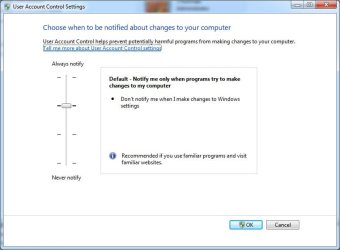
The most likely cause, you have disabled UAC.
If this is your case, uninstall the codecs, set UAC to its 'Default' position,
reboot the computer and re-install the codecs.

The 2nd possible cause, you need to install drivers from the graphics chipset manufacturer, not the PC manufacturer
 

Attachments

  • UAC.jpg
    UAC.jpg
    118.5 KB · Views: 4

My Computer

Computer Manufacturer/Model Number
Selfbuilt
OS
Windows 7 Ultimate 64bit
CPU
i7 2600k
Motherboard
asus P8Z68-V LE
Memory
16GB (4x4) corsair vengeance
Graphics Card(s)
Intel HD3000 iGPU / AMD HD6870 1024MB
Sound Card
bitstreamed to an Onkyo 609
Monitor(s) Displays
Asus VE278 27" LED / Bravia EX7 60" LED
Screen Resolution
native 1080p x2
Hard Drives
4x 2TB int. + 2x 2TB external and a SSD for the boot drive.
PSU
650w Antec
Case
NZXT tempest evo
Cooling
air/stock
Keyboard
Dell
Mouse
logitech m505
Internet Speed
dual: cable/blackberry tether for travel use
Other Info
BD re-writer //
asus notebook G73Jw
Thanks for all your help Shark.

The UAC settings are correct, and the graphics driver was from the nvidia site.

Maybe it has something to do with a conflict between the nvidia card and the intel hd graphics. I tried to uninstall the intel hd driver but the screen just went black and I had to do a hard reset. When I powered back on the intel driver was still there.
 

My Computer

Computer Manufacturer/Model Number
Dell XPS 15
OS
Windows 7 Home Premium 64 bit
CPU
Intel core I5 2540m
Memory
6gb
Graphics Card(s)
Nvidia Geforce GT540m
Hard Drives
750gb hdd
now you're getting somewhere.

you need to enter the BIOS setup (usually accessed by pressing del during the boot sequence)
and set the PCI graphics to innitialize before the iGPU (integrated graphics)

you will also need to physically move the monitor connection away from the motherboard connection and onto the graphics card connection.
 

My Computer

Computer Manufacturer/Model Number
Selfbuilt
OS
Windows 7 Ultimate 64bit
CPU
i7 2600k
Motherboard
asus P8Z68-V LE
Memory
16GB (4x4) corsair vengeance
Graphics Card(s)
Intel HD3000 iGPU / AMD HD6870 1024MB
Sound Card
bitstreamed to an Onkyo 609
Monitor(s) Displays
Asus VE278 27" LED / Bravia EX7 60" LED
Screen Resolution
native 1080p x2
Hard Drives
4x 2TB int. + 2x 2TB external and a SSD for the boot drive.
PSU
650w Antec
Case
NZXT tempest evo
Cooling
air/stock
Keyboard
Dell
Mouse
logitech m505
Internet Speed
dual: cable/blackberry tether for travel use
Other Info
BD re-writer //
asus notebook G73Jw
Back
Top