
Solved Problems with Acer Aspire 5750 network connection

edenforge

New member
Local time
2:52 AM
Messages
31
Location
Carlisle UK
Hi folks
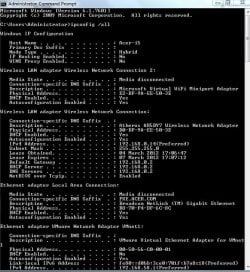
I've got an Aspire 5750 laptop and am having network problems.
My network is a Workgroup, all machines running flavours of Win7.
FROM the Aspire I can log into the other comps and access the disks on them.
TO the Aspire: in explorer on another machine I can see the symbol and name (ACER-I5) of the Aspire but cannot connect to it.
Network diagnostics states:
------------------------------------
Problems found
Your computer appears to be correctly configured, but the
device or recsource (ACER-I5) is not responding.
------------------------------------
Any suggestion as to what to look for to solve this would be most welcome as I am somewhat of a network novice.
Regards
Bob
 

Attachments
  • edenforge.JPG
    edenforge.JPG
    80.5 KB · Views: 132

My Computer My Computer

Computer Manufacturer/Model Number
Self Build
OS
XP Pro and Windows 7
CPU
core2/quad Q9550 2.83GHz
Motherboard
Asustek P5E3
Memory
4 GB DDR3 1333MHz
Graphics Card(s)
?
Sound Card
on board
Monitor(s) Displays
1x 22" Wide + 1x 19"
Hard Drives
4x Hitachi 500Gb SATA-II
Case
Antec Sonata
Keyboard
MS
Mouse
MS
Try removing the Microsoft Virtual Mini Wi-fi Adapter.

As far as I'm aware, it's something Microsoft has introduced for connecting to a wireless hotspot so if you've no need for it just delete it.
 

My Computer My Computer

Computer Manufacturer/Model Number
HP Pavilion Elite 495UK
OS
Windows 7 Ultimate SP1 64-Bit
CPU
Intel Core i7 870 @ 2.93GHz
Motherboard
MSI 2A9C (CPU1)
Memory
8Gb Dual-Channel DDR3 @ 664MHz
Graphics Card(s)
nVidia GeForce GTX 460 1024MB dedicated RAM
Sound Card
Realtek HD Audio
Monitor(s) Displays
HP2310i
Screen Resolution
1920 x 1080
Hard Drives
1x1954GB Hitachi HDS22020ALA 330 (RAID), 1x1954GB Hitachi External for backup and storage
PSU
460W
Case
HP Elite
Cooling
Air cooled
Keyboard
Logitech K750 solar-powered keyboard
Mouse
Logitech Wireless M180 mouse
Internet Speed
2Mb
Other Info
Pure Avanti Flow Internet Radio with iPod Dock, 64Gb iPod, HP USB Speakers, Sony MDR-V500 Headphones, Sony Vaio F-Series Laptop
no difference I'm afraid :confused:
Bob
 

My Computer My Computer

Computer Manufacturer/Model Number
Self Build
OS
XP Pro and Windows 7
CPU
core2/quad Q9550 2.83GHz
Motherboard
Asustek P5E3
Memory
4 GB DDR3 1333MHz
Graphics Card(s)
?
Sound Card
on board
Monitor(s) Displays
1x 22" Wide + 1x 19"
Hard Drives
4x Hitachi 500Gb SATA-II
Case
Antec Sonata
Keyboard
MS
Mouse
MS
this problem would appear to be with the wireles connection as when connected by cable it works fine.
Any suggestions???
Bob
 

My Computer My Computer

Computer Manufacturer/Model Number
Self Build
OS
XP Pro and Windows 7
CPU
core2/quad Q9550 2.83GHz
Motherboard
Asustek P5E3
Memory
4 GB DDR3 1333MHz
Graphics Card(s)
?
Sound Card
on board
Monitor(s) Displays
1x 22" Wide + 1x 19"
Hard Drives
4x Hitachi 500Gb SATA-II
Case
Antec Sonata
Keyboard
MS
Mouse
MS
the problem is on wireless LAN, internet is OK
 

My Computer My Computer

Computer Manufacturer/Model Number
Self Build
OS
XP Pro and Windows 7
CPU
core2/quad Q9550 2.83GHz
Motherboard
Asustek P5E3
Memory
4 GB DDR3 1333MHz
Graphics Card(s)
?
Sound Card
on board
Monitor(s) Displays
1x 22" Wide + 1x 19"
Hard Drives
4x Hitachi 500Gb SATA-II
Case
Antec Sonata
Keyboard
MS
Mouse
MS
Hi folks
I've got an Aspire 5750 laptop and am having network problems.
My network is a Workgroup, all machines running flavours of Win7.
FROM the Aspire I can log into the other comps and access the disks on them.
TO the Aspire: in explorer on another machine I can see the symbol and name (ACER-I5) of the Aspire but cannot connect to it.
Network diagnostics states:
------------------------------------
Problems found
Your computer appears to be correctly configured, but the
device or recsource (ACER-I5) is not responding.
------------------------------------
Any suggestion as to what to look for to solve this would be most welcome as I am somewhat of a network novice.
Regards
Bob

________


Go to advanced sharing:
Control Panel\All Control Panel Items\Network and Sharing Center\Advanced sharing settings

Make sure that the rules are set up to allow the computer to allow sharing to be active. If you read through the different choices you should be able to figure it out. Compare the parameters in this setup to the one in a computer that is sharing the way you want.

Also, after this is set up properly, the actual folders themselves, and etc must be set up to allow sharing.

:)
 

My Computer My Computer

OS
Windows XP Will Soon be Windows 7
solved now, many thanks.
 

My Computer My Computer

Computer Manufacturer/Model Number
Self Build
OS
XP Pro and Windows 7
CPU
core2/quad Q9550 2.83GHz
Motherboard
Asustek P5E3
Memory
4 GB DDR3 1333MHz
Graphics Card(s)
?
Sound Card
on board
Monitor(s) Displays
1x 22" Wide + 1x 19"
Hard Drives
4x Hitachi 500Gb SATA-II
Case
Antec Sonata
Keyboard
MS
Mouse
MS
Back
Top