
darksentinel
New member
- Local time
- 1:31 PM
- Messages
- 1
Hi all.
I have installed Command and Conquer 3 Tiberium Wars, and have been trying to get it to run.
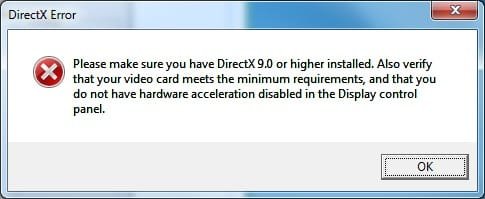
When I try to launch it I get the following Direct X error, and the game closes:
I'm pretty sure that the graphics card "meets the minimum requirements".
Running Dxdiag shows I have DirectX 11, and I also install DX 9.
My current display driver doesn't allow me to change settings to enable hardware acceleration via the control panel, but in ATI's Catalyst Control Center I couldn't find anything relevant that wasn't already checked. Also downloaded the latest video drivers for my card.
On a possibly unrelated note I've been having problems with Guild Wars and Red Alert 3, when I try to run either of them in full-screen mode the screen goes totally black (sounds are normal), and then gradually turns bright white in patches. Alt-tabbing or force-quitting results in serious monitor flickering for a minute or so once the desktop appears. Guild Wars is now played windowed, although following today's tinkering RA3 seems to work fine again in full-screen).
Any help much appreciated.
I have installed Command and Conquer 3 Tiberium Wars, and have been trying to get it to run.
When I try to launch it I get the following Direct X error, and the game closes:
Please make sure you have Direct X 9.0 or higher installed. Also verify that your video card meets the minimum requirements, and that you do not have hardware acceleration disabled in the Display control panel.
I'm running Windows 7 64-bit, RC7100 and have a Radeon 4890 (see sys specs for further details).
I'm pretty sure that the graphics card "meets the minimum requirements".
Running Dxdiag shows I have DirectX 11, and I also install DX 9.
My current display driver doesn't allow me to change settings to enable hardware acceleration via the control panel, but in ATI's Catalyst Control Center I couldn't find anything relevant that wasn't already checked. Also downloaded the latest video drivers for my card.
On a possibly unrelated note I've been having problems with Guild Wars and Red Alert 3, when I try to run either of them in full-screen mode the screen goes totally black (sounds are normal), and then gradually turns bright white in patches. Alt-tabbing or force-quitting results in serious monitor flickering for a minute or so once the desktop appears. Guild Wars is now played windowed, although following today's tinkering RA3 seems to work fine again in full-screen).
Any help much appreciated.
Attachments
My Computer
- OS
- Windows 7 64-bit RC7100
- CPU
- AMD 720 Phenom II X3 2.8GHz
- Motherboard
- GigaByte GA-MA790FX-UD5P ATX DDR2
- Memory
- 4GB DDR2-1066
- Graphics Card(s)
- XFX HD-489A-ZDDC Radeon 4890 1GB
- Monitor(s) Displays
- Viewsonic VA2413WM 24"
- Screen Resolution
- 1920x1080
- Hard Drives
- Seagate ST3250310AS Barracuda 250GB 7200rpm
- PSU
- Silverstone Element ST50EF-Plus ATX12V 500W
- Mouse
- Logitech G5