Problems with curser movement

samplemaven

New member
Local time
6:02 PM
Messages
7
I'm using an Asus netbook as I travel...and a larger HP in my office. Both have Windows 7 os. On my Asus, I cannot type more than a word or two without my curser jumping back into what I am typing and putting characters in the middle of what I have already typed. A partial solution is to move my pointer to the end of the line I am typing on and I can usually type an entire sentence without the problem repeating itself. Does anyone know what is going on...it's very frustrating. Thanks in advance for any help with this.
 

My Computer

OS
windows 7
hi samplemaven, and welcome to sevenforums,

maybe a part of your hand is brushing against your mousepad as you are typing?

try control panel >> hardware and sound >> mouse (near the top under 'devices and printers') >> somewhere in there you may have a setting that controls your touchpad sensitivity - try playing with the settings to ensure you don't get any unwanted cursor movement.
 

My Computer

Computer Manufacturer/Model Number
mickey megabyte 1234
OS
ultimate 64 sp1
CPU
i5 2500K [email protected]
Motherboard
MSI P67A-GD53
Memory
8 gigs GSkill Ripjaws 1600
Graphics Card(s)
amd hd6950
Sound Card
creative x-fi gamer
Monitor(s) Displays
samsung 24"
Screen Resolution
1920x1080
Hard Drives
ocz vertex 2e 60 gig, samsung f3 1tb, buffalo 2tb ext
PSU
antec 550
Case
antec three hundred
Cooling
i'm a cooling fan
Keyboard
saitek eclipse ii
Mouse
logitech g3
Internet Speed
about 4 Mbps
Other Info
i love win7
I didn't think that could possibly be the problem, so to prove it...I typed this complete answer being very careful not to touch the pad. Guess what??? I think you're right! I have typed this entire paragraph without a single error, so now I'll go to the sensitivty setting and fix this bad boy. Thanks Mickey...I had an idea it would be a simple fix...but not this simple.
 

My Computer

OS
windows 7
glad i could help :)
 

My Computer

Computer Manufacturer/Model Number
mickey megabyte 1234
OS
ultimate 64 sp1
CPU
i5 2500K [email protected]
Motherboard
MSI P67A-GD53
Memory
8 gigs GSkill Ripjaws 1600
Graphics Card(s)
amd hd6950
Sound Card
creative x-fi gamer
Monitor(s) Displays
samsung 24"
Screen Resolution
1920x1080
Hard Drives
ocz vertex 2e 60 gig, samsung f3 1tb, buffalo 2tb ext
PSU
antec 550
Case
antec three hundred
Cooling
i'm a cooling fan
Keyboard
saitek eclipse ii
Mouse
logitech g3
Internet Speed
about 4 Mbps
Other Info
i love win7
I guess this Noobie has another question. I looked for hardware/sound but couldn't find that icon. I also looked under mouse and keyboard and couldn't find what I am looking for. Can you give me another option to look for? Boy, typing without skipping is great...but I'd like to rest my palms on the computer base!
 

My Computer

OS
windows 7
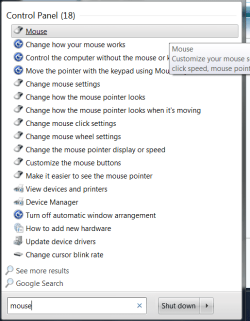
okay - try typing mouse into the searchbox at the bottom of your start-menu.

click 'mouse' in the control panel results that come up - should be right at the top.

meece.png

mice :drool:
 

My Computer

Computer Manufacturer/Model Number
mickey megabyte 1234
OS
ultimate 64 sp1
CPU
i5 2500K [email protected]
Motherboard
MSI P67A-GD53
Memory
8 gigs GSkill Ripjaws 1600
Graphics Card(s)
amd hd6950
Sound Card
creative x-fi gamer
Monitor(s) Displays
samsung 24"
Screen Resolution
1920x1080
Hard Drives
ocz vertex 2e 60 gig, samsung f3 1tb, buffalo 2tb ext
PSU
antec 550
Case
antec three hundred
Cooling
i'm a cooling fan
Keyboard
saitek eclipse ii
Mouse
logitech g3
Internet Speed
about 4 Mbps
Other Info
i love win7
I'm not trying to be a pain in the rear here, but I can't find the trackpad sensitivity settings anywhere!
 

My Computer

OS
windows 7
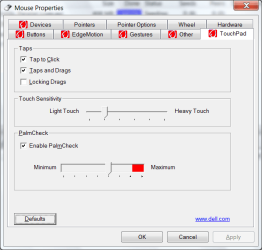
i suppose it all depends on your particular hardware and drivers.

on my dell laptop:

dellmouse.PNG
 

My Computer

Computer Manufacturer/Model Number
mickey megabyte 1234
OS
ultimate 64 sp1
CPU
i5 2500K [email protected]
Motherboard
MSI P67A-GD53
Memory
8 gigs GSkill Ripjaws 1600
Graphics Card(s)
amd hd6950
Sound Card
creative x-fi gamer
Monitor(s) Displays
samsung 24"
Screen Resolution
1920x1080
Hard Drives
ocz vertex 2e 60 gig, samsung f3 1tb, buffalo 2tb ext
PSU
antec 550
Case
antec three hundred
Cooling
i'm a cooling fan
Keyboard
saitek eclipse ii
Mouse
logitech g3
Internet Speed
about 4 Mbps
Other Info
i love win7
maybe we can help more if you can tell us the exact model of your asus machine?
 

My Computer

Computer Manufacturer/Model Number
mickey megabyte 1234
OS
ultimate 64 sp1
CPU
i5 2500K [email protected]
Motherboard
MSI P67A-GD53
Memory
8 gigs GSkill Ripjaws 1600
Graphics Card(s)
amd hd6950
Sound Card
creative x-fi gamer
Monitor(s) Displays
samsung 24"
Screen Resolution
1920x1080
Hard Drives
ocz vertex 2e 60 gig, samsung f3 1tb, buffalo 2tb ext
PSU
antec 550
Case
antec three hundred
Cooling
i'm a cooling fan
Keyboard
saitek eclipse ii
Mouse
logitech g3
Internet Speed
about 4 Mbps
Other Info
i love win7
My Asus Eee PC 1001PX only has the following tabs under mouse: Buttons, Pointers, Pointer Options, and Hardware. I hope I can find "sensitivity", but in any case...I now know how to type now without moving the cursor around!
 

My Computer

OS
windows 7
does this help?

if not, i'm sorry but i'm all out of ideas.

hopefully someone may be along later who can help further.

now you know what the problem may be, some time spent googling may be a good idea.
 

My Computer

Computer Manufacturer/Model Number
mickey megabyte 1234
OS
ultimate 64 sp1
CPU
i5 2500K [email protected]
Motherboard
MSI P67A-GD53
Memory
8 gigs GSkill Ripjaws 1600
Graphics Card(s)
amd hd6950
Sound Card
creative x-fi gamer
Monitor(s) Displays
samsung 24"
Screen Resolution
1920x1080
Hard Drives
ocz vertex 2e 60 gig, samsung f3 1tb, buffalo 2tb ext
PSU
antec 550
Case
antec three hundred
Cooling
i'm a cooling fan
Keyboard
saitek eclipse ii
Mouse
logitech g3
Internet Speed
about 4 Mbps
Other Info
i love win7
This Asus is just used as a spare, and I use it when I'm traveling. Working around the pad sensitivity is no big issue...particularly now that I know what the problem is. I'll do what my piano teacher taught me 50 years ago...keep my fingers curved, and my hands off the keyboard!

I looked for every conceivable means of adjusting the sensitivity...I don't think this computer has a setting for that. Maybe because it is a very inexpensive, base model.

Thanks again for your help. At least I can type without my previous frustration levels.

Tomorrow I'll have my Windows 7 problem fixed by reinstalling the program on my HP (I don't have an installation disk) and I'll be back up to speed.
 

My Computer

OS
windows 7
I already had the enhanced sensitivity setting set on my mouse and the cursor was still moving around. I found that I had to re-install the latest driver update for the keyboard and mouse drivers for my computer. Even though it was already loaded, I re-installed anyway, now all is good. I'm thinking the windows 7 upgrade compromised the update and caused the curser to jump every time I used the keyboard and mouse.
 

My Computer

Computer Manufacturer/Model Number
Dell Inspiron 1545
OS
Windows Ultimate x64
CPU
T4200
Memory
4.0 GB
Monitor(s) Displays
Generic PNP
I'll check the Asus website for a driver and see how that goes...thanks.
 

My Computer

OS
windows 7
Back
Top