Problems with ICS on a Windows 7/XP network

Ben7

New member
Local time
9:33 PM
Messages
6
Hi yall, I am attempting to set up an ICS on my home network. The host computer's OS is Windows 7 but the rest of the computer's OS's are Windows XP. I have an USB modem through Verizon that I use to connect to the internet as there is no better way to connect where I live.

I have tried setting up ICS on the host machine and I am unable to get it to share the connection with the rest of the computers on the network. I can get file sharing and everything else I can think of to work but not ICS. I have tried searching through other forum posts on the same topic but cannot resolve my problem not matter what I try. If you guys have any ideas that might help please enlighten me. I thank you all in advance for your assistance.
 

My Computer

OS
Windows 7 Pro
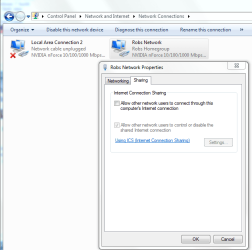
I'm sure you have already tried using this setting to enable ICS? Right click on the adaptor then choose properties then sharing. Put a check then hit OK to enable ICS.
 

Attachments

  • Enable ICS.PNG
    Enable ICS.PNG
    22.8 KB · Views: 119

My Computer

Computer type
PC/Desktop
Computer Manufacturer/Model Number
Home built
OS
Windows 7 Ult, Windows 8.1 Pro,
CPU
Q9650-4.275GHz, E8600 4.5GHz, E6750-3.8GHz
Motherboard
Evga 780i FTW
Memory
G.Skill PC2 9600 1200Mhz 5 5 5 15 2T
Graphics Card(s)
GTX480
Sound Card
Asus Xonar D2
Monitor(s) Displays
HannsG
Screen Resolution
1680X1050
Hard Drives
GSkill Phoenix Pro 120GB SSD
PSU
ThermalTake Toughpower 1000Watt modular
Case
ThermalTake XaserV
Cooling
Xigmatek S1283
Keyboard
Logitech G15
Mouse
Logitech G9
Internet Speed
T1
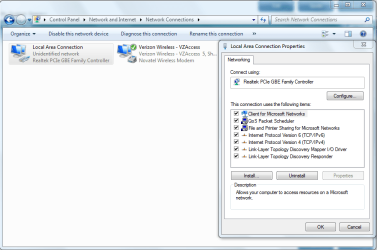
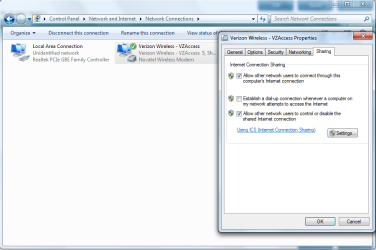
I think I did it right here's what it looks like...
 

Attachments

  • Capture.PNG
    Capture.PNG
    36.4 KB · Views: 114
  • Capture2.PNG
    Capture2.PNG
    36.7 KB · Views: 202

My Computer

OS
Windows 7 Pro
It appears that you have the option checked so it should be working. You might want to check the third one for the dial up access. And the other place where it says "settings" may need some attention. I havn't tested this on my own system but others have used ICS and it seems to be working for most of them.
 

My Computer

Computer type
PC/Desktop
Computer Manufacturer/Model Number
Home built
OS
Windows 7 Ult, Windows 8.1 Pro,
CPU
Q9650-4.275GHz, E8600 4.5GHz, E6750-3.8GHz
Motherboard
Evga 780i FTW
Memory
G.Skill PC2 9600 1200Mhz 5 5 5 15 2T
Graphics Card(s)
GTX480
Sound Card
Asus Xonar D2
Monitor(s) Displays
HannsG
Screen Resolution
1680X1050
Hard Drives
GSkill Phoenix Pro 120GB SSD
PSU
ThermalTake Toughpower 1000Watt modular
Case
ThermalTake XaserV
Cooling
Xigmatek S1283
Keyboard
Logitech G15
Mouse
Logitech G9
Internet Speed
T1
Okay, I have ticked the box for the dial up option and it still does not work. Also the settings section is for if you are hosting services on the host computer that you would like the rest of the network to use. FTP, POP3, Telnet, etc. I doubted that would help but I tried enabling them as well and it didn't make it work either.
 

My Computer

OS
Windows 7 Pro
Okay when do ICS... its fun. I haven't done it in a while I think the last time was when I was in iraq but they rip all of us off anyways.


When you do ICS, make sure that the NIC card you will be using to share the line has 192.168.0.1 in the IP Address becuase that is what we are going to be using as the gateway


then go to another computer and set that computers IP address up as follows

IP: 192.168.0.2

Subnet: 255.255.255.0

Gateway: 192.168.0.1

DNS: 192.168.0.1

DNS 2: the dns number you get from verizon
if you go to cmd
then ipconfig /all
it will give you the dns

see if that works
 

My Computer

Computer Manufacturer/Model Number
HP Pavilion Elite HPE-410f
OS
Windows 7 Ultimate x64
CPU
AMD Phenom x6 1045t
Motherboard
N/A
Memory
8 GB
Graphics Card(s)
ATI Radeon HD 5570
Sound Card
Realtek Highdefinition Audio / 5.1 Dolby Setup
Monitor(s) Displays
HP w2207h Widescreen
Screen Resolution
1680*1050
Hard Drives
1 TB (fixed), 320 Portable maxtor, Server Hard drives
PSU
350 Watt
Case
HP CASE
Cooling
Bass
Keyboard
Logitech MX 5500
Mouse
Logitech MX 5500
Internet Speed
ROAD RUNNER 16MB D/512 U
Acurasd, is on the right track. However with the USB modem, how does it broadcast the network to the other machines, assumming the others are using wireless. Is the macine with the USB modem a desktop or laptop?

A method of sharing the internet is via bridging connections.
 

My Computer

Computer Manufacturer/Model Number
Lenovo ThinkPad T60
OS
Windows 7 Ultimate 64Bit
CPU
GenuineIntel Intel(R) Core(TM) DuoCore T2400 @ 1.83GHz
Motherboard
Intel(R) 82801G (ICH7 Family)
Memory
2.00 GB
Graphics Card(s)
Mobile Intel(R) 945 Express Chipset
Sound Card
SoundMAX Integrated Digital HD Audio
Monitor(s) Displays
ThinkPad Display
Screen Resolution
1400x1050
Hard Drives
100Gb SATA
Keyboard
Standard Keyboard
Mouse
HID-compliant Mouse
Internet Speed
Cable Broadband - 54Mbps
Other Info
Intel(R) PRO/1000 PL Network Connection
11a/b/g Wireless LAN Mini PCI Express Adapter
This is how you really get complex with it:

INTERNET:
You have the internet coming in from Verizon. Make sure you got a good connection coming in to the desktop. I am sure you got a NIC card already built into the desktop.

ROUTER:
Get yourself a cheap router and pt it next to your desktop or away from any 2.4 ghz. If its cheap then more than likely it is 2.4.

You will use ICS on the desktop and run the ICS line into the routers WAN port and give the router internet.

Then distribute the internet to all your wireless communication devices.... Yah! me

If you want the configuration... that will be 20 dollars please...
if your australian... that will be a shrimp on the barbie
 

My Computer

Computer Manufacturer/Model Number
HP Pavilion Elite HPE-410f
OS
Windows 7 Ultimate x64
CPU
AMD Phenom x6 1045t
Motherboard
N/A
Memory
8 GB
Graphics Card(s)
ATI Radeon HD 5570
Sound Card
Realtek Highdefinition Audio / 5.1 Dolby Setup
Monitor(s) Displays
HP w2207h Widescreen
Screen Resolution
1680*1050
Hard Drives
1 TB (fixed), 320 Portable maxtor, Server Hard drives
PSU
350 Watt
Case
HP CASE
Cooling
Bass
Keyboard
Logitech MX 5500
Mouse
Logitech MX 5500
Internet Speed
ROAD RUNNER 16MB D/512 U
how about disabling the firewall and then trying?
 

My Computer

Computer Manufacturer/Model Number
MacBook Pro
OS
Lion
CPU
i5
Memory
4GB
Graphics Card(s)
Intel
Screen Resolution
1200x800
Hard Drives
Seagate FreeAgent GO 250GB Ext. HDD
Okay, thank you very much for your help acurasd it worked.
 

My Computer

OS
Windows 7 Pro
Can we say solved...

so just for my records...

how did you hook everything up if you dont mind me asking...

that way if anyone else was having trouble.... it will help ot others.
 

My Computer

Computer Manufacturer/Model Number
HP Pavilion Elite HPE-410f
OS
Windows 7 Ultimate x64
CPU
AMD Phenom x6 1045t
Motherboard
N/A
Memory
8 GB
Graphics Card(s)
ATI Radeon HD 5570
Sound Card
Realtek Highdefinition Audio / 5.1 Dolby Setup
Monitor(s) Displays
HP w2207h Widescreen
Screen Resolution
1680*1050
Hard Drives
1 TB (fixed), 320 Portable maxtor, Server Hard drives
PSU
350 Watt
Case
HP CASE
Cooling
Bass
Keyboard
Logitech MX 5500
Mouse
Logitech MX 5500
Internet Speed
ROAD RUNNER 16MB D/512 U
I configured the NIC's the way you suggested and it worked.
 

My Computer

OS
Windows 7 Pro
acurasd

nice job acurasd
 

My Computer

Computer Manufacturer/Model Number
Custom Built
OS
Windows 7 Ultimate 32 bit
CPU
AMD Athlon 64 X2 4200+ Overclocked to 3.0Ghz
Motherboard
Biostar TF560 A2+
Memory
2 Gigs of G.Skill DDR2 800
Graphics Card(s)
HIS ATI Radeon HD 2600 Pro With IceQ cooler
Sound Card
6.1 Channel Sound Blaster Live 24 Bit
Monitor(s) Displays
Dual 20.5 " LG Flatrons W2052TO
Screen Resolution
1152x864
Hard Drives
Dual 36 Gig 10,000 RPM Raptors
PSU
430 watt Seasonic 80%+ Dual 12v Rails 2x80mm fans
Case
CHIEFMAX YA-5X
Cooling
4-80mm case fans 1-140mm case fan freezer 64 Pro CPU cooler
Keyboard
Saitek Eclipse II
Mouse
A4Tech wireless battery free optical scroll mouse
Internet Speed
1.5 meg down 384 up
Other Info
Logisys LED fan/light controller and dual 16" LED sticks mounted inside top of case all fans are LED all lighting is blue
DVD RW and CD RW both and Memory card reader
Why on earth would you bother useing ICS if you already have a router? Far as I know the only reason to use ICS is if you don't have a router. This makes zero sense to me.

Someone please explain the reason for using ICS when you already have a router handy?
 

My Computer

Computer type
PC/Desktop
Computer Manufacturer/Model Number
Home built
OS
Windows 7 Ult, Windows 8.1 Pro,
CPU
Q9650-4.275GHz, E8600 4.5GHz, E6750-3.8GHz
Motherboard
Evga 780i FTW
Memory
G.Skill PC2 9600 1200Mhz 5 5 5 15 2T
Graphics Card(s)
GTX480
Sound Card
Asus Xonar D2
Monitor(s) Displays
HannsG
Screen Resolution
1680X1050
Hard Drives
GSkill Phoenix Pro 120GB SSD
PSU
ThermalTake Toughpower 1000Watt modular
Case
ThermalTake XaserV
Cooling
Xigmatek S1283
Keyboard
Logitech G15
Mouse
Logitech G9
Internet Speed
T1
if you only have dial up... for an example
 

My Computer

Computer Manufacturer/Model Number
HP Pavilion Elite HPE-410f
OS
Windows 7 Ultimate x64
CPU
AMD Phenom x6 1045t
Motherboard
N/A
Memory
8 GB
Graphics Card(s)
ATI Radeon HD 5570
Sound Card
Realtek Highdefinition Audio / 5.1 Dolby Setup
Monitor(s) Displays
HP w2207h Widescreen
Screen Resolution
1680*1050
Hard Drives
1 TB (fixed), 320 Portable maxtor, Server Hard drives
PSU
350 Watt
Case
HP CASE
Cooling
Bass
Keyboard
Logitech MX 5500
Mouse
Logitech MX 5500
Internet Speed
ROAD RUNNER 16MB D/512 U
or for somene that went to iraq like I did and paying a bundle o internet... i pulled the internet into my computer... and then distributed it through a router to my friends in the tent using a router and they paid me becuas i had the attenna to get he signal
 

My Computer

Computer Manufacturer/Model Number
HP Pavilion Elite HPE-410f
OS
Windows 7 Ultimate x64
CPU
AMD Phenom x6 1045t
Motherboard
N/A
Memory
8 GB
Graphics Card(s)
ATI Radeon HD 5570
Sound Card
Realtek Highdefinition Audio / 5.1 Dolby Setup
Monitor(s) Displays
HP w2207h Widescreen
Screen Resolution
1680*1050
Hard Drives
1 TB (fixed), 320 Portable maxtor, Server Hard drives
PSU
350 Watt
Case
HP CASE
Cooling
Bass
Keyboard
Logitech MX 5500
Mouse
Logitech MX 5500
Internet Speed
ROAD RUNNER 16MB D/512 U
Setting up ICS when there is router sitting right there doesn't make much sense to me. The lame part is that for anyone to gain access the host machine would need to be turned on. And those dial up passwords aren't hardly used anymore from what I understand.
 

My Computer

Computer type
PC/Desktop
Computer Manufacturer/Model Number
Home built
OS
Windows 7 Ult, Windows 8.1 Pro,
CPU
Q9650-4.275GHz, E8600 4.5GHz, E6750-3.8GHz
Motherboard
Evga 780i FTW
Memory
G.Skill PC2 9600 1200Mhz 5 5 5 15 2T
Graphics Card(s)
GTX480
Sound Card
Asus Xonar D2
Monitor(s) Displays
HannsG
Screen Resolution
1680X1050
Hard Drives
GSkill Phoenix Pro 120GB SSD
PSU
ThermalTake Toughpower 1000Watt modular
Case
ThermalTake XaserV
Cooling
Xigmatek S1283
Keyboard
Logitech G15
Mouse
Logitech G9
Internet Speed
T1
I needed to use ICS to share an internet connection that I get from an USB modem. I have a router, but it does not support USB modems. So therefore I used ICS to share the connection instead. Thank you all for your help. Now, is there some way to mark this thread as solved?
 

My Computer

OS
Windows 7 Pro
Yes ok now it at least makes some sense to me as to why you would use ICS if you already have a router. I didn't even realize you had a router at all. So it was only to make up for the fact that your router doesn't work with a USB modem.

So you just bypassed the problem by using the Win 7 machine as the first router in the system. At least it makes sense to me now thanks. I'll get it marked as solved for you, thanks for reporting back in.
 

My Computer

Computer type
PC/Desktop
Computer Manufacturer/Model Number
Home built
OS
Windows 7 Ult, Windows 8.1 Pro,
CPU
Q9650-4.275GHz, E8600 4.5GHz, E6750-3.8GHz
Motherboard
Evga 780i FTW
Memory
G.Skill PC2 9600 1200Mhz 5 5 5 15 2T
Graphics Card(s)
GTX480
Sound Card
Asus Xonar D2
Monitor(s) Displays
HannsG
Screen Resolution
1680X1050
Hard Drives
GSkill Phoenix Pro 120GB SSD
PSU
ThermalTake Toughpower 1000Watt modular
Case
ThermalTake XaserV
Cooling
Xigmatek S1283
Keyboard
Logitech G15
Mouse
Logitech G9
Internet Speed
T1
Back
Top