Problems with languages

Indiana Jones

New member
Local time
6:15 PM
Messages
7
Hi all!
Finally decided to upgrade to Windows7 Ultimate, from XP.:p
Switched over to the English version.
Anyway, having problems with Software(both x32 and x64). Getting random characters instead of Russian.

Switched over to the original Russian version, didn't help. Never had this problem on XP SP3.
Any ideas why this is happening?
 

My Computer

OS
Win7(x64)
CPU
[email protected]
Motherboard
P5Q
Memory
Samsung Originals 2x2Gb
Graphics Card(s)
4870
Hello Indy, welcome to the Seven Forums.

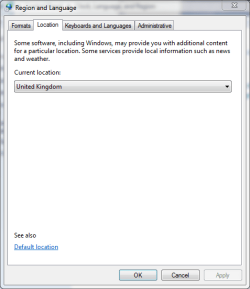
If I understand you right, you have an original Russian Win7 with English language pack? If so, have you also changed the location?

Some applications and software check computers location data and use that language for different kind of information and dialogs. Even if you are using English language pack but your computer "tells" to applications it is located in Russia, you can get some information and dialogs in third party applications in Russian.

The language pack works best, when the location of the computer is changed to correspond with the chosen, installed language. go to Control Panel > Clock, Language and Region > Region and Language > Location and change the location.

An example: this computer I'm using now has user accounts in English, German, Finnish and Swedish. I've set location in English account to United Kingdom, German accounts location to Germany, Finnish accounts to Finland and Swedish accounts to Sweden. This way I get most of that third party localized info in same language that I'm currently using.

Read this thread, too. It's a bit similar issue.

Hope this helps you.

Kari
 

Attachments

  • Location2.PNG
    Location2.PNG
    11.8 KB · Views: 6

My Computer

Computer type
Laptop
Computer Manufacturer/Model Number
HP ENVY 17-1150eg
OS
Windows 10 Pro x64 EN-GB
CPU
1.6 GHz Intel Core i7-720QM Processor
Memory
6 GB
Graphics Card(s)
ATI Mobility Radeon HD 5850 Graphics
Sound Card
Beats sound system with integrated subwoofer
Monitor(s) Displays
17" laptop display, 22" LED and 32" Full HD TV through HDMI
Screen Resolution
1600*900 (1), 1920*1080 (2&3)
Hard Drives
Internal: 2 x 500 GB SATA Hard Disk Drive 7200 rpm
External: 2TB for backups, 3TB USB3 network drive for media
Cooling
As Envy runs a bit warm, I have it on a Cooler Master pad
Keyboard
Logitech diNovo Media Desktop Laser (bluetooth)
Mouse
Logitech Performance Mouse MX
Internet Speed
50/10 Mbps VDSL
Antivirus
Windows Defender 4.3.9431.0
Browser
Maxthon 3.5.2., IE11
Hi, Thanks for the welcome.
If I understand you right, you have an original Russian Win7 with English language pack?
Yeah, that's correct. Downloaded English language pack via Update.
Set language to Russian + location and time.
Unfortunately, that didn't help!:( Winamp, for example, still shows "Ãîñòè èç áóäóùåãî"
I guess I will try reinstalling Windows, and setting all the settings to Russian in the beggining.
 

My Computer

OS
Win7(x64)
CPU
[email protected]
Motherboard
P5Q
Memory
Samsung Originals 2x2Gb
Graphics Card(s)
4870
If you want to use everything in English, you have to check you install English versions of third party software. As you certainly understand, Windows 7 Language Pack can not change the language of all the software you have, it can and will change only the language of Win7 operating system and bundled Microsoft applications (IE, WordPad, Paint etc.).

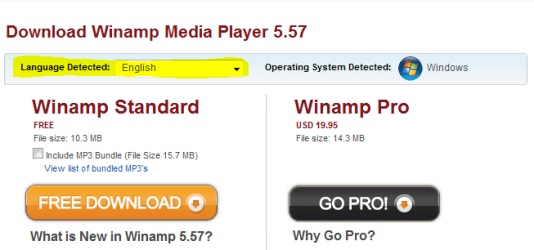
So when you downloaded WinAmp, did you check you got an English version:

winamp.PNG

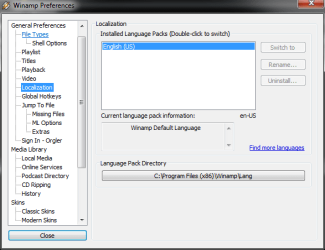
You can also change Winamp language from preferences:

winamp2.PNG

Kari
 

My Computer

Computer type
Laptop
Computer Manufacturer/Model Number
HP ENVY 17-1150eg
OS
Windows 10 Pro x64 EN-GB
CPU
1.6 GHz Intel Core i7-720QM Processor
Memory
6 GB
Graphics Card(s)
ATI Mobility Radeon HD 5850 Graphics
Sound Card
Beats sound system with integrated subwoofer
Monitor(s) Displays
17" laptop display, 22" LED and 32" Full HD TV through HDMI
Screen Resolution
1600*900 (1), 1920*1080 (2&3)
Hard Drives
Internal: 2 x 500 GB SATA Hard Disk Drive 7200 rpm
External: 2TB for backups, 3TB USB3 network drive for media
Cooling
As Envy runs a bit warm, I have it on a Cooler Master pad
Keyboard
Logitech diNovo Media Desktop Laser (bluetooth)
Mouse
Logitech Performance Mouse MX
Internet Speed
50/10 Mbps VDSL
Antivirus
Windows Defender 4.3.9431.0
Browser
Maxthon 3.5.2., IE11
So when you downloaded WinAmp, did you check you got an English version:
Yeah, I got the English version from winamp.com
The weird thing is that I never had this problem on XP...:confused:
 

My Computer

OS
Win7(x64)
CPU
[email protected]
Motherboard
P5Q
Memory
Samsung Originals 2x2Gb
Graphics Card(s)
4870
Back
Top