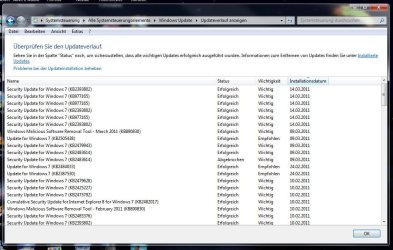
Today WIN told me that there would be 2 important updates. I made the updates. After that WIN said that the updates were successful. Wonderous when it announced these updates a couple hours later again.
I wasn't sure whats going on, maybe at the first time something went wrong. So I installed again. It was over in a few seconds only. Said that again its successful. Now I checked my Update history and you see that its in there several times.
This will not actually uninstall any of your currently installed Windows Update. They will just not be listed anymore. Any Windows Update installed after the reset will show up in the view update history list as normal though.
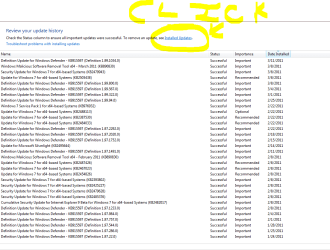
SNIP below on left.
As you can see only about 30 updates showing since January.
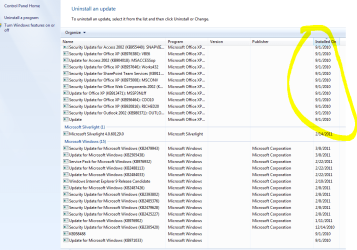
Now click "Installed updates". Right Snip.
It shows all the way back to September when I installed Win 7. Right snip- this window was empty back in January when my updates reset. Now they are showing again.
Yours are all still on the system just not showing.
Mike
Samsung 830 120GB SSD
Intel 320 120GB SSD
Western Digital Caviar Black WD7501AALS 750GB 7200 RPM SATA 3.0Gb/s
Western Digital Caviar Black WD6401AALS 640GB 7200 RPM SATA 3.0Gb/s
PSU
COOLER MASTER Silent Pro RS850-AMBAJ3-US 850W Modular
Thank you very much for clarifying this with me. At least one bit of good news.
But what do I do with the other issue, with the 2 repeating updates coming up ?
That cant be normal.
First off you can try a System Restore. This will remove the updates IF it will restore.
Try the one made just before the updates were installed. This one will be made by the updater and it will be first in the list.
As in this Snip below if the 11/18/2010 update had been a problem. I could have tried all three of the top 3 Restore points listed.
I would have tried the top in the list first.
Did you try the reset?
Try this second and see if it fixes problem.
When done with reset check the list of Installed Updates and see if they are showing. Windows Update - Reset
If the reset does not prompt a reboot and the Installed Updates list is still empty. Reboot and check it again.
It may have to add them back into the list on Boot.
I'm making no guarantees but neither of the above actions will hurt anything.
Mike
Samsung 830 120GB SSD
Intel 320 120GB SSD
Western Digital Caviar Black WD7501AALS 750GB 7200 RPM SATA 3.0Gb/s
Western Digital Caviar Black WD6401AALS 640GB 7200 RPM SATA 3.0Gb/s
PSU
COOLER MASTER Silent Pro RS850-AMBAJ3-US 850W Modular